
1. Введение
The Senwa Vacuum V100 is an advanced robotic vacuum cleaner designed to provide efficient and effortless cleaning for your home. With powerful suction and intelligent navigation, it effectively cleans various surfaces, from hard floors to carpets, ensuring a spotless environment. Its compact design and user-friendly features make daily cleaning simple and convenient. The V100's effective filtration system captures dust and fine particles, contributing to improved air quality in your living space. This manual provides essential information for the safe and optimal use, maintenance, and troubleshooting of your Senwa Vacuum V100.
Основные характеристики:
- Powerful and Efficient Suction: Optimized motor ensures deep cleaning on floors, carpets, and difficult corners, removing dust and dirt in a single pass.
- Lightweight and Maneuverable Design: Easy to transport and use in any space, ideal for quick, effortless cleaning or frequent use.
- Универсальность для различных поверхностей: Works perfectly on different types of surfaces, adapting to the needs of homes or offices.
- Эффективная система фильтрации: Captures fine particles and helps maintain a cleaner environment, ideal for improving hygiene.
- Easy Maintenance and Durability: Accessible components for quick cleaning and long lifespan, designed for continuous and reliable use.
2. Информация по технике безопасности
Please read all safety instructions carefully before using your Senwa Vacuum V100. Keep this manual for future reference.
- Данным прибором могут пользоваться дети в возрасте от 8 лет и старше, а также лица с ограниченными физическими, сенсорными или умственными возможностями или с недостатком опыта и знаний, если они находятся под присмотром или получили инструкции по безопасному использованию прибора и понимают связанные с этим опасности.
- Необходимо следить за детьми, чтобы они не играли с прибором.
- Чистка и техническое обслуживание устройства не должны производиться детьми без присмотра взрослых.
- Do not use the vacuum cleaner in wet environments or on wet surfaces.
- Do not allow the vacuum cleaner to pick up large objects, liquids, burning or smoking objects (e.g., hot ashes, cigarettes).
- Use only the original charging adapter and charging dock provided by the manufacturer.
- Ensure the charging dock is placed against a wall on a level surface, free from obstacles.
- Перед уборкой уберите с пола все свободные кабели, мелкие предметы или хрупкие предметы, чтобы предотвратить запутывание или повреждение.
- Do not operate the vacuum cleaner if it is damaged. Contact customer support for assistance.
- Turn off the vacuum cleaner and unplug it from the charging dock before performing any maintenance or cleaning.
3. Содержимое упаковки
Carefully unpack your Senwa Vacuum V100 and check that all items are present and in good condition. If any items are missing or damaged, please contact customer support.
- Senwa Vacuum V100 Robot Vacuum Cleaner (Main Unit)
- Зарядная док-станция
- Адаптер питания
- Боковые щетки (2 пары)
- Основная щетка (предустановлена)
- Мусорный контейнер (предварительно установлен)
- Высокоэффективный фильтр (предустановлен)
- Инструмент для очистки
- Руководство пользователя
4. Продукт закончилсяview
Familiarize yourself with the components of your Senwa Vacuum V100.
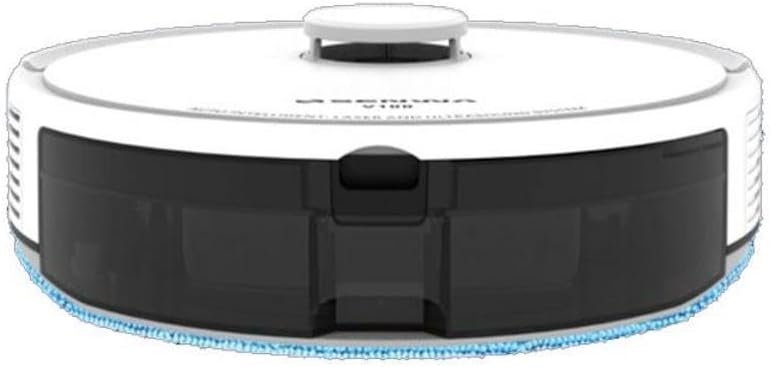
Figure 4.1: Top-Front View of Senwa Vacuum V100
This image shows the top and front of the robot vacuum, highlighting the main body, control button, and dustbin access panel.

Рисунок 4.2: Сторона View of Senwa Vacuum V100
На этом изображении показана боковая панель.file of the robot vacuum, showing a driving wheel, a side brush, and a ventilation grille.

Рисунок 4.3: Сторона View of Senwa Vacuum V100 with Dustbin Area
This image illustrates another side view, focusing on the area where the dustbin is typically accessed or removed.
Основные компоненты:
- Верхняя крышка: Защищает внутренние компоненты.
- Кнопка управления: Initiates or pauses cleaning, returns to charging dock.
- Dustbin: Собирает грязь и мусор.
- Боковые щетки: Смести мусор с краев и углов на пути пылесоса.
- Основная кисть: Agitates and lifts dirt from floors.
- Ведущие колеса: Позвольте роботу перемещаться по различным поверхностям.
- Зарядные контакты: Connect with the charging dock for power.
- Датчики: Detect obstacles, cliffs, and walls for navigation.
- Зарядная док-станция: Обеспечивает питание для подзарядки робота.
5. Настройка
5.1 Распаковка и подготовка
- Извлеките робот-пылесос и все аксессуары из упаковки.
- Снимите с робота и зарядной станции все защитные пленки и наклейки.
- Прикрепите боковые щетки, надавив на них на квадратные стойки в нижней части робота до щелчка.
5.2 Установка зарядной док-станции
- Установите зарядную док-станцию у стены на твердой ровной поверхности.
- Убедитесь, что с обеих сторон причала и перед ним имеется свободное пространство не менее 0.5 метра (1.6 фута).
- Connect the power adapter to the charging dock and plug it into a wall outlet. Ensure the power indicator on the dock lights up.
5.3 Первоначальная зарядка
- Place the robot vacuum onto the charging dock, ensuring the charging contacts on the robot align with those on the dock.
- The robot will begin charging. Allow it to fully charge before its first use (approximately 4-6 hours). The indicator light on the robot will change to indicate a full charge.
6. Инструкция по эксплуатации
6.1 Запуск цикла очистки
- Ensure the robot is fully charged and clear any large obstacles from the cleaning area.
- Press the main control button on the top of the robot once to start an automatic cleaning cycle.
- The robot will automatically navigate and clean your floors.
6.2 Приостановка/возобновление очистки
- To pause cleaning, press the main control button once during operation.
- To resume cleaning, press the main control button again.
6.3 Возврат на зарядную док-станцию
- To send the robot back to its charging dock, press and hold the main control button for a few seconds until the robot indicates it is returning.
- The robot will automatically return to the charging dock when its battery is low or when a cleaning cycle is complete.
6.4 Режимы очистки (если применимо)
Your Senwa Vacuum V100 may feature different cleaning modes for various needs:
- Автоочистка: The robot intelligently plans a cleaning path for comprehensive coverage.
- Точечная уборка: Концентрирует чистку на определенном загрязненном участке.
- Очистка края: Очищает поверхности вдоль стен и краев мебели.
Refer to the specific instructions for your model on how to activate these modes, typically via a mobile app or remote control (if included).
7. Техническое обслуживание
Regular maintenance ensures optimal performance and extends the lifespan of your Senwa Vacuum V100.
7.1 Опорожнение мусорного контейнера
Empty the dustbin after each cleaning cycle or when it is full.
- Нажмите кнопку фиксатора пылесборника и вытяните его.
- Откройте крышку мусорного контейнера и высыпьте его содержимое в мусорное ведро.
7.2 Очистка фильтра
Clean the filter weekly or as needed. Replace every 3-6 months.
- Извлеките фильтр из пылесборника.
- Tap the filter gently to remove dust. Do not wash the high-efficiency filter with water.
- Rinse the primary filter (if applicable) with water and let it air dry completely before reinserting.
7.3 Очистка основной щетки
Clean the main brush weekly.
- Снимите крышку основной щетки и выньте основную щетку.
- Use the cleaning tool to remove hair and debris tangled around the brush.
- Установите на место основную щетку и крышку.
7.4 Очистка боковых щеток
Check side brushes regularly for wear and tear. Replace if damaged.
- Снимите боковые щетки с их стоек.
- Remove any hair or debris.
- Прикрепите щетки обратно, убедившись, что они защелкнулись на месте.
7.5 Очистка датчиков и зарядных контактов
Wipe sensors and charging contacts monthly with a dry cloth.
- Gently wipe the cliff sensors (located on the bottom of the robot) and wall sensors (on the front bumper).
- Clean the charging contacts on both the robot and the charging dock.
8. Поиск Неисправностей
If you encounter issues with your Senwa Vacuum V100, refer to the following common problems and solutions.
| Проблема | Возможная причина | Решение |
|---|---|---|
| Робот не включается и не заряжается. | Battery is completely depleted; charging contacts are dirty; power adapter not connected. | Ensure the charging dock is powered. Clean charging contacts on both robot and dock. Place robot directly on dock. |
| Робот часто застревает. | Слишком много препятствий; датчики на обрыве работают с ошибками. | Clear loose cables, rugs, and small objects. Clean cliff sensors. |
| Низкая эффективность всасывания. | Dustbin is full; filter is clogged; main brush is tangled. | Опорожните пылесборник. Очистите или замените фильтр. Очистите основную щетку. |
| Необычный шум во время работы. | Main brush or side brushes are tangled; foreign object inside. | Clean main brush and side brushes. Check for and remove any foreign objects. |
| Робот не возвращается на зарядную станцию. | Charging dock is blocked or out of range; charging contacts are dirty. | Ensure charging dock has clear space. Clean charging contacts. Manually place robot on dock. |
If the problem persists after trying these solutions, please contact Senwa customer support.
9. Технические характеристики
| Особенность | Деталь |
|---|---|
| Бренд | Senwa |
| Модель | В100 |
| Форм-фактор | Роботизированный |
| Цвет | Белый |
| ASIN | B0GTY5J56M |
| Источник питания | Аккумуляторная батарея |
| Время зарядки | Приблизительно 4-6 часа |
| Система фильтрации | Высокоэффективный фильтр |
| Режимы очистки | Auto, Spot, Edge (may vary by specific model features) |
10. Гарантия и поддержка
The Senwa Vacuum V100 comes with a standard manufacturer's warranty. Please refer to the warranty card included in your package for specific terms and conditions, including the warranty period and coverage details.
For technical support, service, or any questions regarding your product, please contact Senwa customer service through the contact information provided on your warranty card or the official Senwa website. When contacting support, please have your product model (V100) and ASIN (B0GTY5J56M) ready.