
1. Введение
Спасибо за покупкуasing the EUHOMY 2.6kW Portable Spot Cooler. This manual provides essential information for the safe and efficient operation of your appliance. Please read it thoroughly before use and retain it for future reference.

Image 1.1: The EUHOMY 2.6kW Portable Spot Cooler unit.
2. Информация по технике безопасности
Чтобы снизить риск возгорания, поражения электрическим током или травм, всегда соблюдайте основные меры безопасности при эксплуатации данного прибора.
- Убедитесь, что источник питания соответствует мощностиtagе указано на паспортной табличке.
- Не используйте устройство с поврежденным шнуром или вилкой.
- Держите прибор подальше от воды и других жидкостей.
- Do not block air inlets or outlets. Maintain at least 50cm clearance from the front and rear, and 30cm from the sides.
- Always ensure the exhaust duct is properly installed to vent hot air outside the room.
- Перед чисткой или выполнением любого технического обслуживания отключите устройство от сети.
- Данное устройство не предназначено для использования лицами с ограниченными физическими, сенсорными или умственными способностями без присмотра.
3. Содержимое упаковки
Проверьте наличие всех предметов в упаковке:
- Spot Cooler Main Unit (1)
- Window Panels (4)
- Exhaust Duct (1)
- Сливной шланг (1)
- Exhaust Nozzle (1)
- Duct End Connector (1)
- Пульт дистанционного управления (1)
- Руководство пользователя (1)

Image 3.1: Included components of the EUHOMY Portable Spot Cooler.
4. Особенности продукта
4.1. Powerful Cooling Performance
The EUHOMY Spot Cooler provides a powerful 2.6kW (60Hz) cooling capacity, capable of lowering room temperature by 5°C within 15 minutes. It is designed for effective cooling in areas up to 10 tatami (approximately 16.5 square meters), making it suitable for living rooms, bedrooms, garages, and warehouses.

Изображение 4.1: оконченоview of cooling capabilities and specifications.
4.2. Three Operating Modes
This unit offers three versatile operating modes to suit various seasonal needs:
- Режим охлаждения: Provides rapid cooling for hot environments.
- Режим осушения: Removes up to 28.98 liters of moisture per day, helping to maintain a comfortable humidity level between 40% and 60% RH, especially useful during rainy seasons.
- Режим вентилятора: Circulates air with two adjustable fan speeds (Weak/Strong) to provide ventilation.

Image 4.2: Three-in-one functionality for year-round comfort.
4.3. Интеллектуальный спящий режим
The smart sleep mode adjusts the set temperature gradually to ensure comfortable sleep. After 1 hour, the temperature increases by 1°C, and after 2 hours, it increases by another 1°C (total 2°C increase from initial setting). The unit then maintains this temperature, preventing overcooling or overheating during the night. This mode also reduces power consumption by approximately 25% over 8 hours compared to normal operation.
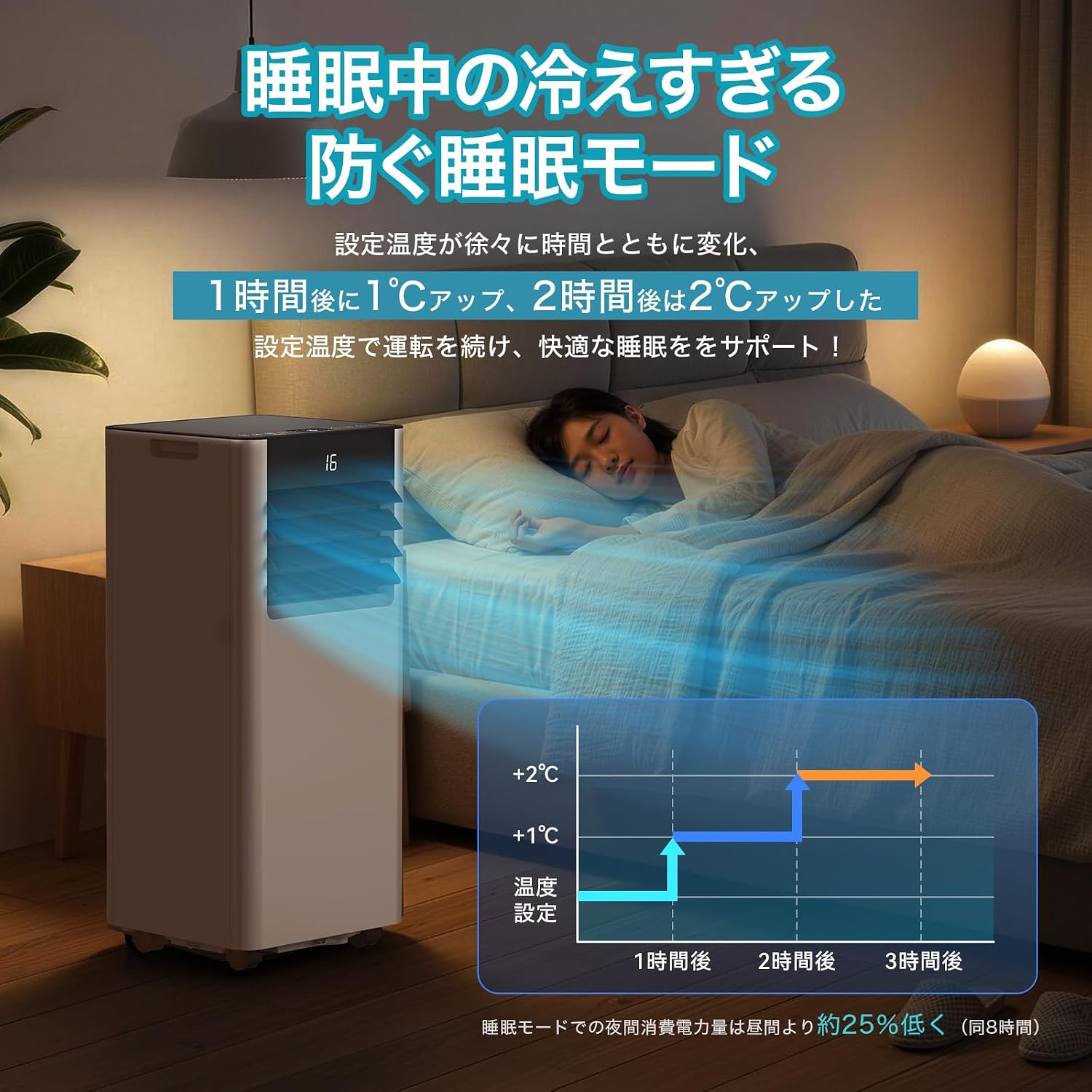
Image 4.3: Smart Sleep Mode for optimized overnight comfort and energy saving.
4.4. 24-Hour Timer Function
Set the unit to automatically turn on or off within a 1 to 24-hour period. This feature allows for efficient operation, ensuring the room is cooled before you arrive home or turns off after you leave, saving energy.
5. Настройка и установка
The EUHOMY Spot Cooler is designed for easy installation without requiring professional construction. Follow these steps for setup:
5.1. Размещение устройства
Place the unit on a flat, stable surface. Ensure there is adequate clearance around the unit for proper airflow (at least 50cm from front/rear, 30cm from sides). The unit is equipped with casters for easy movement between rooms.
5.2. Window Panel Installation
Assemble the window panels according to your window size. The panels are adjustable from 50cm to 135cm to fit various window types (sliding or vertical sash windows). Secure the panels in the window frame using screws. The 2026 model includes four window panels for improved adaptability and sealing.

Image 5.1: Window panel installation guide.
5.3. Exhaust Duct Connection
Attach the exhaust duct to the unit's exhaust outlet and then connect the other end to the window panel. Ensure a secure connection to prevent hot air from re-entering the room. The improved exhaust duct design in the 2026 model enhances sealing performance by 50%.
6. Операция
The unit can be operated using the touch control panel on top of the unit or the included remote control.

Image 6.1: Control panel and remote control layout.
6.1. Включение/выключение питания
Нажмите кнопку питания (運転入/切Нажмите на кнопку на панели управления или пульте дистанционного управления, чтобы включить или выключить устройство.
6.2. Выбор режима
Нажмите кнопку «Режим» (モード) to cycle through Cooling (冷房モード), Dehumidifying (除湿モード), and Fan (送風モード) режимы.
6.3. Регулировка температуры
In Cooling mode, use the Up (+) и вниз (-) buttons to set the desired temperature between 16°C and 32°C.
6.4. Регулировка скорости вентилятора
In Fan mode, press the Fan Speed button (風量) to select between Weak (弱) and Strong (強) airflow.
6.5. Установка таймера
Нажмите кнопку таймера (タイマー機能) to set the auto-on or auto-off time in 1-hour increments, from 1 to 24 hours.
6.6. Активация спящего режима
Нажмите кнопку «Сон» (睡眠) to activate the smart sleep mode for quiet and comfortable overnight operation.
6.7. Louver Adjustment
Manually adjust the vertical louvers to direct the airflow as desired.
7. Техническое обслуживание
Регулярное техническое обслуживание обеспечивает оптимальную производительность и долговечность вашего локального охладителя.
7.1. Дренаж
The unit is designed with a non-drainage system for cooling mode, where condensed water is evaporated and expelled with the exhaust air. However, in high humidity conditions or during dehumidifying mode, significant water accumulation may occur. Connect the included drain hose to the drainage port for continuous drainage to prevent overflow.
7.2. Очистка фильтра
Periodically clean the air filter to maintain air quality and unit efficiency. Refer to the detailed instructions in the printed user manual for filter removal and cleaning procedures.
7.3. Внешняя уборка
Протрите внешнюю поверхность устройства мягкой тряпкой.amp ткань. Не используйте агрессивные химикаты или абразивные чистящие средства.
8. Поиск Неисправностей
Прежде чем обращаться в службу поддержки клиентов, ознакомьтесь со следующими распространенными проблемами и решениями:
| Проблема | Возможная причина | Решение |
|---|---|---|
| Устройство не включается. | Отсутствует электропитание; шнур питания не подключен; сработал автоматический выключатель. | Проверьте подключение к электросети; сбросьте автоматический выключатель. |
| Недостаточное охлаждение | Windows/doors open; Exhaust duct not properly installed; Air filter dirty; Room size too large. | Close windows/doors; Ensure duct is sealed; Clean air filter; Use in recommended room size. |
| Утечка воды | Drain hose not connected or blocked; Water tank full (if applicable). | Connect drain hose; Clear any blockages; Ensure continuous drainage in high humidity. |
| Аппарат шумный | Unit not on a flat surface; Air filter dirty; Normal operating sound. | Place on a flat surface; Clean air filter; Some operating noise is normal for portable ACs. |
9. Технические характеристики
| Особенность | Деталь |
|---|---|
| Бренд | EUHOMY |
| Номер модели | OL-A016UC26N4 |
| Мощность охлаждения | 2.3kW (50Hz) / 2.6kW (60Hz) |
| Область применения | 8-10 Tatami |
| Диапазон настройки температуры | от 16°С до 32°С |
| Источник питания | 100 В (50/60 Гц) |
| Потребляемая мощность охлаждения | 750 Вт (50 Гц) / 800 Вт (60 Гц) |
| Ёмкость | 28.98 л/день |
| Уровень шума | 55dB (Operating Sound: 43dB) |
| Хладагент | R-410A |
| Unit Dimensions (D x W x H) | 30.3 х 28.95 х 67.3 см |
| Вес единицы | Около 20.5 кг |
| Тип контроллера | Сенсорное управление |

Изображение 9.1: Подробные технические характеристики и размеры изделия.
10. Гарантия и поддержка
10.1. One-Year Quality Guarantee
This product comes with a one-year quality guarantee from the date of purchase. Please retain your proof of purchase for warranty claims.

Image 10.1: One-Year Quality Guarantee.
10.2. Поддержка клиентов
For any questions regarding the product or delivery, please contact our customer support. You can reach us via email or inquiry. For inquiries after purchase, navigate to 'Order History' > 'Problem with order' > 'View проfile' > 'Ask a question' or refer to the contact information in the Japanese instruction manual.

Image 10.2: Customer support contact options.