
1. Введение
Спасибо за покупкуasing the Audizio Laredo Bluetooth Turntable. This manual provides essential information for the safe and correct operation of your device. Please read it thoroughly before use and keep it for future reference.
Основные характеристики:
- Integrated HiFi speakers with 160W total power output.
- Bidirectional Bluetooth for wireless audio streaming (in and out).
- High-quality Audio Technica cartridge for precise playback.
- Supports 7, 10, and 12-inch vinyl records at 33 and 45 RPM.
- Adjustable counterweight on the aluminum tonearm.
- RCA Line Out for external ampгромкоговорители/динамики.
- AUX Input for connecting external audio sources.
- Elegant bamboo finish.
Что в коробке:
- Audizio Laredo Turntable Unit
- Руководство по эксплуатации
- Адаптер питания
- 45 RPM Adapter for singles
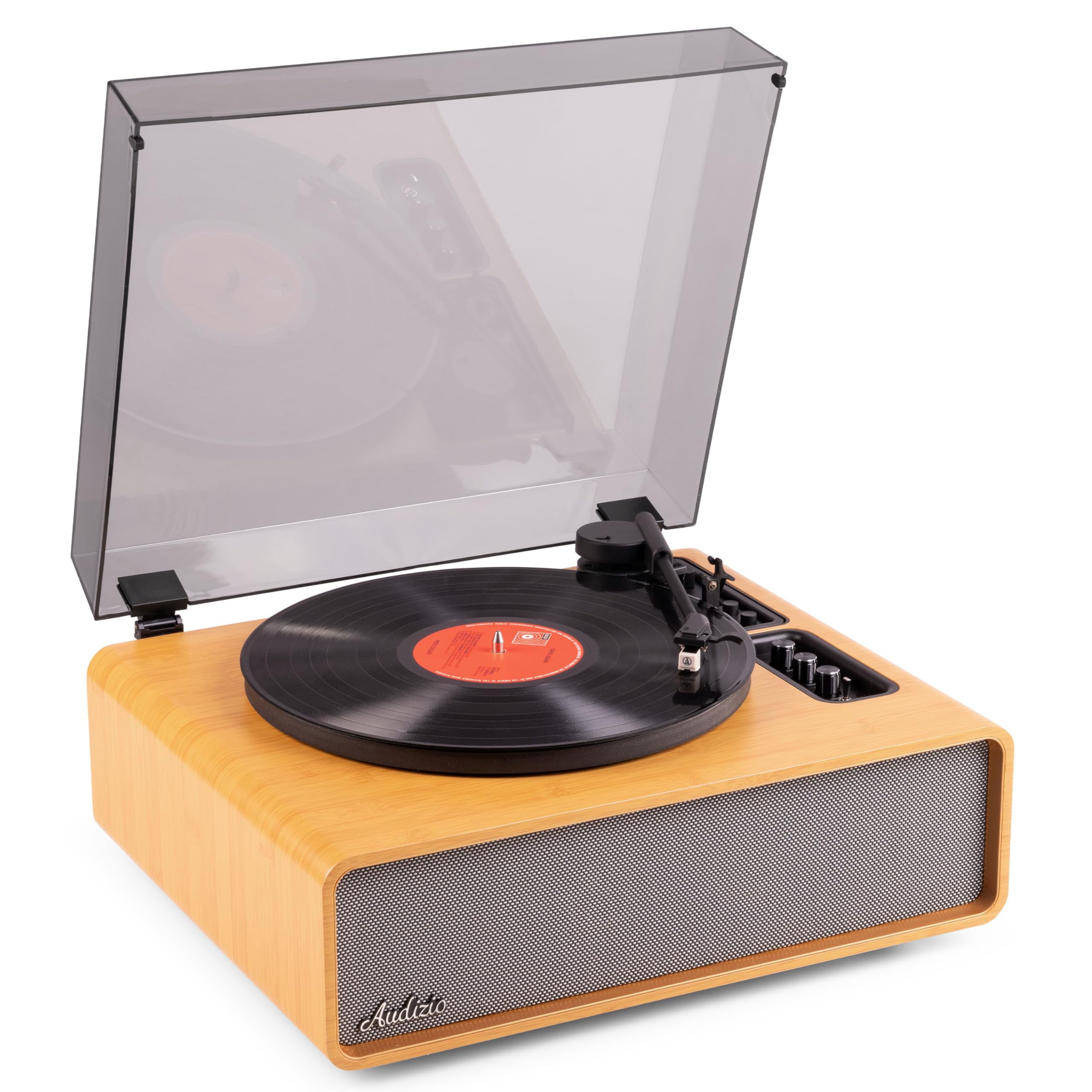
Figure 1.1: Audizio Laredo Turntable, overall view.
2. Инструкции по технике безопасности
Please read and follow these safety instructions carefully to prevent damage to the unit and ensure your safety.
- Не подвергайте устройство воздействию дождя или влаги во избежание возгорания или поражения электрическим током.
- Не открывайте сasing. Внутри нет деталей, подлежащих обслуживанию пользователем. По всем вопросам обслуживания обращайтесь к квалифицированному персоналу.
- Установите устройство на устойчивую ровную поверхность, чтобы предотвратить его падение.
- Держите устройство вдали от прямых солнечных лучей, источников тепла и чрезмерного количества пыли.
- Обеспечьте достаточную вентиляцию вокруг устройства. Не закрывайте вентиляционные отверстия.
- Используйте только прилагаемый адаптер питания.
- Отключайте устройство от сети во время грозы или если оно не используется в течение длительного времени.
3. Продукт закончилсяview
Familiarize yourself with the components and controls of your Audizio Laredo turntable.
Основные компоненты:
- Блюдо: Поддерживает виниловые пластинки.
- Тонарм: Удерживает картридж и стилус.
- Cartridge & Stylus: Reads the grooves of the record. (Audio Technica ATN-3600)
- Пылезащитный чехол: Защищает опорный диск и тонарм от пыли.
- Встроенные динамики: Для прямого воспроизведения звука.
- Панель управления: For power, volume, tone, and mode selection.
- Задние соединения: RCA Line Out, AUX In, Power Input.

Рисунок 3.1: Вверху view of the turntable with key components visible.

Figure 3.2: Control Panel for volume, bass, and treble adjustments.

Figure 3.3: Audio Technica ATN-3600 Cartridge and Stylus.

Figure 3.4: Tonearm base with speed and auto-stop controls.

Figure 3.5: Rear connection panel.
4. Настройка
4.1 Распаковка
- Аккуратно извлеките проигрыватель из упаковки.
- Remove all protective materials, including the stylus guard.
- Сохраните упаковку для будущей транспортировки или хранения.
4.2 Размещение
- Place the turntable on a stable, level surface to prevent vibrations and ensure proper playback.
- Avoid placing the unit near strong magnetic fields, heat sources, or areas with high humidity.
4.3 Установка пылезащитного чехла
- Align the hinges of the dust cover with the slots on the back of the turntable.
- Gently push down until the cover is securely in place.
- The dust cover can be removed for playback if desired.

Figure 4.1: Turntable with dust cover.
4.4 Подключение питания
- Connect the power adapter to the DC IN port on the rear of the turntable.
- Plug the adapter into a suitable wall outlet (220V).
4.5 Настройка тонарма и картриджа
- The Audio Technica cartridge is pre-installed.
- The tonearm features an adjustable counterweight. Refer to the detailed instructions in the included manual for precise counterweight adjustment to optimize tracking force.
5. Инструкция по эксплуатации
5.1 Воспроизведение пластинки
- Place a vinyl record on the platter. If playing a 7-inch single, use the included 45 RPM adapter.
- Select the appropriate speed (33 or 45 RPM) using the speed selector switch near the tonearm base.
- Аккуратно поднимите тонарм с помощью рычага подъема тонарма.
- Position the tonearm over the desired track of the record.
- Медленно опустите тонарм с помощью рычага позиционирования. Игла коснется пластинки, и начнется воспроизведение.
- По окончании записи функция автоостановки автоматически остановит вращение диска. Поднимите тонарм и верните его в исходное положение.

Figure 5.1: Playing a vinyl record.
5.2 Bluetooth Operation (Bidirectional)
The Laredo turntable supports both Bluetooth input (receiving audio from a device) and Bluetooth output (sending audio to a Bluetooth speaker/headphones).
Bluetooth Input (BT IN):
- Press the MODE/POWER button to select Bluetooth mode. The LED indicator will flash.
- On your smartphone or tablet, enable Bluetooth and search for 'Audizio Laredo'.
- Select the turntable to pair. Once connected, the LED will glow solid.
- You can now stream audio from your device to the turntable's integrated speakers.
Bluetooth Output (BT OUT):
- Убедитесь, что ваши наушники или динамики Bluetooth находятся в режиме сопряжения.
- Set the BT OUT switch (located near the tonearm base) to 'ON'.
- The turntable will automatically search for and connect to the nearest Bluetooth audio device.
- Once connected, the audio from your vinyl record will be transmitted to your Bluetooth device.

Figure 5.2: Bidirectional Bluetooth functionality.
5.3 Дополнительный вход
- Connect an external audio device (e.g., MP3 player, CD player) to the AUX IN port on the rear of the turntable using a 3.5mm audio cable.
- Press the MODE/POWER button to select AUX mode.
- Audio from the external device will play through the turntable's speakers.
5.4 Линейный выход RCA
- To connect the turntable to an external amplifier or powered speakers, use an RCA cable (not included) to connect the LINE OUT ports on the rear of the turntable to the corresponding input on your audio system.
- Ensure the 'Speaker ON/OFF' switch on the rear is set to 'OFF' if you only want sound from external speakers.
5.5 Регулировка громкости и тембра
- Use the VOLUME knob on the control panel to adjust the overall playback volume.
- Adjust the BASS and TREBLE knobs to fine-tune the audio output to your preference.
6. Техническое обслуживание
6.1 Чистка устройства
- Протрите пылезащитную крышку и корпус мягкой сухой тканью.
- Не используйте абразивные чистящие средства, воски или растворители.
- For the platter, use a slightly damp тканью и тщательно высушите.
6.2 Stylus Care and Replacement
- Стилус — это хрупкий компонент. Обращайтесь с ним осторожно.
- Clean the stylus regularly using a soft brush designed for stylus cleaning, brushing from back to front.
- A stylus typically lasts for approximately 300-500 hours of playback. If you notice a decrease in sound quality or increased skipping, it may be time to replace the stylus.
- Replacement styli (e.g., Audio Technica ATN-3600L or compatible) can be purchased from authorized dealers. Refer to the detailed instructions provided with the replacement stylus for installation.
7. Поиск Неисправностей
If you encounter issues with your turntable, please consult the following table before contacting support.
| Проблема | Возможная причина | Решение |
|---|---|---|
| Нет электричества | Адаптер питания не подключен; розетка не работает. | Ensure power adapter is securely connected to the unit and a working outlet. |
| Нет звука от динамиков | Volume too low; Speaker ON/OFF switch is OFF; Incorrect mode selected. | Increase volume; Set 'Speaker ON/OFF' switch to ON; Select correct input mode (Phono, BT IN, AUX). |
| Skipping records | Record is dirty or damaged; Stylus is worn or dirty; Turntable not level; Tracking force incorrect. | Clean record; Clean or replace stylus; Place turntable on a level surface; Adjust tonearm counterweight. |
| Проблемы с сопряжением Bluetooth | Устройство находится слишком далеко; проигрыватель не находится в режиме сопряжения; помехи. | Ensure devices are within range; Re-enter pairing mode; Turn off other Bluetooth devices. |
| Искажение звука | Volume too high; Stylus worn; Record damaged. | Reduce volume; Replace stylus; Try a different record. |
8. Технические характеристики
Technical specifications for the Audizio Laredo Turntable.
| Особенность | Спецификация |
|---|---|
| Название модели | Laredo (101.537) |
| Размеры (Д x Ш x В) | 43.2 x 43.2 x 21 см (17 x 17 x 8.3 дюймов) |
| Вес продукта | 7.65 кг (16.86 фунта) |
| Материал | Wood (Bamboo finish) |
| Скорости вращения | 33 об/мин, 45 об/мин |
| Тип картриджа | Audio Technica (ATN-3600) |
| Тип двигателя | Ремень безопасности |
| Формат сигнала | Аналоговый |
| Встроенные динамики | Yes, 160W total output |
| Версия Bluetooth | 5.4 (Двунаправленный) |
| Связность | Bluetooth (In/Out), RCA Line Out, AUX In |
| Источник питания | Проводной электрический |
| Томtage | 220 Вольт |
| Совместимые устройства | Speakers, Headphones, Smartphone, Tablet |
9. Гарантия и поддержка
9.1 Информация о гарантии
This Audizio Laredo Turntable comes with a Гарантия 2 год from the date of purchase. This warranty covers manufacturing defects and faults under normal use. It does not cover damage caused by misuse, accidents, unauthorized modifications, or normal wear and tear (e.g., stylus wear).
Пожалуйста, сохраните документ, подтверждающий покупку, для претензий по гарантии.
9.2 Поддержка клиентов
If you have any questions, require technical assistance, or need to make a warranty claim, please contact your retailer or visit the official Audizio webсайт для получения ресурсов поддержки и контактной информации.
Официальное аудио Webсайт: www.audizio.com