
Введение
The Roku Hiro 32-inch 720p HD Smart TV offers an integrated Roku streaming experience. This television features an HD display for clear picture quality and speakers with enhanced audio. It supports Bluetooth for private listening with headphones and includes Wi-Fi for internet connectivity. The Roku operating system provides a customizable home screen, access to numerous streaming channels, and automatic updates, making it suitable for various living spaces.
Что в коробке?
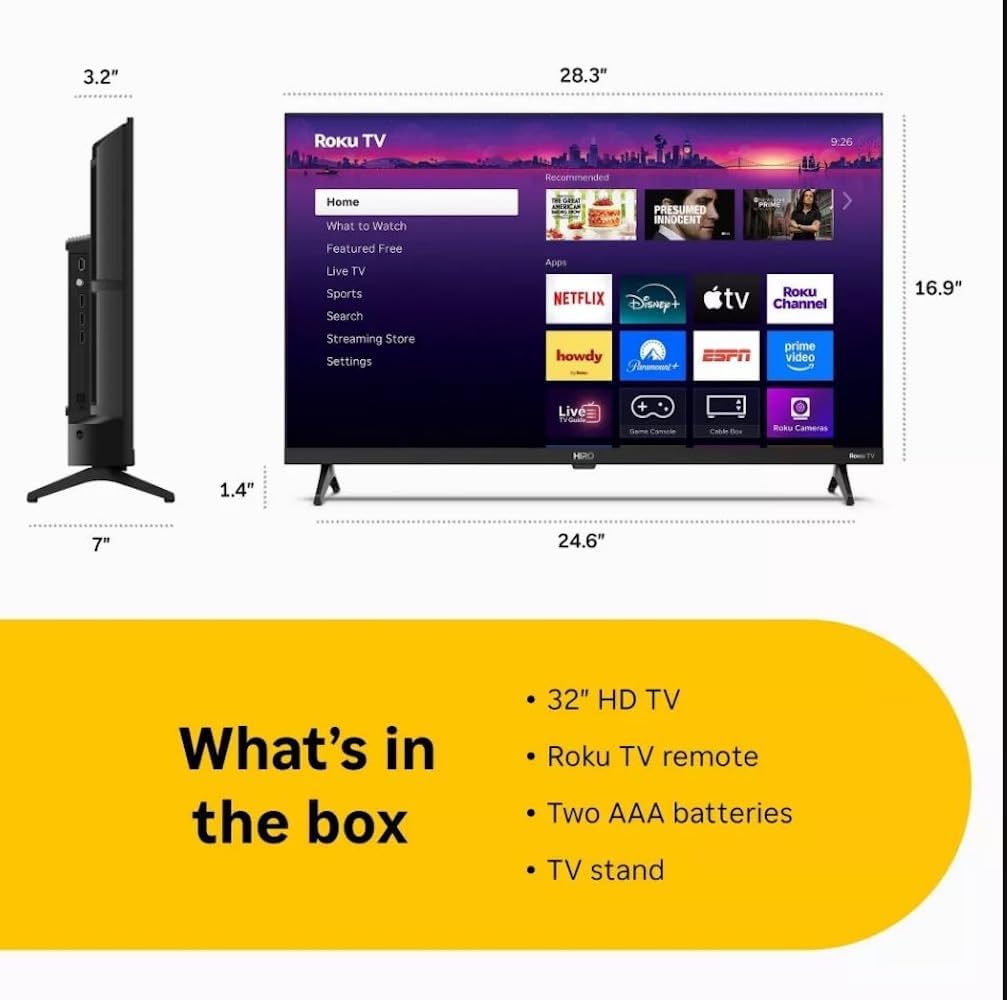
Diagram showing the dimensions of the Roku Hiro 32-inch TV and a list of included accessories: 32-inch HD TV, Roku TV remote, two AAA batteries, and TV stand.
- Hiro 32" 720p HD Smart TV Flat Screen LED Television with Roku TV
- Дистанционное управление
- Тумба под ТВ
- Силовой кабель
- Руководство пользователя
Настраивать
1. Установка подставки
Carefully place the TV screen-down on a soft, clean surface to prevent damage. Align the TV stand with the designated slots on the bottom of the TV. Secure the stand using the provided screws. Ensure the stand is firmly attached before proceeding.
2. Подключение устройств

Задний view of the Roku Hiro TV, showing the input/output ports including USB, HDMI, and antenna connections.
- Власть: Подключите кабель питания к разъему питания телевизора, а затем к розетке.
- HDMI: Connect external devices such as Blu-ray players, game consoles, or cable boxes to the HDMI ports. This TV features 3 HDMI ports.
- USB: Используйте USB-порт для воспроизведения мультимедиа с USB-накопителя.
- Оптический аудиовыход: Connect an external sound system using an optical audio cable for enhanced sound.
- Антенна/кабель: Connect an antenna or cable TV feed to the RF input for over-the-air or cable channels.
3. Начальная настройка
After connecting all necessary cables, power on the TV. Follow the on-screen instructions to:
- Выберите язык.
- Подключитесь к вашей сети Wi-Fi.
- Активируйте свою учетную запись Roku (или создайте новую).
- Scan for available channels if an antenna is connected.
Инструкция по эксплуатации
Функции дистанционного управления

Close-up of the Roku TV remote control, highlighting buttons for TV power, volume, mute, sleep timer, instant replay, options, and app shortcuts.
- Кнопка питания: Включает и выключает телевизор.
- Кнопки управления (D-Pad): Осуществляет навигацию по меню и выбирает пункты.
- Кнопка ОК: Подтверждает выбор.
- Домашняя кнопка: Возврат на главный экран Roku.
- Кнопка «Назад»: Возврат к предыдущему экрану.
- Увеличение/уменьшение громкости: Регулирует громкость телевизора.
- Кнопка выключения звука: Отключает или включает звук телевизора.
- Кнопки быстрого доступа к приложению: Direct access to popular streaming services (e.g., Netflix, Disney+, Apple TV+, Prime Video).
- Таймер сна: Устанавливает таймер для автоматического выключения телевизора.
- Мгновенное воспроизведение: Jumps back a few seconds in supported content.
- Параметры: Accesses additional settings or information for the current content.
Навигация по операционной системе Roku

The Roku TV home screen interface, showing recommended content and various streaming applications.
The Roku home screen provides access to all your streaming channels, inputs, and settings. Use the D-Pad on your remote to navigate through the menu options on the left and the app grid on the right. You can customize the order of your channels by highlighting an app, pressing the * (Options) button, and selecting 'Move channel'.
Потоковый контент
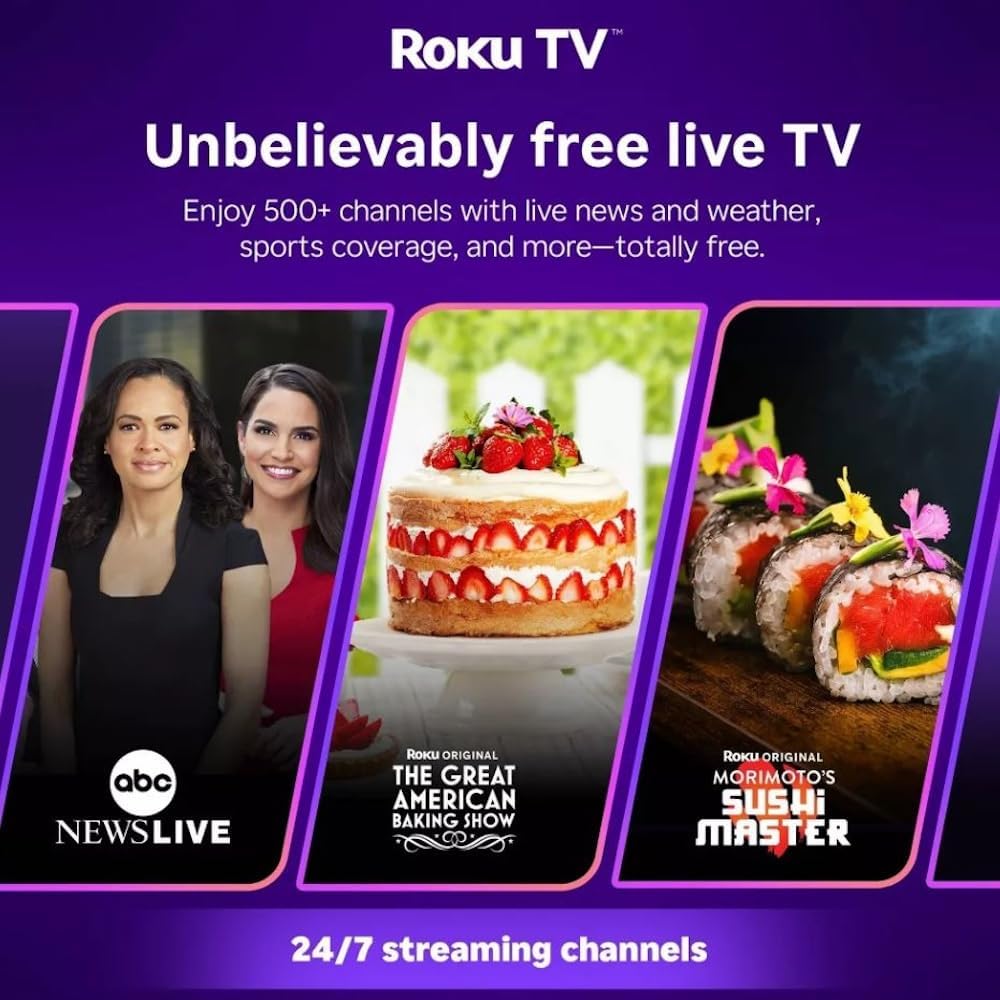
Roku TV interface promoting free live TV channels, featuring examples like ABC News Live, The Great American Baking Show, and Morimoto's Sushi Master.
Access a wide range of streaming services and free content through the Roku Channel Store. The Roku platform offers over 500 free channels, including live television, movies, and news. Use the 'Search' function on the home screen to find specific titles or channels.
Аудио особенности

Roku Hiro TV displaying the home screen with various streaming apps, emphasizing enhanced audio quality.
The TV features enhanced audio quality. For private listening, you can pair Bluetooth headphones directly with the TV. Navigate to Settings > Remotes & devices > Bluetooth devices > Pair new device to connect your headphones.
Обслуживание
Чистка телевизора
- Перед чисткой всегда отключайте телевизор от сети.
- Аккуратно протрите экран и корпус мягкой безворсовой тканью.
- Для удаления стойких пятен слегка потритеampСмочите ткань водой или мягким неабразивным чистящим средством для экрана. Не распыляйте чистящее средство непосредственно на экран.
- Избегайте использования едких химикатов, абразивных губок или растворителей.
Обновления программного обеспечения
The Roku TV automatically checks for and installs software updates when connected to the internet. To manually check for updates, go to Настройки > Система > Обновление программного обеспечения.
Поиск неисправностей
| Проблема | Решение |
|---|---|
| Нет электричества | Убедитесь, что кабель питания надежно подключен как к телевизору, так и к работающей электрической розетке. Попробуйте другую розетку. |
| Нет изображения, но есть звук | Проверьте источник входного сигнала. Нажмите Дом button on the remote and select the correct input. Ensure all HDMI cables are securely connected. |
| Нет звука, но есть изображение | Проверьте уровень громкости и убедитесь, что звук телевизора не отключен. При использовании внешнего аудиоустройства проверьте подключения и настройки. |
| Невозможно подключиться к Wi-Fi | Verify your Wi-Fi password. Restart your router and modem. Go to Настройки > Сеть > Настройка подключения to reconfigure. |
| Пульт дистанционного управления не работает | Замените батарейки в пульте дистанционного управления. Убедитесь, что между пультом и ИК-датчиком телевизора нет никаких препятствий. |
Технические характеристики
| Название модели | H32C2C4 |
| Размер экрана | 32 дюйма |
| Технология отображения | ВЕЛ |
| Разрешение | 720p |
| Частота обновления | 60 Гц |
| Операционная система | ОС Roku |
| Технология связи | Bluetooth, HDMI, Optical Audio, USB, Wi-Fi |
| Total Number of HDMI Ports | 3 |
| Общее количество портов USB | 1 |
| Размеры продукта (Д x Ш x В) | 3.2"Д x 28.3"Ш x 16.9"В |
| Вес товара | 7.5 фунта |
| Томtage | 120 вольт (переменный ток) |
| Тип крепления | Крепление на стол |
| Цвет | Черный |
Информация о гарантии
This Roku Hiro TV is covered by a 90-day Replacement Warranty. Please retain your proof of purchase for any warranty claims. For detailed terms and conditions, refer to the warranty documentation included with your product or visit the official Roku support webсайт.
Поддерживать
For further assistance, troubleshooting guides, or to contact customer support, please visit the official Roku support website. You can find comprehensive FAQs and contact information there.