
1. Введение
Welcome to the user manual for your ATTACK SHARK R68 HE Carbon Fiber 8000Hz Rapid Trigger Keyboard. This manual provides detailed instructions for setting up, operating, customizing, and maintaining your keyboard to ensure optimal performance and a superior gaming experience.

Image: The ATTACK SHARK R68 HE Wired Forged Carbon Fiber Keyboard, showcasing its design and vibrant RGB lighting.
2.Основные характеристики
The ATTACK SHARK R68 HE keyboard is engineered for high-performance gaming and typing, incorporating advanced technologies:
- Премиум-строительство: Features a compact 60% layout with CNC-machined aluminum alloy side trims and advanced carbon fiber composite materials for durability and aesthetics.
- Магнитные переключатели: Equipped with Hall effect magnetic switches for ultra-sensitive operation and a silky smooth feel.
- Rapid Trigger (RT) Functionality: Adjustable 0.005mm RT accuracy with a global actuation range of 0.005mm to 3.4mm, allowing for precise and instant key responses.
- Высокая частота опроса: An 8000Hz polling rate delivers 8x faster response times than traditional gaming keyboards, with ultra-low 0.08ms latency.
- Расширенные функции клавиш: Supports Dynamic Keystroke (DKS), Mod Tap (MT), Toggle Key (TGL), and Snap Tap (SOCD) for enhanced gaming precision.
- Настраиваемая RGB-подсветка: Dual-sided dynamic RGB light strips and individual key RGB lighting with 16.8 million colors, featuring 20+ preset light effects.
- КМК WebДрайвер на базе: Offers comprehensive customization for key remapping, macros, lighting effects, and magnetic switch settings.
- C01 Ultra RGB Coiled Cable: Designed for stable data transfer and fast charging.
- Совместимость: Fully compatible with Windows and Mac operating systems.

Image: Visual representation of the keyboard's high performance metrics, including 8000Hz polling rate and 256K scan rate, emphasizing instant response and precision.
3. Содержимое упаковки
Проверьте наличие всех предметов в посылке:
- ATTACK SHARK R68 HE Keyboard
- C01 Ultra RGB Coiled Cable
- Инструмент для извлечения ключей 2-в-1
- Чехол для клавиатуры
- 2 x Spare Magnetic Switches
- 2 x ATTACK SHARK Stickers
- Руководство пользователя (этот документ)

Изображение: Оверview of all items included in the ATTACK SHARK R68 HE keyboard retail box, neatly arranged.
4. Настройка
4.1 Подключение клавиатуры
The R68 HE is a wired keyboard. Connect it to your computer using the provided C01 Ultra RGB Coiled Cable.
- Insert the USB-C end of the coiled cable into the port on the back of the keyboard.
- Подключите конец USB-A спирального кабеля к свободному USB-порту на вашем компьютере.
- The keyboard will automatically be recognized by your operating system (Windows or Mac).

Image: The keyboard connected to a coiled USB-C cable, emphasizing the wired connection and high polling rate for stable data transfer.
4.2 Начальная калибровка
For optimal performance, especially with Rapid Trigger features, it is recommended to perform an initial calibration using the web программное обеспечение драйвера.
- Open the QMK web-based driver (www.qmk.top) or the downloaded software.
- Navigate to the "Keyboard Setting" panel.
- Locate and click "Travel calibration" on the right side.
- In the pop-up window, select "Start Calibration."
- Follow the on-screen instructions, then click "Calibration Complete" to finish.
Image: A visual guide demonstrating the steps for performing a quick calibration using the keyboard's web driver software interface.
5. Инструкция по эксплуатации
5.1 Основные функции клавиатуры
The R68 HE features a 68-key ANSI layout. Standard key functions operate as expected. Utilize the Function (Fn) key for secondary key actions, typically indicated by legends on the keycaps.
5.2 Управление RGB-подсветкой
The keyboard features dynamic RGB backlighting and side light bars. You can control these directly from the keyboard or through the customization software.
Keyboard Backlight Controls:
- Fn + \ |: Переключить световые эффекты
- Fn + Enter: Переключить цвет подсветки
- Fn + Backspace: Свет Вкл/Выкл
- Fn+Tab: Белый Свет
- Fn + + / -: Отрегулируйте скорость подсветки
- Fn + ↑ / ↓: Настройка яркости подсветки
Side Light Bar Controls:
- Фн + Z: Switch Side Light Effects
- Fn + X: Switch Side Light Color
- Фн + С: Side Light On/Off

Image: The keyboard displaying various RGB lighting effects, accompanied by a guide to onboard lighting controls for both key backlights and side light bars.
5.3 Magnetic Switch Features (Rapid Trigger, DKS, MT, TGL, SOCD)
The magnetic switches allow for advanced functionalities crucial for competitive gaming:
- Быстрый триггер (RT): Allows a key to activate and deactivate based on movement rather than a fixed actuation point. This means a key can register a press as soon as it moves down and reset as soon as it moves up, enabling extremely fast repeated inputs.
- Регулируемое приведение в действие: Customize the actuation point for each key individually from 0.005mm to 3.4mm via the software, tailoring sensitivity to your preference.
- Динамическое нажатие клавиши (DKS): Assign up to four different actions to a single key based on how far it is pressed.
- Mod Tap (MT): A key can perform one action when tapped and a different action when held.
- Переключатель клавиш (TGL): Press and hold a key to activate a continuous action, release to stop.
- Snap Tap (SOCD - Simultaneous Opposite Cardinal Directions): Optimizes directional inputs in games by neutralizing opposing inputs (e.g., pressing both 'A' and 'D' simultaneously results in no horizontal movement).

Image: A detailed explanation of magnetic Hall Effect switches and the Rapid Trigger mechanism, comparing its dynamic actuation to standard switches.

Image: Visual guides for advanced magnetic switch features including Toggle Key (TGL), Snap Tap (SOCD), and Dynamic Keystroke (DKS).
6.Настройка
The ATTACK SHARK R68 HE keyboard offers extensive customization through its QMK web-based driver or downloadable software. This allows you to personalize your keyboard experience to a high degree.
Варианты настройки:
- Переназначение клавиш: Reassign any key to a different function.
- Настройки макроса: Create and assign complex macros for single-key execution.
- RGB Lighting Settings: Fine-tune lighting effects, colors, and brightness beyond onboard controls.
- Настройки магнитного выключателя: Adjust actuation points, Rapid Trigger sensitivity, and configure DKS, MT, TGL, and SOCD functions.
- Music Visualization: Synchronize lighting with audio output.
- Zone Wake-up & Screen Lighting Rhythm: Advanced lighting synchronization features.
Доступ к web водитель в: www.qmk.top

Image: The user interface of the QMK web driver, demonstrating options for customizing lighting, magnetic switch behavior, and key functions.
7. Техническое обслуживание
Правильный уход гарантирует долговечность и производительность вашей клавиатуры.
- Уборка: Use a soft, dry cloth to wipe the keyboard surface. For deeper cleaning, use the provided key puller to remove keycaps and clean dust or debris with compressed air. Avoid using harsh chemicals or abrasive materials.
- Хранилище: When not in use, store the keyboard in a clean, dry environment. The included keyboard cover can help protect it from dust.
- Уход за кабелем: Во избежание повреждений не допускайте резких изгибов или чрезмерного натяжения спирального кабеля.
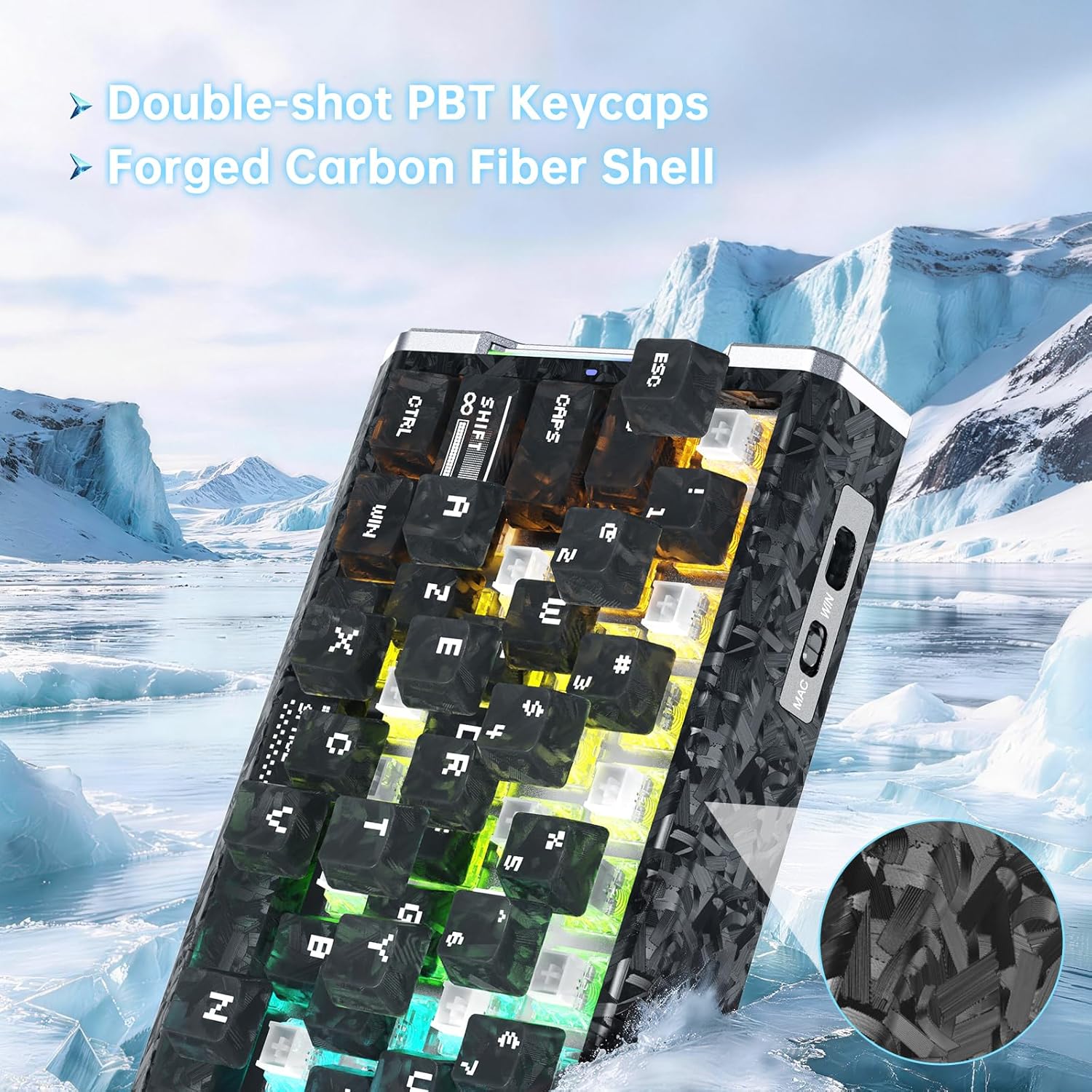
Изображение: Подробный view of the keyboard's forged carbon fiber keycaps and shell material, alongside accessories like spare switches and a key puller, relevant for maintenance.
8. Поиск Неисправностей
If you encounter issues with your ATTACK SHARK R68 HE keyboard, refer to the following common solutions:
| Проблема | Возможная причина | Решение |
|---|---|---|
| Клавиатура не отвечает | Ненадежное соединение кабеля, неправильный USB-порт, проблема с драйверами. | Ensure the USB-C cable is securely connected to both the keyboard and the computer. Try a different USB port. Restart your computer. Check device manager for driver issues. |
| RGB-подсветка не работает или работает неправильно | Lighting settings misconfigured, software conflict. | Use the onboard Fn key combinations to cycle through effects and colors (see Section 5.2). Check the QMK web driver for detailed lighting settings. Ensure no other lighting software is conflicting. |
| Клавиши не регистрируются или печатаются дважды | Dust/debris under keycap, magnetic switch calibration needed, software issue. | Remove the keycap and clean the switch area. Perform a "Travel calibration" using the QMK web driver (see Section 4.2). Update or reinstall the keyboard software/driver. |
| Advanced features (RT, DKS, etc.) not working | Features not enabled or configured in software. | Ensure these features are properly configured and enabled within the QMK web driver software (see Section 6). |
| Computer lagging or freezing after connecting keyboard | Potential software conflict or system resource issue (rare). | Ensure your operating system and drivers are up to date. Try connecting the keyboard to a different computer to isolate the issue. If the problem persists, contact customer support. |
9. Технические характеристики
Detailed technical specifications for the ATTACK SHARK R68 HE Keyboard:
| Особенность | Деталь |
|---|---|
| Бренд | АТАКУЮЩАЯ АКУЛА |
| Модель | Р68 ХЕ |
| Технология связи | USB-C (проводной) |
| Раскладка клавиатуры | 68-Key ANSI (60% Layout) |
| Тип переключателя | Magnetic Hall Effect Switches (Linear) |
| Диапазон срабатывания | 0.005mm to 3.4mm (Adjustable) |
| Высокая точность срабатывания затвора | 0.005 мм |
| Скорость опроса | 8000 Гц |
| Задержка | 0.08мс |
| Скорость сканирования | 256КГц |
| Материал колпачка | PC Matte Forged Carbon |
| Материал корпуса | Углеродное волокно, алюминиевый сплав |
| RGB-освещение | 16.8 Million Colors, Dynamic Backlight & Side Strips |
| Совместимые операционные системы | Windows, Mac OS 14 Sonoma and above |
| Размеры | 325 мм x 122 мм x 20 мм (прибл. 12.8 дюйма x 4.8 дюйма x 0.79 дюйма) |
| СКП | 707630517426 |
Image: A technical diagram illustrating the ANSI layout and physical dimensions of the R68 HE keyboard.
10. Гарантия и поддержка
10.1 Гарантия производителя
The ATTACK SHARK R68 HE keyboard comes with a Гарантия производителя 1 год с даты покупки. Данная гарантия распространяется на дефекты материалов и изготовления при нормальном использовании. Она не распространяется на повреждения, вызванные неправильным использованием, несчастными случаями, несанкционированными модификациями или естественным износом.
Пожалуйста, сохраните документ, подтверждающий покупку, для претензий по гарантии.
10.2 Поддержка клиентов
For technical assistance, warranty claims, or any questions regarding your ATTACK SHARK R68 HE keyboard, please contact ATTACK SHARK customer support through their official channels or the retailer where the product was purchased.
You may also refer to the official brand store on Amazon: Магазин ATTACK SHARK
11. Видеоролики о продуктах
ATTACK SHARK R68 HE Carbon Fiber 8000Hz Rapid Trigger Keyboard Overview
Видео: Официальное лицоview of the ATTACK SHARK R68 HE Carbon Fiber 8000Hz Rapid Trigger Keyboard, highlighting its features and design.
R68HE Carbon Fiber Rapid Trigger Keyboard with Magnetic Switch Features
Video: A demonstration of the R68HE Carbon Fiber Rapid Trigger Keyboard, focusing on its magnetic switch technology and rapid trigger capabilities.