
1. Введение
The MINISO MS116 AI Translation Earbuds are designed to provide real-time language translation, high-fidelity audio, and seamless communication. These earbuds integrate advanced AI technology to support 135 languages, offering a versatile solution for travel, business, and learning. This manual will guide you through the setup, operation, maintenance, and troubleshooting of your MS116 earbuds.
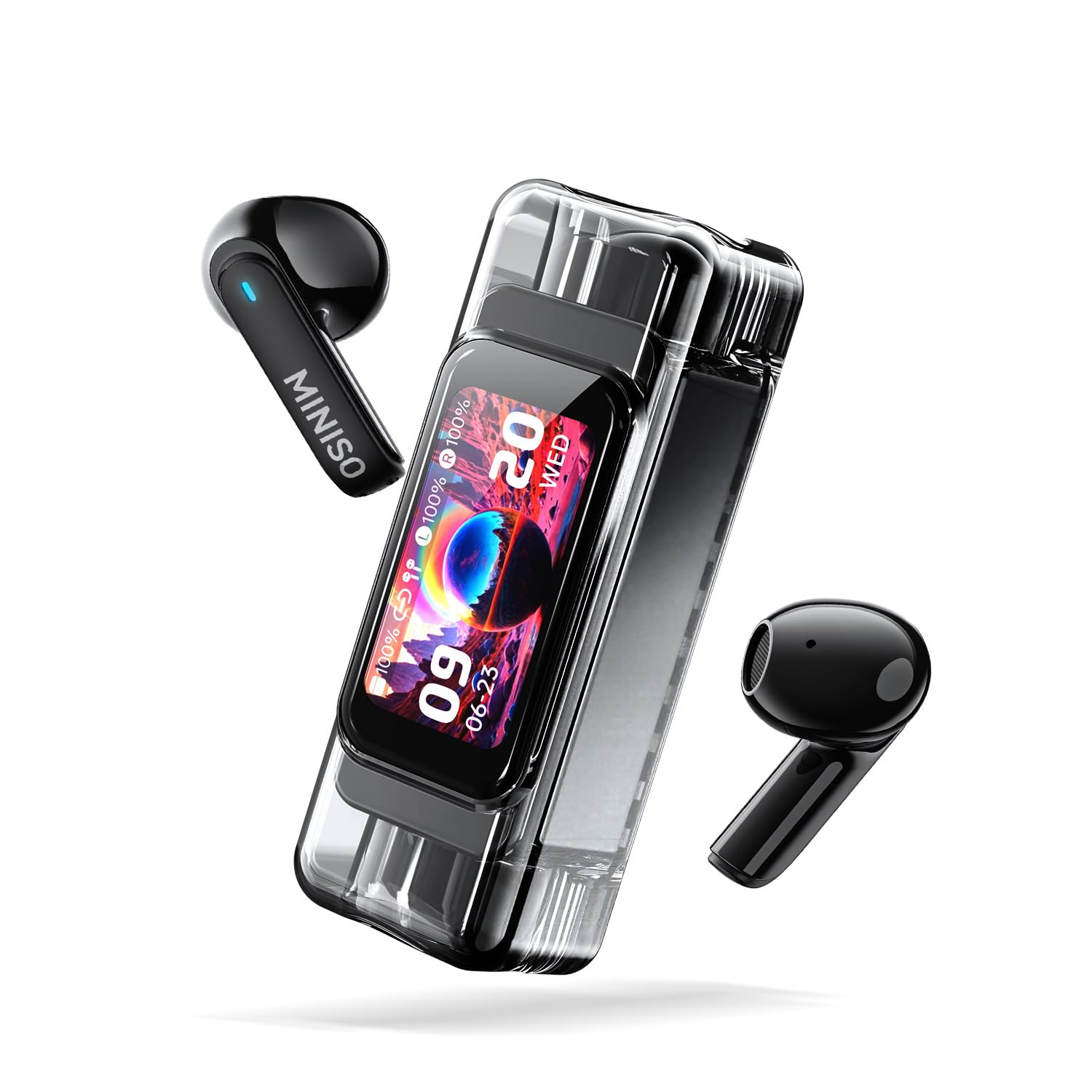
The MINISO MS116 AI Translation Earbuds with their transparent charging case, showcasinэлегантный дизайн и цифровой дисплей.
2. Содержимое упаковки
- MINISO MS116 AI Translation Earbuds (Left and Right)
- Зарядный футляр
- USB-кабель для зарядки
- Руководство пользователя (этот документ)
3. Настройка
3.1 Первоначальная зарядка
Before first use, fully charge the earbuds and the charging case. Connect the provided USB charging cable to the charging port on the case and a compatible USB power source. The charging case display will indicate the charging status.
3.2 Загрузка приложения Saymi
The translation function of the MS116 earbuds requires the Saymi APP. Scan the QR code provided in the quick start guide (or search 'Saymi' in your device's app store) to download and install the application on your iOS or Android smartphone.
3.3 Сопряжение по Bluetooth
- Убедитесь, что наушники находятся в зарядном футляре и футляр имеет достаточный заряд.
- Откройте крышку зарядного кейса. Наушники автоматически перейдут в режим сопряжения.
- На смартфоне перейдите в настройки Bluetooth и выполните поиск доступных устройств.
- Select "MINISO MS116" from the list to connect. A voice prompt will confirm successful pairing.
- Open the Saymi APP and follow the on-screen instructions to connect the earbuds within the app for translation features.
4. Инструкция по эксплуатации
4.1 Basic Earbud Controls (Touch)
The MS116 earbuds feature smart touch controls. Specific functions may vary slightly based on the app settings or mode. Refer to the Saymi APP for customizable touch controls.
- Воспроизведение/Пауза музыки: Нажмите один раз на любой наушник.
- Ответить/завершить вызов: Нажмите один раз на любой наушник.
- Отклонить вызов: Нажмите и удерживайте любой наушник в течение 2 секунд.
- Следующий трек: Дважды нажмите на правый наушник.
- Предыдущий трек: Дважды коснитесь левого наушника.
- Активировать голосового помощника: Трижды нажмите на любой наушник.
- Переключить режим ANC/прозрачности: Нажмите и удерживайте любой наушник в течение 3 секунд (когда вы не разговариваете по телефону).
4.2 Translation Modes (via Saymi APP)
The Saymi APP offers multiple translation modes to suit various scenarios:
- Hands-free Mode (Real-time Communication): For direct conversations. One person speaks, the earbuds translate and play the translation in real-time.
- Dual-ear Control: Allows for click operations within the app to manage translation flow.
- Live Photo Translation: Use your phone's camera through the app to translate text from images.
- Режим диалога с использованием ИИ: Facilitates fluent dialogue with AI assistance for complex interactions.
- Режим конференции: Designed for multilingual meetings, allowing multiple participants to receive translations.
- Dual Mode (Music & Translation): Listen to music while simultaneously using translation features.
- Голосовые заметки: Records and automatically transcribes spoken language.
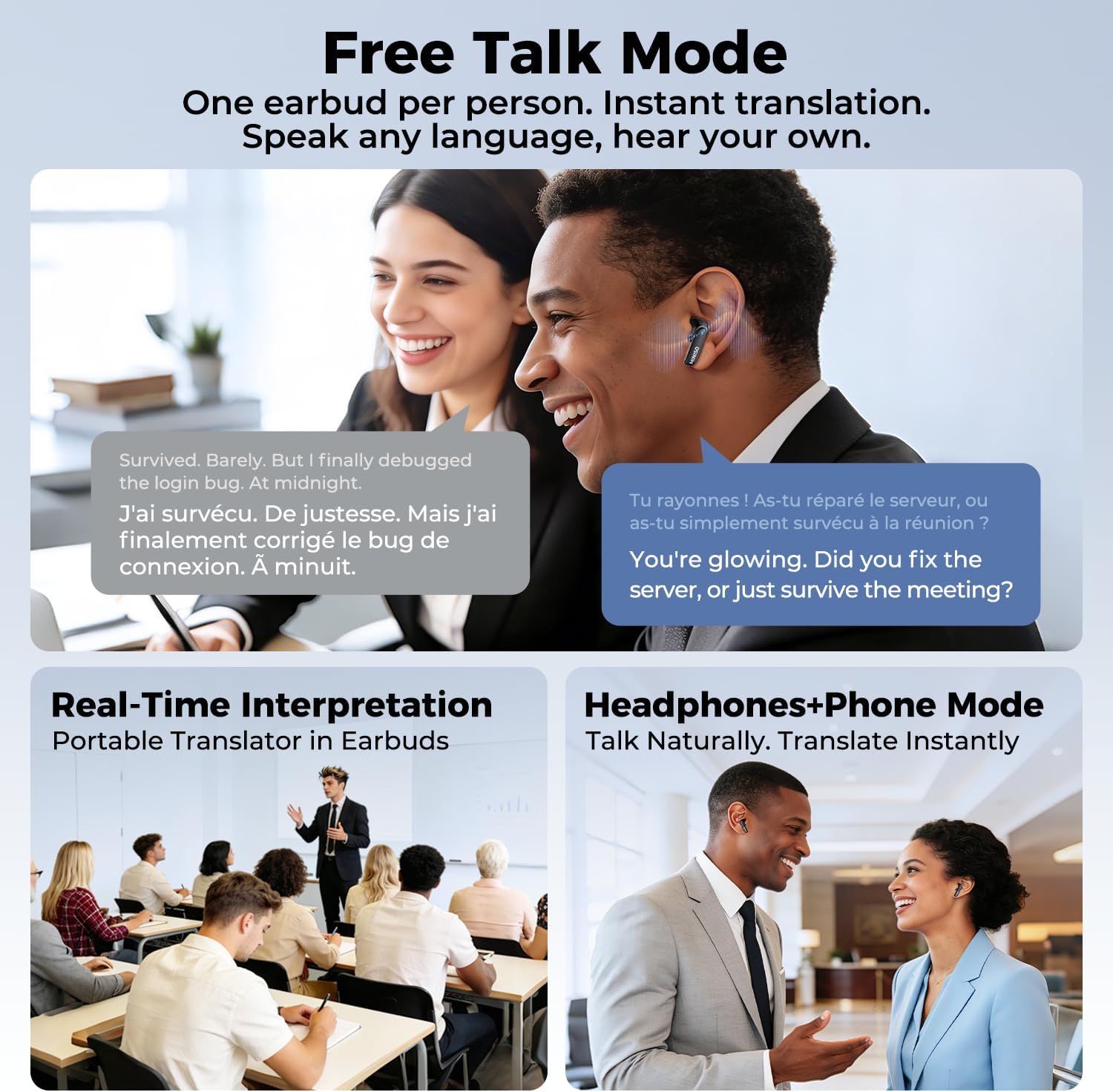
This image depicts three scenarios for the MINISO MS116 earbuds' translation modes: 'Free Talk Mode' for instant translation with one earbud per person, 'Real-Time Interpretation' for group settings, and 'Headphones+Phone Mode' for natural, instant translation during phone conversations.

The MINISO MS116 charging case display cycling through various functions, including music control, call notifications, battery status, and app-related features, indicating its smart capabilities.
4.3 Звонки высокой четкости
The earbuds are equipped with a high-sensitivity microphone and intelligent call noise reduction algorithms to filter out wind noise and other background distractions, ensuring clear communication during calls.

A person wearing a MINISO MS116 earbud, demonstrating its use for high-definition calls with advanced noise reduction for clear communication.
4.4 Active Noise Cancellation (ANC) and HiFi Audio
Enjoy immersive audio with Active Noise Cancellation, which effectively blocks background noise. The earbuds also feature HiFi Spatial Sound technology for a rich and detailed listening experience.

Взорванный view diagram of the earbud's internal speaker components, emphasizing the HiFi Spatial Sound technology for an immersive audio experience.
5. Срок службы аккумулятора и зарядка
The MS116 earbuds offer extended battery life for continuous use.
- Earbuds: До 6 часов непрерывной работы на одном заряде.
- Зарядный футляр: Provides an additional 24 hours of battery life, extending the total usage time to over 30 hours.
To charge, place the earbuds back into the charging case. Connect the charging case to a USB power source using the provided cable.

An image showing the MINISO MS116 earbuds and charging case, detailing the battery life: 6 hours for earbuds and an additional 24 hours from the charging case, totaling over 30 hours.
6. Техническое обслуживание
6.1 Очистка
Regularly clean your earbuds and charging case to ensure optimal performance and hygiene. Use a soft, dry, lint-free cloth. Do not use abrasive materials or harsh chemicals. For ear tips, remove them and clean with a damp cloth, then ensure they are completely dry before reattaching.
6.2 Водостойкость
The MINISO MS116 earbuds are rated IPX5 Sports Waterproof, meaning they are resistant to sweat and light splashes of water. They are not designed for swimming, showering, or submersion in water. Do not expose the charging case to water.

The MINISO MS116 earbuds and charging case are shown with water droplets, illustrating their IPX5 sports waterproof capability, making them resistant to sweat and light splashes.
6.3 Хранение
Когда наушники не используются, храните их в зарядном футляре, чтобы защитить их и поддерживать заряд. Избегайте хранения при экстремальных температурах или высокой влажности.
7. Поиск Неисправностей
Если у вас возникли проблемы с наушниками MINISO MS116, попробуйте следующие решения:
- Наушники не подключаются: Ensure both earbuds are in the charging case, close the lid, then open it again. Check your device's Bluetooth settings and try re-pairing. Ensure the earbuds are charged.
- Нет звука в одном наушнике: Place both earbuds back in the case, close the lid, and then take them out again. Check Bluetooth connection.
- Перевод не работает: Ensure the Saymi APP is open and connected to the earbuds. Check your internet connection (required for translation). Verify language settings in the app.
- Плохое качество звука: Ensure earbuds are clean and properly seated in your ears. Check the audio source. Disable ANC temporarily to see if it resolves the issue.
- Проблемы с зарядкой: Ensure the charging cable is securely connected to both the case and the power source. Try a different USB port or cable.
- Приложение не отвечает: Close and restart the Saymi APP. If the issue persists, reinstall the app.
Если эти действия не помогли решить проблему, обратитесь в службу поддержки клиентов.
8. Технические характеристики
| Бренд | МИНИСО |
| Название модели | MS116 |
| Номер модели | МС116-Б |
| Технология связи | Беспроводная связь (Bluetooth 6.0) |
| Контроль шума | Активное шумоподавление |
| Водостойкость | IPX5 Sports Waterproof |
| Срок службы батареи наушников | До 6 часов |
| Общее время работы батареи (с чехлом) | Более 30 часов |
| Метод контроля | Приложение, сенсорный экран |
| Совместимые устройства | Cellphones (iOS & Android) |
| Диапазон частот | 20 Гц - 20 000 Гц |
| Материал | Металл, Пластик |
| СКП | 850073442845 |
| ASIN | B0GLDVDXCX |
9. Информация о гарантии
The MINISO MS116 AI Translation Earbuds come with a limited warranty. For detailed information regarding warranty coverage, terms, and conditions, please refer to the official MINISO webОбратитесь в службу поддержки клиентов или посетите их веб-сайт. Сохраните чек о покупке для предъявления гарантийных претензий.
10 Поддержка
Для получения дополнительной помощи, технической поддержки или ответов на ваши вопросы, пожалуйста:
- Visit the official MINISO webсайт для ответов на часто задаваемые вопросы и получения ресурсов поддержки.
- Contact MINISO customer service through the contact information provided on their official website or within the Saymi APP.
- Ensure your Saymi APP is updated to the latest version for optimal performance and new features.