
1. Введение
Thank you for choosing the ACEMAGIC M5 Mini PC. This manual provides essential information for setting up, operating, and maintaining your device. Please read it carefully to ensure optimal performance and longevity of your Mini PC.
The ACEMAGIC M5 is a compact and powerful computing solution, featuring an Intel Core i5-14500HX processor, 32GB DDR4 RAM, and a 1TB NVMe PCIe4.0 SSD. It comes pre-installed with Windows 11 Pro and supports triple 4K display output, making it suitable for various applications from office work to multimedia entertainment.
2. Что в коробке
Проверьте комплектность посылки. Если какие-либо предметы отсутствуют или повреждены, обратитесь в службу поддержки клиентов.
- 1 x ACEMAGIC M5 Mini PC
- 1 х Адаптер питания
- 1 х HDMI-кабель
- 1 крепление VESA и винты
- 1 х Руководство пользователя

Image: Contents of the ACEMAGIC M5 Mini PC package, including the Mini PC unit, power adapter, HDMI cable, VESA mount, and user manual.
3. Продукт закончилсяview
The ACEMAGIC M5 Mini PC is designed for high performance in a compact form factor. Below is an overview of its key features and connectivity options.

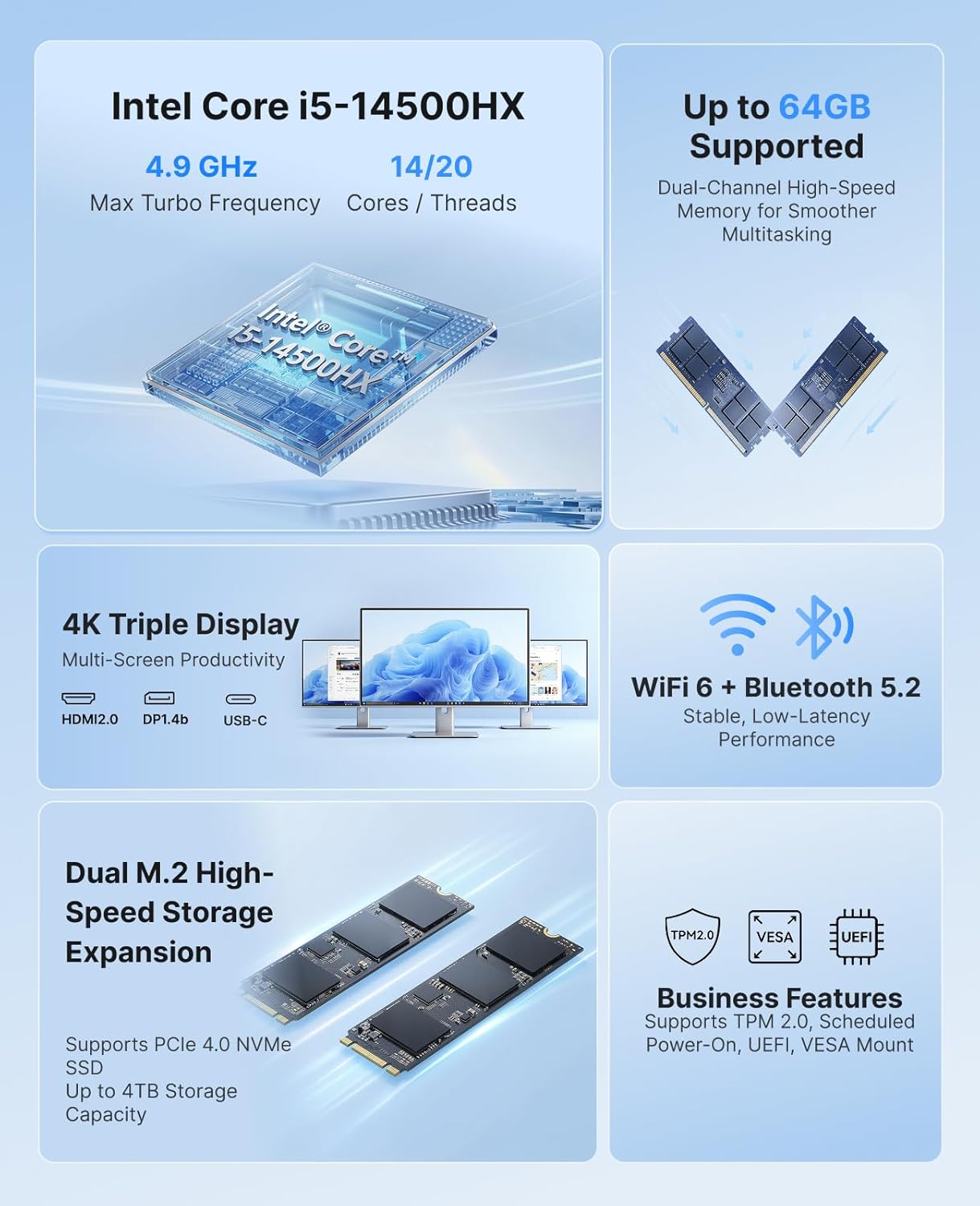
Изображение: Оверview of the ACEMAGIC M5 Mini PC highlighting its Intel Core i5-14500HX processor, up to 64GB RAM support, dual M.2 high-speed storage expansion, 4K triple display, WiFi 6 + Bluetooth 5.2, and business features like TPM 2.0 and VESA mount.
3.1 Передние и боковые порты
Изображение: Крупный план view of the ACEMAGIC M5 Mini PC showing the front and side ports. The front includes a power button, USB 3.2 Gen 2 Type-A ports, and a 3.5mm audio jack. The sides feature ventilation grilles.
- Кнопка питания: Для включения/выключения устройства.
- Порты USB 3.2 Gen 2 Type-A (x2): For connecting peripherals like keyboards, mice, or external drives.
- Аудиоразъем 3.5 мм: Для наушников или динамиков.
- Вентиляционные решетки: Обеспечивает надлежащий поток воздуха для охлаждения.
3.2 Задние порты

Image: A diagram illustrating the rear ports of the ACEMAGIC M5 Mini PC. It shows multiple USB ports, HDMI, DisplayPort, LAN, and DC power input.
- Порт Type-C (1 шт.): 10Gbps data transfer, DP1.4 4K@60Hz video output, and 15W PD output.
- Порты USB 3.2 Gen 2 Type-A (x4): High-speed connectivity for various USB devices.
- RJ45 Gigabit Ethernet Port (x1): Для проводного сетевого подключения.
- Порт HDMI 2.0 (1 шт.): Поддерживает вывод видео в разрешении 4K при 60 Гц.
- DisplayPort 1.4b (x1): Поддерживает вывод видео в разрешении 4K при 60 Гц.
- DC Power Input (x1): Подключите прилагаемый адаптер питания сюда.
4. Инструкции по настройке
Follow these steps to set up your ACEMAGIC M5 Mini PC for the first time.
- Подключить дисплей: Connect your monitor(s) to the Mini PC using the HDMI, DisplayPort, or Type-C ports. The device supports up to three 4K displays simultaneously.
- Подключите периферийные устройства: Подключите клавиатуру, мышь и любые другие USB-устройства к доступным USB-портам.
- Подключите питание: Подключите адаптер питания к разъему постоянного тока на задней панели мини-ПК, а затем вставьте адаптер в розетку.
- Включение питания: Нажмите кнопку питания на передней панели мини-ПК. Загорится индикатор питания.
- Начальная настройка: The Mini PC comes with Windows 11 Pro pre-installed. Follow the on-screen instructions to complete the initial Windows setup. It is recommended to avoid connecting to Wi-Fi or LAN initially to prevent long updates from delaying desktop access.
5. Инструкция по эксплуатации
5.1 Основные операции
- Включение/выключение питания: Press the power button once to turn on. To turn off, click the Start menu in Windows and select Power > Shut down.
- Перезапуск: В меню «Пуск» выберите «Питание» > «Перезагрузить».
- Спящий режим: В меню «Пуск» выберите «Питание» > «Сон».
5.2 Конфигурация дисплея
The ACEMAGIC M5 supports triple 4K display output, allowing for enhanced multitasking and visual fidelity.

Image: A user working with three monitors connected to the ACEMAGIC M5 Mini PC, demonstrating its triple 4K display capability via HDMI, DisplayPort, and USB-C.
- Connect up to three monitors using any combination of HDMI, DisplayPort, and Type-C ports.
- To configure display settings in Windows, right-click on the desktop and select
Ask a question about this manual
Ask about setup, troubleshooting, compatibility, parts, safety, or missing instructions. Manuals+ will review the question and use this page’s manual context to help answer it.