
1. Введение
1.1 продукта болееview
The Hikvision DS-7108HGHI-M1/T is an 8-channel Turbo HD DVR designed for reliable surveillance recording in various environments. This digital video recorder supports 1080p Lite recording, providing clear video footage. It incorporates H.265 Pro+ compression technology for efficient storage and video quality. Features include Motion Detection 2.0 for intelligent event identification, 2-way audio support for communication, and HDMI/VGA output options for display connectivity. Remote viewing is available via the Hik-Connect application.
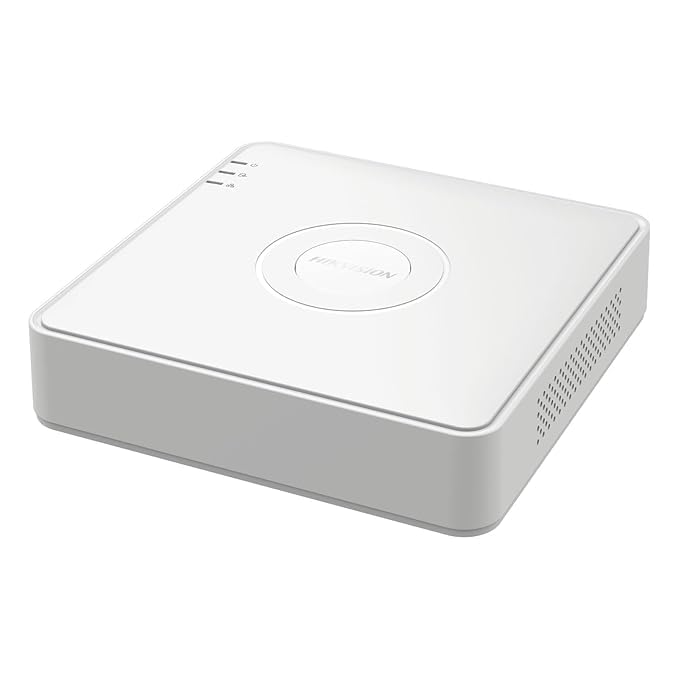
Рисунок 1: Вверху view of the Hikvision DS-7108HGHI-M1/T DVR. This image displays the device's compact white casing with the Hikvision brand logo centrally located. Indicator lights for power, hard drive activity, and network status are visible on the left side of the top panel.
1.2 Основные характеристики
- 8-Channel Turbo HD DVR: Supports up to 8 analog cameras with 1080p Lite recording resolution.
- Расширенное сжатие: Utilizes H.265 Pro+ video compression for reduced bandwidth and storage while maintaining video quality.
- Two-Way Audio Support: Enables real-time communication through connected cameras via built-in audio input and output.
- Обнаружение движения 2.0: Intelligent motion detection technology for improved accuracy and reduced false alarms.
- Гибкое подключение: Equipped with HDMI and VGA outputs, a network port for remote viewing via Hik-Connect, and USB ports for data backup.
1.3 Содержимое упаковки
Проверьте наличие всех предметов в упаковке:
- 1 x 4 Channel DVR Recorder (Note: Product title indicates 8-channel, but package content lists 4-channel. Please verify actual product received.)
- 2 x 2MP ColorVu Dome Cameras
- 2 x 2MP ColorVu Bullet Cameras
- 1 x 1TB Surveillance Hard Disk Drive
- 1 x 4 Channel SMPS Power Supply
- 8 x BNC Connectors
- 4 x DC Power Connectors
- 1 х HDMI-кабель
- 1 x USB-мышь
- 1 x Адаптер питания для DVR
- 1 x Cable Roll (90 Metres)
- 6 x крепежных винтов
- Монтажные принадлежности
2. Настройка
2.1 Физическая установка
Before connecting, ensure the DVR is placed on a stable, flat surface with adequate ventilation. Avoid direct sunlight, heat sources, and areas with high humidity or dust.
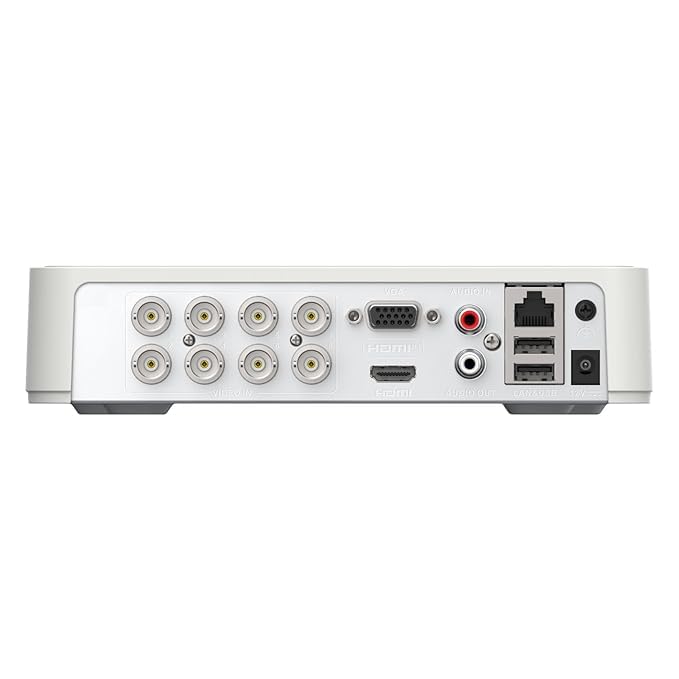
Figure 2: Rear panel of the Hikvision DS-7108HGHI-M1/T DVR. This image illustrates the various connectivity ports available on the back of the device, including multiple BNC connectors for camera inputs, VGA and HDMI outputs for display, audio input and output jacks, an Ethernet port for network connection, USB ports for peripherals, and the DC power input.
2.2 Подключение видеорегистратора
- Подключить камеры: Attach your analog cameras to the BNC video input ports on the rear panel (refer to Figure 2).
- Подключить монитор: Connect a monitor to the DVR using either the HDMI or VGA output port.
- Подключить сеть: Для удаленного viewing and network access, connect an Ethernet cable from the DVR's LAN port to your router or network switch.
- Подключите USB-устройства: Plug the included USB mouse into one of the USB ports for navigation. Additional USB ports can be used for external storage for backup.
- Подключить аудио (дополнительно): If using cameras with audio or an external microphone, connect to the Audio In port. Connect speakers to the Audio Out port for two-way audio communication.
- Подключите питание: Connect the provided power adapter to the DVR's power input and then to a power outlet.
2.3 Первоначальное включение и настройка
After connecting all necessary cables, power on the DVR. The system will boot up, and you will be guided through an initial setup wizard on the connected monitor. Follow the on-screen prompts to set up basic parameters such as language, date/time, network settings, and administrator password. It is crucial to set a strong password for security.
3. Инструкция по эксплуатации
3.1 Прямой эфир View
Once the DVR is powered on and cameras are connected, the live view of all connected cameras will be displayed on the monitor. You can switch between single-camera view, многокамерная сетка view, and sequence display using the on-screen controls or the USB mouse.
3.2 Запись
Видеорегистратор поддерживает различные режимы записи:
- Непрерывная запись: Записи 24/7.
- Запланированная запись: Записи за указанные периоды времени.
- Запись, активируемая движением: Запись производится только при обнаружении движения.
- Запись события: Records based on other events like alarm input.
Configure recording schedules and parameters through the DVR's menu system. The H.265 Pro+ compression technology optimizes storage space while maintaining video quality.
3.3 Воспроизведение
Чтобы повторноview записано фуtage:
- Access the 'Playback' menu from the main interface.
- Выберите нужную камеру(ы) и диапазон даты/времени.
- Use the timeline to navigate through recordings. Playback controls (play, pause, fast forward, rewind) are available.
3.4 пульт Viewing via Hik-Connect
The Hik-Connect application allows remote access to your DVR from a smartphone or computer. To set up:
- Убедитесь, что DVR подключен к Интернету.
- Download and install the Hik-Connect app on your mobile device.
- Create a Hik-Connect account and add your DVR by scanning the QR code or manually entering the serial number.
- Follow the app's instructions to view Прямые трансляции, воспроизведение записей и удаленное получение уведомлений.
3.5 Motion Detection 2.0
Motion Detection 2.0 is an advanced feature that intelligently identifies movement, reducing false alarms caused by environmental factors. Configure motion detection zones and sensitivity settings in the DVR's menu. When motion is detected, the DVR can trigger recording, send notifications, or activate alarms.
3.6 Двусторонняя аудиосвязь
If your cameras support audio and are connected to the DVR's audio input/output, you can use the two-way audio feature. This allows you to listen to audio from the camera's location and speak through a connected speaker, enabling interactive communication.
4. Техническое обслуживание
4.1 Общее обслуживание
- Уборка: Regularly clean the DVR's exterior with a soft, dry cloth. Do not use liquid or aerosol cleaners.
- Вентиляция: Ensure the DVR's ventilation openings are clear and not obstructed to prevent overheating.
- Обновления прошивки: Периодически проверяйте информацию производителя. webсайт для обновления прошивки с целью обеспечения оптимальной производительности и безопасности.
4.2 Управление хранением
- Состояние жесткого диска: Monitor the health status of the internal hard drive through the DVR's system information menu.
- Резервное копирование данных: Regularly back up important recordings to an external USB drive or network storage to prevent data loss.
- Режим перезаписи: Configure the DVR to overwrite older recordings when the hard drive is full, or set it to stop recording.
5. Поиск Неисправностей
5.1 Общие проблемы и решения
- Нет отображения видео:
- Check power connections to the DVR and monitor.
- Проверьте правильность подключения кабелей HDMI/VGA.
- Убедитесь, что на мониторе выбран правильный источник входного сигнала.
- Нет изображения с камеры:
- Проверьте блок питания камеры.
- Verify BNC cable connections between camera and DVR.
- Ensure camera is compatible with the DVR's technology (e.g., TVI, CVI, AHD, CVBS).
- Удаленный ViewНе работает:
- Confirm the DVR is connected to the internet (check network cable and router status).
- Verify network settings on the DVR.
- Ensure the Hik-Connect app is correctly configured and the DVR is added.
- Нет записи:
- Проверьте, установлен ли и инициализирован ли жесткий диск.
- Проверьте расписание и настройки записи.
- Check hard drive health status.
6. Технические характеристики
6.1 Технические характеристики
| Особенность | Деталь |
|---|---|
| Номер модели | DS-7108HGHI-M1/T |
| Бренд | HIKONECT (Manufacturer: Hikvision) |
| Количество каналов | 8 |
| Технология связи | Ethernet, HDMI, USB, VGA |
| Совместимые устройства | Камера |
| Размеры продукта (Д x Ш x В) | 12Д x 14Ш x 5В сантиметров |
| Вес товара | 750 грамм |
| Название типа элемента | Цифровой видеорегистратор |
7. Гарантия и поддержка
7.1 Информация о гарантии
Этот продукт поставляется с 2-летняя гарантия производителя. Please retain your proof of purchase for warranty claims. The warranty covers defects in materials and workmanship under normal use. It does not cover damage caused by misuse, accidents, unauthorized modifications, or improper installation.
7.2 Поддержка клиентов
For technical assistance, troubleshooting, or warranty inquiries, please contact your retailer or the manufacturer's customer support. Refer to the contact information provided with your purchase or visit the official Hikvision webсайт ресурсов поддержки.


