
1. Введение
Спасибо за покупкуasing the Sharp PS-916 Bluetooth Party Speaker System. This system includes two identical portable Bluetooth speakers designed to deliver powerful audio with versatile connectivity options. Please read this manual carefully before using the product to ensure proper operation and to maximize your listening experience.
Содержимое упаковки:
- 2 x Sharp PS-916 Party Speakers
- 1 х зарядный кабель
- 1 х пульт дистанционного управления
- 1 х Руководство пользователя

Image: The Sharp PS-916 system includes two speakers for a complete stereo experience.
2. Настройка
2.1 Зарядка колонок
The PS-916 speakers are equipped with rechargeable batteries, providing up to 12 hours of playback. Before initial use, fully charge both speakers.
- Connect the charging cable to the DC IN port on the rear of each speaker.
- Plug the other end of the charging cable into a suitable power adapter (not included) or USB power source.
- Загорится индикатор зарядки. После завершения зарядки он изменит цвет или погаснет.
2.2 Включение/выключение питания
To power on or off each speaker, press and hold the ON/STAND BY INPUT кнопку, расположенную на панели управления.
2.3 Сопряжение Bluetooth (один динамик)
- Ensure the speaker is powered on and in Bluetooth mode. The Bluetooth indicator will flash, indicating it is ready for pairing.
- На своем мобильном устройстве включите Bluetooth и выполните поиск доступных устройств.
- Select "Sharp PS-916" from the list of devices.
- После подключения индикатор Bluetooth перестанет мигать и будет гореть постоянно.
2.4 True Wireless Stereo (TWS) сопряжение (два динамика)
TWS allows you to connect two PS-916 speakers wirelessly for a stereo sound experience.
- Power on both PS-916 speakers.
- Ensure neither speaker is currently connected to a Bluetooth device.
- На одном из динамиков (это будет основной динамик) нажмите СПЦ button. The speaker will enter TWS pairing mode.
- The primary speaker will automatically search for the secondary speaker. Once connected, you will hear an audible confirmation, and the TWS indicator lights on both speakers will illuminate.
- Теперь подключите мобильное устройство к основному динамику по Bluetooth, как описано в разделе 2.3. Звук будет воспроизводиться через оба динамика в режиме стерео.
3. Операционная
3.1 Панель управления оконченаview

Image: Main control panel for the Sharp PS-916 speaker.
- ON/STAND BY INPUT: Power on/off, switch input modes (Bluetooth, USB, TF, AUX, FM).
- PLAY/PAUSE (►/∕∕): Воспроизведение аудиофайла может быть приостановлено.
- ПРЕДЫДУЩИЙ (◀◀): Переход к предыдущей дорожке.
- NEXT (▶▶): Перейти к следующему треку.
- РУЧКА ГРОМКОСТИ: Поверните, чтобы отрегулировать общую громкость.
- ТВС: Initiate or disconnect True Wireless Stereo pairing.
- ЭКВАЛАЙЗЕР: Cycle through preset equalizer modes.
- БАС: Activate or deactivate bass boost.
- СВЕТ: Change or turn off the LED light effects.
- РЕГУЛИРОВКА МИКРОФОНА: Adjust microphone volume or echo (if applicable).
3.2 входных портов
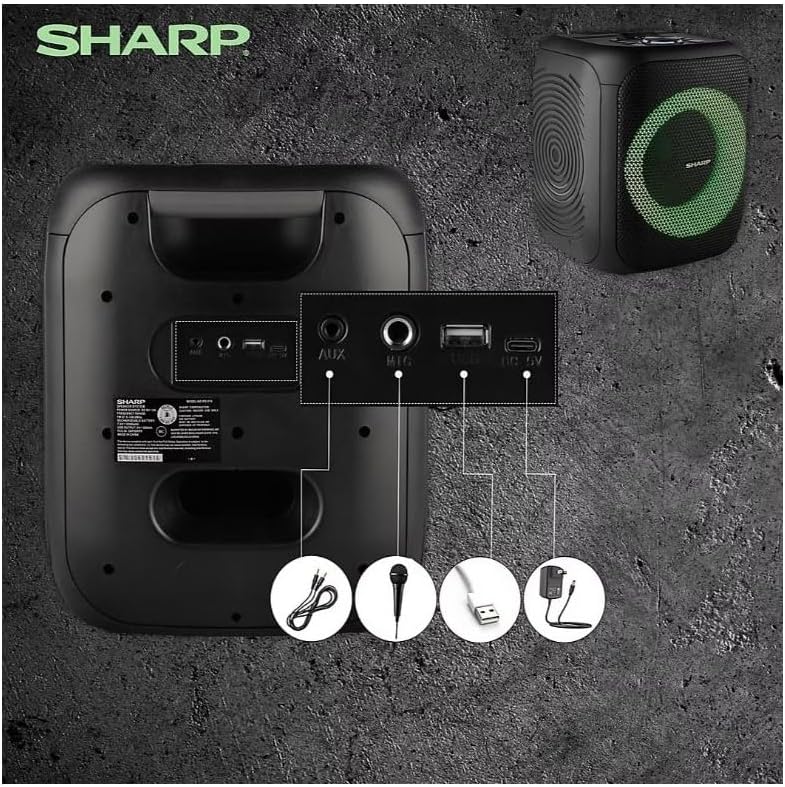
Image: Rear panel with various input and charging ports.
- ДОПОЛНИТЕЛЬНЫЙ ВХОД: Подключите внешние аудиоустройства с помощью аудиокабеля 3.5 мм.
- ВХОД МИКРОФОНА: Подключите микрофон (продается отдельно) для караоке или объявлений.
- USB: Вставьте USB-флешку для воспроизведения аудио.
- TF КАРТА: Вставьте карту памяти TF (microSD) для воспроизведения аудио.
- DC IN: Connect the charging cable to power and charge the speaker.
3.3 Playing Audio from USB/TF Card
- Insert a USB flash drive or TF card into the corresponding port.
- Нажмите ON/STAND BY INPUT button repeatedly until the display shows the USB or TF mode.
- Воспроизведение начнется автоматически. Используйте ВОСПРОИЗВЕДЕНИЕ/ПАУЗА, ПРЕДЫДУЩИЙ, и СЛЕДУЮЩИЙ кнопки для управления воспроизведением.
3.4 Использование AUX-входа
- Connect one end of a 3.5mm audio cable to the AUX IN port on the speaker.
- Другой конец подключите к разъему для наушников или аудиовыходу внешнего устройства.
- Нажмите ON/STAND BY INPUT button repeatedly until the display shows AUX mode.
- Управляйте воспроизведением и громкостью с внешнего устройства.
3.5 Работа FM-радио

Image: The PS-916 features an integrated FM Tuner.
- Нажмите ON/STAND BY INPUT button repeatedly until the display shows FM mode.
- Нажмите и удерживайте ВОСПРОИЗВЕДЕНИЕ/ПАУЗА кнопка для автоматического сканирования и сохранения доступных FM-станций.
- Используйте ПРЕДЫДУЩИЙ и СЛЕДУЮЩИЙ кнопки для навигации по сохраненным станциям.
3.6 светодиодных световых эффекта
Нажмите СВЕТ button to cycle through different LED light modes or to turn the lights off.
4. Техническое обслуживание
4.1 Очистка
- Перед чисткой всегда выключайте динамик и отсоединяйте его от источника питания.
- Для протирки внешних поверхностей используйте мягкую сухую ткань.
- Не используйте жидкие чистящие средства, аэрозоли или растворители, так как они могут повредить покрытие или внутренние компоненты.
4.2 Хранение
- Храните колонки в прохладном, сухом месте, вдали от прямых солнечных лучей и экстремальных температур.
- При длительном хранении заряжайте аккумулятор примерно до 50% каждые несколько месяцев, чтобы поддерживать его работоспособность.
5. Поиск Неисправностей
If you encounter issues with your Sharp PS-916 speakers, please refer to the following common problems and solutions:
| Проблема | Возможное решение |
|---|---|
| Динамик не включается. | Убедитесь, что аккумулятор заряжен. Подключите зарядный кабель и повторите попытку. |
| Нет звука из динамика. | Проверьте уровень громкости как на динамике, так и на подключенном устройстве. Убедитесь, что выбран правильный режим ввода. |
| Не удается выполнить сопряжение Bluetooth-устройства. | Ensure the speaker is in Bluetooth pairing mode (indicator flashing). Move your device closer to the speaker. Disconnect from other Bluetooth devices. |
| Сопряжение TWS не удалось. | Ensure both speakers are powered on and not connected to any other Bluetooth devices. Try initiating TWS pairing again. |
| Искаженный звук. | Reduce the volume on both the speaker and your connected device. Ensure the audio source is not distorted. |
6. Технические характеристики
| Особенность | Деталь |
|---|---|
| Бренд | Острый |
| Название модели | ПС-916 |
| Конфигурация динамиков | 8" Woofer, 1" Tweeter (per speaker) |
| Пиковая выходная мощность | 400 Вт (на динамик) |
| Выходная мощность RMS | 40 Вт (на динамик) |
| Технология связи | Bluetooth |
| Дополнительные входы | USB, TF Card, 3.5mm AUX, Microphone Input |
| Срок службы батареи | До 12 часов |
| Особые возможности | True Wireless Stereo (TWS) Pairing, Bass Boost, LED Light Effects, FM Tuner |
| Цвет | Черный |
| Вес товара | 6.5 фунтов (за динамик) |
| СКП | 728434122111 |
| GTIN | 728434122111 |
7. Гарантия и поддержка
7.1 Информация о гарантии
This Sharp PS-916 product comes with a 90-day limited warranty. This warranty covers manufacturing defects under normal use. It does not cover damage caused by misuse, accidents, unauthorized modifications, or normal wear and tear.
7.2 Поддержка клиентов
For technical assistance, warranty claims, or further inquiries, please refer to the contact information provided with your purchase documentation or visit the official Sharp support webсайт.