
1. Введение
The XTOOL IP500 is a professional diagnostic scan tool designed for Jeep, Dodge, and Chrysler vehicles. It offers comprehensive full system diagnostics, bi-directional control, and various special reset functions. This manual provides instructions for setting up, operating, maintaining, and troubleshooting your IP500 device.

Image 1.1: The XTOOL IP500 diagnostic tool, highlighting its key capabilities including bi-directional control, full system diagnostics, all services, and FCA CAN FD support.
2. Настройка
2.1 Содержимое упаковки
Перед началом работы убедитесь, что все компоненты присутствуют:
- XTOOL IP500 Main Unit
- Основной кабель OBD2
- 12+8 Adapter Cable (for 2018+ FCA vehicles)
- Адаптер питания (если применимо)
- Руководство пользователя (этот документ)
2.2 Подключение устройства
- Найдите порт OBD2 автомобиля, обычно он находится под приборной панелью со стороны водителя.
- For most vehicles, connect the OBD2 Main Cable directly to the vehicle's OBD2 port and the IP500 device.
- For 2018 and newer FCA (Fiat Chrysler Automobiles) vehicles (Jeep, Dodge, Chrysler, RAM), use the included 12+8 Adapter Cable. Connect the 12-pin and 8-pin connectors to the vehicle's respective ports, then connect the OBD2 male connector of the adapter to the OBD2 female connector of the main cable, and finally to the IP500 device.
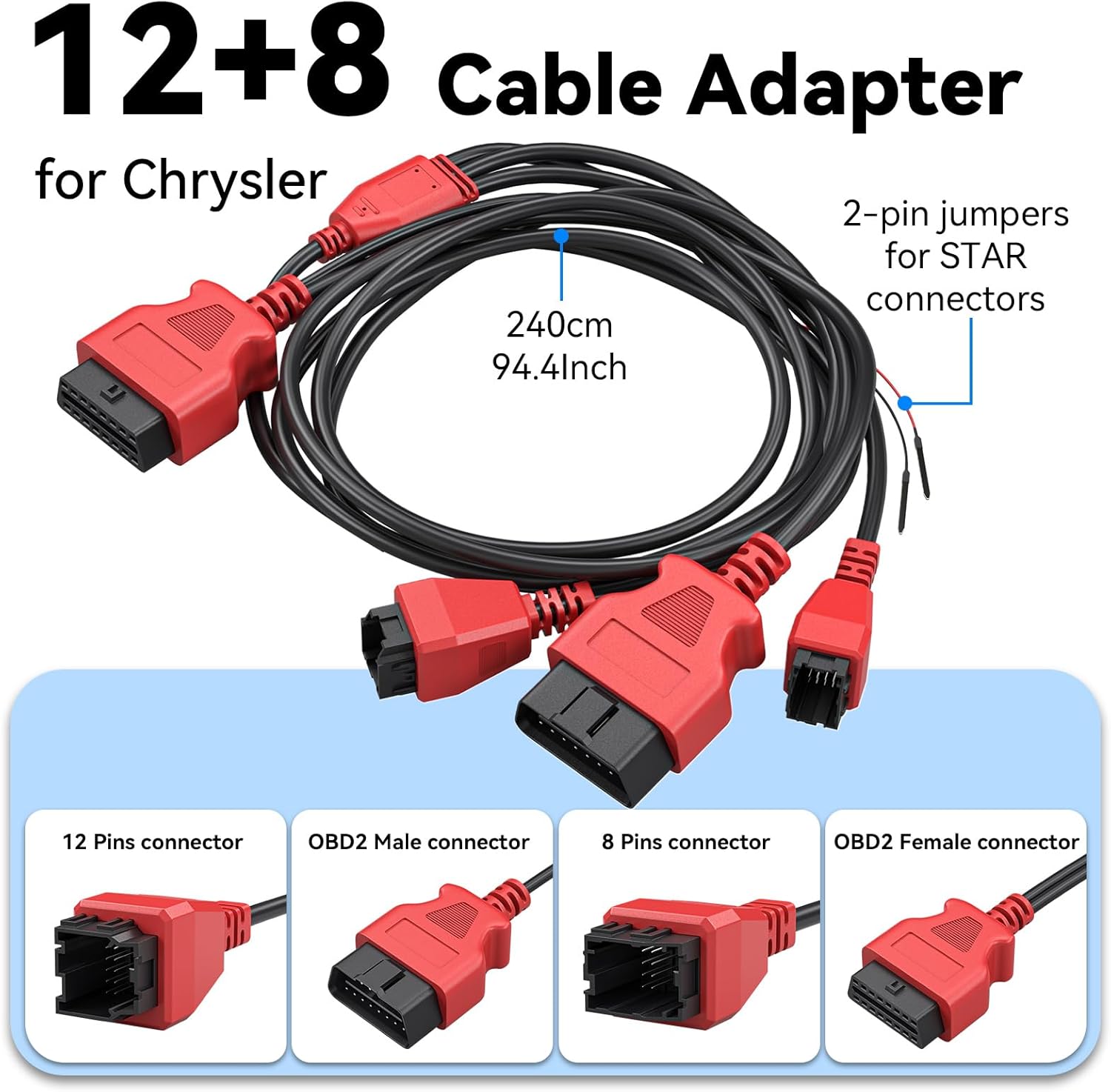
Изображение 2.1: Подробно view of the 12+8 Cable Adapter, illustrating its various connectors and overall length, essential for connecting to newer FCA vehicles.
2.3 Initial Power-On and Software Updates
- Once connected, the IP500 device should power on automatically. If not, press the power button.
- Follow the on-screen prompts to select your preferred language (23 languages supported).
- Подключите устройство к сети Wi-Fi.
- Navigate to the 'Updates' section on the main menu to download and install the latest software. Regular updates ensure optimal performance and vehicle compatibility.
3. Инструкция по эксплуатации
3.1 Навигация по главному меню
The IP500 features a 5.45" HD touchscreen for intuitive navigation. The main menu typically includes options such as 'Auto Scan', 'Diagnosis', 'OBD II', 'Special Function', 'Updates', and 'More'.
3.2 Полная диагностика системы
This function allows you to access and diagnose all available electronic control modules within the vehicle. It supports comprehensive diagnostics for Fiat Group vehicles (Chrysler, Dodge, Jeep, RAM) from 1998 to 2024.
- Select 'Diagnosis' from the main menu.
- Выберите марку и модель автомобиля.
- Perform an 'Auto Scan' or manually select specific systems (e.g., Engine, Transmission, ABS, Airbag, HVAC, Suspension, Headlamp, Audio, A/C).
- View live data streams, read and clear Diagnostic Trouble Codes (DTCs).

Image 3.1: The IP500 device displaying a diagnostic menu, with an overlay showing various vehicle systems it can diagnose, such as engine, airbag, and transmission.
3.3 Специальные функции и службы сброса
The IP500 provides access to 18+ special functions for various vehicle maintenance and repair tasks, including those for 2018+ FCA vehicles using the 12+8 adapter.
- Select 'Special Function' from the main menu.
- Choose the desired service from the list. Common services include:
- Сброс EPB: Сброс электронного стояночного тормоза.
- Сброс SAS: Калибровка датчика угла поворота рулевого колеса.
- Сброс BMS: Battery Management System reset.
- Регулировка фар: Adjusting headlight settings.
- Кодирование инжектора: Coding new injector values.
- Соответствие дроссельной заслонки: Throttle body relearn.
- Кровотечение из АБС: Performing ABS brake bleeding.
- Подбор коробки передач: Transmission adaptation.
- Система подвески: Suspension calibration.
- Инициализация окна: Window motor relearn.
- Seat Matching: Seat position calibration.
- Сброс индикатора технического обслуживания: Resetting service indicators.
- A/F Settings: Air/Fuel ratio adjustments.
- Транспортный режим: Deactivating/activating transport mode.

Image 3.2: A visual representation of the 'ALL RESET SERVICES' menu on the IP500, showing various available functions for vehicle maintenance.
3.4 Двунаправленное управление (активные тесты)
This feature allows the IP500 to send commands to vehicle components and receive feedback, enabling active testing of actuators and sensors. This helps in quickly pinpointing issues.
- Select 'Diagnosis' and then navigate to the specific system.
- Найдите опции «Активное тестирование» или «Двунаправленное управление».
- Examples of components that can be tested include: Windows, Mirrors, Injectors, Door Locks, Braking systems, Wipers, Headlights, and Horns.

Image 3.3: The IP500 illustrating bi-directional control capabilities, showing how it can command and receive feedback from various vehicle components.
3.5 полных функций OBD2
The IP500 supports all 10 modes of OBD2 testing, providing essential diagnostic information for emissions-related issues.
- Select 'OBD II' from the main menu.
- Доступные функции включают:
- Прочтите коды: Retrieve current, pending, and permanent DTCs.
- Очистить коды: Удалите коды неисправностей и выключите индикатор неисправности (MIL).
- Живые данные: View Параметры данных в реальном времени.
- Стоп-кадр: View a snapshot of vehicle operating conditions when an emission-related fault occurs.
- I / M Готовность: Проверить готовность систем контроля выбросов.
- Тест монитора O2: Получите результаты проверки датчика кислорода.
- Тест бортового монитора: Получите результаты по компонентам и системам силовой установки, связанным с выбросами.
- Тест компонентов: Проведите проверку герметичности системы улавливания паров топлива (EVAP) транспортного средства.
- Информация о транспортном средстве: Получите идентификационный номер транспортного средства (VIN), идентификатор калибровки (CALID) и номер проверки калибровки (CVN).

Image 3.4: The IP500's interface showing the comprehensive range of OBD2 functions available for vehicle diagnostics.
3.6 FCA Secure Gateway Access
For 2018+ FCA vehicles equipped with a Secure Gateway Module (SGM), the 12+8 adapter cable provides direct diagnostic access without requiring an FCA AutoAuth subscription. This allows full diagnostic capabilities on these newer models.

Image 3.5: The IP500 demonstrating FCA Secure Gateway Access, indicating its compatibility with 2018+ Chrysler, Dodge, and Jeep vehicles.
4. Техническое обслуживание
4.1 Очистка устройства
Используйте мягкий, damp cloth to clean the device's screen and body. Avoid using abrasive cleaners or solvents that could damage the surface.
4.2 Обновления программного обеспечения
Regularly check for and install software updates via Wi-Fi. These updates provide new vehicle coverage, bug fixes, and improved functionality. The IP500 offers free lifetime functional updates.
4.3 Хранение
Store the device in a cool, dry place away from direct sunlight and extreme temperatures. Keep it in its protective case when not in use to prevent damage.
5. Поиск Неисправностей
5.1 Устройство не включается
- Ensure the device is correctly connected to the vehicle's OBD2 port.
- Проверьте уровень заряда аккумулятора автомобиля.tage; a low battery might prevent the device from powering up.
- Verify the OBD2 port fuse in the vehicle.
5.2 Ошибки связи
- Confirm the ignition is in the ON position (engine off).
- Ensure the correct vehicle make, model, and year are selected in the device menu.
- For 2018+ FCA vehicles, verify the 12+8 adapter is correctly installed.
- Попробуйте подключиться к другому автомобилю, чтобы исключить неполадки, связанные с ним.
5.3 Зависание программного обеспечения или низкая производительность
- Перезагрузите устройство.
- Убедитесь, что программное обеспечение обновлено.
- Clear cache or temporary files if the option is available in device settings.
6. Технические характеристики
| Особенность | Описание |
|---|---|
| Процессор | 1.2 ГГц двухъядерный |
| Отображать | 5.45-дюймовый сенсорный HD-экран |
| Аккумулятор | 3150мАч |
| Хранилище | 32 ГБ |
| Операционная система | Android на основе |
| Покрытие транспортного средства | Fiat Group (Chrysler, Dodge, Jeep, RAM) 1998-2024; 2018+ FCA with 12+8 adapter |
| Языки | Поддерживается 23 языков |
| Обновления | Free Lifetime Functional Updates |
7. Гарантия и поддержка
7.1 Информация о гарантии
For detailed warranty information, please refer to the official XTOOL website or contact your point of purchase. The device includes free lifetime functional updates, ensuring ongoing software support.
7.2 Техническая поддержка
If you encounter any issues or require technical assistance, please contact XTOOL customer support. Contact details can typically be found on the official XTOOL website or within the device's 'About' section.