1. Введение
This manual provides detailed instructions for the installation, operation, and maintenance of your LOKLNEYK V9BW Smart Wifi Boiler Thermostat. This battery-powered room temperature controller is designed to manage gas boiler systems, offering smart control via Wi-Fi connectivity and various operational modes to optimize your home's heating.

Image 1.1: The LOKLNEYK V9BW Smart Wifi Boiler Thermostat display, showing a clear digital readout of the current room temperature and the user-set temperature. The interface includes icons for Wi-Fi, heating status, and a lock function, along with navigation buttons.
2. Настройка и установка
2.1 Источник питания
The thermostat is powered by three (3) 1.5V AA alkaline batteries. Ensure batteries are inserted correctly according to polarity markings inside the battery compartment.

Изображение 2.1: Сзади view of the thermostat with the battery compartment open, illustrating the correct placement of three AA alkaline batteries. The internal circuitry is also visible.
2.2 Wiring for Boiler Connection
Connect the thermostat to your gas boiler system. The thermostat uses COM (Common) and NO (Normally Open) terminals for boiler control. Refer to the wiring diagram below for proper connection.
- КОМ: Общий терминал.
- НЕТ: Normally Open terminal, connects to the boiler's control input.
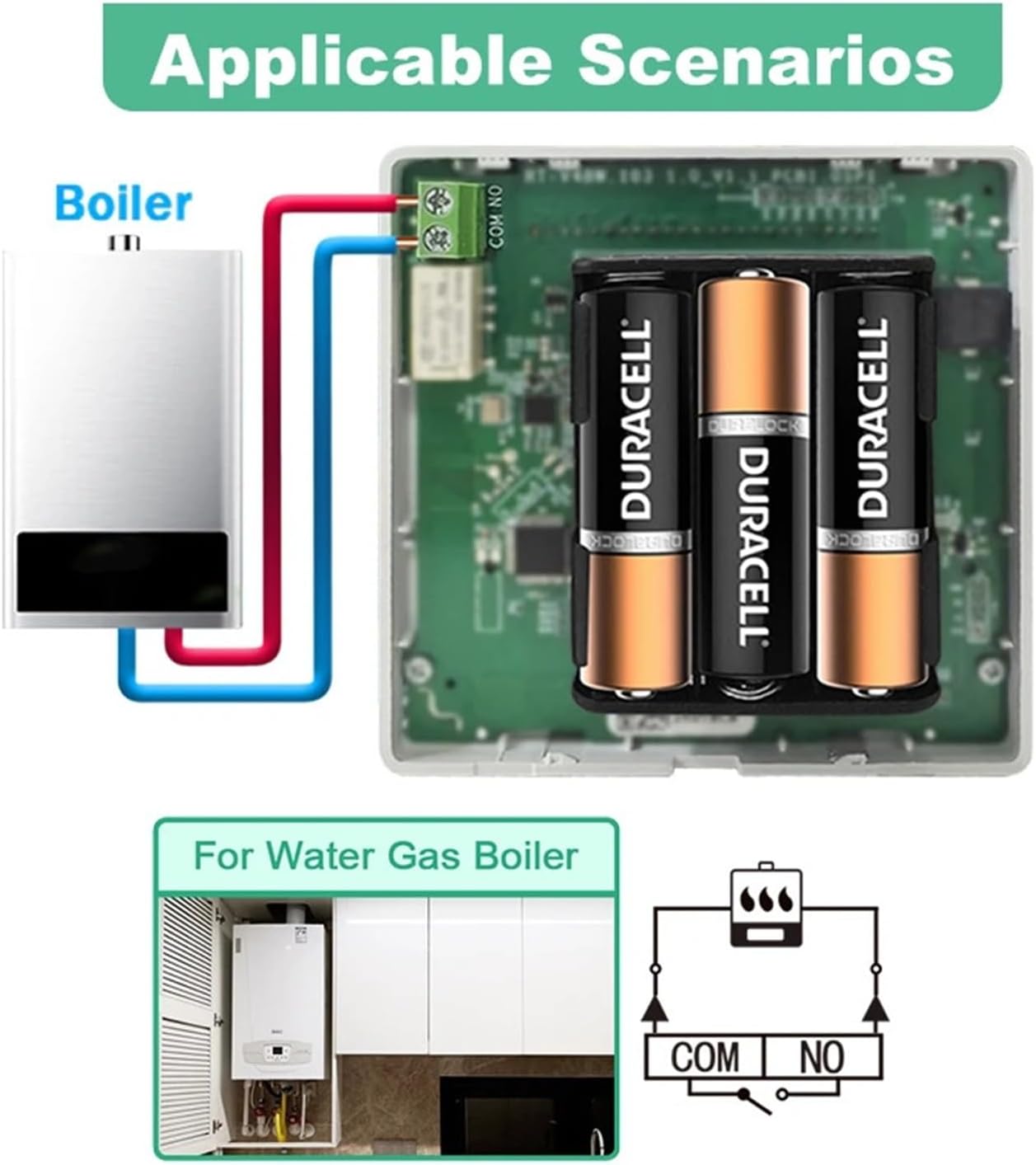
Image 2.2: A clear wiring diagram demonstrating how to connect the thermostat to a gas boiler. Red and blue wires are shown connecting the thermostat's COM and NO terminals to the boiler's control inputs. An additional diagram illustrates a typical water gas boiler setup.
2.3 App Connection (Tuya / Smart Life)
To enable smart features, download the Tuya Smart or Smart Life app from your mobile device's app store. Follow the in-app instructions to pair your thermostat with your Wi-Fi network. This allows for remote control and advanced programming.
3. Инструкция по эксплуатации
3.1 Настройка температуры
Use the up and down arrow buttons on the thermostat to adjust the desired setpoint temperature. The display will show both the current room temperature and the set temperature.
3.2 Выбор режима
The thermostat supports multiple operating modes:
- Ручной режим: Поддерживает постоянную температуру, заданную пользователем.
- Автоматический режим (режим программирования): Следует заранее составленному еженедельному графику.
- Temporary Override Mode: Allows a temporary temperature adjustment during Auto Mode, reverting to the schedule after a set period.
- ЭКО-режим: An energy-saving mode designed to reduce power consumption.

Image 3.1: The thermostat display showing the 'Set' temperature, accompanied by a visual list of the four primary operating modes: ECO mode, Auto mode, Manual mode, and Temporary Override mode.
3.3 ECO Mode Functionality
When activated, ECO Mode optimizes heating to save energy. This mode can lead to approximately 20% energy savings compared to standard operation.

Image 3.2: The thermostat display indicating 'ECO Mode' is active. Below the thermostat, a graph illustrates the comparative electricity cost over time, highlighting a 20% energy saving when using this thermostat's ECO mode versus other systems.
3.4 дополнительных функций
- Функция блокировки от детей: Prevents unauthorized changes to settings. Activate via the mobile app or thermostat interface.
- Еженедельное программирование: Set custom heating schedules for each day of the week through the app.
- Голосовое управление: Compatible with Alexa, Google Home, and Alice for hands-free operation.
- Защита от замерзания: Automatically activates heating if the room temperature drops below a pre-set minimum to prevent freezing.
- Функция совместного использования ресурсов в семье: Share control of the thermostat with multiple family members via the app.
- Напоминание батареи: The thermostat will display an icon or notification when batteries are low and require replacement.
4. Техническое обслуживание
4.1. Замена батареи
When the low battery indicator appears, replace all three AA alkaline batteries promptly to ensure continuous operation. Refer to Section 2.1 for battery installation.
4.2 Очистка
Wipe the thermostat's surface with a soft, dry cloth. Do not use abrasive cleaners or solvents, as these can damage the display or housing material.
5. Поиск Неисправностей
| Проблема | Возможная причина | Решение |
|---|---|---|
| Термостат не включается | Разряженные или неправильно установленные батареи. | Замените батарейки на новые щелочные батарейки типа АА, соблюдая правильную полярность. |
| Котел не отвечает | Incorrect wiring; boiler power off; thermostat not calling for heat. | Check wiring connections (Section 2.2). Ensure boiler has power. Verify thermostat is set to a temperature higher than the current room temperature. |
| Проблемы с подключением Wi-Fi | Неверный пароль Wi-Fi; роутер находится слишком далеко; выбрана сеть 5 ГГц. | Ensure correct 2.4GHz Wi-Fi network and password. Move thermostat closer to router or use a Wi-Fi extender. Re-pair via the app. |
| Неточные показания температуры | Thermostat placed near heat source/draft; sensor obstruction. | Relocate thermostat away from direct sunlight, drafts, or heat-emitting appliances. Ensure sensor is clear. |
6. Технические характеристики
| Особенность | Деталь |
|---|---|
| Номер модели | V9BW |
| Источник питания | 3 х 1.5 В щелочные батареи типа АА |
| Диапазон настройки температуры | 5~95°С |
| Точность заданной температуры | 0.5°С |
| Отклонение переключателя | 0.1–10 °C (Заводская настройка: 0.5 °C) |
| Температура окружающей среды | -5~50°С |
| Уровень защиты | IP20 |
| Материал корпуса | Противовоспламеняющийся ПК |
| Рабочее приложение | Приложение Tuya / Умная жизнь |
| Система приложений | Газовый котел |
| Совместимость с голосовым управлением | Alexa / Google Home / Alice |
| Вес товара | 1.76 унции |
| Размеры упаковки | 0.39 x 0.39 x 0.39 дюйма |
7. Информация о гарантии
Пожалуйста, обратитесь к официальному производителю. website or the product packaging for detailed warranty information. Typically, products come with a limited warranty covering manufacturing defects from the date of purchase.
8. Поддержка клиентов
For technical assistance, troubleshooting, or further inquiries, please contact LOKLNEYK customer support through their official webсайт или контактную информацию, указанную на упаковке вашего продукта.