
Введение
Thank you for choosing the RAINPOINT 4-Zone Programmable Watering Timer. This device is designed to automate your garden and lawn irrigation, providing flexible and efficient watering schedules for up to four independent zones. Please read this manual carefully to ensure proper installation, operation, and maintenance of your watering timer.
Характеристики продукта
- 4 Individual Programmable Zones: Customize watering schedules (start time, duration, frequency) for each zone independently.
- Multiple Watering Cycle Modes: Set watering duration from 1 minute to 3 hours 59 minutes, and frequency for every 8 hours, every 12 hours, or every 1 to 7 days.
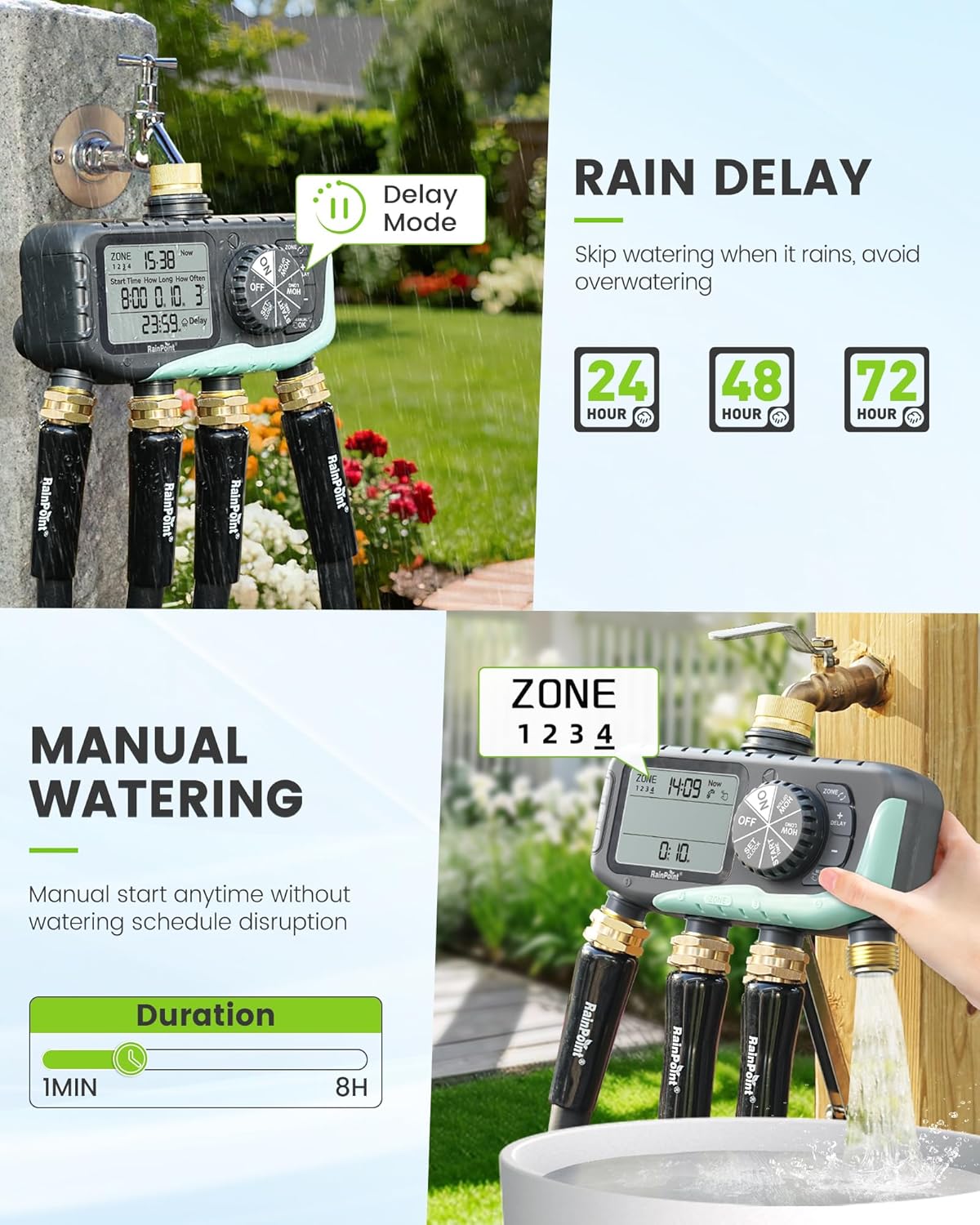
- Функция задержки дождя: Skip watering for 24, 48, or 72 hours to conserve water during rainy periods.
- Ручной режим полива: Initiate watering instantly for 1 minute to 8 hours without affecting programmed schedules.
- Простое программирование: Features a large 3.4-inch LCD screen, a large dial, and clear buttons for intuitive setup.
- Прочная конструкция: Equipped with solid brass inlet and outlet, leak-proof sealing rings, and an IP65 waterproof rating for outdoor use.
- Upgraded Coil Valve: Provides stronger water pressure and wider coverage compared to standard valves.
- Защита от низкого энергопотребления: Valves automatically close when battery power is low to prevent water waste.


Содержимое упаковки
- RAINPOINT 4-Zone Programmable Watering Timer
- Руководство пользователя
- Standard 3/4-inch faucet adapter (if applicable)
Настройка и установка
- Установка аккумулятора: Open the battery compartment on the back of the timer. Insert two (2) AA alkaline batteries (not included), ensuring correct polarity. Close the compartment securely.
- Подключиться к крану: Screw the timer onto a standard 3/4-inch outdoor faucet. Ensure the connection is tight to prevent leaks. It is recommended to use a short hose between the faucet and the timer to reduce stress on the faucet connection and allow for easier positioning.
- Подсоедините шланги: Attach your garden hoses to the four independent outlets (Zone 1, Zone 2, Zone 3, Zone 4) at the bottom of the timer. Ensure each connection is secure.
- Первоначальное включение: The LCD screen will light up, and the timer will be ready for programming.


Инструкция по эксплуатации
1. Установка текущего времени
Rotate the dial to the 'SET CLOCK' position. Use the '+' and '-' buttons to adjust the current time. Press 'OK' to confirm and move to the next setting (e.g., AM/PM or 24-hour format). Rotate the dial away from 'SET CLOCK' to save.
2. Programming Watering Schedules (for each zone)
The timer allows individual programming for each of its four zones.
- Выберите зону: Rotate the dial to 'PROGRAM'. Use the 'ZONE' button to select the desired zone (1, 2, 3, or 4) you wish to program.
- Установить время начала: Use the '+' and '-' buttons to set the desired watering start time for the selected zone. Press 'OK' to confirm.
- Установить продолжительность полива: Use the '+' and '-' buttons to set how long the watering will last (from 1 minute to 3 hours 59 minutes). Press 'OK' to confirm.
- Установите частоту: Use the '+' and '-' buttons to set how often the watering will occur (e.g., every 8 hours, every 12 hours, or every 1 to 7 days). Press 'OK' to confirm.
- Repeat steps a-d for each zone you wish to program. Rotate the dial to 'ON' to activate the programmed schedules.

3. Функция задержки дождя
To temporarily pause watering due to rain:
- Rotate the dial to 'ON'.
- Press the 'DELAY' button.
- Use the '+' or '-' buttons to select the desired delay duration (24, 48, or 72 hours).
- Press 'OK' to confirm. The timer will resume its programmed schedule after the delay period.
4. Ручной полив
Чтобы полить немедленно, не нарушая запланированного графика:
- Rotate the dial to 'ON'.
- Press the 'MANUAL/OK' button.
- Use the '+' or '-' buttons to set the desired manual watering duration (from 1 minute to 8 hours).
- Press 'OK' to start manual watering. The timer will automatically return to its programmed schedule after the manual watering duration ends.
5. Low Power Protection
When the battery level is critically low, the timer's valves will automatically close to prevent continuous water flow and waste. Replace batteries promptly when the low battery indicator appears on the screen.

Обслуживание
- Уборка: Periodically wipe the timer's exterior with a soft, damp Ткань. Не используйте абразивные чистящие средства или растворители.
- Замена батареи: Replace batteries annually or when the low battery indicator appears. Always use fresh AA alkaline batteries.
- Подготовка к зиме: Before the first frost, disconnect the timer from the faucet and hoses. Drain any remaining water and store the unit indoors in a dry, protected area to prevent freezing damage.
- Check Washers: Regularly inspect the rubber washers in the inlet and outlet connections for wear or damage. Replace if necessary to prevent leaks.
Поиск неисправностей
- No Water Flow or Partial Flow:
- Проверьте уровень заряда батареи и замените ее, если он низкий.
- Убедитесь, что кран полностью открыт.
- Verify that the watering schedule is correctly programmed and activated ('ON' mode).
- Inspect hose connections for kinks or blockages.
- Check the timer's inlet filter for debris.
- Утечки из Connections:
- Ensure all connections (faucet, hoses) are tightened securely.
- Check rubber washers for proper seating and damage; replace if worn.
- Display Fading or Not Working:
- Замените батарейки на новые.
- Avoid prolonged exposure to direct sunlight, which can degrade LCD screens over time. Consider shielding the display if installed in a very sunny area.
- Water Hammer (Pipes Clanging):
- This can occur when valves close rapidly. Consider installing a water hammer arrester between the faucet and the timer.
- Таймер не отвечает:
- Remove batteries for a few minutes, then reinsert them to reset the device. Reprogram as needed.
Технические характеристики
| Номер модели | iob447 |
| Бренд | ТОЧКА ДОЖДЯ |
| ASIN | B0G32Z1HMB |
| Материал | Пластик, латунь |
| Цвет | Синий |
| Размеры продукта (Д x Ш x В) | 2.54 x 2.54 x 2.54 cm (approx. 1 x 1 x 1 inch); 317.51 grams |
| Размер экрана | 3.4 дюйма |
| Количество настроек | 7 (referring to programming options) |
| Рейтинг водонепроницаемости | IP65 |
| Источник питания | 2 щелочные батарейки типа АА (не входят в комплект) |
Гарантия и поддержка
RAINPOINT products are designed for reliability and performance. For warranty information, technical support, or any questions regarding your 4-Zone Programmable Watering Timer, please contact RAINPOINT customer service through the official website or your retailer's support channels. Please have your model number (iob447) and purchase information ready when contacting support.


