
1. Введение
The Lilytech ZL-6210A+ is a high-performance temperature controller designed for precise temperature management. Featuring a robust 30A relay output, it is suitable for a wide range of heating or cooling applications. This manual provides essential information for the safe installation, operation, and maintenance of your ZL-6210A+ controller.

Рисунок 1: Передняя часть view of the ZL-6210A+ Temperature Controller, showing the display and control buttons.
2. Информация по технике безопасности
Please read all safety instructions carefully before installation and operation. Failure to follow these instructions may result in electric shock, fire, or damage to the device.
- Опасность поражения электрическим током: Это устройство работает с высоким объемомtage (185-245Vac). Installation should only be performed by qualified personnel.
- Отключить питание: Always disconnect power to the circuit before performing any wiring or maintenance.
- Правильное заземление: Убедитесь, что устройство надлежащим образом заземлено в соответствии с местными электротехническими нормами.
- Условия окружающей среды: Do not expose the controller to excessive moisture, dust, or corrosive environments beyond its specified working conditions.
- Грузоподъемность: Do not exceed the maximum current rating of the relay (30A for R1, 5A for R2).
3. Технические характеристики
| Параметр | Ценить |
|---|---|
| Источник питания | 185 ~ 245 В переменного тока, 50/60 Гц |
| Тип датчика | NTC (2 meters long) |
| Output Relay R1 | 30A / 250Vac (resistive load) |
| Output Relay R2 | 5A / 250Vac (resistive load) |
| Диапазон настройки | -40 ~ 120°С |
| Диапазон отображения | -40 ~ 130°С |
| Рабочая среда | -10 ~ 45°C, 5 ~ 90%RH (non-condensing) |
| Размеры (Ш x В x Г) | 78 х 34.5 х 71 мм |
| Монтажное сверление (Ш x В) | 71 х 29 мм |
| Материалы корпуса | ПК + АБС огнеупорный |
| Уровень защиты | IP65 (только передняя сторона) |
| Вес товара | 1.76 унций (приблизительно 50 г) |
NTC Sensor Selection
The ZL-6210A+ uses NTC sensors. Different sensor types are available, varying in seal material, wire length, resistance, and B-value. Ensure the correct sensor type is used for your application.
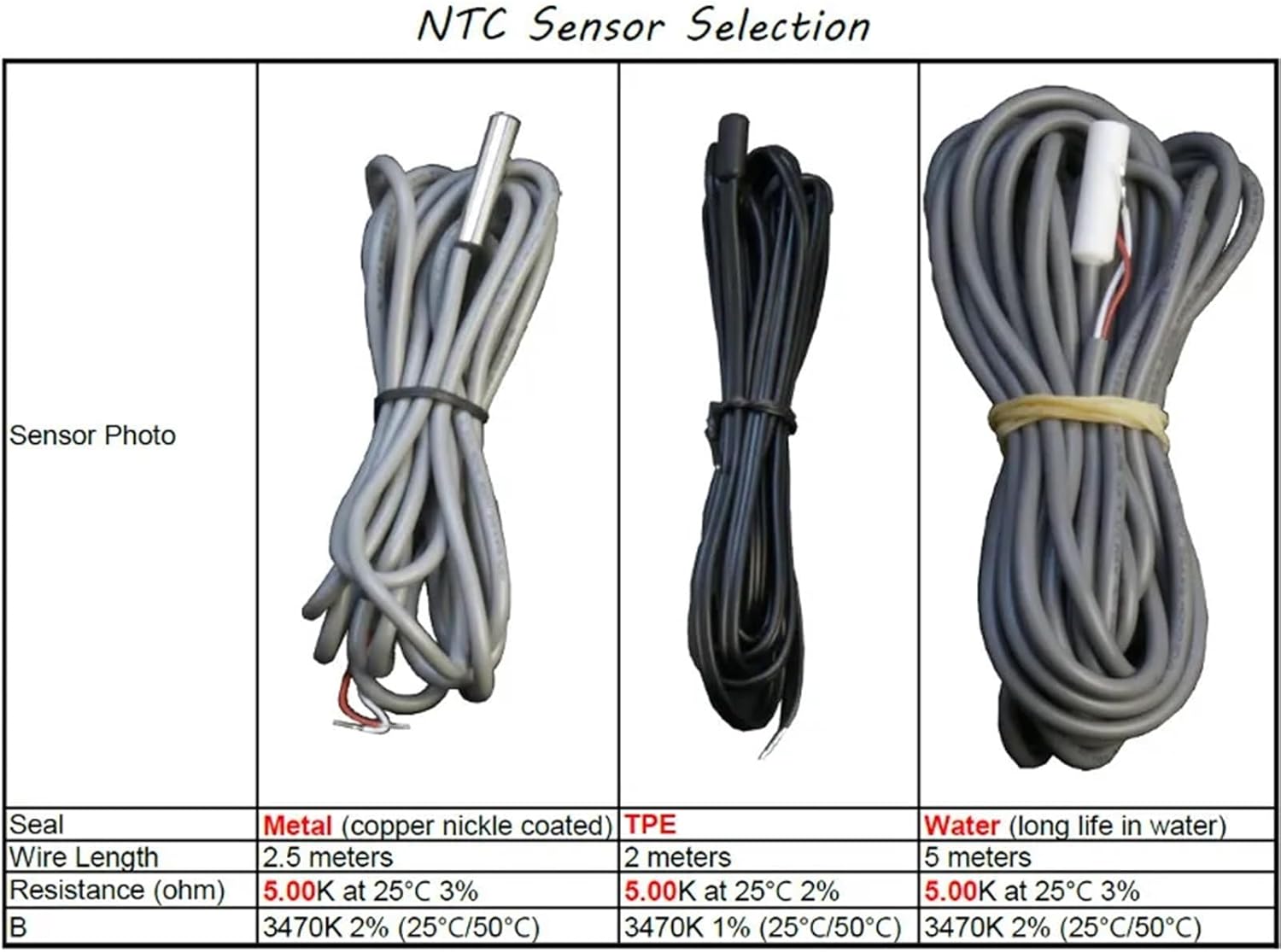
Figure 2: NTC Sensor Selection table, detailing specifications for Metal, TPE, and Water sealed sensors.
4. Установка
4.1 Монтаж
The ZL-6210A+ is designed for panel mounting. Create an opening in your panel with the dimensions of 71 mm (width) x 29 mm (height). Insert the controller into the opening and secure it using the provided clips.
4.2 Подключение
Refer to the wiring diagrams below for proper connection. Ensure all connections are secure and comply with local electrical codes. The main power input is 185-245Vac. The primary temperature output (R1) is rated for 30A.

Рисунок 3: Сзади view of the ZL-6210A+ showing the terminal block layout. Terminals 1-2 are for R1 Temp. Output, 3-6 for 220V~ power (L, N), and 7-10 for Alarm Input and Temp. Sensor.
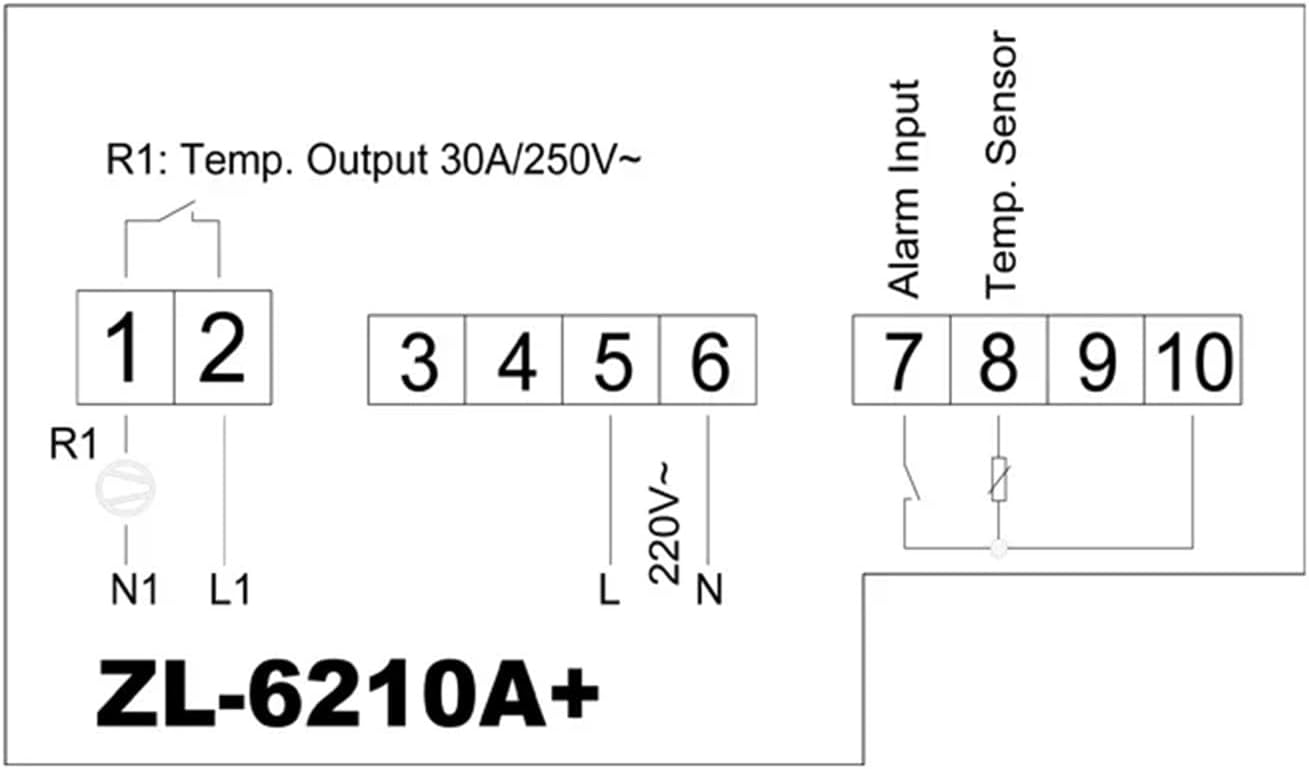
Figure 4: Simplified wiring diagram. Connect power to terminals 5 (L) and 6 (N). Connect the temperature sensor to terminals 9 and 10. The main relay output (R1) is connected to terminals 1 and 2. An alarm input can be connected to terminals 7 and 8.
Терминальные соединения:
- 1, 2: R1 Temperature Output (30A / 250V~)
- 3, 4: (Not explicitly labeled in diagram, often for auxiliary functions or R2 if present)
- 5 (L), 6 (N): Power Supply Input (220V~)
- 7, 8: Сигнал тревоги вход
- 9, 10: Temperature Sensor Input (NTC)
5. Операция
The ZL-6210A+ features a digital display and control buttons for setting parameters. Specific operational details, including setting the desired temperature, hysteresis, and alarm functions, are typically accessed via a menu system. Refer to the detailed manual available from the manufacturer for complete programming instructions.

Рисунок 5: Внутренний view showing the digital display and buttons (S1, S2, S3, S4) used for parameter setting and navigation.
Основные функции:
- Отображение температуры: Показывает текущую измеренную температуру.
- Регулировка уставки: Allows users to set the desired target temperature.
- Выбор режима: Typically allows selection between heating and cooling modes.
- Настройки будильника: Configures high/low temperature alarms.
6. Техническое обслуживание
Регулярное техническое обслуживание обеспечивает оптимальную производительность и долговечность вашего регулятора температуры.
- Уборка: Очистите переднюю панель мягкой тряпкой, damp тряпкой. Не используйте абразивные чистящие средства или растворители. Следите за тем, чтобы жидкость не попала внутрь устройства.
- Экологическая проверка: Periodically inspect the installation environment to ensure it remains within the specified temperature and humidity ranges.
- Проверка проводки: Check all wiring connections periodically for tightness and signs of wear or corrosion.
- Состояние датчика: Ensure the temperature sensor is clean and free from damage.
7. Поиск Неисправностей
If you encounter issues with your ZL-6210A+, refer to the following common problems and solutions:
| Проблема | Возможная причина | Решение |
|---|---|---|
| Контроллер не включается | Нет питания; Неправильная проводка; Перегоревший предохранитель | Check power connections; Verify wiring against diagram; Check for internal fuse (if accessible, consult professional) |
| Неверное показание температуры | Faulty sensor; Sensor not connected properly; Sensor placed incorrectly | Check sensor wiring; Replace sensor if damaged; Relocate sensor to a representative area |
| Output relay (R1) not switching | Temperature not within set range; Incorrect parameter settings; Faulty relay | Verify set point and hysteresis; Check operating mode (heating/cooling); Consult professional for relay replacement |
| Дисплей показывает код ошибки | Sensor error; Internal fault | Refer to the full manufacturer's manual for specific error code meanings and solutions. |
8. Гарантия и поддержка
For warranty information, please refer to the terms provided by your retailer or the manufacturer at the time of purchase. For detailed technical support, additional documentation, or specific programming instructions, please visit the official Lilytech webсайт или свяжитесь с их службой поддержки.
A comprehensive manual can be found at: www.suzhoulily.com/pdf/ZL-62x0A(plus)_en_2.0d.pdf