
1. Введение
Thank you for choosing the Dexnor Keyboard Case. This manual provides essential information for setting up, operating, and maintaining your keyboard case to ensure optimal performance and longevity.
Что в коробке?
- Slim Folio Magnetic Keyboard Case
- USB-кабель
- Краткое руководство пользователя
- Руководство пользователя
Совместимость
This keyboard case is designed for the following iPad models:
- iPad Air 11-inch 2025 M3 (Models: A3266/A3267/A3270)
- iPad Air 11-inch 2024 M2 (Models: A2902/A2903/A2904)
- iPad Pro 11-inch 2022 4th Gen (Models: A2435/A2759/A2761/A2762)
- iPad Pro 11-inch 2021 3rd Gen (Models: A2377/A2301/A2459/A2460)
- iPad Pro 11-inch 2020 2nd Gen (Models: A2228/A2068/A2231)
- iPad Pro 11-inch 2018 1st Gen (Models: A1980/A2013/A1934/A1979)
- iPad Air 5th Gen 2022 (Models: A2588/A2589/A2591)
- iPad Air 4th Gen 2020 (Models: A2072/A2316/A2324/A2325)
Please double-check the 'A' code on the back of your device for compatibility. This case is NOT compatible with iPad Pro 11 M4/M5 2024/2025 or iPad (A16) 11th/10th Gen. iPad and Apple Pencil are not included.

Image: Compatibility chart for Dexnor Keyboard Case.
2. Настройка
2.1 Подключение iPad
- Откройте корпус клавиатуры.
- Align your compatible iPad with the magnetic back cover of the case. The strong magnets will securely attach the iPad.
- Position the bottom edge of your iPad into the designated slot on the keyboard for a stable viewing angle. The ergonomic 120-degree viewing angle is designed for comfort during study, work, and entertainment.
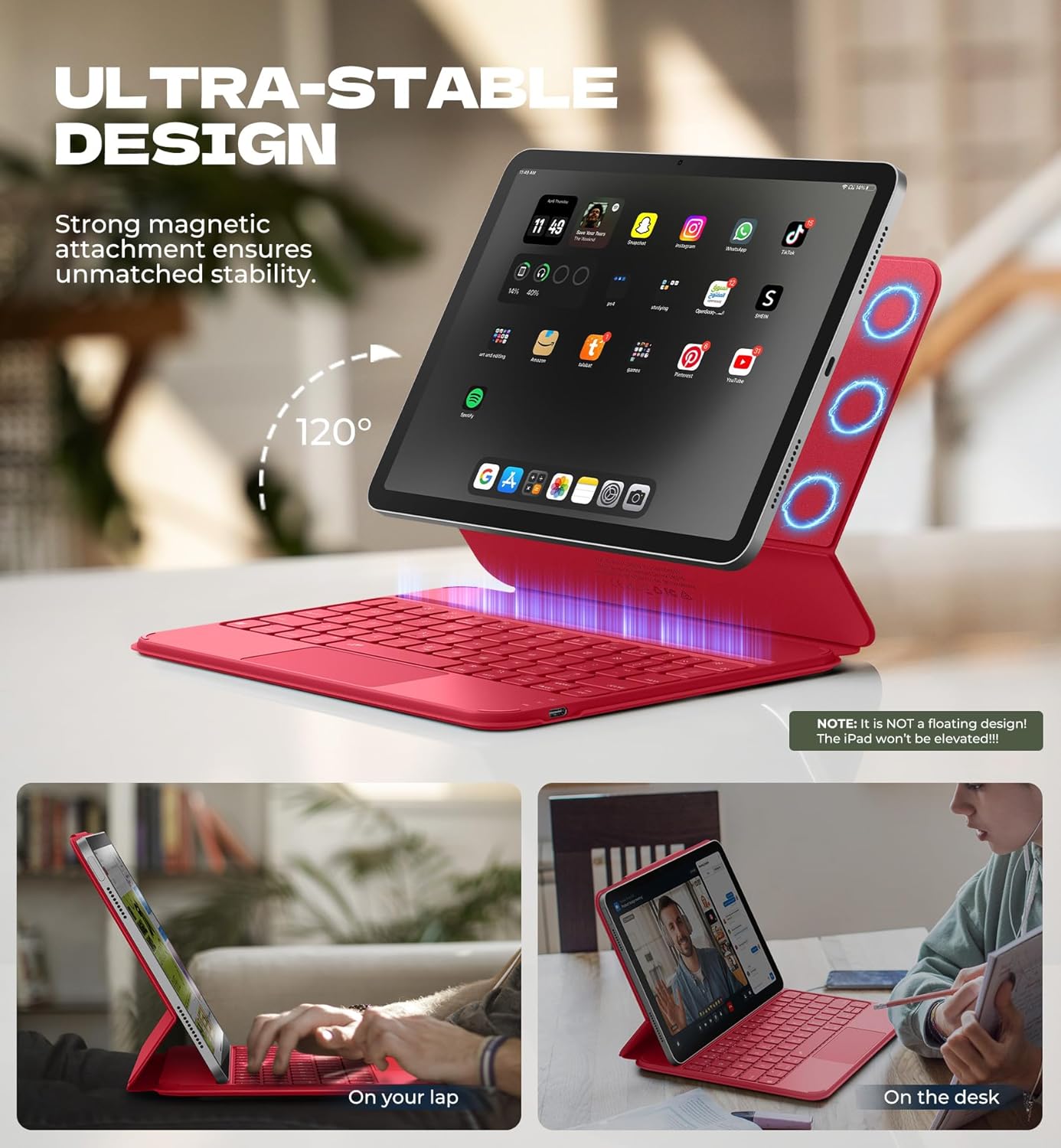
Image: iPad attached to the keyboard case, demonstrating the stable viewугол наклона.
2.2 Сопряжение по Bluetooth
- Ensure your keyboard case is charged.
- Turn on the keyboard using the side power button.
- На вашем iPad перейдите в Настройки > Bluetooth и включите Bluetooth.
- Нажмите Fn ключ и Пара key (often indicated by a Bluetooth symbol) simultaneously on the keyboard. The Bluetooth indicator light on the keyboard will flash.
- On your iPad, locate "Dexnor Keyboard" in the "Other Devices" list and tap to connect. A pairing request pop-up will appear; tap "Pair".
- Once connected, the Bluetooth indicator light on the keyboard will stop flashing, and your iPad will show "Connected" next to "Dexnor Keyboard".
Video: Demonstrates the setup and magnetic attachment of the Dexnor Ultra-light Folio Keyboard Case with Trackpad.
Video: Shows the connection process for the Dexnor Keyboard Case for iPad Air 11/Pro 11/Air 5th/4th Gen.
3. Инструкция по эксплуатации
3.1 Функции клавиатуры
- Клавиши с подсветкой: The keyboard features a single-color backlight with 3 adjustable brightness levels for comfortable typing in low-light conditions. Use the dedicated backlight keys (often Fn + light icon) to adjust brightness.
- Функциональные клавиши: Utilize the function keys for quick access to iPad features such as media control, volume adjustment, and screen lock.
- Auto-Wake/Sleep: The case supports auto-wake/sleep functionality, preserving battery life by automatically turning your iPad screen on or off when the case is opened or closed.
3.2-дюймовая мультисенсорная сенсорная панель
The integrated multi-touch trackpad provides precise navigation and supports various gestures for a laptop-like experience on your iPad.
- Увеличение/уменьшение: Use pinch gestures on the trackpad.
- Управлять Files: Utilize standard trackpad gestures for file навигация и выбор.
- Просматривать Webстраницы: Scroll and navigate with ease.
- Переключение приложений: Use multi-finger gestures to switch between applications.
- Disable Trackpad: To prevent accidental touches during typing, press Fn + Пробел to disable or enable the trackpad.

Image: Multi-touch trackpad with gesture illustrations.

Image: Backlit keyboard keys.
4. Техническое обслуживание
4.1 Уход за аккумулятором
The keyboard case is equipped with a 650mAh lithium polymer battery. To maximize battery life:
- Charge the keyboard using the provided USB cable when the battery indicator is low.
- Избегайте частой полной разрядки аккумулятора.
- Если вы не используете клавиатуру в течение длительного времени, храните ее в прохладном, сухом месте.
Expected battery performance:
- До 720 часов работы в режиме ожидания.
- Up to 200 hours of use without backlight.
- Up to 10 hours of continuous use with the brightest backlight setting.
4.2 Очистка
To clean your keyboard case:
- Протрите внешнюю поверхность мягкой тряпкой.amp ткань.
- Избегайте использования едких химикатов и абразивных чистящих средств.
- Ensure no moisture enters the keyboard or charging port.
5. Поиск Неисправностей
Клавиатура не подключается через Bluetooth
- Проверьте аккумулятор: Убедитесь, что клавиатура достаточно заряжена.
- Перезагрузка клавиатуры: Выключите клавиатуру, а затем снова включите.
- Повторное сопряжение Bluetooth: Go to your iPad's Bluetooth settings, forget the "Dexnor Keyboard" device if it appears, and then repeat the pairing steps in Section 2.2.
- Перезагрузите iPad: Sometimes a simple iPad restart can resolve connectivity issues.
Trackpad Not Responding
- Check if Disabled: Ensure the trackpad is not disabled (press Fn + Пробел (переключить).
- Чистый трекпад: Убедитесь, что поверхность тачпада чистая и свободна от мусора.
- Restart Keyboard/iPad: Perform a restart of both devices.
Клавиши не отвечают
- Проверьте аккумулятор: A low battery can cause keys to become unresponsive.
- Повторное сопряжение Bluetooth: Follow the steps to re-pair the keyboard.
- Чистые ключи: Убедитесь, что под клавишами нет мусора.
6. Технические характеристики
| Особенность | Деталь |
|---|---|
| Номер модели | ДК015 |
| Вес товара | 1.06 фунта (482 граммов) |
| Размеры упаковки | 10.43 x 9.05 x 1.05 дюйма |
| Производитель | Dexnor |
| Технология связи | Bluetooth |
| Описание клавиатуры | Многофункциональный |
| Особые возможности | Backlit keys, Long-lasting rechargeable battery, Auto-wake/sleep, High precision click-anywhere trackpad, Magnetic detachable, Magnetic clasp, Pencil Holder, Smart Magnetic Keyboard Folio with Rock-solid stability (NOTE: NOT Floating), Ultra-thin slim lightweight portable compact |
| Цвет | Rose Red (Current Product Variant) |
| Подсветка клавиатуры | Один цвет |
| Материал | Polycarbonate, Polyurethane (PU) |
| Аккумулятор | 1 A battery required (included) - 650mAh Lithium Polymer |
7. Гарантия и поддержка
Dexnor is committed to providing high-quality products and customer satisfaction. For any inquiries or support needs, please refer to the following:
- Гарантия: This product comes with a 10-year warranty for phone/tablet cases.
- Политика возврата: Возврат товара возможен в течение 60 дней.
- Customer Support Response: Expect a response within 24 hours on business days and 48 hours on weekends/holidays.
For further assistance, please visit the official Dexnor store or contact customer service through your purchase platform.