
1. Введение
This manual provides instructions for the safe and effective operation, maintenance, and troubleshooting of your TOOLTOP 928D-III 110W Digital Temperature Adjustable Electric Soldering Iron. Please read this manual thoroughly before using the device to ensure proper function and safety.
The TOOLTOP 928D-III is a high-power electric soldering iron designed for various soldering applications. It features an adjustable digital temperature display, rapid heating, and intelligent functions such as sleep mode and temperature correction.
2. Инструкции по технике безопасности
ВНИМАНИЕ: Несоблюдение этих инструкций по технике безопасности может привести к поражению электрическим током, пожару или серьезным травмам.
- При работе с паяльником всегда используйте соответствующие средства индивидуальной защиты, включая защитные очки.
- Ensure the work area is well-ventilated to avoid inhaling solder fumes. Use a fume extractor if possible.
- Do not touch the soldering iron tip or heating element when the iron is powered on or cooling down, as temperatures can reach up to 480°C (896°F).
- Когда паяльник не используется, всегда ставьте его на предназначенную для него подставку.
- Держите паяльник подальше от легковоспламеняющихся материалов.
- Не используйте паяльник вблизи воды или в воде.amp условия.
- Unplug the soldering iron from the power outlet when not in use or before performing maintenance.
- Do not modify the soldering iron or use it for purposes other than soldering.
- Хранить в недоступном для детей месте.
3. Продукт закончилсяview и компоненты
Familiarize yourself with the various parts of your soldering iron.

Изображение: Оверview of the TOOLTOP 928D-III soldering iron, highlighting its adjustable temperature, LED digital display, sleep function, temperature correction, C/F switching, and master switch. It also shows the large power heater element and fast heating capability.

Image: Detailed breakdown of the soldering iron components, including the SGS Certified Lead-Free Soldering Iron Tip, Stainless Steel Element Cover, High-Temp. Resistant Bakelite Thread Insert, High-Temperature and Slip Resistant Silicone Grip, Temp. Adjustable Buttons / Functions Switchable Buttons, Master Switch, and Anti-Flex Cable Cover.
- Жало паяльника: The part that heats up and melts solder. Replaceable.
- Stainless Steel Element Cover: Protects the heating element.
- Bakelite Thread Insert: High-temperature resistant component for tip assembly.
- Силиконовая рукоятка: Provides a comfortable and heat-resistant hold.
- Светодиодный цифровой дисплей: Отображает текущую температуру и настройки.
- Кнопки регулировки температуры: Used to increase or decrease the temperature and navigate functions.
- Главный переключатель: Включает и выключает устройство.
- Anti-Flex Cable Cover: Protects the power cable connection.
4. Настройка
- Распаковка: Аккуратно извлеките все компоненты из упаковки. Убедитесь, что все детали, перечисленные в разделе «Что в коробке», присутствуют.
- Установка наконечника: Ensure the desired soldering tip is securely screwed into the heating element. Do not overtighten.
- Размещение: Place the soldering iron in its stand on a stable, heat-resistant surface. Ensure the stand is firm and will not tip over.

Image: A firm and light soldering iron holder with a silicone base for strong adsorption and good stability.
- Подключение питания: Подключите шнур питания к подходящей электрической розетке.
5. Инструкция по эксплуатации
- Включение питания: Flip the Master Switch to the "ON" position. The LED digital display will illuminate.
- Регулировка температуры:
- Используйте Up и Вниз arrow buttons to adjust the desired temperature. The temperature range is typically 90°C to 480°C (194°F to 896°F).
- The iron heats rapidly, reaching 300°C in approximately 18 seconds.
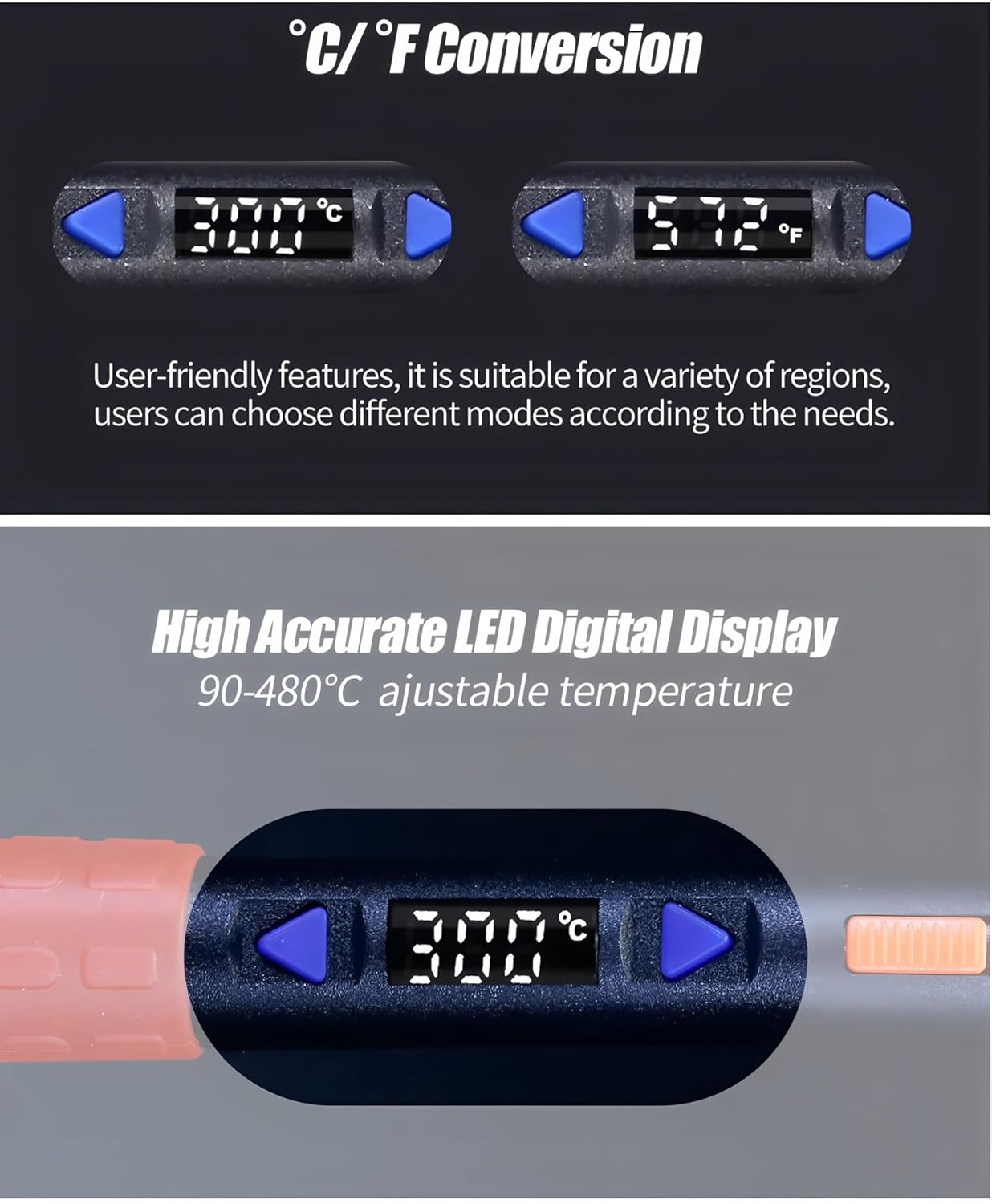
Image: Close-up of the LED digital display showing temperature in Celsius and Fahrenheit, demonstrating the C/F conversion feature and high accuracy.
- Переключение между градусами Цельсия и Фаренгейта:
- To switch between Celsius (°C) and Fahrenheit (°F), press and hold both the Up и Вниз arrow buttons simultaneously for a few seconds until the unit changes.
- Функция интеллектуального сна:
- The soldering iron features an intelligent sleep function (0-99 minutes). If the iron remains static for the set sleep time, its temperature will automatically drop to 90°C to save energy and prolong tip life.
- To wake the iron from sleep mode, gently shake it. The iron will quickly return to its previously set operating temperature.

Image: Illustration of the intelligent sleep function, showing the display indicating "SLP" and the iron resting in its stand. A hand is shown gently shaking the iron to awaken it.
- Температурная коррекция:
- If the displayed temperature deviates from the actual tip temperature, a temperature correction function is available. Refer to the full product manual or manufacturer's webСайт содержит подробные инструкции по калибровке.
- Пайка: Once the desired temperature is reached, the iron is ready for use. Apply solder to the joint, not directly to the iron tip.
- Выключение: When finished, turn off the Master Switch and unplug the iron. Allow it to cool completely in its stand before storing.
6. Техническое обслуживание
- Очистка наконечника: Регулярно очищайте наконечник паяльника с помощью припоя.amp sponge or brass wool. This helps prevent oxidation and ensures efficient heat transfer.
- Лужение наконечников: After cleaning and before storage, apply a small amount of solder to the tip (tinning) to protect it from oxidation.
- Замена наконечника: Replace the soldering tip when it becomes excessively worn or corroded. Ensure the iron is cool and unplugged before changing tips.
- Генеральная уборка: Протрите корпус паяльника мягкой сухой тканью. Не используйте абразивные чистящие средства или растворители.
- Хранилище: Store the soldering iron in a dry, safe place, away from dust and moisture, and out of reach of children.
7. Поиск Неисправностей
| Проблема | Возможная причина | Решение |
|---|---|---|
| Утюг не нагревается. | Not plugged in; Master Switch off; Faulty power outlet; Damaged heating element. | Check power connection; Turn on Master Switch; Test outlet with another device; Contact support if element is damaged. |
| Отображение температуры некорректно или отображается неверным образом. | Loose tip; Sensor issue; Need for temperature correction. | Ensure tip is securely installed; Perform temperature correction; Contact support if issue persists. |
| Припой не плавится легко. | Слишком низкая заданная температура; Окисленный наконечник; Неправильный тип припоя. | Increase temperature; Clean and re-tin tip; Use appropriate solder for the application. |
| Iron enters sleep mode too quickly/not at all. | Sleep timer setting incorrect. | Adjust the sleep timer setting (refer to full manual for specific steps). |
8. Технические характеристики
- Модель: TT-YIHUA 928D-III 110W
- Варианты питания: 65W, 90W, 110W (depending on model variant)
- Диапазон температур: 90°C - 480°C (194°F - 896°F)
- Отображать: Светодиодный цифровой дисплей
- Нагревательный элемент: Internal Heating Type Heating Core
- Быстрый нагрев: Reaches 300°C in approx. 18 seconds
- Функции: Intelligent Sleep, Temperature Correction, °C/°F Switching, Microcomputer Temp. Control, Security Master Switch
- Сертификации: CE, RoHS
- Производитель: ИНСТРУМЕНТЫ
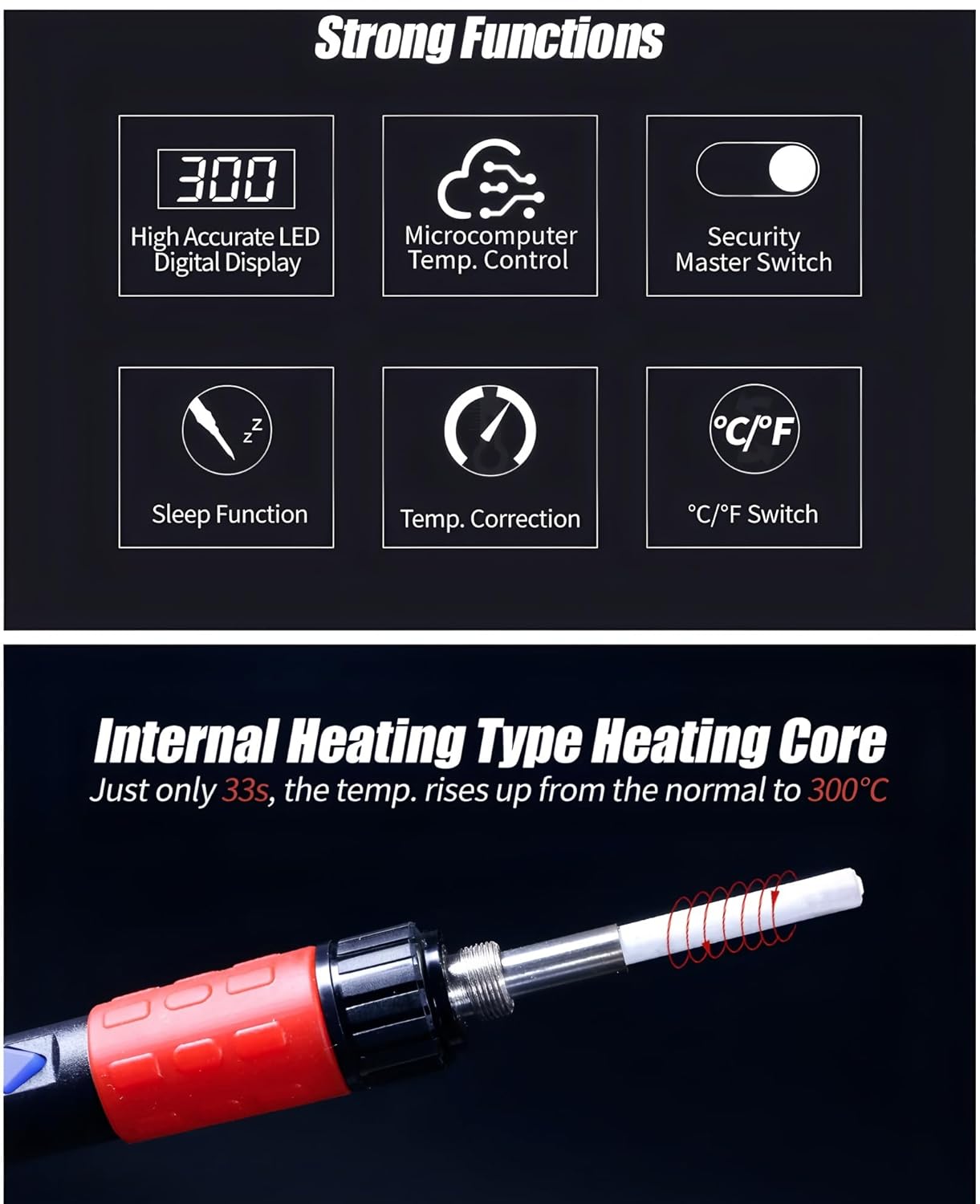
Image: Visual summary of the soldering iron's strong functions, including High Accurate LED Digital Display, Microcomputer Temp. Control, Security Master Switch, Sleep Function, Temp. Correction, and °C/°F Switch.

Image: Shows the internal heating type heating core, which heats up to 300°C in 33 seconds. Also illustrates low temperature application (90-250°C for pyrography) and high temperature application (300-480°C for desoldering).
9. Гарантия
This product comes with a 1-year EU Spare Part Availability Duration. For specific warranty terms and conditions, please refer to the documentation included with your purchase or contact TOOLTOP customer support.
10 Поддержка
For technical assistance, troubleshooting not covered in this manual, or warranty claims, please contact TOOLTOP customer support through their official webсайт или контактную информацию, указанную на упаковке вашего продукта.
You can often find additional resources, FAQs, and updated information on the manufacturer's webсайт: www.tooltop.com (Примечание: это заполнитель. URL, please refer to your product's official documentation for the correct support webсайт.)