
Введение
Thank you for choosing the TOZO NC9 Bluetooth 5.3 Hybrid ANC Wireless Earbuds. These earbuds are designed to provide a superior audio experience with advanced features such as Hybrid Active Noise Cancellation, clear call quality, and extended battery life. This manual will guide you through the setup, operation, and maintenance of your new earbuds.
Содержимое упаковки
Пожалуйста, убедитесь, что в посылке присутствуют все предметы:
- TOZO NC9 Wireless Earbuds (Left and Right)
- Зарядный футляр
- Ear Tips (Multiple Sizes)
- Зарядный кабель USB-C
- Руководство пользователя (этот документ)
Продукт болееview
Familiarize yourself with the components of your TOZO NC9 earbuds and charging case.
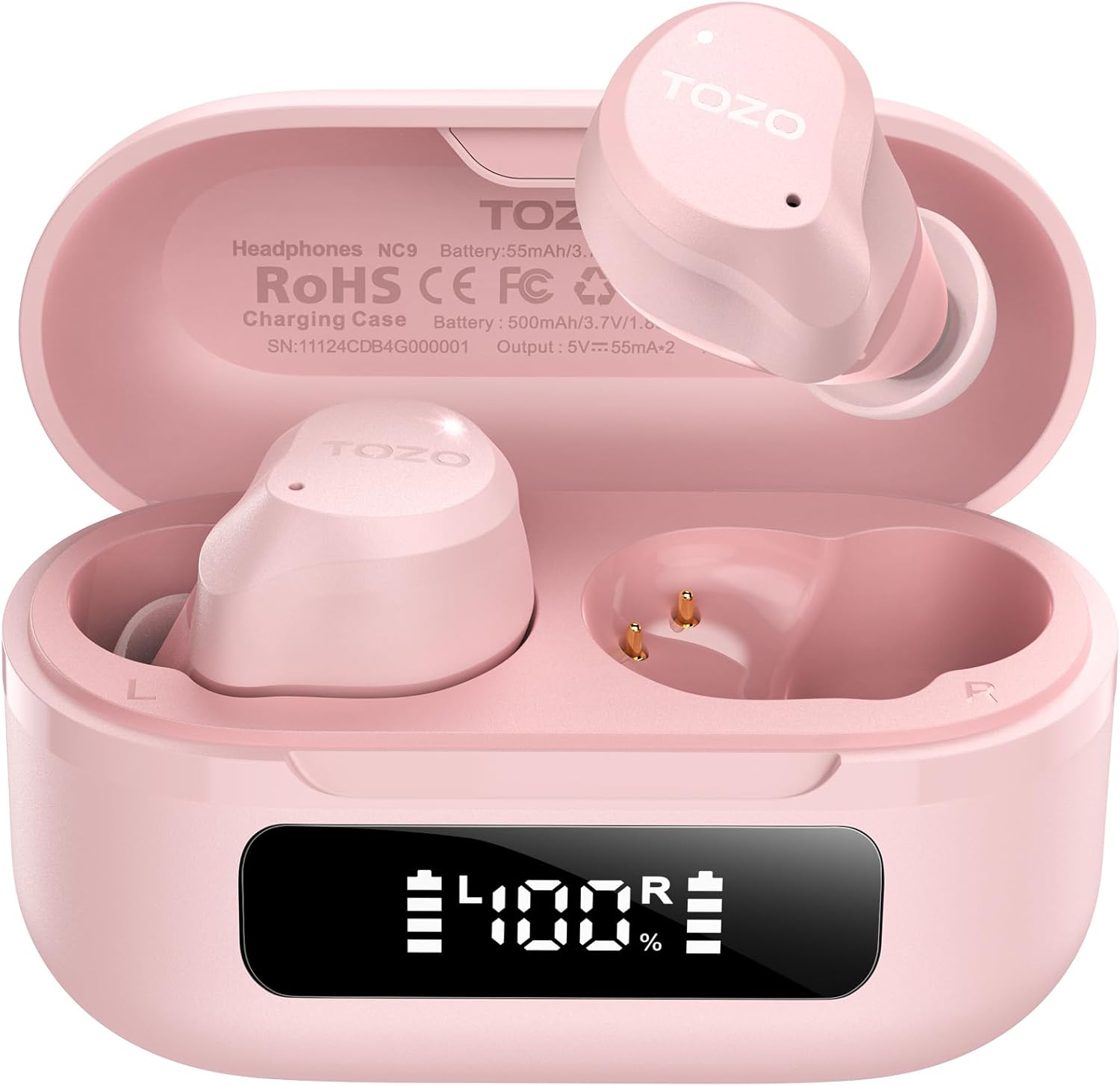
Image: The TOZO NC9 earbuds shown with their charging case. The earbuds are pink and feature an in-ear design. The charging case is also pink with a smooth, compact form factor. This image provides a general view компонентов продукта.

Image: The TOZO NC9 earbuds are placed inside their open charging case, revealing an LED display on the front of the case that shows battery percentage. This illustrates how the earbuds are stored and charged within the case.

Image: A detailed diagram illustrating the internal driver components of the TOZO NC9 earbud, highlighting the OrigX Acoustics Technology. This visual explains the audio engineering behind the sound quality.
Настраивать
1. Зарядка наушников и кейса
Перед первым использованием полностью зарядите наушники и зарядный чехол.
- Поместите наушники в зарядный футляр. Убедитесь, что они правильно установлены.
- Подключите зарядный кабель USB-C к зарядному порту на чехле и к источнику питания.
- The LED display on the charging case will indicate the charging status. A full charge may take approximately 5 hours if completely depleted.

Image: The TOZO NC9 charging case with earbuds, displaying "60 hrs" to indicate the total playtime. This image emphasizes the extended battery life of the product.

Image: A close-up of the TOZO NC9 charging case's LED display showing "100%" battery charge, with the "SmartPow Power Management" logo. This highlights the intelligent battery optimization feature.
2. Сопряжение с вашим устройством
The TOZO NC9 earbuds use Bluetooth 5.3 for a stable connection.
- Откройте зарядный кейс. Наушники автоматически перейдут в режим сопряжения.
- На вашем устройстве (смартфоне, планшете, компьютере) перейдите в настройки Bluetooth.
- Искать В списке доступных устройств выберите устройство "TOZO NC9" и подключитесь к нему.
- После подключения вы услышите звуковой сигнал, и наушники будут готовы к использованию.

Image: A visual representation of the TOZO App interface on a smartphone, showing various settings like ANC modes, EQ adjustments, and white noise tracks. This demonstrates the app's capabilities for customizing the earbud experience.
Инструкция по эксплуатации
Сенсорное управление
The TOZO NC9 earbuds feature intuitive touch controls. Specific functions can be customized via the TOZO App.
| Действие | Функция |
|---|---|
| Одинарное нажатие (Л/П) | Воспроизведение/Пауза, Ответ на звонок |
| Двойной тап (L) | Предыдущий трек |
| Двойное нажатие (R) | Следующий трек |
| Тройной удар (Л/П) | Активировать голосовой помощник |
| Длительное нажатие (Л/П) | Switch ANC/Transparency/Normal Mode, Reject Call |
Режимы активного шумоподавления (ANC)
The TOZO NC9 offers Hybrid ANC to reduce ambient noise by up to 45dB, along with a Transparency Mode.
- Режим активного шумоподавления (ANC): Снижает внешний шум, идеально подходит для путешествий или шумных помещений.
- Режим прозрачности: Позволяет слышать окружающие звуки, не снимая наушников, что полезно для разговоров или повышения осведомленности.
- Нормальный режим: Standard audio experience without noise cancellation or transparency.
Cycle through these modes by long-pressing either earbud (customizable via app).

Image: A person wearing TOZO NC9 earbuds on an airplane, illustrating the effectiveness of the up to 45dB advanced noise cancellation feature for a peaceful listening experience.
Кристально чистые звонки
Equipped with 6 ENC (Environmental Noise Cancellation) microphones, the NC9 ensures your voice is clear during calls, even in noisy environments.

Image: A person wearing TOZO NC9 earbuds while walking in a city environment, making a phone call. This image highlights the crystal-clear call quality provided by the six ENC microphones, minimizing background noise.
Интеграция приложения TOZO
Download the TOZO App for enhanced control and customization:
- Adjustable Noise Control Modes (6 options)
- 32 Preset EQ Modes and access to over 2000 user-shared EQs
- 100+ White Noise Tracks
- Обновления прошивки
The app allows for a personalized audio experience.
Обслуживание
Уборка
- Регулярно очищайте наушники, особенно амбушюры и зарядные контакты, мягкой, сухой тканью без ворса.
- Не используйте абразивные чистящие средства или растворители.
Хранилище
- Когда наушники не используются, храните их в зарядном футляре, чтобы защитить их и сохранить заряженными.
- Хранить в прохладном, сухом месте, вдали от экстремальных температур.
Водонепроницаемость (IPX8)
The TOZO NC9 earbuds are IPX8 waterproof, meaning they are protected against immersion in water up to 1 meter for up to 30 minutes. This makes them suitable for workouts and light rain, but they are not designed for swimming or prolonged submersion.

Image: A person wearing TOZO NC9 earbuds while reading, demonstrating the ergonomic design for all-day comfort and a secure fit. This image emphasizes the comfort aspect of the earbuds.
Поиск неисправностей
| Проблема | Возможное решение |
|---|---|
| Наушники не заряжаются | Ensure earbuds are correctly seated in the case. Check charging cable and power source. Clean charging contacts. |
| Невозможно подключиться к устройству | Ensure Bluetooth is enabled on your device. Place earbuds in case, close, then open to re-enter pairing mode. Forget "TOZO NC9" from your device's Bluetooth list and try pairing again. |
| Нет звука из одного наушника | Place both earbuds back in the case, close it, then open again. Ensure both earbuds are charged. Perform a factory reset (refer to TOZO App or online support for specific steps). |
| АНК не работает эффективно | Ensure ear tips provide a good seal. Try different sized ear tips. Ensure ANC mode is activated. |
| Плохое качество связи | Ensure microphones are not obstructed. Check network signal. |
For further assistance, please refer to the TOZO App or contact TOZO customer support.
Технические характеристики
| Название модели | NC9 |
| Версия Bluetooth | 5.3 |
| Контроль шума | Hybrid Noise Reduction (up to 45dB ANC) |
| Микрофоны | 6 микрофона ENC |
| Тип аудиодрайвера | Dynamic (10mm drivers) |
| Диапазон частот | 15 Гц - 20 000 Гц |
| Срок службы батареи (наушники) | Примерно 14 часов (одна зарядка) |
| Общее время воспроизведения (с кейсом) | До 60 часов |
| Рейтинг водонепроницаемости | IPX8 (водонепроницаемый) |
| Тип управления | Сенсорное управление, управление приложениями |
| Совместимые устройства | Телефоны, ноутбуки, планшеты, умные колонки |
| GTIN/UPC | 810102982537 |
Гарантия и поддержка
TOZO products come with a standard warranty. For detailed warranty information, product registration, or technical support, please visit the official TOZO webили обратитесь в службу поддержки клиентов. Сохраните чек о покупке для предъявления гарантийных претензий.
Политика возврата: Для возврата товара и обмена на новый действует политика возврата в течение 30 дней.