
Введение
The Fender Mustang LTX50 is a versatile 50-watt modeling combo amplifier designed for guitarists seeking a wide range of authentic Fender tones and modern features. Equipped with a 12-inch Celestion G12P-80 speaker, it delivers dynamic sound suitable for practice, rehearsal, and performance. This amplifier offers 25 amp models and 25 effects, covering various musical styles from clean to high-gain. Its intuitive color display, onboard tuner, and 100 user preset slots provide easy customization and quick access to your preferred sounds. The Mustang LTX50 also features Bluetooth audio streaming for playing along with tracks and USB-C connectivity for direct recording and monitoring.
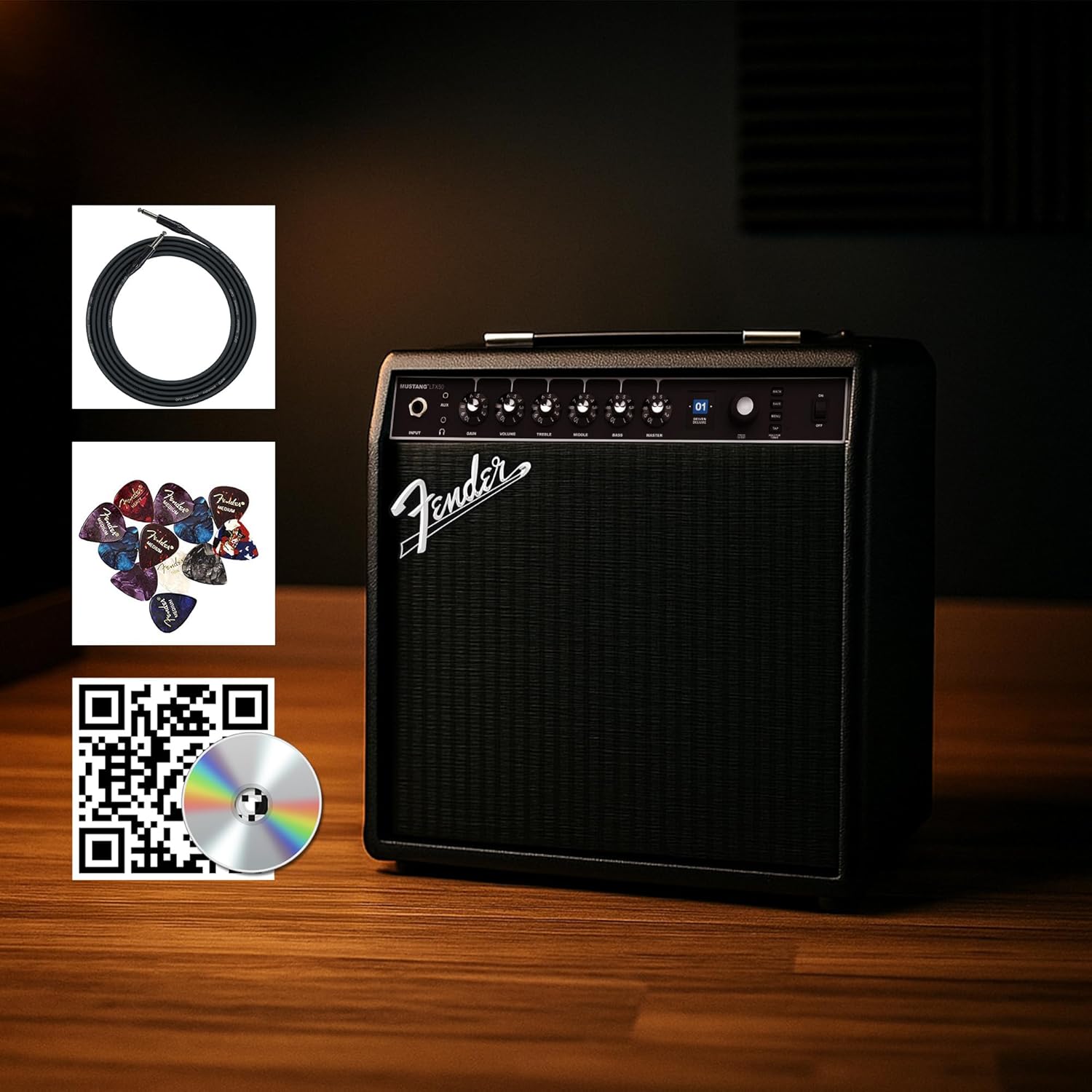
Figure 1: Fender Mustang LTX50 Guitar Combo AmpУсилитель с прилагаемыми аксессуарами.
Настраивать
1. Распаковка и первоначальный осмотр
- Осторожно удалите amplifier and all accessories from the packaging.
- Осмотрите amplifier for any signs of damage that may have occurred during shipping.
- Confirm all included items are present: Mustang LTX50 amplifier, power cord, instrument cable, 12-pack guitar picks, and instructional DVD.
2. Подключение питания
- Обеспечить ampВыключатель питания осветителя находится в положении «ВЫКЛ».
- Connect the included power cord to the AC input on the rear panel of the ampпожизненнее.
- Вставьте другой конец шнура питания в заземленную электрическую розетку.
3. Подключение гитары
- Use the included instrument cable to connect your guitar to the ВХОД jack on the front panel of the ampпожизненнее.
4. Основные элементы управленияview
Familiarize yourself with the front panel controls before powering on the ampпожизненнее.
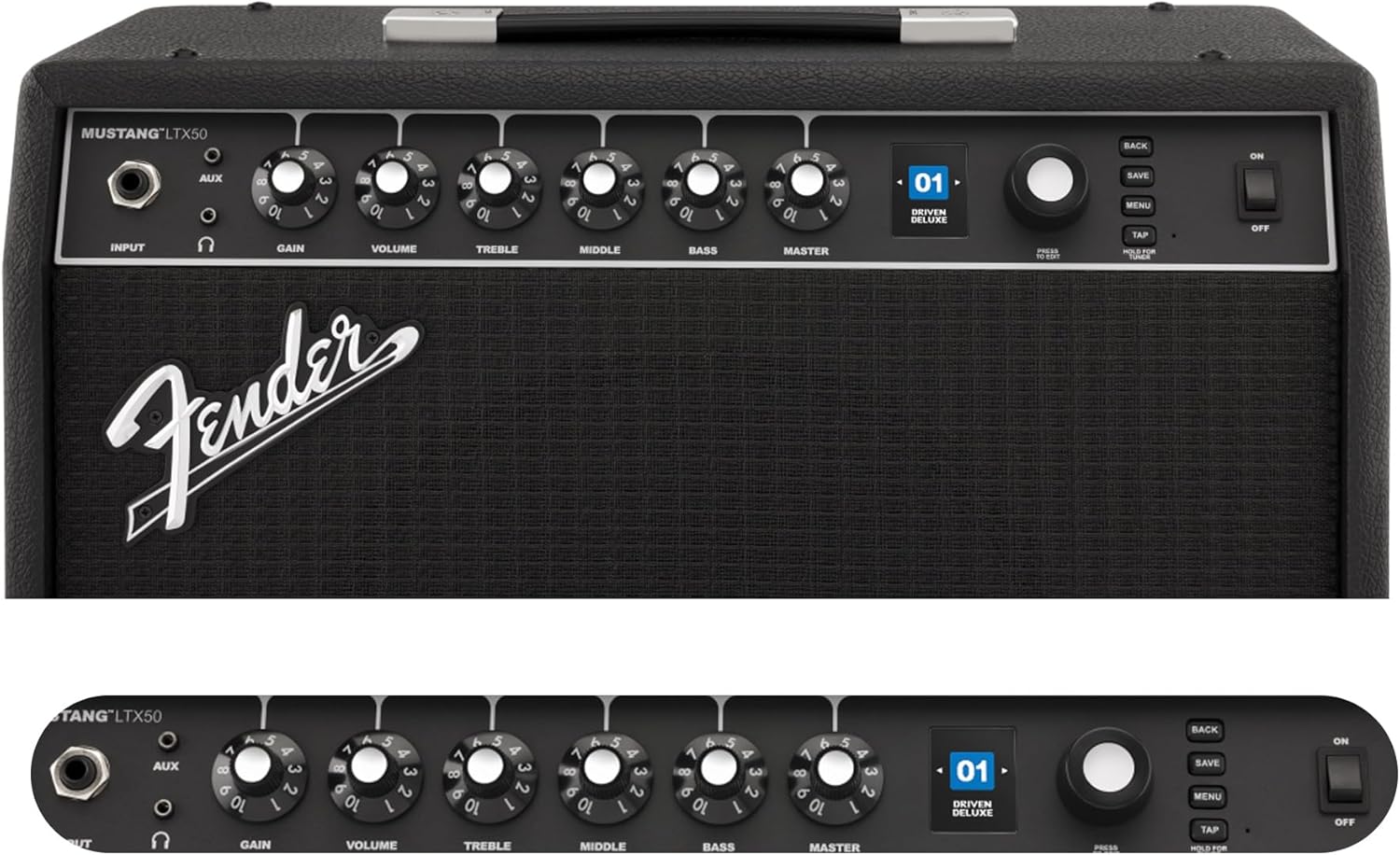
Figure 2: Front Panel Controls of the Mustang LTX50.
Инструкция по эксплуатации
1. Включение и выключение
- To power on, ensure all volume controls are set to minimum, then flip the ВЛАСТЬ переключатель в положение ON.
- Чтобы выключить питание, переверните переключатель. ВЛАСТЬ переключитесь в положение ВЫКЛ.
2. Навигация по предустановкам
- Используйте КОДЕР knob (large rotary knob) to scroll through the 100 available presets (70 factory, 30 user).
- Нажмите КОДЕР knob to select a preset.
- The color LCD displays the current preset number and name.
3. Регулировка Amp Модели и эффекты
- Нажмите МЕНЮ кнопка для доступа к ampнастройки lifier.
- Navigate through options like AMP, STOMP, MOD, DELAY, REVERB using the КОДЕР.
- Select an option and use the КОДЕР to choose different amp models or effects.
- Adjust parameters for each effect using the smaller control knobs (GAIN, VOLUME, TREBLE, MIDDLE, BASS, MASTER) or by selecting parameters on the display.
- Нажимать СОХРАНЯТЬ to store your customized preset.
4. Использование встроенного тюнера
- Нажмите и удерживайте КРАН button to activate the chromatic tuner.
- Play a single note on your guitar; the display will show the note and indicate if it is sharp, flat, or in tune.
- Press any button or play for a few seconds to exit tuner mode.
5. Fender Tone 3.0 App Control
- Download the Fender Tone 3.0 app from your device's app store (iOS/Android).
- Включите Bluetooth на вашем мобильном устройстве.
- На amplifier, нажмите кнопку МЕНЮ button, navigate to "Bluetooth," and select "Pair."
- Select "Mustang LTX50" from your device's Bluetooth settings to connect.
- Use the app to wirelessly create, edit, save, and share presets, and to manage your ampнастройки лифера.
6. Playing Along with Audio (Bluetooth)
- Once paired via Bluetooth, you can stream audio from your mobile device directly to the ampпожизненнее.
- Adjust the volume of the streamed audio from your mobile device.
- Alternatively, connect an external audio source to the AUX IN jack on the front panel using a 3.5mm stereo cable.
7. Recording via USB-C
- Connect a USB-C cable from the amplifier's USB-C port to your computer (Mac or PC).
- The amplifier functions as a bidirectional audio interface, allowing direct recording and monitoring.
- Refer to your Digital Audio Workstation (DAW) software's manual for specific setup instructions.
Обслуживание
1. Уборка
- Отключите amplifier from power before cleaning.
- Протрите внешние поверхности мягкой сухой тканью.
- Для стойких загрязнений слегкаamp Можно использовать ткань, смоченную мягким мылом, а затем протереть сухой тканью.
- Избегайте использования абразивных чистящих средств, растворителей или воска, так как они могут повредить отделку.
2. Хранение
- Хранить ampхранить в прохладном, сухом месте, вдали от прямых солнечных лучей и экстремальных температур.
- Избегайте хранения в местах с высокой влажностью.
- If storing for extended periods, cover the ampдля защиты от пыли.
3. Safety Warnings (Proposition 65)
Данный продукт может содержать химические вещества, которые, согласно законодательству штата Калифорния, могут вызывать рак, врожденные дефекты или другие нарушения репродуктивной функции. Для получения дополнительной информации посетите [ссылка]. www.P65Warnings.ca.gov.
Поиск неисправностей
Нет звука
- Обеспечить ampУсилитель включен, и шнур питания надежно подключен.
- Check that your guitar is properly connected to the ВХОД Джек.
- Убедитесь, что ВЛАДЕЛЕЦ volume and individual preset volume controls are not set to zero.
- Test with a different instrument cable and guitar to rule out faulty equipment.
- If using headphones, ensure they are fully plugged into the headphone jack and that the main speaker is not muted.
Искаженный или нежелательный шум
- Проверьте регуляторы громкости и тембра вашей гитары.
- Уменьшить ПРИРОСТ установка на ampпожизненнее.
- Ensure your instrument cable is not damaged or poorly shielded.
- Попробуйте использовать другую розетку, чтобы исключить электрические помехи.
- If using high-gain amp models, some distortion is inherent. Adjust settings accordingly.
Проблемы с подключением Bluetooth
- Ensure Bluetooth is enabled on both your mobile device and the ampпожизненнее.
- Убедитесь, что amplifier is in pairing mode (refer to "Fender Tone 3.0 App Control" section).
- Поднесите мобильное устройство ближе к ampпожизненнее.
- Попробуйте разорвать и заново соединить устройства.
- Перезапустите оба ampусилитель и ваше мобильное устройство.
Amplifier Not Responding
- Выключите и включите amplifier by turning it off, waiting 10 seconds, and turning it back on.
- If the issue persists, a factory reset may be necessary. Consult the Fender support website for instructions on performing a factory reset for the Mustang LTX50.
Технические характеристики
| Название модели | MUSTANG LTX50 |
| Номер модели | 2311700000 |
| Бренд | Крыло |
| AmpТип лифтера | Цифровое моделирование |
| Выходная мощность | 50 Вт |
| Спикер | 1 x 12" Celestion G12P-80 |
| Amp Модели | 25 |
| Эффекты | 25 (distortion, overdrive, compression, modulation, reverb, delay, octave, etc.) |
| Предустановки | 70 factory + 100 user slots |
| Отображать | Color LCD with onboard chromatic tuner |
| Связность | Bluetooth audio, USB-C bidirectional audio |
| Выходы | XLR line out, Headphone out |
| Поддержка приложений | Fender Tone 3.0 app (iOS/Android) |
| Материал корпуса | Металл |
| Размеры товара (Д x Ш x В) | 22.3"Д x 19.9"Ш x 12.3"В |
| Вес товара | 26.4 фунта |
| СКП | 840262259088 |

Figure 3: Rear Panel Connections of the Mustang LTX50.
Информация о гарантии
The Fender Mustang LTX50 Guitar Combo AmpУсилитель покрыт Ограниченная гарантия сроком на 2 года. This warranty covers defects in materials and workmanship under normal use. For full terms and conditions, please refer to the warranty documentation included with your product or visit the official Fender webсайт.
Поддерживать
For further assistance, technical support, or service inquiries regarding your Fender Mustang LTX50 amplifier, please visit the official Fender support webсайт:
You may also find additional resources, FAQs, and software updates on the Fender webсайт.