
Введение
This manual provides essential information for setting up, operating, and maintaining your TCL 32S5K 32-inch HD QLED Google Smart TV. Please read this manual thoroughly before using your television to ensure safe and optimal performance. Keep this manual for future reference.
Информация по безопасности
При использовании этого телевизора всегда соблюдайте основные меры предосторожности, чтобы снизить риск возгорания, поражения электрическим током и травм. Не подвергайте телевизор воздействию дождя или влаги. Не открывайте крышку телевизора.asing; refer all servicing to qualified personnel. Ensure proper ventilation and avoid placing the TV near heat sources. Use only the power cord and accessories specified by the manufacturer.
Содержимое упаковки
Проверьте наличие всех предметов в упаковке:
- TCL 32S5K 32-inch HD QLED Google Smart TV
- Дистанционное управление
- Шнур питания
- Подставка под телевизор (2 шт.) и винты
- Краткое руководство пользователя
- Гарантийный талон
Настраивать
Физическая установка
Установка стенда: Place the TV screen-down on a soft, flat surface. Attach the two stand pieces to the designated slots on the bottom of the TV using the provided screws. Ensure the stand is securely fastened.
Настенный монтаж: If wall-mounting, ensure you use a VESA-compatible wall mount (not included) and follow the wall mount manufacturer's instructions. Disconnect the power cord before mounting.
Подключение устройств
Connect your external devices to the appropriate ports on the TV. Refer to the image below for port locations and types.

Figure 1: Rear and Side Connectivity Ports. This image illustrates the various input and output ports available on the TCL 32S5K Smart TV, including USB 2.0, LAN, Antenna/Cable In, Digital Audio Out (Optical), HDMI 1, HDMI 2, and AV In adapter.
- HDMI Ports (1, 2): Подключайте Blu-ray плееры, игровые приставки, кабельные/спутниковые ресиверы или другие устройства с поддержкой HDMI.
- Порт USB 2.0: Подключите USB-накопители для воспроизведения мультимедиа.
- Порт локальной сети: Подключите кабель Ethernet для проводного подключения к Интернету.
- Вход антенны/кабеля: Подключите антенну или кабельный ТВ-сигнал.
- Цифровой аудиовыход (оптический): Подключитесь к внешнему аудиоресиверу или саундбару для воспроизведения цифрового звука.
- AV-адаптер: Use the provided adapter to connect older devices with composite video and stereo audio outputs.
Первое включение и настройка Google TV
After connecting all necessary cables, plug the power cord into an electrical outlet. Press the power button on the remote control or on the TV. Follow the on-screen instructions to complete the initial setup, which includes selecting your language, connecting to a Wi-Fi network, and signing in to your Google account to access Google TV features.
Операционная
Функции дистанционного управления
The remote control allows you to navigate the Google TV interface, adjust volume, change channels, access apps, and control playback. Familiarize yourself with the button layout for easy operation.
Интерфейс Google TV
Google TV organizes your favorite movies, shows, and live TV from across your apps and subscriptions. Use the remote to browse recommendations, search for content, and manage your watch list. Access the Google Play Store to download additional applications.
Возможности подключения
- Wi-Fi: Connects your TV to your home wireless network for internet access and streaming.
- Bluetooth: Pair Bluetooth-enabled devices such as headphones or game controllers for a personalized experience.
- Googlecast (Chromecast built-in): Cast content from your compatible mobile devices or computer directly to your TV screen.
Настройки изображения и звука
Your TCL 32S5K TV features QLED technology, Full HD resolution, HDR10 support, and Dolby Audio for an enhanced viewing and listening experience. Adjust picture modes (e.g., Standard, Vivid, Movie) and sound modes (e.g., Standard, Music, Movie) through the TV settings menu to suit your preferences.

Figure 2: Image Quality Features. This image highlights the key display technologies of the TCL 32S5K Smart TV, including QLED for vibrant colors, FHD (Full High Definition) for clear resolution, and HDR10 for enhanced contrast and brightness.
Обслуживание
Чистка телевизора
Всегда отключайте телевизор от сети перед чисткой. Протирайте экран и корпус мягкой сухой тканью. Для удаления стойких загрязнений слегка потрите.ampen the cloth with water or a mild, non-abrasive screen cleaner. Never spray cleaner directly onto the screen or allow liquids to enter the TV's openings.
Обновления программного обеспечения
Your Google TV may receive automatic software updates. Ensure your TV is connected to the internet to receive these updates, which can improve performance and add new features. You can also manually check for updates in the TV's settings menu.
Поиск неисправностей
Если у вас возникли проблемы с телевизором, воспользуйтесь следующими распространенными решениями:
- Нет питания: Проверьте, надежно ли вставлен шнур питания как в телевизор, так и в розетку. Попробуйте другую розетку.
- No Picture/Poor Picture: Ensure all cables are correctly connected. Check the input source. Adjust picture settings. If using an antenna, check signal strength.
- Нет звука/Плохое качество звука: Check volume levels and mute settings. Ensure external audio devices are properly connected and selected as the audio output.
- Пульт дистанционного управления не работает: Замените батарейки. Убедитесь, что между пультом ДУ и ИК-датчиком телевизора нет препятствий.
- Проблемы с сетевым подключением: Restart your router and modem. Reconnect to the Wi-Fi network in the TV settings. For wired connections, ensure the Ethernet cable is properly connected.
- Google TV Slow/Unresponsive: Restart the TV by unplugging it for a few minutes and plugging it back in. Clear cache for problematic apps in settings.
For persistent issues, consult the TCL support webсайт или свяжитесь со службой поддержки клиентов.
Технические характеристики
Below are the technical specifications for the TCL 32S5K Smart TV:
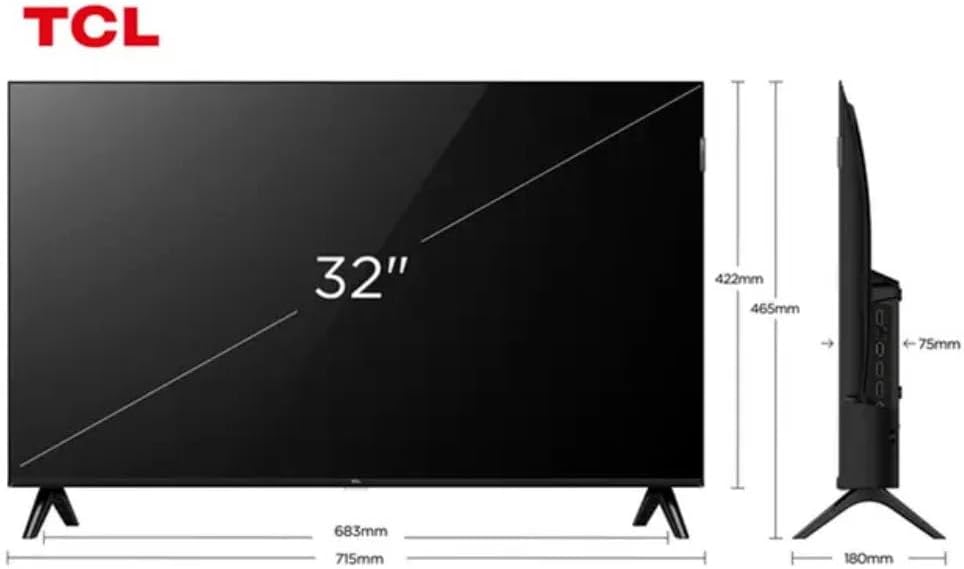
Figure 3: TV Dimensions. This image provides a detailed diagram of the TCL 32S5K Smart TV's physical dimensions, including screen size (32 inches), width (715mm), height (422mm without stand, 465mm with stand), and depth (75mm).
| Особенность | Описание |
|---|---|
| Название модели | 32С5К |
| Размер экрана | 32 дюйма |
| Технология отображения | QLED |
| Разрешение | 1080p (Full HD) |
| Частота обновления | 60 Гц |
| Связность | Bluetooth, Ethernet, HDMI, USB, Wi-Fi |
| Всего портов HDMI | 2 |
| Особые возможности | Integrated Speaker, Google TV, Googlecast Integrated, HDR10, Dolby Audio |
| Размеры продукта (Д x Ш x В) | 7.6P x 71.6L x 42.3A centimeters (approx. 3 x 28.2 x 16.7 inches) |
| Производитель | ТКЛ |
| Страна происхождения | Бразилия |
Гарантия и поддержка
Информация о гарантии
The TCL 32S5K Smart TV comes with a 1-летняя гарантия производителя. This warranty covers defects in materials and workmanship under normal use. Please retain your proof of purchase for warranty claims. For specific terms and conditions, refer to the warranty card included in your package or visit the official TCL webсайт.
Поддержка клиентов
If you require technical assistance, have questions about your product, or need to initiate a warranty claim, please contact TCL customer support. You can typically find contact information on the TCL official webсайте или в документации к вашему продукту.
Before contacting support, please have your TV model number (32S5K) and serial number ready, along with a detailed description of the issue.