
Введение
Welcome to the user manual for your Samsung QN65QN990FFXZA 65 Inch QN990F Neo QLED 8K TV. This document provides essential information for setting up, operating, maintaining, and troubleshooting your television. Please read these instructions carefully to ensure proper use and to maximize your viewопыт.

Рисунок 1: Передняя часть view of the Samsung QN65QN990FFXZA 65 Inch QN990F Neo QLED 8K TV.
Настраивать
1. Распаковка и размещение
- Аккуратно извлеките телевизор и все аксессуары из упаковки.
- Place the TV on a stable, flat surface or mount it on a wall using a VESA 400mm x 300mm compatible mount. Ensure adequate ventilation around the TV.
2. Connecting the Wireless One Connect Box
The Samsung QN990F utilizes a Wireless One Connect Box to manage all external connections, reducing cable clutter around the TV. Connect all your devices to this box.

Figure 2: Wireless One Connect Box for streamlined connections.
3. Подключение внешних устройств
Connect your external devices (e.g., Blu-ray player, game console, soundbar) to the Wireless One Connect Box using the appropriate ports.

Figure 3: Detailed diagram of the Wireless One Connect Box ports.
- Кабель/ANT: Connect for over-the-air antenna or cable TV signals.
- USB-A: Стандартный прямоугольный порт для питания или воспроизведения мультимедиа.
- EX-Link: Сервисный порт Samsung для внешнего управления и диагностики.
- HDMI 1, 2, 4: Transmits high-definition video and audio from external devices. Supports 8K@120Hz / 4K@240Hz for Gaming.
- HDMI 3 (eARC): Enhanced audio return for high-quality sound and advanced formats. Supports 8K@120Hz / 4K@240Hz for Gaming.
- Ethernet: Проводное подключение к Интернету для потоковой передачи, обновлений и интеллектуальных функций.
- Аудиовыход (оптический): Обеспечивает высококачественное цифровое аудио для звуковых панелей и ресиверов.
- Власть: Connects the power cable to the Wireless One Connect Box.
4. Подключение питания
- Connect the power cable to the Wireless One Connect Box, then plug it into a wall outlet.
- Ensure the TV is properly connected to the One Connect Box.
Инструкция по эксплуатации
1. Первоначальная настройка и интеллектуальные функции
Upon first power-on, the TV will guide you through the initial setup process, including network connection, channel scanning, and smart feature configuration. The TV runs on the One UI Tizen operating system.
- Процессор NQ8 AI Gen3: This processor optimizes content for enhanced viewинж.
- Масштабирование 8K с помощью искусственного интеллекта Pro: Lower resolution content is automatically upscaled to near 8K clarity.

Figure 4: 8K AI Upscaling Pro enhances content to near 8K resolution.
2. Улучшение качества изображения
- Без бликов: This technology minimizes reflections on the screen, improving visibility in bright environments.
- Neo Quantum HDR 8K+: Experience enhanced contrast and color depth.
- Технология квантовой матрицы Pro: Precise light control for detailed images.
- Ультра ViewУгол входа: Maintains picture quality from various viewпозиции.
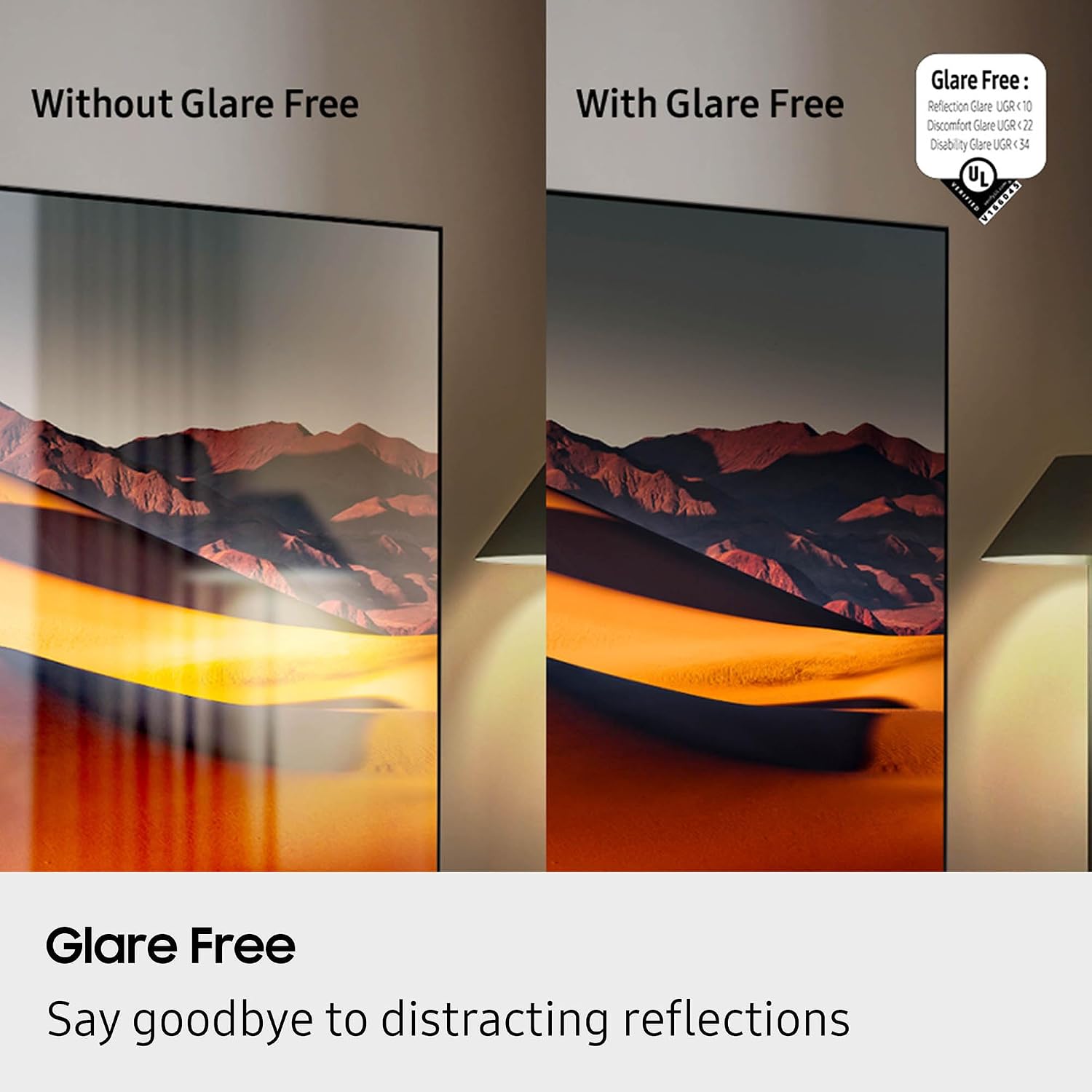
Figure 5: Glare Free technology reduces screen reflections.
3. Аудиовозможности
- Долби Атмос: Обеспечивает объемное, многомерное звучание.
- Q-Symphony: Synchronizes TV speakers with compatible Samsung soundbars for a richer audio experience.
- AVA Pro (Active Voice Amplifier Pro): Enhances dialogue clarity in noisy environments.
- Адаптивный звук Pro: Оптимизирует звук на основе контента и акустики помещения.
- 6.2.4-канальный объемный звук: Integrated speaker system for a comprehensive audio field.
4. Игровые возможности
- Игровой центр: Access cloud gaming services and console games directly from your TV.
- 120Hz Refresh Rate & VRR FreeSync Premium Pro: Обеспечивает плавный игровой процесс без разрывов изображения.

Figure 6: Samsung Gaming Hub for integrated gaming experience.
5. Официальное видео о продукте
Video 1: An informational overview of the Samsung QN990F Series TV features and capabilities.
Обслуживание
1. Очистка экрана
To clean your TV screen, use a soft, lint-free cloth. For stubborn marks, a non-ammonia and alcohol-free screen cleaning solution is recommended.

Figure 7: Recommended screen cleaning solution for display screens.
- Apply cleaning solution to the cloth, not directly to the screen.
- Аккуратно протрите экран, чтобы удалить пыль, грязь и отпечатки пальцев.
- Избегайте использования едких химикатов и абразивных материалов.
2. Обновления программного обеспечения
Periodically check for and install software updates to ensure optimal performance and access to the latest features. This can usually be done through the TV's settings menu under "Support" or "Software Update."
Поиск неисправностей
Если у вас возникли проблемы с телевизором, воспользуйтесь следующими общими шагами по устранению неполадок.
Нет питания / Нет изображения
- Убедитесь, что кабель питания надежно подключен как к блоку One Connect, так и к настенной розетке.
- Verify the One Connect Box is properly connected to the TV.
- Проверьте работоспособность розетки, подключив к ней другое устройство.
- Нажмите кнопку питания на пульте дистанционного управления или на самом телевизоре.
Нет звука
- Проверьте уровень громкости как на телевизоре, так и на подключенных аудиоустройствах (саундбар, ресивер).
- Убедитесь, что звук телевизора не отключен.
- Verify audio cables are correctly connected to the One Connect Box.
- If using external audio, check the audio output settings on the TV.
Плохое качество изображения
- Check the source resolution. While 8K AI Upscaling Pro enhances content, native 8K content will provide the best quality.
- Настройте параметры изображения (яркость, контрастность, резкость, цвет) в меню телевизора.
- Ensure all video cables are securely connected and not damaged.
- If using an antenna, check antenna positioning and signal strength.
Пульт дистанционного управления не работает
- Замените батарейки в пульте дистанционного управления.
- Убедитесь, что между пультом ДУ и телевизором нет препятствий.
- Try re-pairing the remote control with the TV if it's a Bluetooth remote (refer to the TV's on-screen guide for pairing instructions).
Технические характеристики
| Особенность | Спецификация |
|---|---|
| Название модели | QN65QN990FFXZA |
| Размер экрана | 65 дюйма |
| Технология отображения | Нео QLED |
| Разрешение | 8K |
| Частота обновления | 120 Гц |
| Процессор | Процессор NQ8 AI Gen3 |
| Технология масштабирования | 8K AI Upscaling Pro |
| Операционная система | Один пользовательский интерфейс Tizen |
| Связность | HDMI x 5, USB-A x 3, USB-C x 1, Ethernet, RF, Wireless One Connect, Bluetooth, Wi-Fi |
| Режим аудиовыхода | Объемный звук (6.2.4 канала) |
| Integrated Surround Sound | Долби Атмос |
| Поддерживаемый формат HDR | HDR10+, HDR10 |
| Размеры продукта (Д x Ш x В) | 10.5"Д x 56.4"Ш x 35.1"В |
| Вес товара | 66.6 фунта |
| Стандарт крепления VESA | 400мм х 300мм |
| Цвет | Черная |
Гарантия и поддержка
Гарантия производителя
Your Samsung QN65QN990FFXZA 65 Inch QN990F Neo QLED 8K TV comes with a full 1-year manufacturer's warranty. This warranty covers defects in materials and workmanship under normal use. Please retain your proof of purchase for warranty claims.
Поддержка клиентов
For technical assistance, troubleshooting beyond this manual, or warranty service, please contact Samsung Customer Support. Refer to the official Samsung website or your product registration documents for the most current contact information.
- Онлайн поддержка: Посетите официальную поддержку Samsung webсайт.
- Поддержка по телефону: Contact the Samsung customer service hotline.