
1. Введение
This manual provides essential information for the VIMIN 10-Port 10G/2.5G Unmanaged Ethernet Switch. This device is designed to expand your network capacity with high-speed connectivity, featuring 8x 2.5 Gigabit Ethernet ports and 2x 10 Gigabit Ethernet ports. It offers a non-blocking 80Gbps switching capacity, ensuring efficient data transfer for demanding applications like 4K streaming, gaming, and NAS connections. The switch operates on a plug-and-play principle, requiring no complex configuration for immediate use.
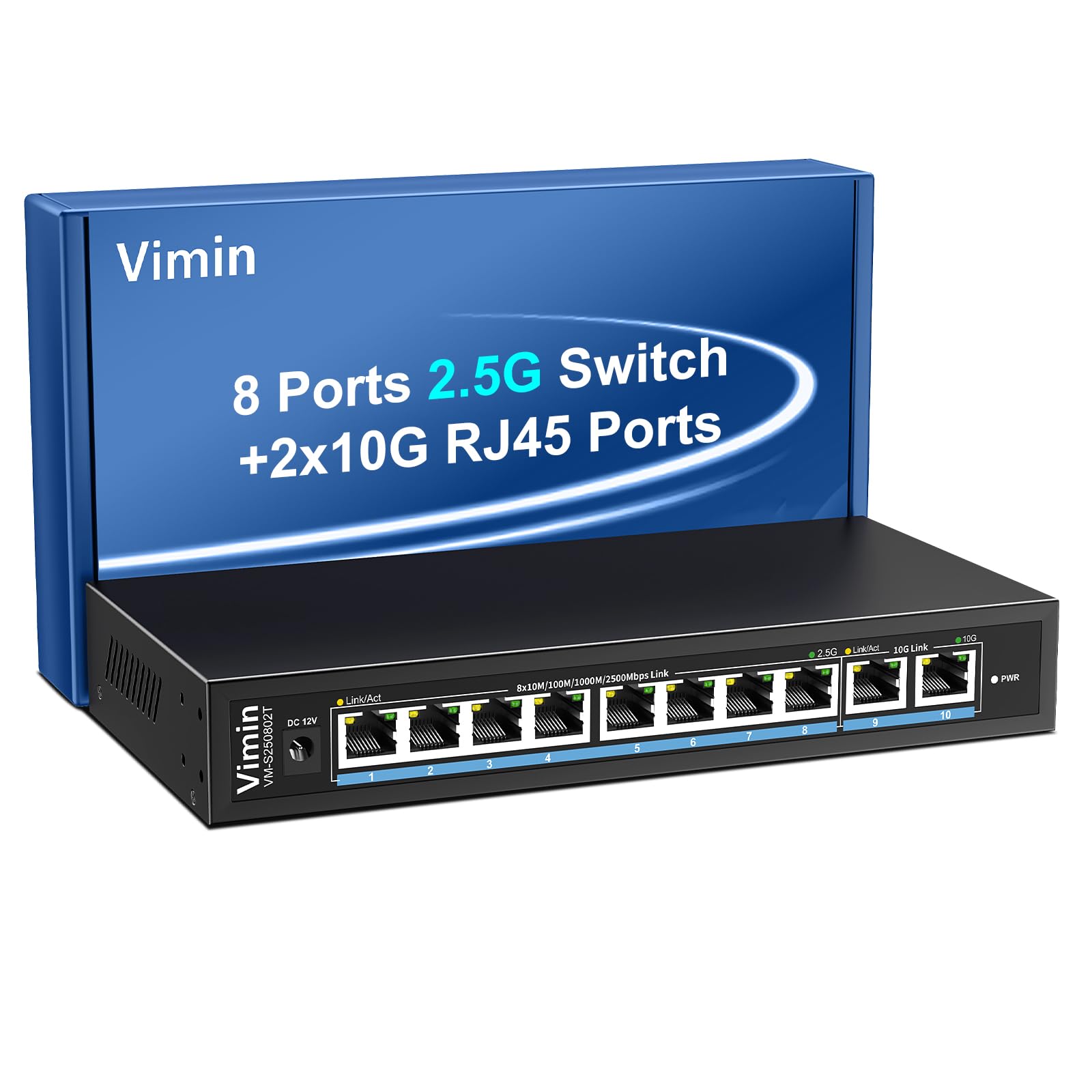
Figure 1: VIMIN 10-Port 2.5Gb Unmanaged Ethernet Switch in a typical setup.
2. Содержимое упаковки
Пожалуйста, убедитесь, что все товары присутствуют и находятся в хорошем состоянии при вскрытии упаковки. Если какие-либо товары отсутствуют или повреждены, обратитесь в службу поддержки клиентов.
- 1x VIMIN 10-Port 2.5G Unmanaged Ethernet Switch
- 1x Руководство пользователя
- 1x Кабель питания

Figure 2: Package contents of the VIMIN 10-Port 2.5G Ethernet Switch.
3. Продукт закончилсяview
3.1 Передняя панель
The front panel of the switch features ten RJ45 Ethernet ports and LED indicators for status monitoring.
- Порты 1-8: 2.5 Gigabit Ethernet ports (10/100/1000/2500Mbps auto-negotiation).
- Порты 9-10: 10 Gigabit Ethernet ports (10/100/1000/2500/5000/10000Mbps auto-negotiation).
- Link/Act LED (Yellow/Green): Indicates link status and data activity.
- 2.5G Link LED (Green, for ports 1-8): Indicates a 2.5Gbps connection.
- 10G Link LED (Green, for ports 9-10): Indicates a 10Gbps connection.
- Светодиод PWR: Указывает состояние питания.

Figure 3: Front and rear panel of the VIMIN 10-Port 2.5G Ethernet Switch.

Рисунок 4: Подробная информация view of the RJ45 ports and LED indicators.
3.2 Задняя панель
The rear panel includes the DC 12V 1A power input port.
4. Настройка
The VIMIN 10-Port Ethernet Switch is designed for simple plug-and-play operation, requiring no software configuration.
4.1 Подключение питания
- Connect the provided power adapter to the DC 12V 1A power input port on the rear panel of the switch.
- Plug the power adapter into a standard electrical outlet. The PWR LED on the front panel will illuminate, indicating the switch is powered on.
4.2 Подключение устройства
- Connect your network devices (e.g., NAS, PC, Wireless AP, WiFi 7 Routers, 10G Adapter/NIC, Gaming PC, 4K/8K Video devices) to any of the RJ45 ports (1-10) using appropriate Ethernet cables.
- The switch automatically detects the speed and duplex mode of the connected device. The Link/Act LED for the respective port will light up when a valid connection is established and flash during data transmission.

Figure 5: Plug and Play connectivity with various network devices.

Рисунок 6: Example applications for the 10-Port 2.5G Ethernet Switch.
4.3 Cable Type Recommendations
For optimal performance, especially for 2.5G and 10G connections, use appropriate Ethernet cable types:
| Тип кабеля | 10М | 100М | 1G | 2.5G | 5G | 10G |
|---|---|---|---|---|---|---|
| КАТ 3/4 | ✓ | ✗ | ✗ | ✗ | ✗ | ✗ |
| CAT 5 | ✓ | ✓ | ✗ | ✗ | ✗ | ✗ |
| CAT 5e | ✓ | ✓ | ✓ | ✗ | ✗ | ✗ |
| CAT 6 | ✓ | ✓ | ✓ | ✓ | ✓ | (<55m) |
| CAT 6A/7 | ✓ | ✓ | ✓ | ✓ | ✓ | ✓ |
Figure 7: Ethernet cable type compatibility and performance.
4.4 Варианты монтажа
The compact design of the switch allows for both desktop placement and wall mounting to save space.

Figure 8: Desktop and wall-mount installation options.
5. Инструкция по эксплуатации
The VIMIN 10-Port Unmanaged Ethernet Switch operates automatically once connected, requiring no user intervention for basic network functions.
5.1 Автосогласование
Each port on the switch supports auto-negotiation, automatically adjusting the transmission method and speed (10/100/1000/2500Mbps for ports 1-8, and up to 10Gbps for ports 9-10) to match the connected device. This ensures optimal performance without manual configuration.

Figure 9: Self-Negotiation Functionality.
5.2 Управление потоком
The switch supports IEEE 802.3x flow control for full-duplex mode and backpressure for half-duplex mode. These mechanisms prevent data packet loss during periods of high network traffic by temporarily pausing data transmission from congested devices, ensuring stable and reliable connections.
6. Техническое обслуживание
To ensure the longevity and optimal performance of your VIMIN Ethernet Switch, follow these maintenance guidelines:
- Уборка: Для чистки внешней поверхности переключателя используйте мягкую сухую ткань. Не используйте жидкие или аэрозольные чистящие средства.
- Вентиляция: Ensure proper airflow around the switch. Do not block ventilation openings. The fanless design relies on natural convection for cooling.
- Среда: Place the switch in a cool, dry location away from direct sunlight, heat sources, and excessive moisture.
- Власть: Use only the provided power adapter. Disconnect power during electrical storms or when unused for long periods.
7. Поиск Неисправностей
If you encounter issues with your VIMIN Ethernet Switch, refer to the following common troubleshooting steps:
- Нет питания:
- Убедитесь, что адаптер питания надежно подключен как к выключателю, так и к исправной электрической розетке.
- Проверьте работоспособность розетки, подключив к ней другое устройство.
- Check if the PWR LED on the switch is illuminated.
- Нет связи/активности на порту:
- Убедитесь, что кабель Ethernet надежно подключен как к порту коммутатора, так и к подключенному устройству.
- Убедитесь, что подключенное устройство включено и работает правильно.
- Попробуйте использовать другой Ethernet-кабель, чтобы исключить неисправность основного кабеля.
- Проверьте работу коммутатора, используя другой порт.
- Низкая скорость сети:
- Ensure you are using appropriate cable types (e.g., CAT6 or CAT6A/7 for 2.5G/10G connections) as indicated in Section 4.3.
- Check the network adapter settings on your connected device to ensure it supports the desired speed.
- Verify that the Link/Act LED indicates the expected speed (e.g., green for 2.5G/10G).
- Reduce network congestion by limiting simultaneous high-bandwidth activities.
- Прерывистое соединение:
- Проверьте наличие ослабленных кабельных соединений.
- Ensure the switch is placed in a stable environment, free from excessive vibrations or temperature fluctuations.
- Consider potential electromagnetic interference from other electronic devices.
8. Технические характеристики
| Особенность | Описание |
|---|---|
| Бренд | ВИМИН |
| Номер модели | 8x2.5G Ethernet (Unmanaged) |
| Количество портов | 10 (8x 2.5G RJ45, 2x 10G RJ45) |
| Тип интерфейса | RJ45 |
| Скорость передачи данных | 10 гигабит в секунду (макс.) |
| Коммутационная способность | 80 Гбит/с |
| Управление потоком | IEEE 802.3x (Full-Duplex), Backpressure (Half-Duplex) |
| Стандарты | IEEE 802.3bz, IEEE 802.3u, IEEE 802.3ab, IEEE 802.3z |
| Входная мощность | DC 12V 1A (AC 100-240V adapter) |
| Вес товара | 1.83 фунта (приблизительно 0.83 кг) |
| Размеры упаковки | 9.53 x 6.5 x 2.99 дюйма (прибл. 24.2 x 16.5 x 7.6 см) |
| Цвет | Черный |
| Совместимые устройства | Desktop, Gaming Console, Laptop, NAS, Wireless AP |
9. Гарантия и поддержка
VIMIN products are designed for reliability and performance. For warranty information, technical support, or any product-related inquiries, please refer to the warranty card included with your product or visit the official VIMIN website. You may also contact VIMIN customer service through the retailer where the product was purchased.
Для получения дополнительной помощи посетите, пожалуйста, VIMIN Store on Amazon.