
1. Введение
Thank you for choosing the DEVAISE ASJZ031 Electric Standing Desk. This manual provides essential information for the safe assembly, operation, and maintenance of your new desk. Please read these instructions thoroughly before use and retain them for future reference.
This electric standing desk is designed to provide a versatile workspace, allowing seamless transitions between sitting and standing positions to promote better posture and productivity. It features a robust steel frame, a powerful lift system, and a seamless one-piece desktop for enhanced stability.
2. Инструкции по технике безопасности
- Перед сборкой убедитесь, что все компоненты на месте и не повреждены.
- Во избежание травм, во время работы держите детей и домашних животных подальше от стола.
- Не перегружайте стол. Максимальная грузоподъемность составляет 80 кг (176 фунтов).
- При регулировке высоты стола убедитесь, что над или под ним нет никаких препятствий.
- Во время регулировки высоты держите руки и пальцы подальше от движущихся частей.
- Используйте только прилагаемый адаптер питания и кабели.
- Не разбирайте и не модифицируйте электрические компоненты стола. Для получения сервисного обслуживания обратитесь в службу поддержки клиентов.
- Установите стол на ровной поверхности для обеспечения устойчивости.
3. Содержимое упаковки
Verify that all parts are included in your package. Refer to the diagram below for identification.

Image: All components of the DEVAISE Electric Standing Desk laid out for assembly.
- Настольный компьютер (1 шт.)
- Ножки (2 шт.)
- Ноги (2 шт.)
- Crossbar/Motor Assembly
- Панель управления
- Адаптер питания и кабели
- Крючок для наушников
- Монтажные комплектующие (винты, шестигранный ключ)
4. Инструкция по сборке
Follow these steps for assembling your DEVAISE Electric Standing Desk. It is recommended to have two people for certain steps.
- Прикрепите ступни к ногам: Secure the two feet to the bottom of each leg using the provided screws.
- Install Crossbar/Motor Assembly: Connect the crossbar, which contains the motor, between the two legs. Ensure it is securely fastened.
- Прикрепите ножки к столешнице: Carefully place the desktop upside down on a soft, clean surface. Align the assembled leg frame with the pre-drilled holes on the desktop and secure it with the appropriate screws.
- Подключите панель управления и питание: Mount the control panel to the underside of the desktop in the designated area. Connect all motor and power cables as per the diagram in your included paper manual.
- Установите крючок для наушников: Attach the headphone hook to the desired side of the desk.
- Управление кабелями: Use the included cable ties or clips to organize and secure all cables to prevent tangling and damage.
- Начальное включение: Plug the desk into a power outlet. The control panel should light up.
Для визуального обзораview of the desk's features and operation, please refer to the video below:
Видео: Оверview of the DEVAISE Adjustable Electric Standing Desk, demonstrating its features and height adjustment.
5. Инструкция по эксплуатации
Your DEVAISE Electric Standing Desk is equipped with an intuitive digital control panel for easy height adjustment and memory presets.
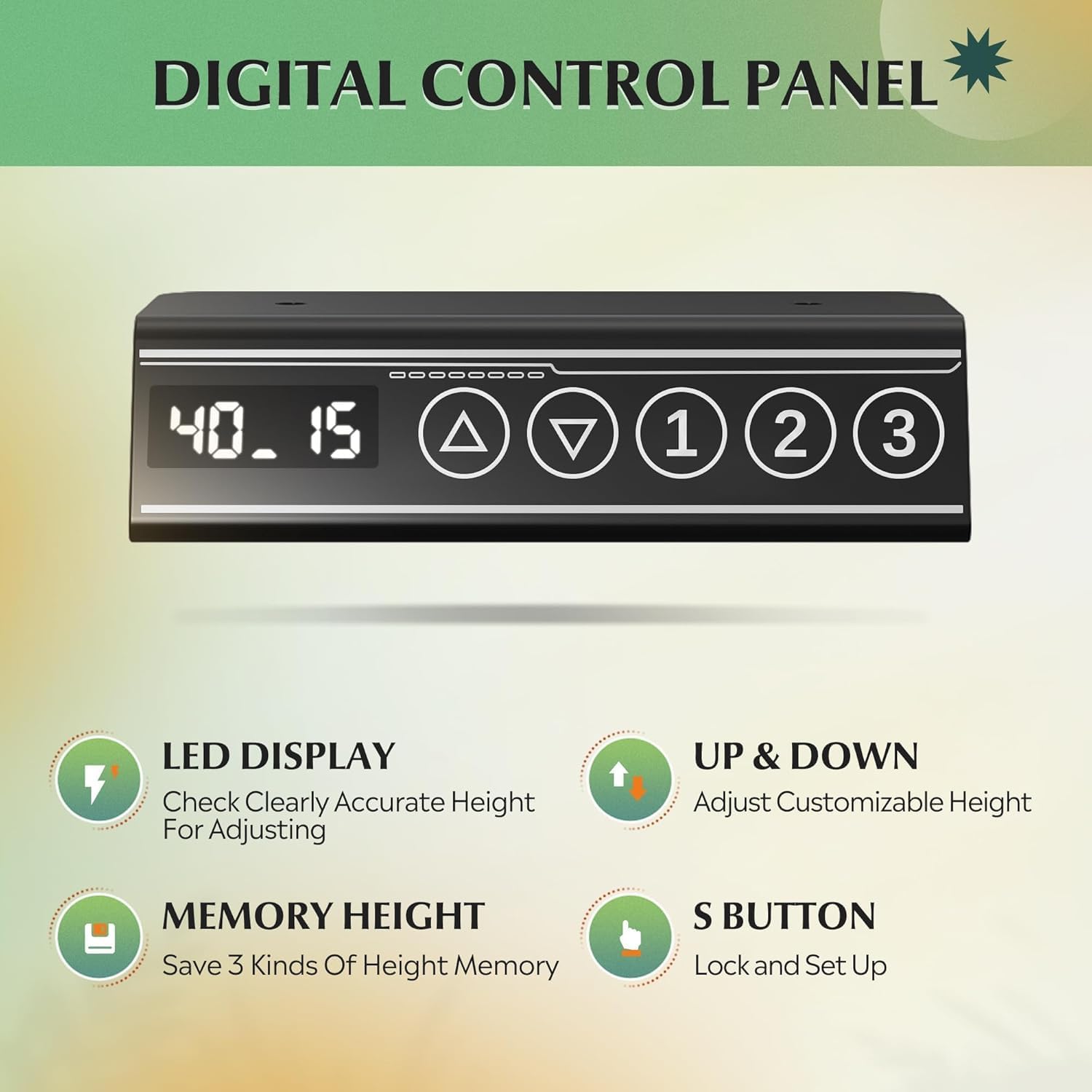
Image: Close-up of the digital control panel with LED display, up/down arrows, and three memory preset buttons.
Регулировка высоты
- Поднимите стол: Нажмите и удерживайте Стрелка вверх (▲) кнопку, чтобы поднять стол на нужную вам высоту.
- Нижний стол: Нажмите и удерживайте Стрелка вниз (▼) кнопку, чтобы опустить стол на желаемую вами высоту.
- The LED display will show the current height in inches. The adjustable height range is approximately 28.35 inches to 46.46 inches.

Image: Illustration showing the DEVAISE Standing Desk adjusting from its lowest height (28.35 inches) to its highest height (46.45 inches).
Предустановки памяти
The desk features three programmable memory presets to save your favorite sitting and standing heights.
- Отрегулируйте высоту стола до желаемого уровня с помощью стрелок вверх/вниз.
- Нажмите 'С' button (Set button). The display will flash.
- Немедленно нажмите одну из пронумерованных кнопок памяти (1, 2 или 3) чтобы сохранить текущую высоту в соответствии с заданными параметрами.
- To recall a saved height, simply press the corresponding numbered memory button (1, 2 или 3Стол автоматически переместится в сохраненное положение.
Система предотвращения столкновений
The desk is equipped with an anti-collision system that automatically stops and slightly reverses movement if it encounters an obstruction during height adjustment. This feature enhances safety and prevents damage to the desk or surrounding objects.
Video: Demonstration of the DEVAISE Electric Standing Desk in various home office settings, highlighting its smooth operation and cable management features.
6. Техническое обслуживание
- Уборка: Протрите рабочий стол и раму мягкой тряпкой.amp Ткань. Избегайте использования едких химикатов и абразивных чистящих средств.
- Управление кабелями: Periodically check that all cables are securely fastened and not pinched or tangled.
- Крепеж: Периодически проверяйте и подтягивайте ослабленные винты для обеспечения устойчивости.
- Двигатель: Двигатель не требует технического обслуживания. Не пытайтесь смазывать или открывать корпус двигателя.
7. Поиск Неисправностей
| Проблема | Возможная причина | Решение |
|---|---|---|
| Стол не двигается. | Power cable disconnected; motor cable loose. | Check all power and motor connections. Ensure the desk is plugged into a working outlet. |
| Стол двигается неравномерно или издает необычные звуки. | Uneven load; loose fasteners; obstruction. | Distribute weight evenly. Check and tighten all screws. Ensure no obstructions are interfering with movement. |
| Система предотвращения столкновений часто срабатывает. | Sensitivity too high; frequent obstructions. | Ensure clear path for desk movement. Refer to the full manual for adjusting anti-collision sensitivity if available. |
| Настройки памяти не работают. | Настройки сохранены некорректно. | Перепрограммируйте сохраненные в памяти параметры в соответствии с инструкцией по эксплуатации. |
If you encounter issues not listed here or if solutions do not resolve the problem, please contact DEVAISE customer support.
8. Технические характеристики
| Бренд | ДЕВАЙС |
| Номер модели | ASJZ031-new |
| Размеры продукта | 27.5"Д x 55"Ш x 28"В |
| Регулируемый диапазон высоты | от 28.35 до 46.46 дюймов |
| Цвет | Черный |
| Верхний тип материала | Инженерная древесина |
| Основной материал | Железо |
| Рекомендация по максимальному весу | 180 фунтов (81.6 кг) |
| Вес товара | 37 фунтов (16.8 кг) |
| Особые возможности | 3 Preset Memories, Adjustable Height, Electric, Quiet, Whole Piece Desktop |
9. Гарантия и поддержка
The DEVAISE ASJZ031 Electric Standing Desk comes with a 1-летняя гарантия. For any questions regarding assembly, product selection, or warranty claims, please contact our U.S.-based product support team. We offer 24/7 customer service to assist you.
For further assistance, please visit the official DEVAISE website or contact the customer service number provided with your purchase documentation.