
1. Введение
The Radioddity X1 Walkie Talkies are designed for reliable two-way communication in various environments. Featuring an IP67 waterproof and dustproof rating, durable construction, and advanced noise reduction, these FRS radios are suitable for outdoor adventures, professional use, and emergency situations. They offer a long communication range and include essential features like NOAA weather alerts and voice-activated transmission (VOX).

Image: The Radioddity X1 Walkie Talkie, showcasinг его прочная конструкция.
2. Что в коробке
Upon opening your Radioddity X1 package, you should find the following items:
- 2 x Radioddity X1 Walkie Talkies
- 2 x Аккумуляторы
- 1 x зарядный кабель USB-C 2-в-1
- 2 x поясные клипы
- 2 x ручных ремня
- 1 адаптера
- 1 x Руководство пользователя (этот документ)

Image: All components included in the Radioddity X1 package, including two radios, batteries, charging cable, belt clips, hand straps, and adapters.
3. Настройка
3.1. Установка аккумулятора
- Убедитесь, что рация выключена.
- Найдите батарейный отсек на задней панели устройства.
- Align the battery with the contacts and gently push it into the compartment until it clicks into place.
3.2. Зарядка аккумулятора
The Radioddity X1 features a 2500mAh rechargeable lithium battery. For optimal performance, fully charge the battery before first use.
- Connect the provided USB-C charging cable to the charging port on the walkie talkie.
- Connect the other end of the USB-C cable to the adapter, and then plug the adapter into a standard power outlet. Alternatively, you can connect the USB-C cable to a compatible USB power source (e.g., computer, power bank).
- Индикатор батареи на дисплее покажет состояние зарядки. Полная зарядка обычно занимает несколько часов.
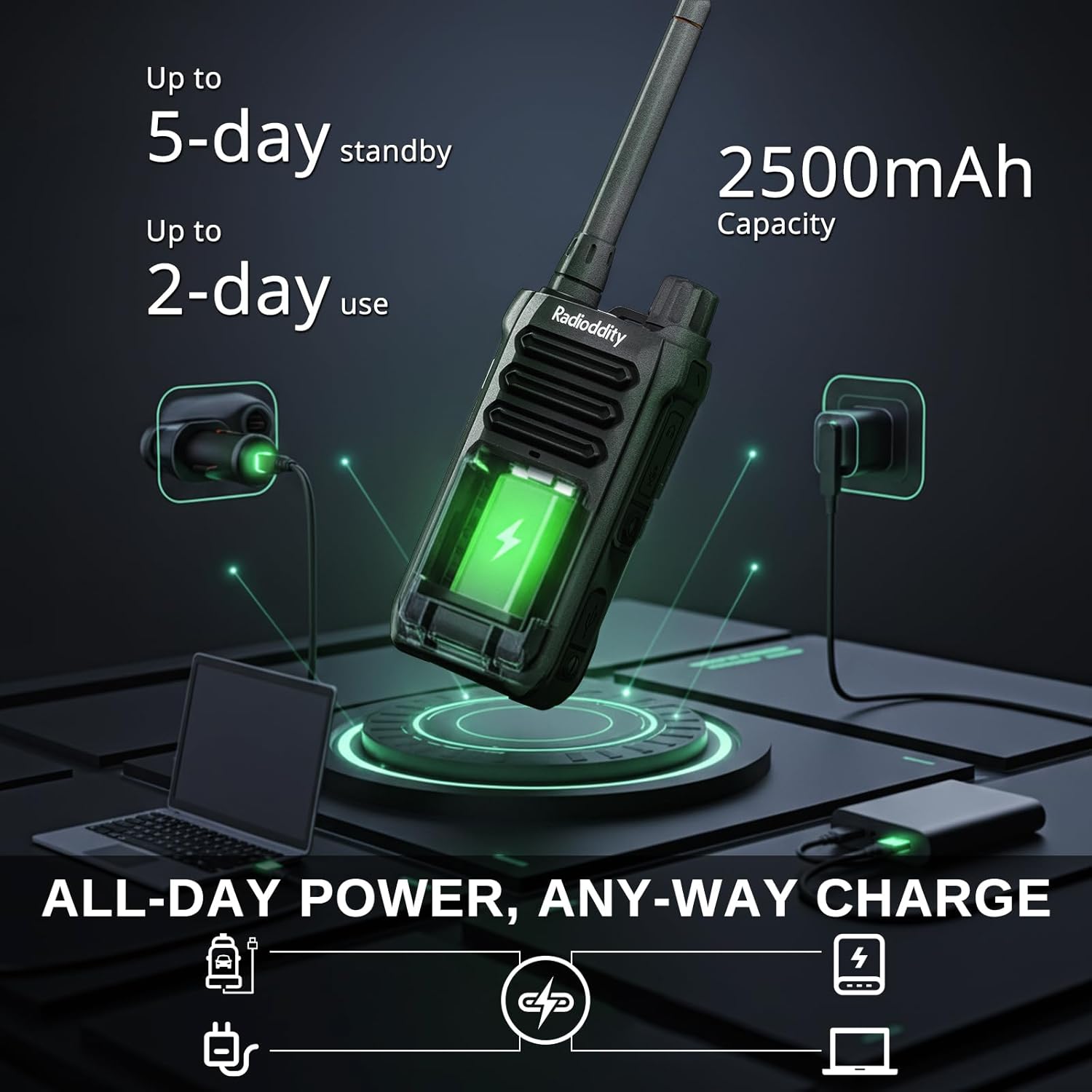
Image: The Radioddity X1 Walkie Talkie connected to a USB-C charger, illustrating the charging process.
3.3. Прикрепление аксессуаров
- Зажим для ремня: Secure the belt clip to the designated slot on the back of the walkie talkie.
- Ручной ремешок: Thread the hand strap through the loop on the top or side of the walkie talkie for added security.
3.4. Включение и выключение
To power on or off the device, rotate the power/volume knob located on the top of the unit clockwise to turn on, and counter-clockwise until it clicks to turn off.
4. Инструкция по эксплуатации
4.1. Выбор канала
The Radioddity X1 comes pre-programmed with 22 FRS channels. To select a channel:
- Нажмите МЕНЮ кнопка для входа в меню.
- Используйте Стрелка вверх/вниз кнопки для перехода к настройкам канала.
- Нажимать OK для подтверждения, затем используйте Стрелка вверх/вниз кнопки для выбора нужного канала (1-22).
- Нажимать OK again to save the selection and МЕНЮ для выхода.
4.2. Кодексы конфиденциальности (CTCSS/DCS)
The radio supports 155 privacy codes (CTCSS/DCS) to filter out unwanted conversations on a channel. While not providing true privacy, these codes ensure you only hear transmissions from radios set to the same channel and code.
- Нажмите МЕНЮ кнопка.
- Navigate to the CTCSS or DCS setting using the Стрелка вверх/вниз кнопки.
- Нажимать OK, then select your desired code.
- Нажимать OK спасти и МЕНЮ to exit. Ensure all radios in your group use the same channel and privacy code.
4.3. Функция «нажми и говори» (PTT)
Для передачи нажмите и удерживайте большую кнопку. ПТТ Нажмите кнопку сбоку радиоприемника. Чётко говорите в микрофон. Отпустите кнопку. ПТТ кнопка для прослушивания.
4.4. Функция VOX (голосовое управление передачей)
The VOX function allows for hands-free operation. When activated, the radio transmits automatically when it detects your voice.
- Нажмите МЕНЮ кнопка.
- Перейдите к ГОКС параметр.
- Нажимать OK, then select an appropriate sensitivity level (higher numbers for lower sensitivity).
- Нажимать OK спасти и МЕНЮ для выхода.

Image: Icon representing the Voice Operated Transmission (VOX) function.
4.5. Метеорологические предупреждения NOAA
Stay informed with 10 built-in NOAA weather channels providing real-time alerts.
- Нажмите МЕНЮ кнопка.
- Перейдите к НОАА параметр.
- Нажимать OK, then select the desired NOAA channel or activate weather alerts.
- Нажимать OK спасти и МЕНЮ для выхода.

Image: Icon representing the NOAA Scan & Alert feature.
4.6. Запись воспроизведения
The Radioddity X1 features a unique recording playback function for up to 20 messages.
- To record, press and hold the dedicated ЗАПИСЫВАТЬ button (if available, or refer to specific menu options).
- To play back recorded messages, press the ПОВТОР кнопка.

Image: The Radioddity X1 display showing the recording and replay functions, highlighting its audio safety net capability.

Image: Icon representing the Recording function.
4.7. Шумоподавление
The dual-way noise reduction feature ensures clear communication even in noisy environments.

Image: The Radioddity X1 in a construction setting, illustrating its noise reduction capabilities for clear communication.
5. Техническое обслуживание
5.1. IP67 Waterproof and Dustproof Care
The Radioddity X1 is rated IP67, meaning it is dustproof and can withstand submersion in up to 1 meter of water for 30 minutes. To maintain its integrity:
- Ensure all port covers (e.g., charging port, accessory port) are securely closed before exposure to water or dust.
- After exposure to water, wipe the radio dry with a clean cloth. Do not charge the radio if the charging port is wet.
- Избегайте длительного погружения сверх указанной глубины и времени.

Image: The Radioddity X1 Walkie Talkie submerged in clear water, demonstrating its IP67 waterproof capability.

Image: The Radioddity X1 Walkie Talkie partially covered in sand, highlighting its dustproof design.
5.2. Уход за аккумулятором
The 2500mAh battery provides up to 48 hours of average use. To prolong battery life:
- Избегайте регулярной полной разрядки аккумулятора.
- Когда радио не используется, храните его в прохладном, сухом месте.
- Используйте только прилагаемый зарядный кабель и адаптер.
5.3. Уборка
Протрите радио мягкой, damp ткань. Не используйте агрессивные химикаты или абразивные чистящие средства.
6. Поиск Неисправностей
| Проблема | Возможная причина | Решение |
|---|---|---|
| Нет электричества | Батарея разряжена или установлена неправильно. | Зарядите аккумулятор или переустановите его. |
| Невозможно передать или получить | Неверный канал или код конфиденциальности. Выход за пределы зоны действия. | Verify channel and privacy code settings. Move closer to the other radio. |
| Плохое качество звука | Weak signal, interference, or volume too low. | Adjust volume. Move to an area with less obstruction. Check for interference sources. |
| Короткая дальность связи | Obstructions (buildings, terrain), low power channel. | Move to an open area. Use channels 1-7 or 15-22 for higher power output. |
7. Технические характеристики
| Особенность | Деталь |
|---|---|
| Бренд | лучезарность |
| Номер модели | X1 |
| Цвет | Черный |
| Количество каналов | 22 (FRS) |
| Диапазон частот | ФРС |
| Максимальный диапазон разговора | 5 Miles (open areas), 2 Miles (urban settings) |
| Уровень водонепроницаемости | Водонепроницаемость IP67 |
| Особые возможности | Dust Proof, Emergency Alarm (SOS), Long Range, Shockproof, Voice Operated Transmission (VOX), Noise Reduction, NOAA Weather Alerts, Recording Playback |
| Емкость аккумулятора | Литий 2500 мАч |
| Средний срок службы батареи | 48 часов |
| Зарядка | USB-C |
| Размеры продукта (Д x Ш x В) | 1.1" x 2.4" x 7.1" |
| Идентификатор FCC | 2AN62-X1 |

Image: Visual representation of the Radioddity X1's communication range, showing up to 5 miles in open areas and 2 miles in urban settings.

Image: The Radioddity X1 Walkie Talkie on the ground at a construction site, illustrating its durability and shockproof design after 1,000+ drop tests.
8. Гарантия и поддержка
8.1. Информация о гарантии
The Radioddity X1 Walkie Talkies come with an Гарантия 18 месяца from the date of purchase. This warranty covers manufacturing defects and ensures your product is free from material and workmanship flaws under normal use. Please retain your proof of purchase for warranty claims.
8.2. Поддержка клиентов
For technical assistance, troubleshooting, or warranty inquiries, please visit the official Radioddity website or contact their customer support team. You can find contact information and additional resources on their webсайт: www.radioddity.com.
9. Видеоролики о продуктах
Radioddity X1 | Built for Harsh Conditions
Video: This official Radioddity video demonstrates the X1's robust features, including its IP67 dustproof and waterproof capabilities, drop resistance, car-crush resistance, long-range communication, and noise-cancelling audio, highlighting its suitability for challenging environments.