
1. Введение
Thank you for choosing the BOSGAME P3 Mix Mini PC. This manual provides essential information for setting up, operating, maintaining, and troubleshooting your new mini PC. Please read it carefully before use and retain it for future reference.
2. Что в коробке
Убедитесь, что все перечисленные ниже предметы включены в ваш пакет:
- 1x P3 MIX Mini PC
- 1x HDMI-кабель
- 1 крепление VESA и винты
- 1x Адаптер питания
- 1x Руководство пользователя
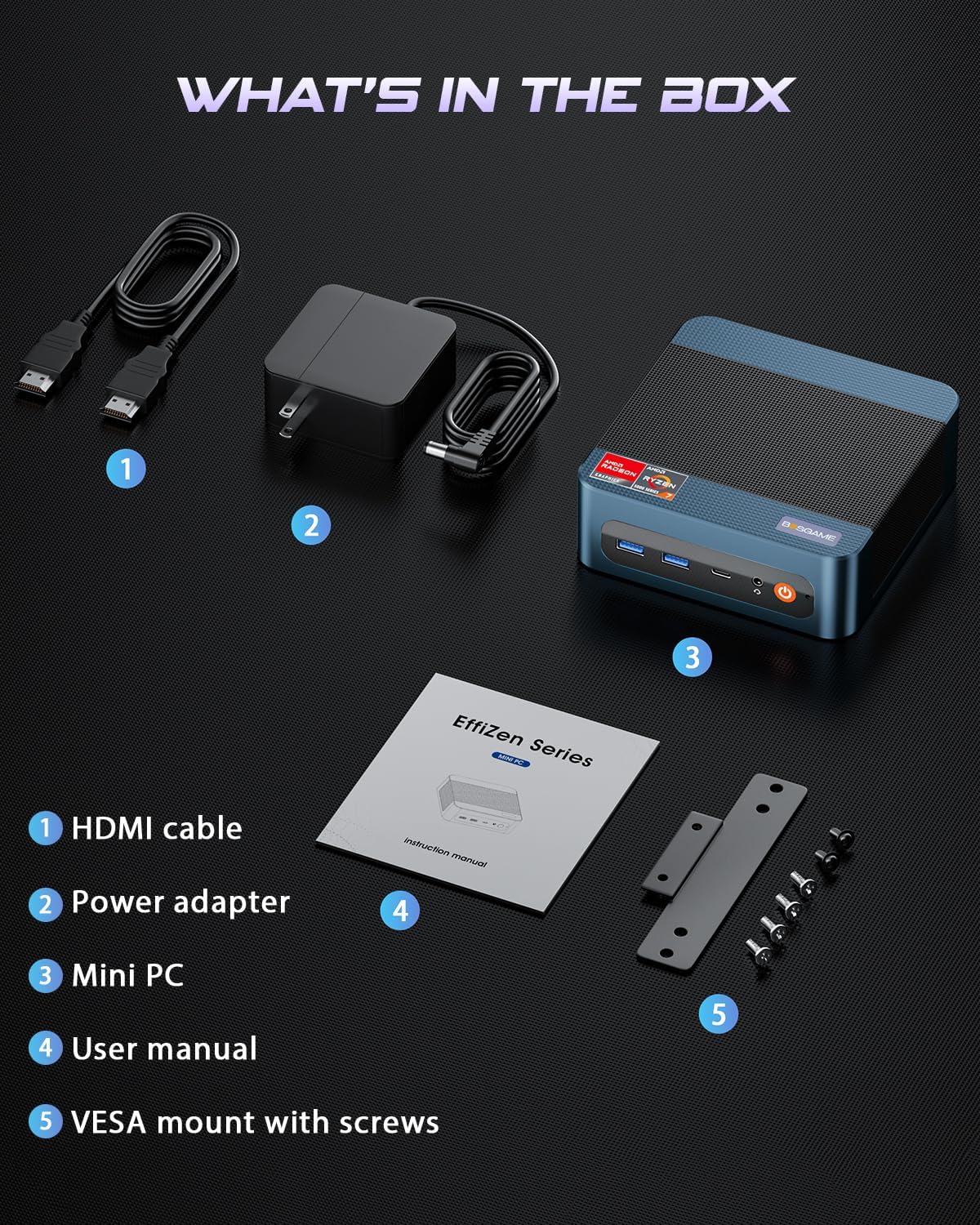
This image displays the BOSGAME P3 Mix Mini PC and its included accessories: an HDMI cable, a power adapter, the mini PC unit, a user manual, and a VESA mount with screws for installation.
3. Продукт закончилсяview
The BOSGAME P3 Mix Mini PC is a compact desktop computer designed for various applications, from home office tasks to gaming and 4K video editing. It features a powerful AMD Ryzen 7640HS processor and Radeon 760M graphics.

This image highlights the core specifications of the mini PC, including its AMD Ryzen 5 7640HS processor, AMD Radeon 760M GPU, 16GB DDR5 RAM, 512GB M.2 PCIe 3.0 x4 SSD, support for 8K 60Hz display, USB-4 (40Gbps) connectivity, Wi-Fi 6E AX210, and Bluetooth 5.2.
This diagram illustrates the various input/output ports available on the mini PC, including power input, dual 2.5G LAN, HDMI, DisplayPort, USB 2.0, USB 4, USB 3.2 ports, and a 3.5mm audio jack.
Video 3.1: BOSGAME Ryzen 5 7640HS MINI PC OverviewЭто видео дает визуальное представление о...view of the BOSGAME P3 Mix Mini PC, showcasing its compact design, internal components, port layout, and connectivity features.
4. Инструкции по настройке
4.1 Подключение адаптера питания
- Connect the power adapter cable to the DC 19V 6.3 port on the rear of the mini PC.
- Подключите адаптер питания к розетке.
4.2 Подключение к дисплею
The P3 Mix Mini PC supports triple display output via HDMI, DisplayPort, and USB4.
- Connect one end of an HDMI cable to the HDMI port on the mini PC and the other end to your monitor.
- For additional displays, connect a DisplayPort cable to the DP port and/or a USB4 cable to the USB4 port, then connect to your respective monitors.
- Убедитесь, что ваши мониторы включены и настроены на правильный источник входного сигнала.

This image demonstrates how to set up a triple display configuration with the mini PC, utilizing the DP 1.4, HDMI 2.0, and USB4 ports to connect to multiple monitors.
4.3 Подключение периферийных устройств
- Connect your USB keyboard and mouse to any available USB ports (USB 2.0, USB 3.2).
- Для проводного доступа к сети подключите кабель Ethernet к одному из портов LAN 2.5G.
- Для вывода звука подключите динамики или наушники к аудиоразъему 3.5 мм.
4.4 Первоначальное включение питания
- After connecting all necessary cables, press the power button located on the front of the mini PC.
- The system will boot up, and you should see the operating system on your connected display(s).
5. Инструкция по эксплуатации
5.1 Включение/выключение питания
- Для включения: Нажмите кнопку питания один раз.
- Выключить: From the operating system, select 'Shut Down'. Alternatively, press and hold the power button for 5 seconds to force a shutdown (use only when necessary).
- Начать заново: В операционной системе выберите «Перезагрузить».
5.2 Сетевое подключение
- Проводное подключение: Connect an Ethernet cable to one of the two 2.5G LAN ports. The system will automatically detect the connection.
- Беспроводное соединение (Wi-Fi 6E): Navigate to your operating system's network settings, select the desired Wi-Fi network, and enter the password.
5.3. Bluetooth-подключение
The mini PC supports Bluetooth 5.2 for connecting wireless peripherals.
- Убедитесь, что ваше устройство Bluetooth находится в режиме сопряжения.
- On your mini PC, go to the operating system's Bluetooth settings.
- Искать and select your device to pair.
6. Техническое обслуживание и модернизация
6.1 Обновление оперативной памяти и SSD
The BOSGAME P3 Mix Mini PC allows for easy upgrades of its DDR5 RAM and M.2 PCIe SSD. Always power off and unplug the device before performing any internal maintenance.

This image provides a visual guide for upgrading the RAM and SSD. The process involves removing screws, carefully opening the base plate, repositioning the system fan, and then replacing the memory modules and SSD.
- Выключите питание и отсоедините: Ensure the mini PC is completely powered off and disconnected from the power source.
- Удалить винты: Locate and remove the screws securing the bottom panel.
- Open Base Plate: Carefully open the base plate to access the internal components.
- Компоненты доступа: You may need to gently move the system fan or other components to gain full access to the RAM and SSD slots.
- Replace RAM/SSD: Install new DDR5 SO-DIMM RAM modules into the dual channel slots (up to 64GB supported) or a new M.2 2280 NVMe PCIe 3.0 SSD (up to 4TB per slot, 8TB total capacity).
- Собрать заново: Carefully reassemble the mini PC, ensuring all connections are secure and screws are tightened.
6.2 Очистка
- Регулярно протирайте внешнюю поверхность мини-ПК мягкой сухой тканью.
- Use compressed air to clear dust from ventilation grilles to ensure optimal airflow and prevent overheating. Do not insert objects into the vents.
7. Поиск Неисправностей
7.1 Нет питания
- Убедитесь, что адаптер питания надежно подключен как к мини-ПК, так и к работающей розетке.
- Проверьте работоспособность розетки, подключив к ней другое устройство.
- Попробуйте использовать другой адаптер питания, если он доступен и совместим.
7.2 Нет вывода на дисплей
- Check all display cable connections (HDMI, DP, USB4) between the mini PC and the monitor(s).
- Ensure the monitor(s) are powered on and set to the correct input source.
- Try connecting to a single monitor using a different cable or port.
- If you recently reinstalled the operating system, ensure all display drivers are correctly installed. Some users have reported needing specific drivers from the manufacturer for optimal display performance.
7.3 Проблемы с сетевым подключением
- Wired: Проверьте подключение по кабелю Ethernet. Убедитесь, что ваш маршрутизатор/модем работает правильно.
- Беспроводная связь: Ensure Wi-Fi is enabled in your operating system settings. Re-enter the Wi-Fi password. Restart your router/modem.
7.4 Проблемы с производительностью
- Закройте ненужные приложения, работающие в фоновом режиме.
- Убедитесь, что мини-ПК имеет достаточную вентиляцию и не перегревается.
- Проверьте наличие обновлений операционной системы и драйверов.
- Verify that the RAM and SSD are properly seated if you have performed an upgrade.
8. Технические характеристики
| Особенность | Спецификация |
|---|---|
| Бренд | БОСГЕЙМ |
| Название модели | P3 |
| Модель ЦП | AMD Ryzen 5 7640HS (6C/12T, up to 5.0 GHz) |
| Графический сопроцессор | Radeon 760M (интегрированная) |
| Оперативная память | 16 ГБ DDR5 4800 МГц (2x8 ГБ), максимальный объем 64 ГБ |
| Емкость памяти | 512GB PCIe 3.0 SSD (M.2 2280), Max 8TB (2x4TB) |
| Операционная система | OS11 Support Win/Ubuntu/Linux |
| Интерфейс видеовыхода | HDMI 2.0, DisplayPort 1.4, USB4 (8K@60Hz) |
| Технология связи | Двойная локальная сеть 2.5G, Wi-Fi 6E (802.11ax), Bluetooth 5.2 |
| USB-порты | 3 порт USB 3.2 (10 Гбит/с), 1 порта USB 4 (40 Гбит/с), 2 порта USB 2.0 (480 Мбит/с) |
| Аудиовыход | Звуковой разъем 3.5mm |
| Вес товара | 1.26 Килограмма |
| Питание Тип штепсельной вилки | Тип А - 2 контакта (североамериканский) |
9. Гарантия и поддержка
9.1 Информация о гарантии
BOSGAME offers a 1-year limited warranty for the P3 Mix Mini PC. This warranty covers manufacturing defects and ensures product quality.
9.2 Поддержка клиентов
For any product-related inquiries, technical assistance, or warranty claims, please contact BOSGAME customer support. You can reach out via the following methods:
- Электронная почта: Qingzhuomao@163.com
- Онлайн: Visit the BOSGAME store on Amazon or their official webсайт для ответов на часто задаваемые вопросы и получения ресурсов поддержки.
A professional after-sales team is available to assist you with your needs.