
1. Введение
The OUKITEL P5000 Pro Portable Power Station is a high-capacity, high-output solar generator designed to provide reliable power for various applications, from home backup during outages на открытом воздухе camping and off-grid living. Featuring a robust LiFePO4 battery and multiple charging options, it ensures your essential devices remain powered.
Что в коробке?
- 1 x P5000 Pro Power Station
- 1 x 500W Solar Panel (if purchased as a bundle)
- 1 х кабель для зарядки переменного тока
- 1 x Солнечный зарядный кабель
- 1 х Автомобильное зарядное устройство
- 1 х Руководство пользователя
Примечание: Из-за веса изделия электростанция и солнечные панели могут быть доставлены в отдельных упаковках.
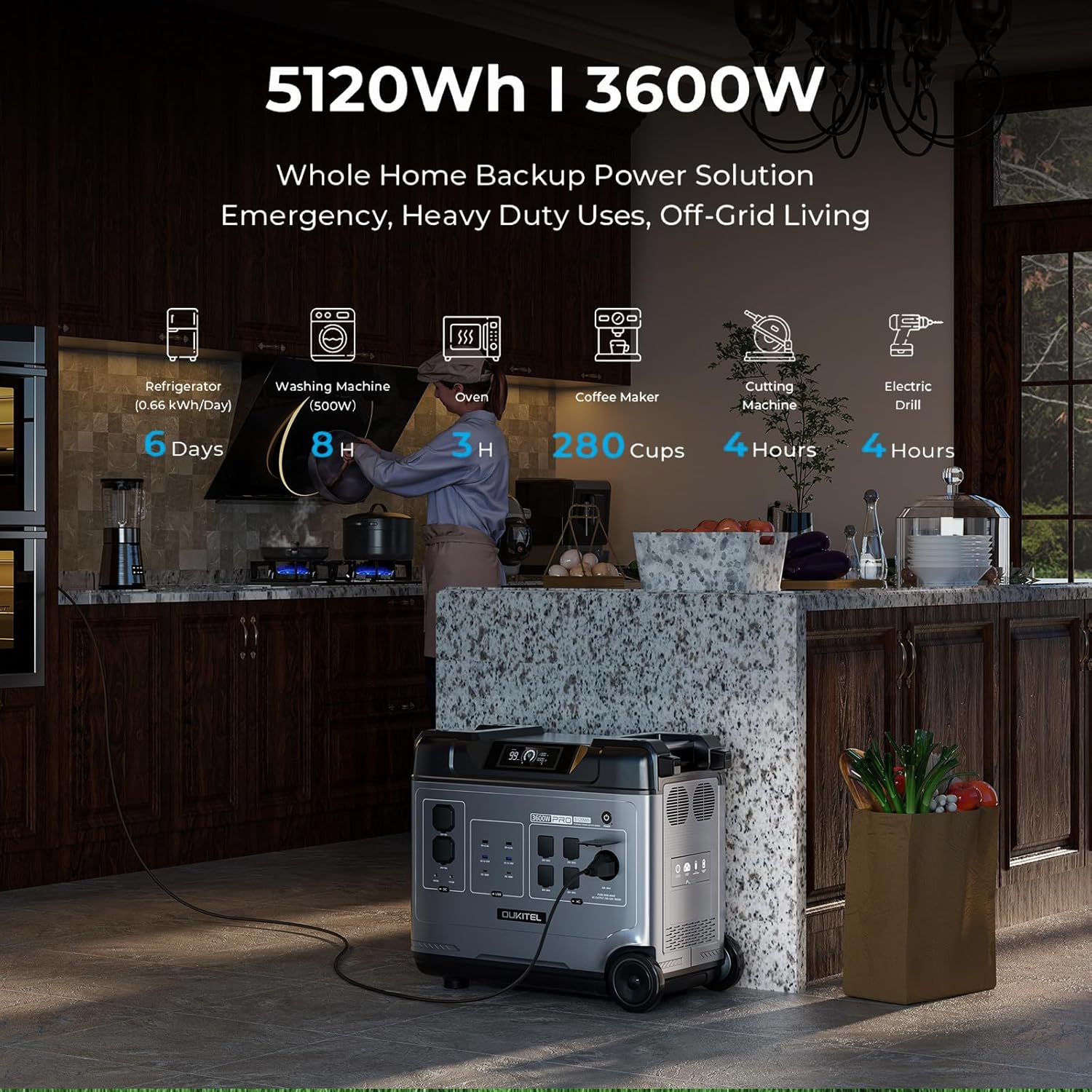
Image: OUKITEL P5000 Pro Portable Power Station with its various ports and accessories.
2. Инструкции по технике безопасности
Внимательно ознакомьтесь со всеми предупреждениями и инструкциями по технике безопасности перед использованием данного изделия. Несоблюдение этих инструкций может привести к поражению электрическим током, пожару или серьезным травмам.
- Не разбирайте, не ремонтируйте и не модифицируйте устройство.
- Держите устройство подальше от огня, источников тепла и прямых солнечных лучей.
- Не используйте и не храните устройство в ванной комнате или в месте, подверженном воздействию воды или влаги.
- Используйте только оригинальные или сертифицированные кабели и аксессуары.
- Во время использования обеспечьте надлежащую вентиляцию во избежание перегрева.
- Хранить в недоступном для детей и домашних животных месте.
- Утилизируйте изделие в соответствии с местными правилами.
3. Настройка и первоначальная зарядка
Initial AC Charging
Before first use, fully charge the P5000 Pro using the provided AC charging cable. The unit supports 1800W fast charging, allowing a full charge in approximately 2.5 hours.
- Подключите кабель зарядки переменного тока к входному порту переменного тока на электростанции.
- Подключите другой конец кабеля к стандартной розетке.
- The display will show the charging status and estimated time to full charge.
Video: Demonstrates connecting the AC charging cable to the OUKITEL P5000 Pro for fast charging.
Зарядка от солнечной панели
The P5000 Pro features a built-in MPPT controller for optimized solar charging. It supports up to 1000W solar input, allowing a full charge in approximately 5 hours when combined with AC hybrid charging.
- Разверните солнечные панели и разместите их под прямыми солнечными лучами.
- Подключите кабель для солнечной зарядки к входному разъему для солнечной энергии на электростанции.
- Connect the other end of the solar charging cable to the solar panels.
- На дисплее будет отображаться количество воды, поступающей от солнечных батарей.tage и состояние зарядки.
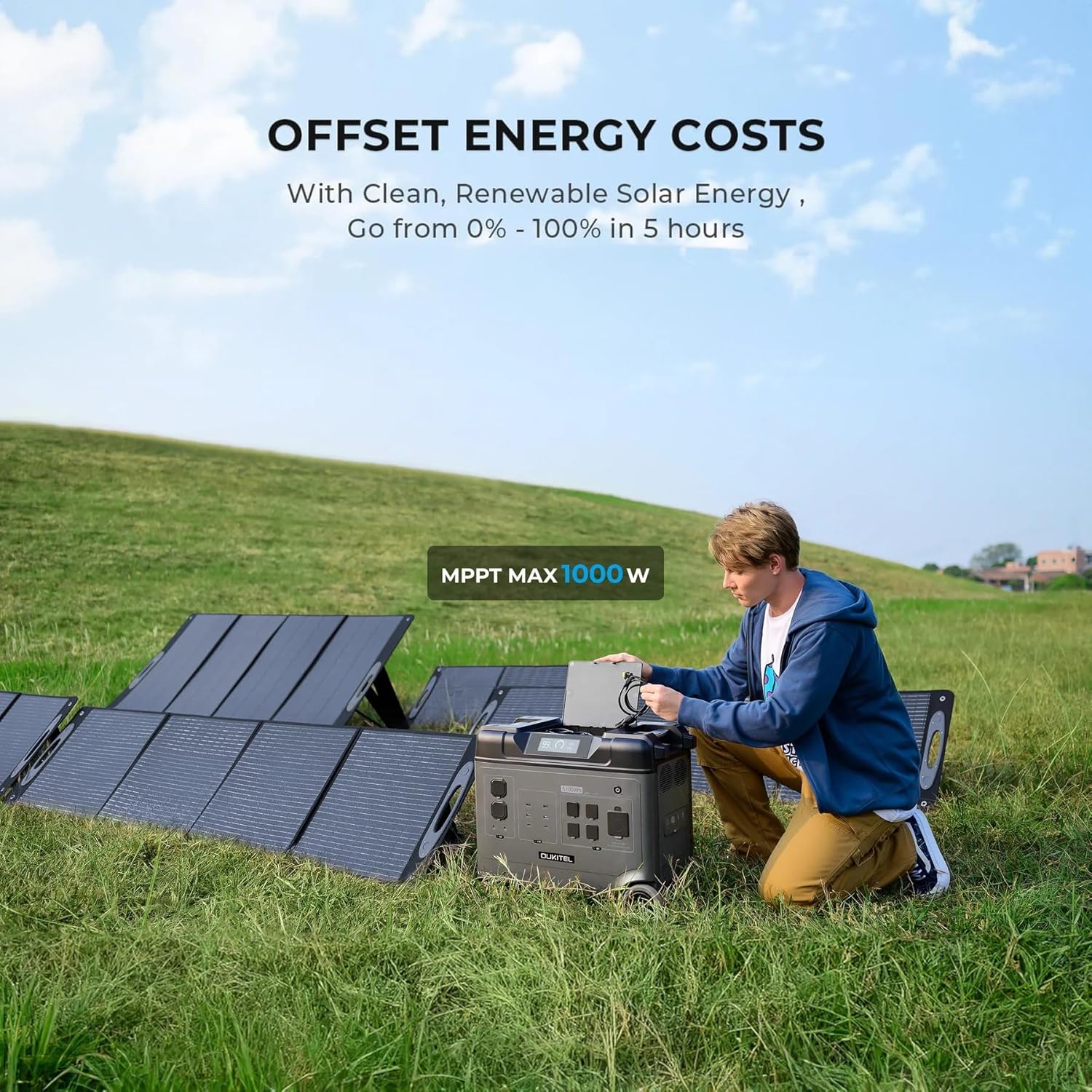
Image: OUKITEL P5000 Pro connected to solar panels for charging in an outdoor setting.
4. Операция
Устройства питания
The P5000 Pro offers 15 versatile outlets to power a wide range of devices simultaneously.
- Розетки переменного тока (5 шт.): Для высоких водtage appliances like refrigerators, space heaters, power tools, microwaves, and electric kettles.
- Порты USB-A (4x): Для зарядки смартфонов, планшетов и других устройств с питанием от USB.
- Порты USB-C (2x): Для устройств, совместимых с быстрой зарядкой.
- Порты постоянного тока (2 шт.): Для устройств, питающихся от постоянного тока.
- Разъем для прикуривателя (1 шт.): Автомобильные аксессуары.
- Airline Port (1x): Для специальных применений постоянного тока высокой мощности.

Image: The OUKITEL P5000 Pro with various cables connected, illustrating its ability to charge multiple devices simultaneously.
Умное управление приложением
Monitor and control your P5000 Pro remotely via the mobile app. Connect using Bluetooth or Wi-Fi to check battery levels, manage input/output, and schedule charging.
- Download the OUKITEL app from your device's app store.
- Ensure the P5000 Pro is powered on.
- Open the app and follow the instructions to connect via Bluetooth or Wi-Fi.
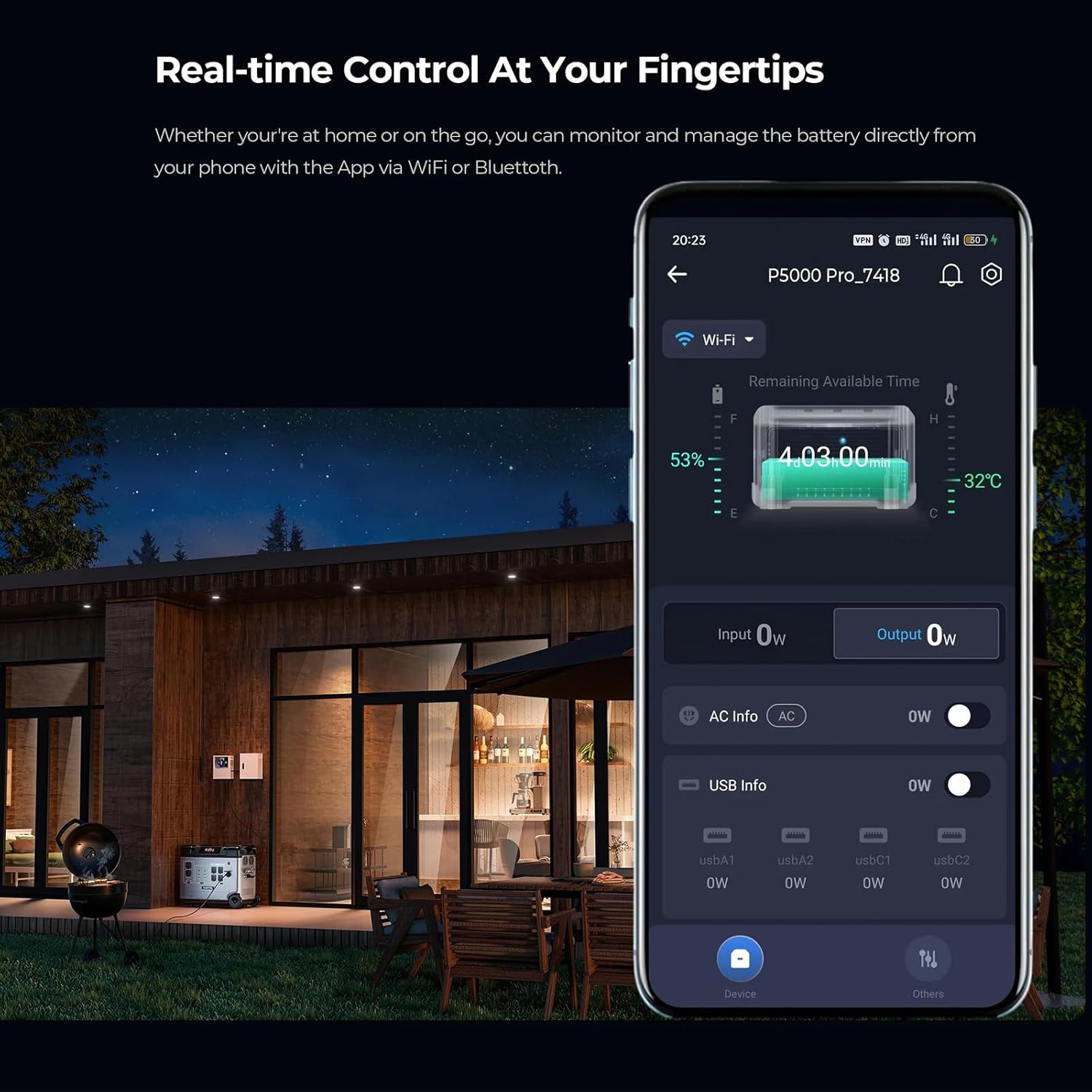
Image: A smartphone displaying the OUKITEL P5000 Pro app, showing real-time control and monitoring features.
Функция источника бесперебойного питания (ИБП)
The EPS function provides seamless power transition (<0.01s) during power outages, protecting sensitive electronics like computers, Wi-Fi routers, and medical equipment.
- Connect the P5000 Pro to a wall outlet using the AC charging cable.
- Connect your devices to the AC output ports of the P5000 Pro.
- В случае отключения электроэнергииtage, the P5000 Pro will automatically switch to battery power, ensuring continuous operation for connected devices.
Video: Illustrates the seamless UPS function of the OUKITEL P5000 Pro during a power outage, keeping devices running.
Electric Vehicle (EV) Charging
The P5000 Pro can provide emergency power to electric vehicles, offering approximately 24 miles of range for a Tesla.
- Ensure the P5000 Pro is adequately charged.
- Connect the appropriate EV charging cable (not included) to the P5000 Pro's AC output and your EV's charging port.
- Monitor the charging status on both the power station and your vehicle's display.
Video: Shows the OUKITEL P5000 Pro being used to charge an electric vehicle, highlighting its versatility.
5. Техническое обслуживание
Уход за аккумулятором
The P5000 Pro uses a LiFePO4 battery, known for its longevity (6000+ cycles, 10-year lifespan). Proper care ensures maximum performance and lifespan.
- Обычная зарядка: Для оптимального состояния батареи полностью заряжайте устройство не реже одного раза в 3-6 месяцев, даже если оно не используется.
- Хранилище: Store the power station in a cool, dry place, away from direct sunlight and extreme temperatures. Maintain a charge level between 50% and 80% for long-term storage.
- Уборка: Для чистки внешней поверхности устройства используйте сухую мягкую ткань. Не используйте едкие химикаты или абразивные материалы.
6. Поиск Неисправностей
If you encounter issues with your OUKITEL P5000 Pro, refer to the following common problems and solutions:
| Проблема | Возможная причина | Решение |
|---|---|---|
| Устройство не включается | Низкий заряд батареи; кнопка питания нажата неправильно | Зарядите устройство; нажмите и удерживайте кнопку питания в течение 3 секунд. |
| Выход переменного тока не работает | Выход переменного тока не включен; сработала защита от перегрузки | Press the AC output button; Reduce connected load, then restart AC output. |
| Солнечная зарядка не работает | Insufficient sunlight; Incorrect connection; Damaged solar panel/cable | Ensure direct sunlight; Check cable connections; Test with another solar panel/cable if possible. |
| Проблемы с подключением приложения | Bluetooth/Wi-Fi off; App not updated; Interference | Ensure Bluetooth/Wi-Fi is on; Update app to latest version; Move closer to the unit. |
Если проблема не устранена, обратитесь в службу поддержки клиентов.
7. Технические характеристики
| Особенность | Деталь |
|---|---|
| Бренд | Keenergy (OUKITEL) |
| Название модели | P5000 Про |
| Емкость | 5120Втч |
| Выход переменного тока (номинальный) | 3600 Вт (чистая синусоида) |
| Выход переменного тока (пиковый) | 6000 Вт |
| Тип батареи | LiFePO4 |
| Продолжительность жизни | Более 6000 циклов (до 80% емкости) |
| Вход переменного тока (быстрая зарядка) | 1800 Вт |
| Вход солнечной энергии (макс.) | 1000 Вт (MPPT) |
| Функция ИБП | Seamless transition (<0.01s) |
| Контроль | Smart App (Bluetooth/Wi-Fi) |
| Размеры (Д x Ш x В) | 22"Д x 12"Ш x 19"В |
| Вес товара | 48 фунта |
| Всего розеток | 15 (5x AC, 4x USB-A, 2x USB-C, 2x DC, 1x Cigarette Lighter, 1x Airline Port) |
8. Гарантия и поддержка
The OUKITEL P5000 Pro Portable Power Station comes with a 5-летняя гарантия производителя, гарантируя спокойствие относительно качества и производительности продукции.
For technical assistance, troubleshooting, or warranty claims, please contact OUKITEL customer service through the official webна сайте или у вашего продавца.
Please have your purchase receipt and product model number (P5000 Pro) ready when contacting support.