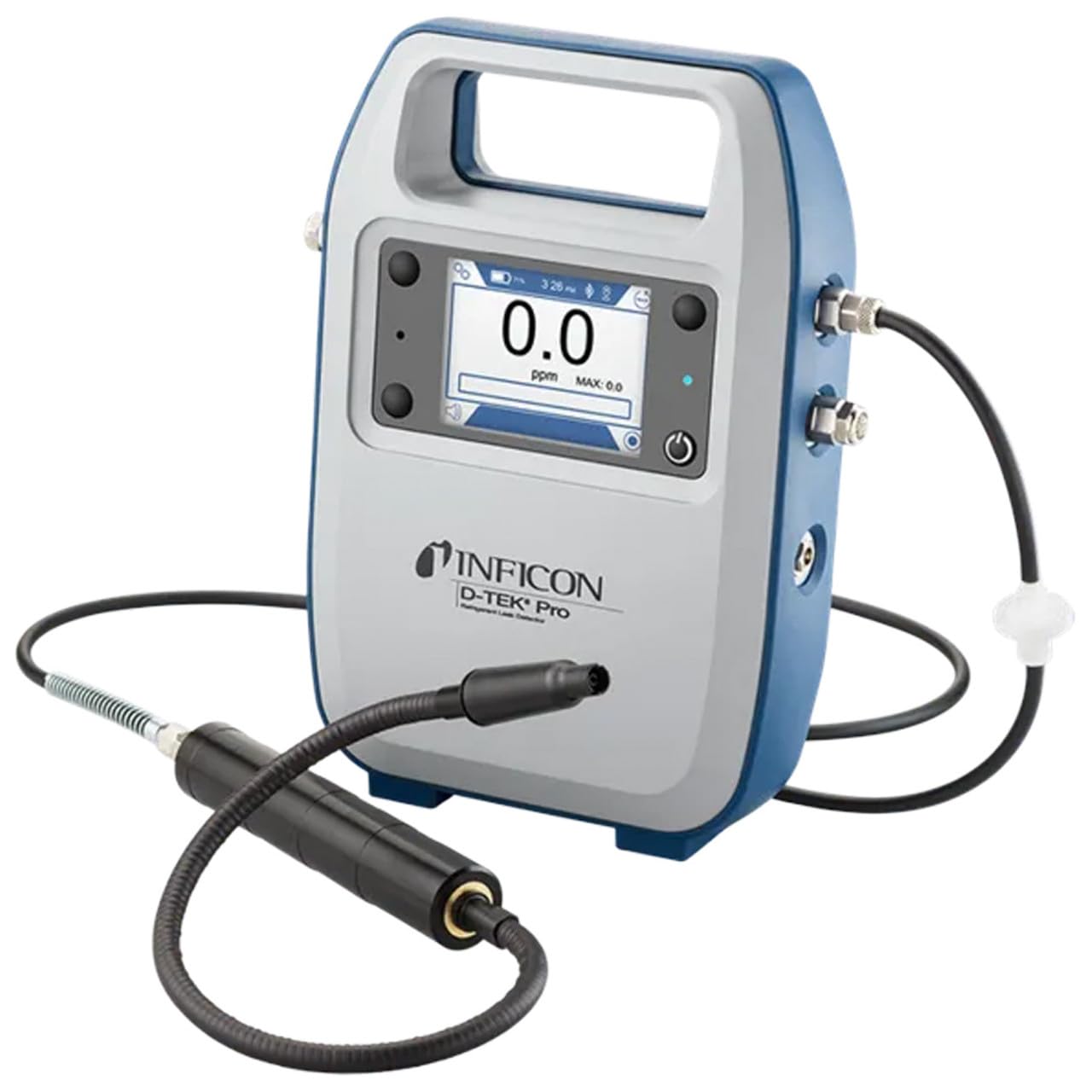
Inficon D-TEK Pro Refrigerant Leak Detector User Manual
Модель: 508-202-G1
1. Введение
The Inficon D-TEK Pro Refrigerant Leak Detector is designed for precise and rapid detection of refrigerant leaks. This device offers high sensitivity and an all-in-one Pro Mode for efficient leak identification. This manual provides essential information for the proper setup, operation, and maintenance of your D-TEK Pro.
2. Информация по технике безопасности
Всегда соблюдайте следующие меры предосторожности, чтобы предотвратить травмы и повреждение устройства:
Перед началом работы с устройством прочтите все инструкции.
Используйте устройство только так, как описано в данном руководстве.
Не подвергайте устройство воздействию экстремальных температур или влаги.
При работе с хладагентами необходимо обеспечить надлежащую вентиляцию.
Используйте соответствующие средства индивидуальной защиты (СИЗ), такие как перчатки и средства защиты глаз.
Do not attempt to service the device beyond what is described in the maintenance section. Refer all other servicing to qualified personnel.
3. Что в коробке
При распаковке убедитесь в наличии всех предметов:
(1) D-TEK Pro Refrigerant Leak Detector
(1) Soft case with shoulder strap
(1) Spare filters
(1) Phone holder
(1) Зарядный кабель
4. Настройка
4.1 Зарядка устройства
The D-TEK Pro is powered by a rechargeable battery. Before first use, fully charge the device.
Connect the provided charging cable to the charging port on the D-TEK Pro.
Plug the other end of the charging cable into a suitable power source.
The charging indicator on the device will illuminate. Allow sufficient time for a full charge.
4.2 Крепление держателя телефона
The included phone holder allows for convenient mobile device integration.
Locate the attachment point for the phone holder on the D-TEK Pro.
Securely attach the phone holder according to its design.
Place your mobile device into the holder, ensuring it is stable.
5. Инструкция по эксплуатации
5.1 Включение/выключение питания
Для включения нажмите и удерживайте кнопку питания, пока не загорится дисплей.
Чтобы выключить питание, нажмите и удерживайте кнопку питания, пока устройство не выключится.
5.2 Using Pro Mode for Leak Detection
The D-TEK Pro features an all-in-one Pro Mode that combines cloud hunting and pinpointing capabilities, allowing for efficient leak location.
Ensure the device is powered on and in Pro Mode (refer to the display for mode indication).
Move the sensor probe slowly around suspected leak areas. The device's superior airflow allows for detection from a greater distance.
The D-TEK Pro will indicate the presence of refrigerants with high sensitivity, detecting down to 0.1 ppm.
Следуйте за увеличениемasing readings to pinpoint the exact leak source.
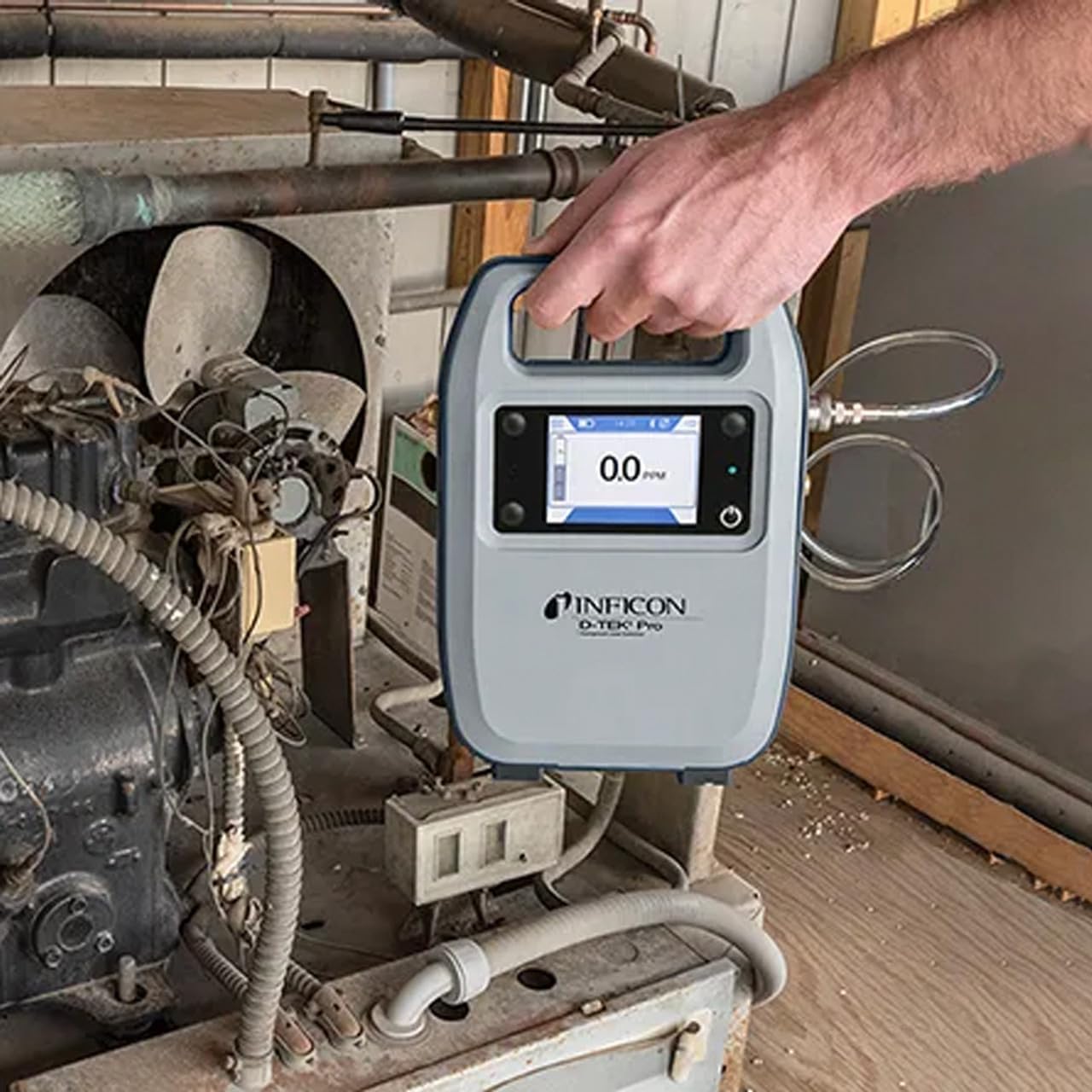
Figure 1: The Inficon D-TEK Pro being used to inspect a refrigeration unit. The display shows a 0.0 ppm reading, indicating no refrigerant detected at the current location. The device is held by a user's hand, demonstrating its portability and ease of use in an industrial setting.
5.3 Refrigerant Compatibility
The D-TEK Pro is designed to detect a wide range of refrigerants, including:
ХФУ (хлорфторуглероды)
ГХФУ (гидрохлорфторуглероды)
ГФУ (гидрофторуглероды)
Гидрофторолефины (ГФО)
Blends including A2Ls
5.4 Интеграция с мобильным приложением
Download the D-TEK Pro mobile app to enhance your leak detection workflow.
Customer Reports: Generate detailed reports with photos and ppm tracking.
Отслеживание GPS: Confirm job location with integrated GPS functionality.
Figure 2: The Inficon D-TEK Pro connected to a smartphone, showcasing the mobile application's interface. This setup allows users to view real-time leak detection data, generate reports, and utilize GPS tracking for job site verification.
6. Техническое обслуживание
6.1 Общий уход и чистка
To ensure optimal performance and longevity of your D-TEK Pro:
Протрите устройство мягкой, дamp Ткань. Не используйте абразивные чистящие средства или растворители.
Keep the sensor probe clean and free from debris.
Store the device in its soft case when not in use to protect it from dust and physical damage.
6.2 Замена фильтра
The D-TEK Pro is designed for low maintenance, requiring no purging and no charcoal filters. However, spare filters are provided for specific applications or if the existing filter becomes visibly soiled or damaged.
Locate the filter housing on the device.
Аккуратно извлеките старый фильтр.
Insert a new spare filter, ensuring it is seated correctly.
7. Поиск Неисправностей
This section addresses common issues you might encounter with your D-TEK Pro.
Проблема
Возможная причина
Решение
Устройство не включается.
Низкий или разряженный аккумулятор.
Зарядите устройство с помощью прилагаемого зарядного кабеля.
Неточные или непоследовательные показания.
Sensor probe is dirty or damaged; environmental interference.
Clean the sensor probe. Ensure proper environmental conditions. If issue persists, contact support.
Мобильное приложение не подключается.
Bluetooth issue; app not updated.
Ensure Bluetooth is enabled on both devices. Update the D-TEK Pro app to the latest version.
8. Технические характеристики
Особенность
Деталь
Номер модели
508-202-Г1
Вес товара
3 фунта
Размеры упаковки
15 x 12 x 4 дюйма
Тип дисплея
ЖК, светодиодный
Источник питания
Аккумуляторная батарея
Чувствительность
Разрешение 0.1 ppm
Detected Refrigerants
CFCs, HCFCs, HFCs, HFOs, and blends including A2Ls
9. Информация о гарантии
The Inficon D-TEK Pro Refrigerant Leak Detector comes with a Гарантия 2 год from the date of purchase. This warranty covers defects in materials and workmanship under normal use. For warranty claims or detailed terms and conditions, please refer to the official Inficon webсайт или обратитесь в службу поддержки клиентов.
10. Поддержка клиентов
For technical assistance, troubleshooting not covered in this manual, or general inquiries, please contact Inficon customer support.
Интернет-ресурсы: Посетите официальный сайт Inficon Store on Amazon для получения информации о продукте и обновлений.
Контактная информация: Refer to the Inficon official webСайт для получения контактной информации (телефон, электронная почта).
Ask a question about this manual
Ask about setup, troubleshooting, compatibility, parts, safety, or missing instructions. Manuals+ will review the question and use this page’s manual context to help answer it.