1. Введение
The EKIY EC17 is a 2-in-1 wireless adapter designed to convert your car's wired Apple CarPlay or Android Auto system into a wireless one. This device features 6GHz WiFi and Bluetooth 5.4 for stable connectivity, a Cortex A9 processor for smooth performance, and an aluminum alloy casing with 4-way heat dissipation for optimal operation. Its compact design and tempered glass finish integrate seamlessly into your vehicle's interior, providing convenient access to navigation, music, and communication apps without the need for cables.
2. Содержимое упаковки
Пожалуйста, проверьте наличие всех предметов в вашей посылке:
- 1 x EKIY EC17 Wireless CarPlay & Android Auto Adapter
3. Руководство по установке
3.1 Предварительные условия
- Your vehicle must have a factory-installed wired Apple CarPlay or Android Auto system. Third-party installations are not supported.
- For Wireless CarPlay: iPhone running iOS 10 or above.
- For Wireless Android Auto: Android phone running Android 11.0 or above.
3.2 Способы подключения
The EC17 adapter supports two primary connection types:
- Подключение USB-A: If your car has a standard USB-A port, plug the adapter directly into the port.
- Соединение USB-C: If your car has a USB-C port, use a USB-A to USB-C adapter (not included) to connect the EC17 adapter.

Figure 3.2: Connection methods for the EKIY EC17 adapter.
3.3 Процесс сопряжения
Follow these steps to establish a wireless connection:
- Убедитесь, что двигатель вашего автомобиля работает и информационно-развлекательная система активна.
- Plug the EKIY EC17 adapter into the car's USB port that supports wired CarPlay or Android Auto.
- On your car's infotainment screen, the adapter interface should appear.
- На своем смартфоне включите Bluetooth и Wi-Fi.
- Искать the adapter's Bluetooth name (usually displayed on the car screen or adapter itself) and pair your phone.
- Once paired via Bluetooth, your phone will automatically connect to the adapter's Wi-Fi for data transfer, enabling Wireless CarPlay or Android Auto.
- Confirm the connection on your car's screen.
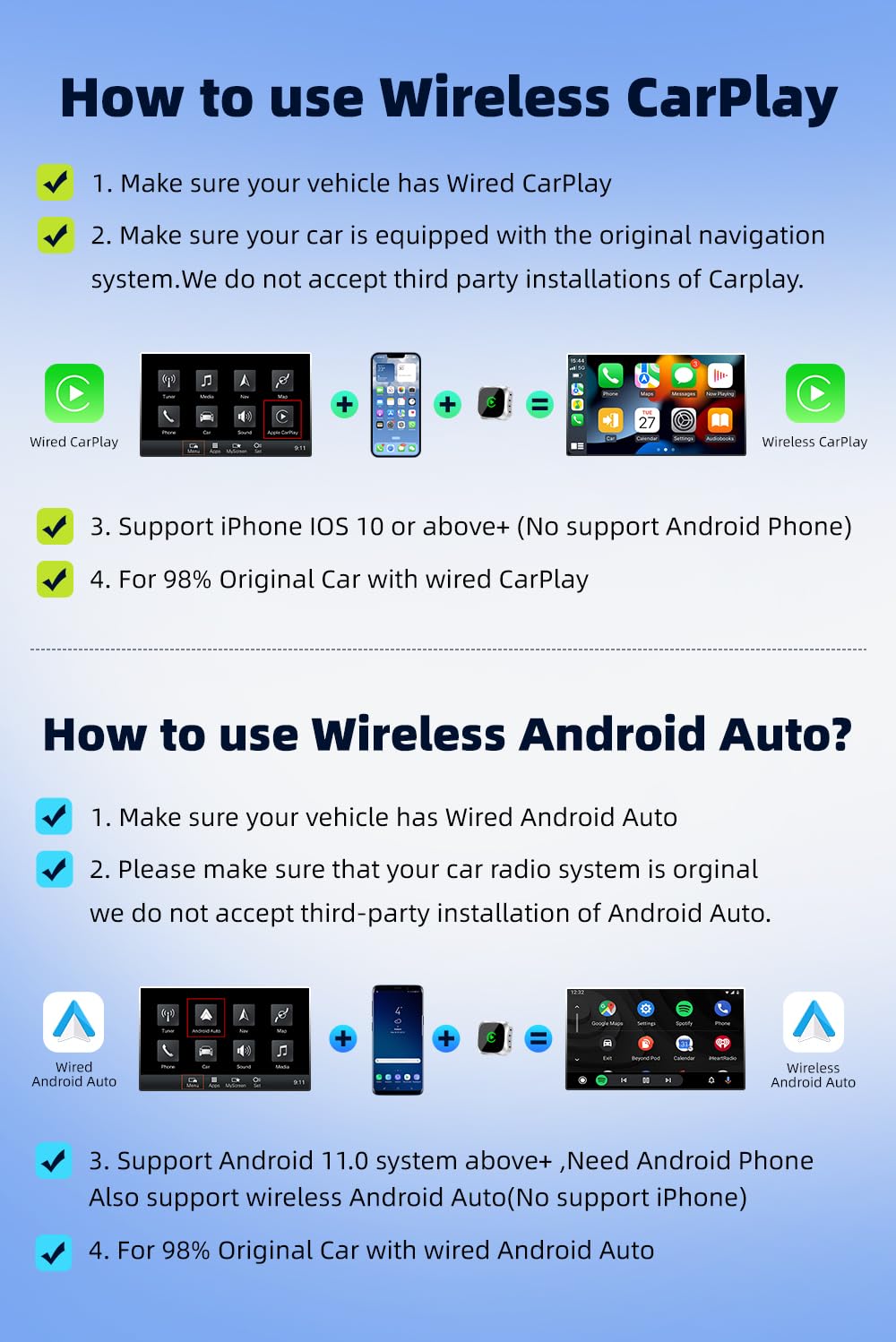
Figure 3.3: Step-by-step guide for Wireless CarPlay and Android Auto setup.
3.4 Совместимость
The EKIY EC17 adapter is designed to be compatible with approximately 98% of car models that come with original wired CarPlay or Android Auto functionality. This includes a wide range of manufacturers such as Audi, Toyota, Hyundai, Porsche, Ford, Honda, Mazda, Mitsubishi, Nissan, Suzuki, KIA, Volkswagen, Skoda, Lexus, Benz, Chevrolet, Jeep, Citroen, and Peugeot.

Figure 3.4: Car model compatibility overview.
4. Инструкция по эксплуатации
4.1 Использование беспроводного CarPlay / Android Auto
Once successfully connected, your car's infotainment screen will display the Wireless CarPlay or Android Auto interface, mirroring your smartphone's compatible applications. You can access various apps including navigation (Google Maps, Apple Maps), music streaming (Spotify, Apple Music), messaging, and more.
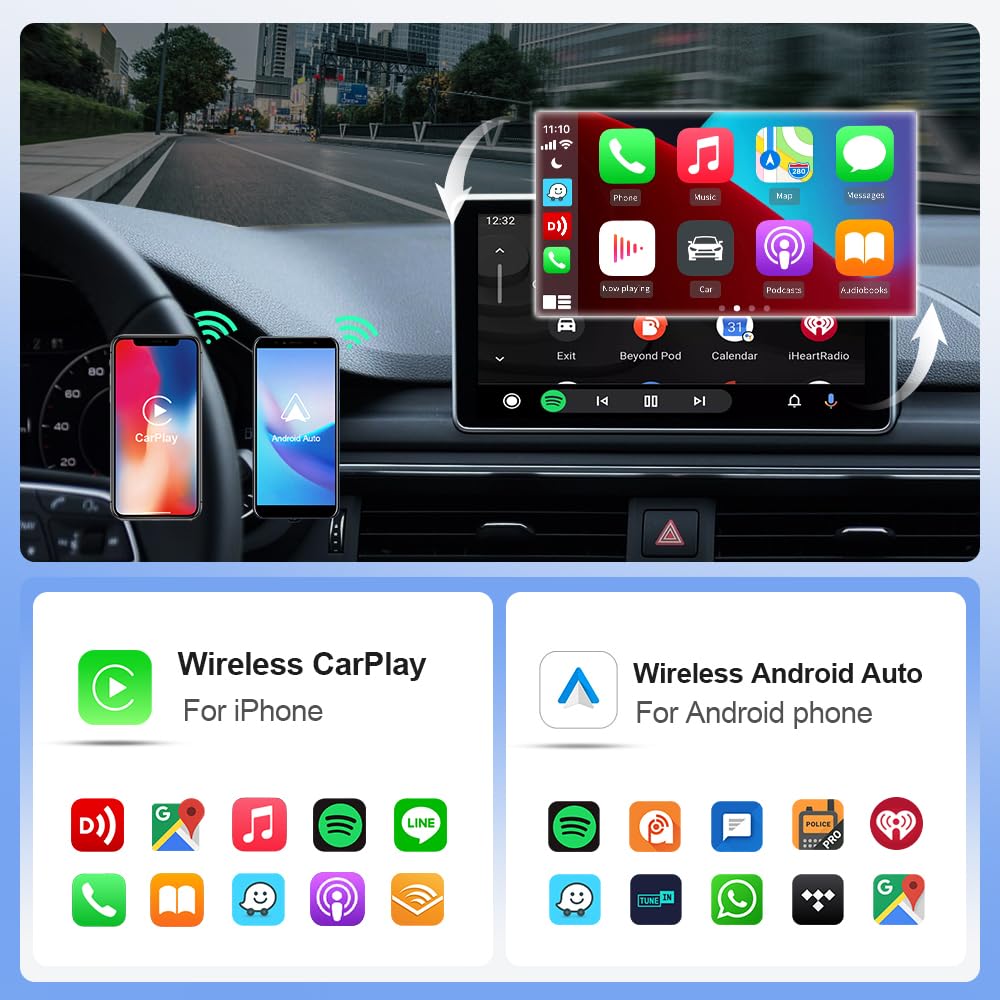
Figure 4.1: Wireless CarPlay and Android Auto interfaces with app exampлес.
Методы управления 4.2
The EKIY EC17 adapter maintains compatibility with your car's original control mechanisms, allowing for a familiar user experience:
- Управление на рулевом колесе: Use your car's steering wheel buttons to navigate menus, adjust volume, and manage calls.
- Ручка управления: Utilize the car's central control knob for precise menu selection and navigation.
- Голосовое управление: Activate voice assistants (Siri for CarPlay, Google Assistant for Android Auto) using your car's voice command button for hands-free operation.
- Сенсорный экран управления: Interact directly with the infotainment screen for app selection and input, if your car supports touch functionality.

Figure 4.2: Supported control methods for the adapter.
5. Техническое обслуживание
To ensure the longevity and optimal performance of your EKIY EC17 adapter, follow these simple maintenance guidelines:
- Уборка: Gently wipe the adapter's surface with a soft, dry cloth. Avoid using liquid cleaners or abrasive materials.
- Хранилище: Если адаптер не используется в течение длительного времени, храните его в прохладном, сухом месте, вдали от прямых солнечных лучей и экстремальных температур.
- Рассеивание тепла: Адаптер имеет корпус из алюминиевого сплава.asing with ventilation openings for heat dissipation. Ensure these openings are not obstructed to prevent overheating.

Figure 5.1: EKIY EC17 adapter with heat dissipation features.
6. Поиск Неисправностей
If you encounter issues with your EKIY EC17 adapter, please refer to the following common solutions:
- No Connection / Frequent Disconnections:
- Ensure your car's wired CarPlay/Android Auto system is functioning correctly.
- Убедитесь, что на вашем смартфоне включены Bluetooth и Wi-Fi.
- Попробуйте отключить адаптер от сети и снова подключить его.
- Перезагрузите информационно-развлекательную систему вашего автомобиля и ваш смартфон.
- Check for any firmware updates for the adapter (refer to support section for details).
- Задержка или отсроченный ответ:
- Ensure your smartphone has a strong Wi-Fi signal from the adapter.
- Закройте ненужные приложения на своем смартфоне, чтобы освободить ресурсы.
- Проверьте наличие возможных помех от других беспроводных устройств.
- Перегрев адаптера:
- Ensure the ventilation openings on the adapter are not blocked.
- Avoid placing the adapter in direct sunlight or enclosed spaces.
- If overheating persists, disconnect the adapter and allow it to cool down before re-connecting.
- Audio Issues (e.g., unclear calls):
- Check your phone's audio settings and ensure the correct output is selected.
- Verify your car's microphone is functioning properly.
- Ensure there are no other Bluetooth devices interfering with the connection.
Если эти действия не помогли решить проблему, обратитесь в службу поддержки клиентов.
7. Технические характеристики
| Особенность | Деталь |
|---|---|
| Бренд | ЭКИЙ |
| Модель | EC17 |
| Размеры продукта | 2.3 х 0.5 х 2.3 см |
| Вес товара | 50 г |
| Связность | Wi-Fi 6 ГГц, Bluetooth 5.4 |
| Процессор | Кортекс А9 |
| Материал | Aluminium, Tempered Glass |
| Совместимые устройства | Smartphones (iPhone iOS 10+, Android 11.0+) |
| Конкретные применения | Car Infotainment System (Wireless CarPlay & Android Auto) |
| Тип разъема | USB Type A, USB Type C (with adapter) |
| Страна происхождения | Китай |
8. Информация о гарантии
Пожалуйста, обратитесь к упаковке продукта или к продавцу. website for specific warranty terms and conditions. Generally, electronic products come with a limited manufacturer's warranty covering defects in materials and workmanship under normal use. Keep your proof of purchase for warranty claims.
9. Поддержка клиентов
For technical assistance, troubleshooting, or any product-related inquiries, please contact our customer support team:
- Телефон: 06282844320
- Производитель: ЭКИЙ

Figure 9.1: EKIY Support Center contact information.