
Введение
This manual provides essential instructions for the setup, operation, and maintenance of your Subsonic Superdrive 270 GT-5 Racing Wheel. Designed for a realistic racing experience, this wheel is compatible with PlayStation 5 (PS5) and PC. Please read this manual thoroughly before use to ensure optimal performance and longevity of your device.
Содержимое упаковки
Проверьте наличие всех предметов в посылке:
- Superdrive 270 GT-5 Racing Wheel
- Pedal Set (Brake and Accelerator)
- Регулируемое крепление Clamp
- Removable Suction Cups (5 units)
- Соединительный кабель USB
Инструкции по установке
Follow these steps to connect your racing wheel to your console or PC.
Физическая установка
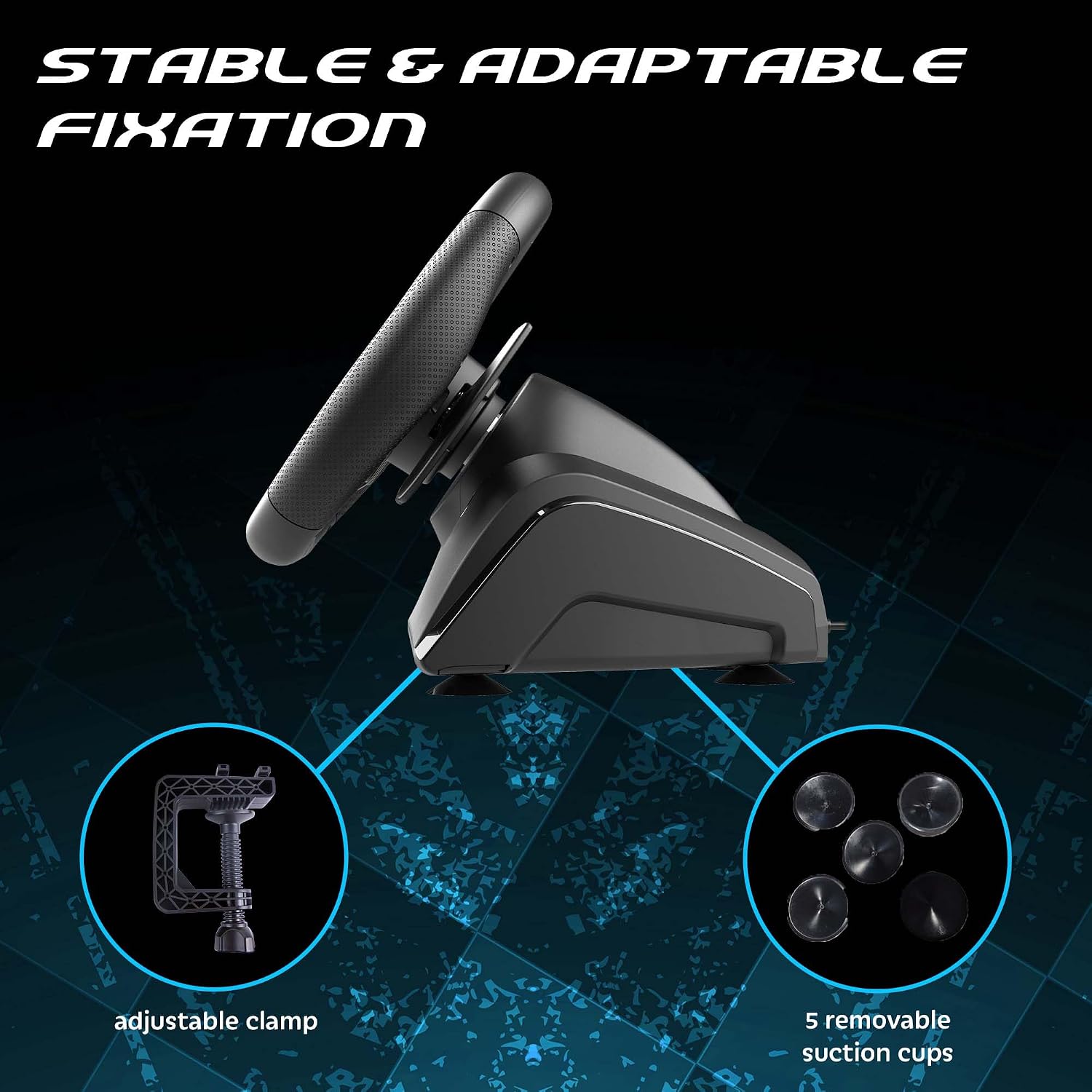
1. Садясь за руль: Place the racing wheel on a stable surface such as a desk or table. Use the adjustable clamp to secure it firmly. Alternatively, attach the five removable suction cups to the bottom of the wheel for additional stability on smooth surfaces.

Регулируемый кл.amp and suction cups provide stable fixation for the racing wheel.
2. Подключение педалей: Connect the pedal set cable to the designated port on the rear of the racing wheel base.
3. Подключение к консоли/ПК: Plug the USB connection cable from the racing wheel into an available USB port on your PlayStation 5 or PC.

The Superdrive 270 GT-5 Racing Wheel is designed for use with PS5 and PC.
PS5 Specific Setup
For optimal performance on PlayStation 5, ensure your console settings are configured correctly:
- Настройки доступа: From the PS5 home screen, navigate to the Настройки icon (gear icon).
- Navigate to Accessories: In the Settings menu, select Аксессуары.
- Select Controller (General): Under Accessories, choose Controller (General).
- Choose Communication Method: Выбирать Метод связи.
- Select Use USB Cable: From the Communication Method options, select Используйте USB-кабель.
- Activate Wheel: After connecting the USB cable, press the ДОМ button on the racing wheel to activate it.

Navigate to the Settings menu on your PS5 console.

Follow the menu path to 'Communication Method'.

Ensure 'Use USB Cable' is selected for controller communication.

Connect the USB cable and press the HOME button on the wheel.
Инструкция по эксплуатации
The Superdrive 270 GT-5 Racing Wheel offers various features for an immersive gaming experience.
Steering and Pedals
- Вращение на 270 градусов: The steering wheel provides a 270-degree rotation for precise control in racing games.
- Analog Pedals: The included pedal set features analog brake and accelerator pedals for responsive input.
- Подрулевые переключатели: Use the integrated paddle shifters on the wheel for quick and intuitive gear changes.

The racing wheel offers a 270-degree rotation for enhanced control.
Dual Joysticks and Programmable LEDs
The racing wheel includes dual joysticks, replicating full controller functionality, and programmable RGB LEDs.
- Dual Joysticks: The right and left joysticks provide access to all standard controller functions, conveniently located on the wheel.
- Programmable RGB LEDs: The LEDs around the joysticks can be customized to fix colors, display a rainbow effect, or show breathing colors. Refer to the programming section for detailed instructions on customization.

The dual joysticks feature programmable RGB LEDs with various display options.
Progressive LEDs
LEDs located on the top of the steering wheel provide visual feedback for acceleration and braking, enhancing immersion.

Progressive LEDs on the wheel indicate acceleration and braking.
Programmable Keys and Sensitivity Levels
The wheel features programmable buttons and adjustable sensitivity to suit different racing styles and game types.
- Программируемые кнопки: Specific buttons on the wheel can be programmed for custom functions. Refer to the dedicated programming section in the full manual for detailed instructions.
- Уровни чувствительности: Choose from three sensitivity levels:
- Низкая чувствительность: Suitable for most racing games, offering stable control.
- Средняя чувствительность: Ideal for games with many curves, providing a balance of responsiveness and control.
- Высокая чувствительность: Best for linking tight turns, offering maximum responsiveness.
Adjustable sensitivity levels allow customization for various racing scenarios.
Обслуживание
To ensure the longevity and proper functioning of your racing wheel:
- Уборка: Use a soft, dry cloth to clean the surfaces of the wheel and pedals. Avoid abrasive cleaners or solvents.
- Хранилище: Храните устройство в прохладном, сухом месте, вдали от прямых солнечных лучей и экстремальных температур.
- Уход за кабелем: Избегайте чрезмерного сгибания или скручивания кабелей. Отсоединяйте кабели, выдергивая вилку, а не сам кабель.
Поиск неисправностей
If you encounter issues with your Superdrive 270 GT-5 Racing Wheel, refer to the following common solutions:
- Руль не реагирует:
- Ensure all cables are securely connected to the wheel, pedals, and console/PC.
- For PS5, verify that the console's communication method is set to 'Use USB Cable' as described in the setup section.
- Try connecting the wheel to a different USB port on your console or PC.
- Перезагрузите консоль или компьютер.
- Disconnections During Gameplay (PS5):
- This issue may occur if the PS5 perceives the wheel as a DualShock 4 controller and disconnects it. Ensure the 'Use USB Cable' setting is correctly applied and remains active.
- Ensure your PS5 system software is up to date.
- Avoid using USB hubs; connect the wheel directly to the console.
- Педали не реагируют:
- Check the connection cable between the pedals and the wheel base.
- Test the wheel and pedals with a different game or on a different platform (if available) to isolate the issue.
- Светодиоды не работают:
- Ensure the wheel is powered on and properly connected.
- Refer to the programming section (in the full manual) for LED customization and ensure settings are correct.
If problems persist after attempting these solutions, please contact Subsonic customer support.
Технические характеристики
| Особенность | Деталь |
|---|---|
| Номер модели | СА5721-2 |
| Совместимость | PlayStation 5, ПК |
| Вращение рулевого колеса | 270 градусов |
| Диаметр колеса | 270 мм |
| Материал рукоятки | Micro-perforated synthetic leather |
| Вибрационная обратная связь | Двойные вибрационные двигатели |
| Управление | Dual joysticks, paddle shifters, programmable buttons |
| светодиоды | Programmable RGB LEDs (joysticks), progressive LEDs (acceleration/braking) |
| Уровни чувствительности | 3 (Низкий, Средний, Высокий) |
| Монтаж | Регулируемый клamp, removable suction cups |
| Педали | Analog brake and accelerator with footrest |
| Размеры (упаковка) | 32 х 29.21 х 27.94 см |
| Вес (упаковка) | 2.5 килограмма |
| Источник | Китай |
Гарантия и поддержка
The Subsonic Superdrive 270 GT-5 Racing Wheel comes with a 2-летняя гарантия производителя. Данная гарантия распространяется на дефекты материалов и изготовления при нормальном использовании.
For technical support, warranty claims, or further assistance, please visit the official Subsonic webили обратитесь в службу поддержки клиентов. Сохраните чек о покупке для подтверждения гарантии.