
1. Введение
Thank you for choosing the DazzlingStage 60W 9LED RGBW Stage Wall Wash Bar Light. This manual provides essential information for the safe and effective operation of your lighting fixture. Please read it thoroughly before installation and use, and retain it for future reference.
Это сtage light bar features 9 high-power RGBW LEDs, offering a wide spectrum of colors and dynamic lighting effects suitable for various events and venues.

Изображение 1.1: оконченоview of the DazzlingStage 60W 9LED RGBW Stage Wall Wash Bar Lights in various colors.
2. Инструкции по технике безопасности
- Электробезопасность: Убедитесь, что источник питания vol.tage matches the specifications of the fixture. Always disconnect power before cleaning, servicing, or moving the unit.
- Установка: Install the fixture in a well-ventilated area, away from heat sources. Ensure secure mounting to prevent accidental falls.
- Операция: Do not look directly into the light source when the fixture is operating, as it can cause eye damage. Avoid operating the unit in wet or damp условия.
- Обслуживание: Все работы по техническому обслуживанию должны выполняться квалифицированным персоналом. Не пытайтесь ремонтировать устройство самостоятельно.
- Дети: Храните устройство в недоступном для детей месте.
3. Содержимое упаковки
После распаковки, пожалуйста, убедитесь, что все перечисленные ниже предметы находятся в комплекте и в надлежащем состоянии:
- DazzlingStage 60W 9LED RGBW Stage Wall Wash Bar Light (x1 per pack)
- Power Cord (x1 per pack)
- Remote Control (x1 per pack)
- Mounting Bracket (x1 per pack)
- Knobs (x2 per pack)
- Black Gaskets (x2 per pack)
- Instruction Manual (x1 per pack)

Рисунок 3.1: Комплектация продукта.
4. Компоненты продукта
Ознакомьтесь с основными компонентами световой панели:
- Светодиодная матрица: 9 RGBW LEDs for color mixing.
- Панель управления: Features a 4-digit LED display and control buttons (MENU, UP, DOWN, ENTER) for mode selection and parameter adjustment.
- Порты DMX IN/OUT: Для подключения к DMX-контроллеру или объединения нескольких устройств.
- Вход/выход питания: For power connection and daisy-chaining power to other units.
- Монтажный кронштейн: Adjustable bracket for floor standing or truss mounting.
- Радиатор: Integrated cooling system to maintain optimal operating temperature.

Image 4.1: Key components and dimensions of the light bar.
5. Настройка и установка
The DazzlingStage Wall Wash Bar Light offers flexible installation options:
5.1 Установка кронштейна
Attach the included mounting bracket to the light bar using the provided knobs and gaskets. Ensure the bracket is securely fastened.
5.2 Варианты размещения
- Напольные: The bracket allows the light bar to stand upright on a flat surface. Adjust the angle as needed.
- Монтаж фермы: Используйте соответствующий клamps (not included) to attach the bracket to a lighting truss. Ensure the truss and clamps can support the weight of the fixture.
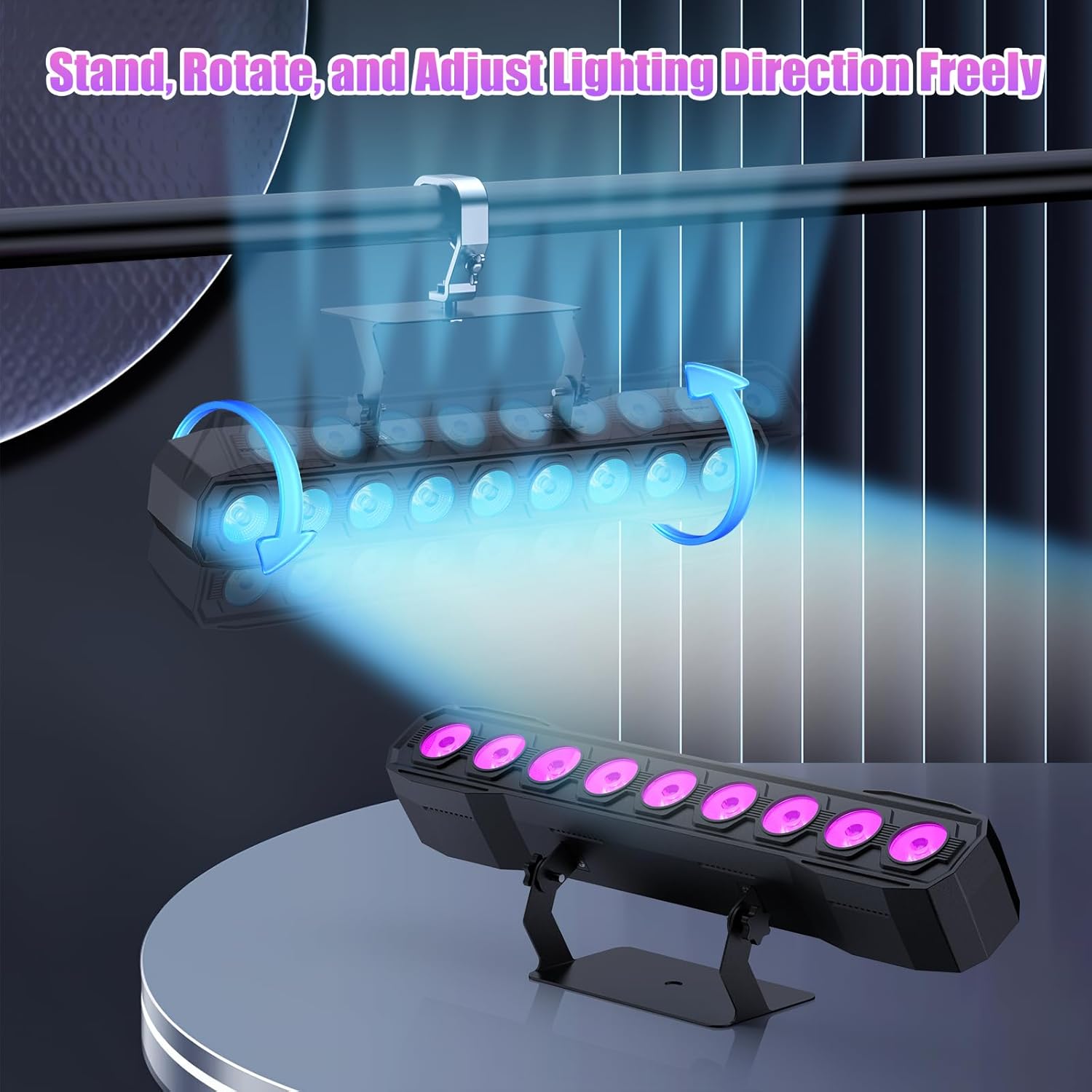
Image 5.1: Illustration of mounting and angle adjustment options.
5.3 Подключение питания
Connect the power cord to the Power IN port on the back of the fixture and then to a suitable power outlet. Multiple units can be daisy-chained using the Power OUT port to simplify wiring for larger setups.
6. Режимы работы
The DazzlingStage Wall Wash Bar Light supports several control modes:
- Управление DMX512: For professional control via a DMX console.
- Автоматический режим: Pre-programmed lighting sequences.
- Sound-Activated Control: Светильники реагируют на окружающие звуки.
- Дистанционное управление: Convenient wireless control using the included remote.
- Режим «главный-подчиненный»: Link multiple units where one acts as a master and others as slaves, synchronizing effects.
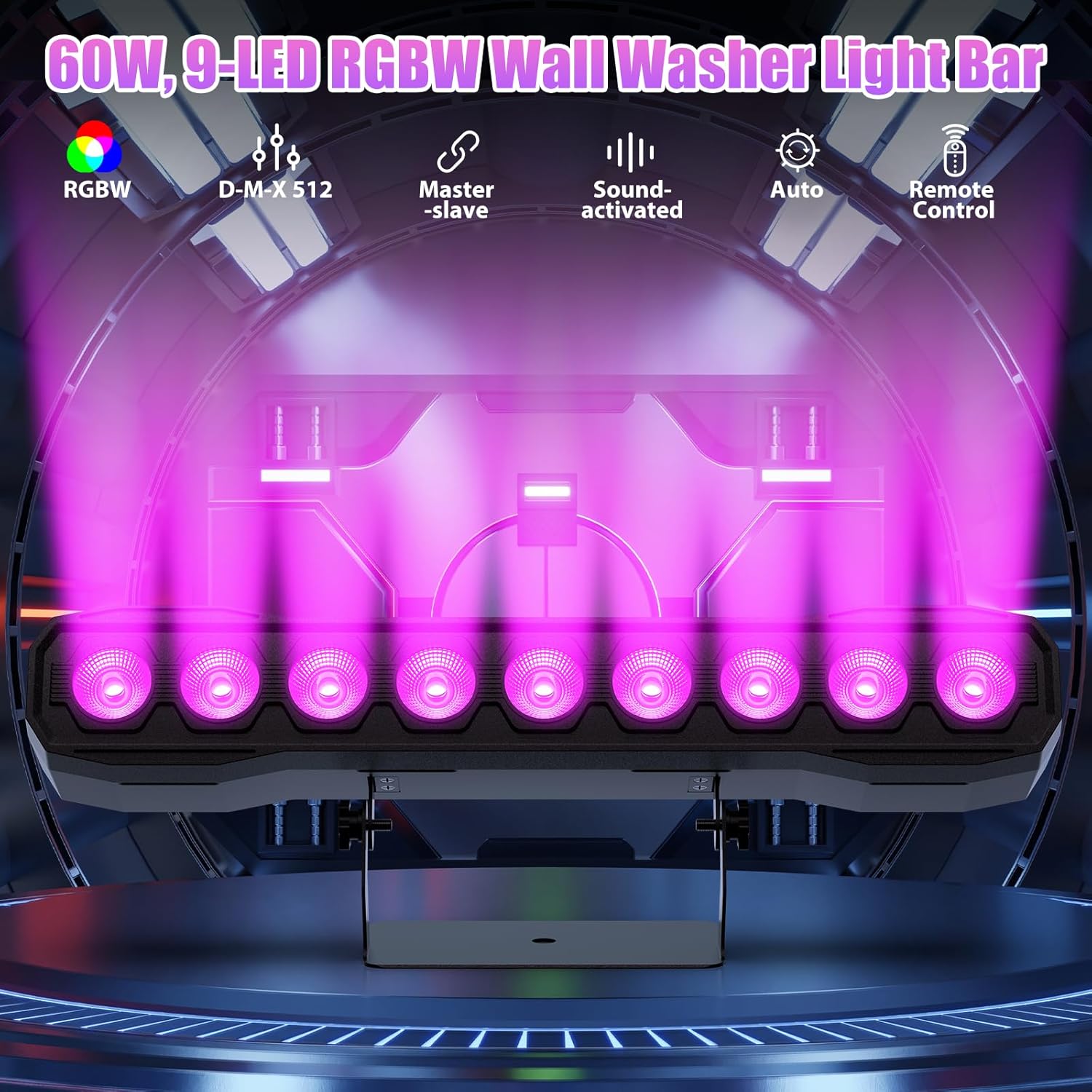
Изображение 6.1: оконченоview доступных режимов управления.
6.1 Display Panel Operation
Use the buttons on the back of the fixture to navigate the menu and select modes:
- МЕНЮ: Перебирает пункты главного меню.
- ВВЕРХ ВНИЗ: Adjusts values or navigates sub-menus.
- ВОЙТИ: Подтверждает выбор.
6.2 световых эффектов
The fixture supports various dynamic effects:
- Смешивание цветов: Over 16.7 million color combinations with 0-100% linear dimming.
- строб: Flashing effect.
- Прыжок: Instant color changes.
- Fade: Плавные переходы между цветами.
- Пульс: Gradual changing effects.
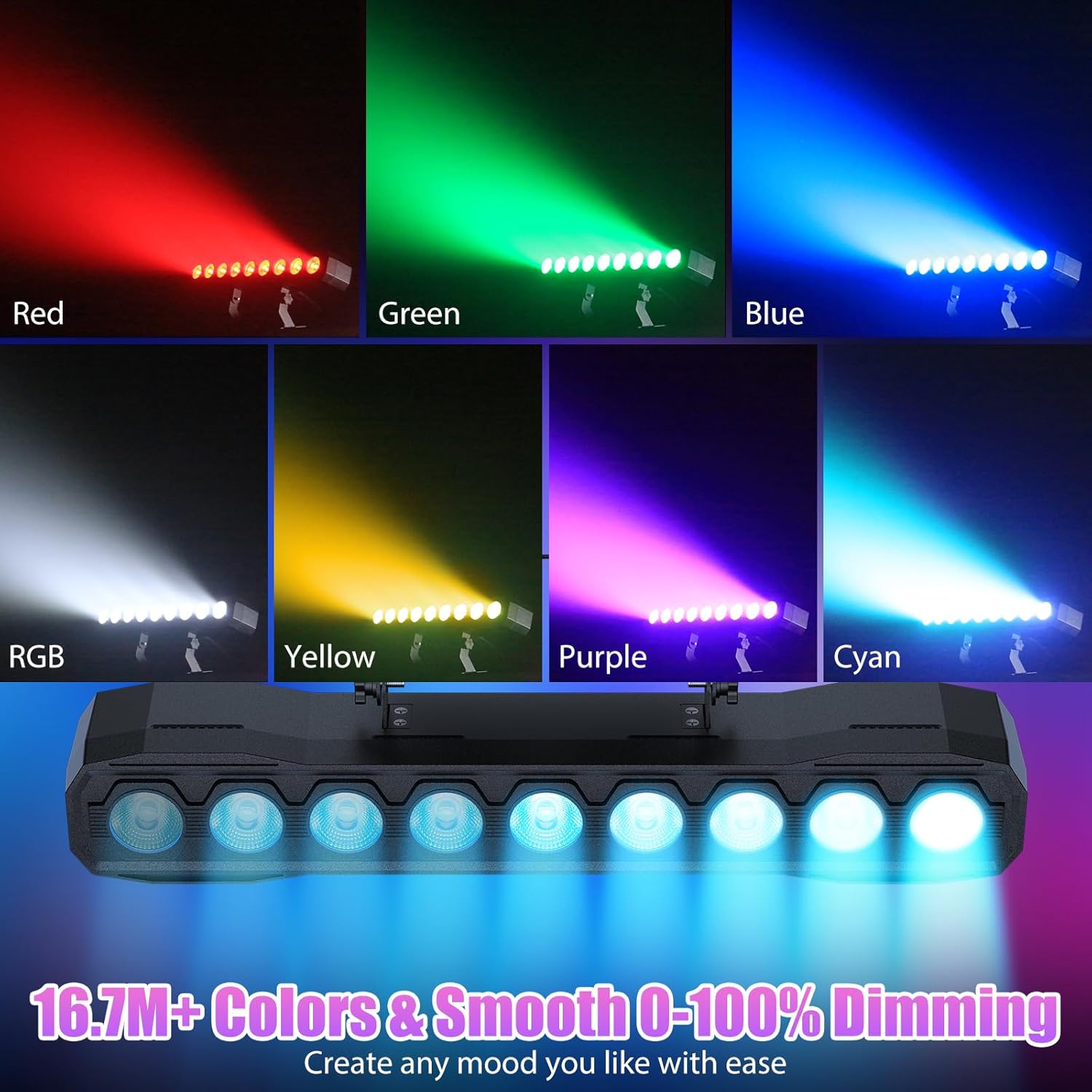
Изображение 6.2: Примерamples of color mixing and dimming capabilities.

Image 6.3: Visual representation of Strobe, Jump, Fade, and Pulse effects.
7. Функции дистанционного управления
Входящий в комплект пульт дистанционного управления обеспечивает удобный доступ к различным функциям:
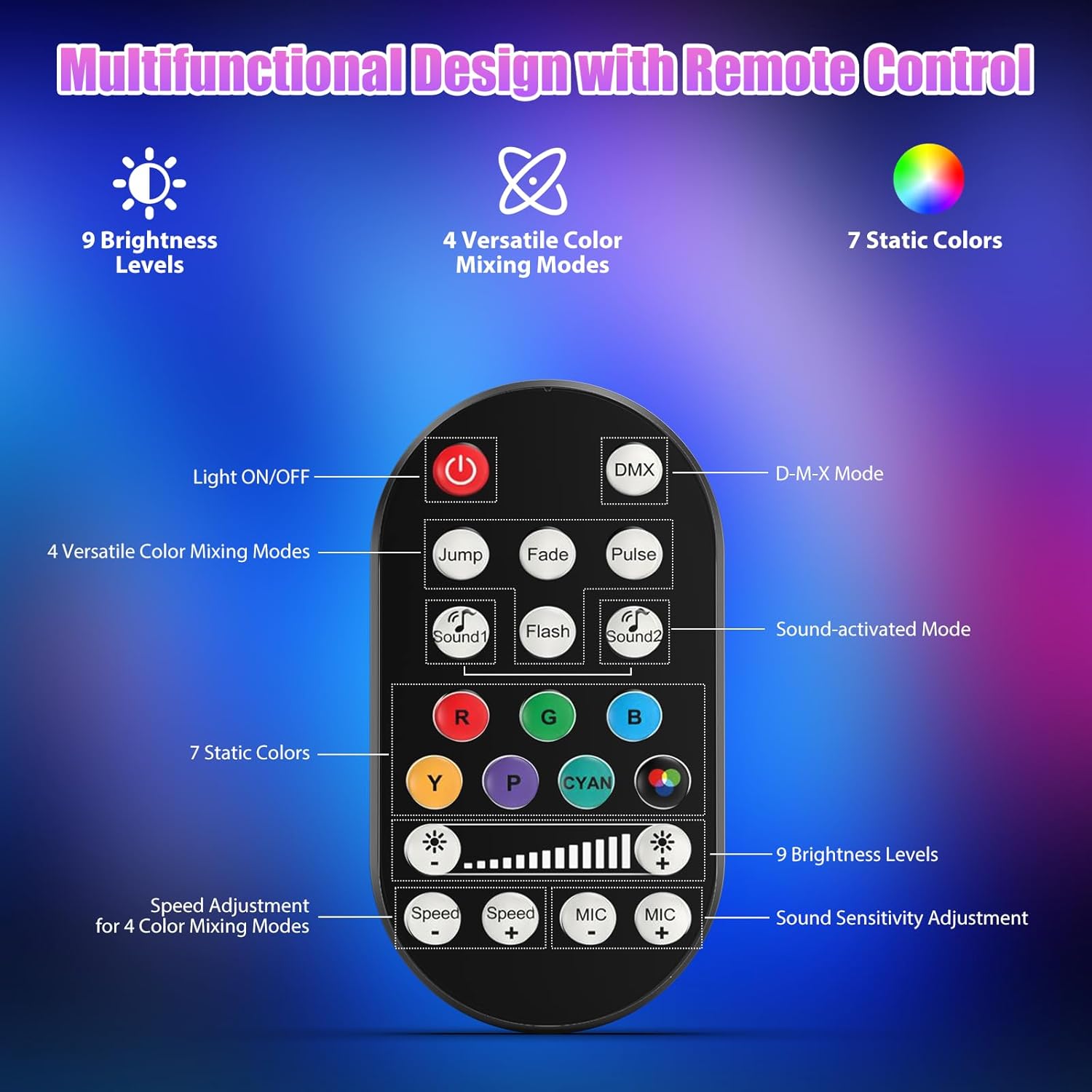
Рисунок 7.1: Схема и функции пульта дистанционного управления.
- Свет ВКЛ/ВЫКЛ: Включает и выключает устройство.
- DMX: Активирует режим управления DMX.
- Jump, Fade, Pulse, Flash: Selects different color mixing modes.
- Sound1, Sound2: Activates sound-activated modes with different sensitivities.
- R, G, B, Y, P, Cyan, White: Selects static colors.
- Уровни яркости: Adjusts the overall intensity of the light (9 levels).
- Скорость +/-: Регулирует скорость динамических эффектов.
- MIC +/-: Adjusts the sound sensitivity for sound-activated modes (15 levels).
8. Управление DMX512
For advanced control, connect the fixture to a DMX512 controller. The light bar typically uses 4 or 8 DMX channels. Refer to the display panel for DMX address setting and channel assignments.
8.1 Настройка адреса DMX
Use the MENU, UP, DOWN, and ENTER buttons on the fixture's display panel to set the DMX starting address. The display will show 'AXXX' where XXX is the address (e.g., A001).
8.2 DMX Channel Functions (Example - 8 Channel Mode)
| Канал | Функция | Диапазон значений | Описание |
|---|---|---|---|
| CH1 | Мастер Диммер | 0-255 | Общая яркость (от 0% до 100%) |
| CH2 | Красный Интенсивность | 0-255 | Red LED brightness (0% to 100%) |
| CH3 | Зеленый Интенсивность | 0-255 | Green LED brightness (0% to 100%) |
| CH4 | Интенсивность синего | 0-255 | Blue LED brightness (0% to 100%) |
| CH5 | Интенсивность белого | 0-255 | White LED brightness (0% to 100%) |
| CH6 | Strobe/Effect | 0-255 | 0-10: No function; 11-255: Strobe speed (slow to fast) |
| CH7 | Автоматическая программа | 0-255 | Selects and controls speed of built-in auto programs |
| CH8 | Звук Актив | 0-255 | Activates sound mode and adjusts sensitivity |
Таблица 8.1: Example DMX Channel Functions (may vary slightly by firmware version).
9. Техническое обслуживание
Регулярное техническое обслуживание обеспечивает оптимальную производительность и продлевает срок службы вашего устройства.
- Уборка: Periodically clean the lens and housing with a soft, lint-free cloth. Do not use abrasive cleaners or solvents. Ensure the fixture is powered off and cool before cleaning.
- Инспекция: Регулярно проверяйте кабели питания, DMX-кабели и монтажное оборудование на наличие признаков износа или повреждений. Немедленно заменяйте повреждённые компоненты.
- Хранилище: При длительном неиспользовании храните светильник в сухом, защищенном от пыли месте.
10. Поиск Неисправностей
Если у вас возникли проблемы, ознакомьтесь со следующими распространенными проблемами и решениями:
| Проблема | Возможная причина | Решение |
|---|---|---|
| Нет электричества | Power cable disconnected; No power from outlet; Blown fuse | Check power cable connection; Test outlet with another device; Replace fuse if necessary |
| Нет светового потока | Dimmer channel at 0%; Incorrect mode selected; DMX signal issue | Increase dimmer level; Select desired operating mode; Check DMX cable and address settings |
| Incorrect colors/effects | Incorrect DMX channel values; Remote control interference | Verify DMX channel settings; Ensure remote is pointed directly at the sensor; Check for other IR interference |
| Режим активации звуком не работает | Microphone sensitivity too low; No sound input | Increase MIC sensitivity via remote or display; Ensure sufficient sound is present near the fixture |
| Перегрев приспособления | Poor ventilation; Blocked heat sink | Ensure adequate airflow around the unit; Clean any dust or debris from the heat sink fins |
11. Технические характеристики
| Особенность | Деталь |
|---|---|
| Бренд | DazzlingStage |
| Номер модели | ZQ06190 |
| Источник света | 9 светодиодов RGBW мощностью 60 Вт |
| цветосмешение | RGBW 4-in-1, 16.7 million colors |
| Затемнение | 0-100% линейное электронное затемнение |
| Угол луча | Широкий угол 35° |
| Режимы управления | DMX512, Auto, Sound-Activated, Remote Control, Master-Slave |
| DMX-каналы | 4 or 8 Channels (selectable) |
| Отображать | Светодиодный индикатор 4 |
| Материал | Акрилонитрилбутадиенстирол (АБС) |
| Размеры продукта | 18.1 x 5.5 x 5.1 дюйма (46 x 14 x 13 см) |
| Вес товара | Приблизительно 1.98 фунта (0.9 кг) |
| Входная мощность | Переменный ток 100-240 В, 50/60 Гц |
| Производитель | Шэньчжэньская компания Zhuoqiong Technology Co., Ltd. |
12. Гарантия и поддержка
DazzlingStage products are designed for reliability and performance. For warranty information, please refer to the terms and conditions provided at the time of purchase or contact your retailer.
If you require technical assistance or have questions not covered in this manual, please contact DazzlingStage customer support through the retailer's platform or the official brand website. Please have your model number (ZQ06190) and purchase details ready when contacting support.