
karuisrc K610
Руководство пользователя GPS-дрона karuisrc K610
Модель: К610
1. Введение
This manual provides essential information for the safe operation and maintenance of your karuisrc K610 GPS Drone. Please read this manual thoroughly before operating the drone to ensure proper usage and to prevent damage or injury. The K610 is a foldable GPS quadcopter equipped with a 4K camera, designed for both beginners and experienced users, featuring intelligent flight modes and stable performance.

Image 1.1: The karuisrc K610 GPS Drone in flight.
2. Правила техники безопасности
Operating a drone requires responsibility. Adhere to the following safety guidelines to ensure a safe flight experience for yourself and others:
- Предполетная проверка: Перед каждым полётом обязательно проверяйте дрон, пропеллеры и аккумулятор. Убедитесь, что все компоненты надёжно закреплены и не повреждены.
- Условия окружающей среды: Fly in open areas, away from people, animals, buildings, and obstacles. Avoid flying in strong winds, rain, snow, or fog.
- Безопасность аккумулятора: Use only approved batteries and chargers. Do not overcharge or puncture batteries. Discontinue use if batteries are damaged or swollen.
- Поле зрения: Постоянно поддерживайте прямую видимость с дроном.
- Уважайте конфиденциальность: Do not use the drone to invade privacy.
- Местные правила: Знайте и соблюдайте все местные законы и правила, касающиеся эксплуатации дронов.
3. Содержимое упаковки
Проверьте наличие всех предметов в посылке:
- Дрон K610 x 1
- Пульт дистанционного управления х 1
- Batteries x 1 (Nonstandard Battery)
- Запасные гребные винты (4 шт.)
- Отвертка х 1
- USB-кабель х 1
- Сумка для переноски x 1
- Руководство по эксплуатации х 1

Image 3.1: Included items in the karuisrc K610 drone package.
4. Компоненты закончилисьview
4.1 Дрон
The K610 drone features a foldable design for portability, brushless motors for stable flight, and an integrated 4K camera.

Image 4.1: The karuisrc K610 drone and remote control.
Пульт дистанционного управления 4.2
The remote control provides intuitive flight control and a mount for your smartphone to view FPV-канал.
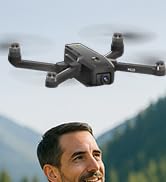
Image 4.2: Remote control with smartphone for FPV viewинж.
5. Настройка
5.1 Установка и зарядка аккумулятора
- Insert the modular battery into the drone's battery compartment until it clicks into place.
- Для зарядки извлеките аккумулятор из дрона. Подключите USB-кабель для зарядки к аккумулятору и подходящему USB-адаптеру питания (не входит в комплект).
- The charging indicator on the battery will show its status. Ensure the battery is fully charged before flight.

Image 5.1: Modular battery for the K610 drone.
5.2 Установка пропеллера
Attach the propellers according to the markings (A and B) on the propellers and motor arms. Ensure they are securely fastened with the provided screwdriver.
5.3 Настройка дистанционного управления
- Вставьте 3 батарейки типа АА (не входят в комплект) в пульт дистанционного управления.
- Extend the phone holder and securely mount your smartphone.
5.4 Установка и подключение приложения
- Download the official karuisrc drone app from your smartphone's app store.
- Включите дрон, затем включите пульт дистанционного управления.
- On your smartphone, connect to the drone's Wi-Fi network (usually named 'K610-XXXXXX').
- Откройте приложение, чтобы установить соединение и view Прямая трансляция FPV.

Image 5.2: 5GHz WiFi transmission for real-time viewинж.
5.5 Калибровка
Before the first flight and after any significant change in location, perform compass and gyroscope calibration as instructed in the app or quick start guide. This ensures stable flight and accurate GPS positioning.
6. Операционная
6.1 Основные элементы управления полетом
Refer to the remote control diagram in the quick start guide for specific joystick and button functions. Generally:
- Left Joystick: Controls altitude (up/down) and rotation (yaw left/right).
- Right Joystick: Controls forward/backward and left/right movement (pitch/roll).
6.2 Взлет и посадка
- Взлет одним нажатием: Press the designated take-off button on the remote or in the app. The drone will automatically ascend to a safe height and hover.
- Ручной взлет: Чтобы разблокировать двигатели, нажмите оба джойстика до упора в нижние внешние углы, затем медленно нажмите левый джойстик вверх, чтобы подняться.
- Посадка одним нажатием: Press the designated landing button. The drone will descend and land automatically.
- Ручная посадка: Slowly pull the left joystick down to descend. Once landed, push both joysticks to the bottom-outer corners to stop motors.
6.3 Функции GPS
The K610 drone utilizes GPS for enhanced stability and intelligent flight functions.
- Автоматический возврат домой (RTH): The drone can automatically return to its take-off point if the signal is lost, battery is low, or the RTH button is pressed.

Image 6.1: GPS Auto Return Home functionality.
6.4 Расширенные режимы полета
Access these modes via the drone's app:
- Подписывайтесь на меня: The drone will automatically follow the remote control or smartphone, capturing footagе по мере вашего движения.
- Waypoint Flight (Tap Fly): Tap points on the map in the app, and the drone will fly along the specified path.
- Point-of-Interest (Circle Fly): Select a point on the map, and the drone will circle around it at a set radius and altitude.

Image 6.2: Advanced flight modes: Follow Me, Circle Fly, and Tap Fly.
6.5 4K Camera Operation
The K610 is equipped with a 4K UHD camera with 90° adjustable tilt for capturing high-quality aerial footagе и фотографии.
- Фото/Видеосъемка: Используйте специальные кнопки на пульте дистанционного управления или в интерфейсе приложения, чтобы делать фотографии или начинать/останавливать запись видео.
- Регулируемый угол камеры: The camera's tilt can be adjusted remotely via the app or remote control.
- Поддержка SD-карт: Insert an SD card (not included) into the drone for direct storage of high-resolution media.

Image 6.3: The K610's 4K HD Camera.
6.6 продукта болееview Видео
Watch this video for a visual guide on the karuisrc K610 GPS Drone's features and operation.
Видео 6.4: Оверview of the karuisrc K610 GPS Drone's features and capabilities.
7. Техническое обслуживание
Регулярное техническое обслуживание обеспечит долговечность и оптимальную производительность вашего дрона.
- Уборка: Gently wipe the drone and remote control with a soft, dry cloth after each use. Avoid using harsh chemicals.
- Проверка винта: Регулярно проверяйте винты на наличие трещин, изгибов и повреждений. Немедленно заменяйте повреждённые винты, используя предоставленные запасные части.
- Уход батареи: Храните батареи в прохладном, сухом месте. Не храните полностью заряженные или полностью разряженные батареи в течение длительного времени. Для длительного хранения заряжайте их примерно до 50-60%.
- Хранилище: Когда дрон не используется, сложите его и храните в чехле, чтобы защитить от пыли и механических повреждений.
8. Поиск Неисправностей
Если у вас возникли проблемы, ознакомьтесь со следующими распространенными проблемами и решениями:
| Проблема | Возможная причина | Решение |
|---|---|---|
| Дрон не взлетает и не реагирует на управление. | Low battery, improper calibration, motors locked. | Charge drone/remote batteries. Perform calibration. Unlock motors (refer to section 6.2). |
| Неустойчивый полет или дрейф. | Poor calibration, strong winds, damaged propellers. | Recalibrate the drone. Fly in calm conditions. Inspect and replace damaged propellers. |
| На смартфоне нет FPV-трансляции. | Wi-Fi not connected, app not open, drone/phone too far apart. | Ensure phone is connected to drone's Wi-Fi. Open the app. Move closer to the drone. |
| GPS features (RTH, Follow Me) not working. | Insufficient GPS signal, drone not calibrated. | Fly in an open area with clear sky. Wait for sufficient GPS satellites to connect (indicated by app). Perform GPS calibration. |
9. Технические характеристики
Key technical specifications for the karuisrc K610 GPS Drone:
| Особенность | Деталь |
|---|---|
| Название модели | К610 |
| Вес товара | 204 грамм (7.2 унции) |
| Камера | 4K UHD (4096×3072P images), 12 MP Effective Still Resolution, 90° Adjustable, CMOS Sensor |
| Разрешение видеозахвата | 1080p (формат MP4) |
| Технология связи | Wi-Fi, RF (5GHz FPV Transmission) |
| Тип управления | Дистанционное управление |
| Особые возможности | Adjustable, Auto-Landing, Portable, GPS Auto Return, Follow Me, Waypoint Flight, Point-of-Interest Circle |
| Тип двигателя | Бесщеточный двигатель |
| Аккумулятор | 1 Nonstandard Lithium Ion Battery (included) |
| Время полета | Up to 20 minutes (typical 18 minutes) |
| Материал | Пластик |
| Размеры продукта | 7"Д x 2"Ш x 8"В |

Image 9.1: Brushless motor technology for the K610 drone.
10. Гарантия и поддержка
For warranty information or technical support, please contact karuisrc customer service. Keep your purchase receipt as proof of purchase.
- Телефон: +44 7419 298225
- Электронная почта: Karuisrc@gmail.com

Image 10.1: karuisrc customer support.
Ask a question about this manual
Ask about setup, troubleshooting, compatibility, parts, safety, or missing instructions. Manuals+ will review the question and use this page’s manual context to help answer it.