
1. Введение
This manual provides comprehensive instructions for the installation, operation, and maintenance of your B2 Audio SixTen 10-Channel Digital Signal Processor (DSP). Please read this manual thoroughly before using the device to ensure proper functionality and to maximize its performance.
2. Продукт закончилсяview
The B2 Audio SixTen DSP is an advanced digital signal processor designed for precise audio customization in car audio systems. It features 6 inputs and 10 outputs, offering extensive control over your sound environment.
Основные характеристики:
- Advanced Digital Signal Processing: 6-input, 10-output DSP with 96 kHz, 32-bit resolution for clear audio and precise tuning.
- Беспроводное управление: Adjust settings via Bluetooth using the dedicated iOS & Android application for real-time customization.
- Высокообъемныйtage Выход: Each of the 10 output channels delivers a 4-volt signal for optimal performance.
- Компактный дизайн: Engineered for seamless integration with a space-saving form factor of 4.5” x 5.75” x 1.5”.
- Звук профессионального уровня: Designed for precise frequency control, low distortion, and superior sound stagинж.

Изображение: под углом view of the B2 Audio SixTen DSP, highlighting its compact design and various connection points.
Что в коробке:
- (1) B2 Audio SixTen 6-Input, 10-Output 4V DSP

Image: The retail packaging for the B2 Audio SixTen DSP, indicating the product is ready for installation.
3. Информация по технике безопасности
При установке и эксплуатации соблюдайте следующие меры предосторожности:
- Перед началом любых работ с электрооборудованием всегда отсоединяйте аккумуляторную батарею автомобиля.
- Обеспечьте правильное заземление во избежание опасности поражения электрическим током.
- Do not expose the DSP to moisture or extreme temperatures.
- Если вы не уверены в каком-либо этапе процесса установки, проконсультируйтесь с профессиональным установщиком.
- Use appropriate gauge wiring for power and signal connections.
4. Настройка и установка
Proper installation is crucial for optimal performance. This section outlines the steps for physically installing and connecting the DSP.
4.1 Физическая установка
- Choose a dry, well-ventilated location in your vehicle, away from direct heat sources or moving parts.
- Mount the DSP securely using appropriate fasteners to prevent vibration.
- Ensure sufficient space around the unit for air circulation and cable management.
4.2 Подключение проводки
The B2 Audio SixTen DSP features 6 RCA inputs and 10 RCA outputs, along with a power terminal block.
- Подключение питания: Connect the power terminal block to a fused 12V constant power source, ground, and a remote turn-on lead from your head unit.
- Входные соединения: Connect your audio source (e.g., head unit, auxiliary input) to the RCA input jacks (AUX1-AUX6).
- Выходные соединения: Connect the RCA output jacks (OUT1-OUT10) to your amplifiers. Each output can be configured for specific channels (e.g., front left, front right, subwoofer).

Image: Front panel of the DSP, illustrating the RCA input connections (AUX1-AUX6) and the power terminal block.

Image: Rear panel of the DSP, displaying the 10 RCA output connections (OUT1-OUT10).
5. Инструкция по эксплуатации
The B2 Audio SixTen DSP is primarily controlled via a dedicated mobile application available for iOS and Android devices.
5.1 Bluetooth-соединение
- Ensure the DSP is powered on. The "BT" indicator light on the unit should be active.
- На смартфоне или планшете включите Bluetooth и выполните поиск доступных устройств.
- Select the B2 Audio SixTen DSP from the list of devices. Follow any on-screen prompts to complete pairing.
- Open the B2 Audio DSP application. The app should automatically detect and connect to the paired DSP.
5.2 Использование мобильного приложения
The application provides a graphical interface for all DSP functions, including:
- Маршрутизация ввода/вывода: Assign specific inputs to desired output channels.
- Эквалайзер (EQ): Adjust the frequency response for each channel using a multi-band equalizer.
- Кроссоверы: Set high-pass, low-pass, and band-pass filters for each output to direct specific frequency ranges to appropriate speakers.
- Выравнивание времени: Adjust the delay for each channel to ensure sound from all speakers arrives at the listening position simultaneously.
- Gain Control: Fine-tune the output level for each channel.
- Ограничитель: Monitor and manage output levels to prevent clipping and speaker damage. The unit features "CLIP L" and "CLIP R" indicators.
- Управление предустановками: Save and recall multiple audio configurations for different listening preferences or music genres.
Refer to the in-app help or tutorials for detailed guidance on specific tuning parameters.
6. Техническое обслуживание
The B2 Audio SixTen DSP requires minimal maintenance to ensure long-term performance.
- Содержите устройство в чистоте, не допуская попадания пыли и мусора. Для чистки используйте мягкую сухую ткань.
- Убедитесь, что все соединения надёжны. Периодически проверяйте проводку на наличие признаков износа или коррозии.
- Не подвергайте устройство длительному воздействию экстремальных температур или прямых солнечных лучей.
- Ensure adequate ventilation around the unit to prevent overheating, especially during prolonged operation.
7. Поиск Неисправностей
If you encounter issues with your B2 Audio SixTen DSP, refer to the following common problems and solutions:
| Проблема | Возможная причина | Решение |
|---|---|---|
| Нет питания / Устройство не включается | Неправильная проводка, перегоревший предохранитель, недостаточное электропитание. | Check power, ground, and remote connections. Verify fuse integrity. Ensure vehicle battery is charged. |
| Нет аудиовыхода | Incorrect input/output routing, muted channels, incorrect gain settings, faulty RCA cables. | Verify input source and output connections. Check app settings for muted channels or low gain. Test RCA cables. |
| Искаженный звук | Input signal too high, output gain too high, clipping. | Reduce input sensitivity or output gain. Monitor "CLIP L/R" indicators and adjust levels to prevent clipping. |
| Проблемы с подключением Bluetooth | DSP not in pairing mode, interference, app issues. | Ensure DSP is powered on. Restart the app and your mobile device. Try re-pairing the device. Move closer to the DSP. |
| Устройство становится горячим | Insufficient ventilation, prolonged high-power operation. | Ensure adequate airflow around the unit. Reduce output levels if operating at maximum for extended periods. |
If the problem persists after attempting these solutions, contact B2 Audio customer support for further assistance.
8. Технические характеристики
The following are the technical specifications for the B2 Audio SixTen DSP:
| Особенность | Спецификация |
|---|---|
| Номер модели | B2-DSP-SIXTEN-BK |
| Входы | 6 (3 Left / 3 Right) |
| Входные разъемы | РКА |
| Максимальный уровень входного сигнала | 4.00 Vrms (+14dBu) |
| Выходы | 10 |
| Максимальный выходной уровень | 3.50 Vrms (+13dBu) |
| Частотная характеристика | от 10 Гц до 24 кГц (-1 дБ) |
| Общее гармоническое искажение + шум (THD + N) | <0.01% |
| Задержка сигнала | <0.6 мс |
| Скорость передачи данных | 32-битный |
| Sampling Частота | 96кГц |
| Рабочий объемtagе DC | 9.5 - 15 В постоянного тока |
| Максимальное потребление тока | 350мА |
| Технология связи | Блютуз, RCA |
| Тип контроллера | Bluetooth |
| Совместимые устройства | Smartphone, Speaker, Tablet, iPhone |
| Размеры продукта (Д x Ш x В) | 4.5 x 5.75 x 1.5 дюйма |
| Вес товара | 1.06 фунта |
| Цвет | Черный |
| Режим аудиовыхода | Mono (Note: Configurable for multi-channel output via DSP software) |
| Конфигурация каналов объемного звука | 5.1 (Note: Configurable for various channel setups via DSP software) |
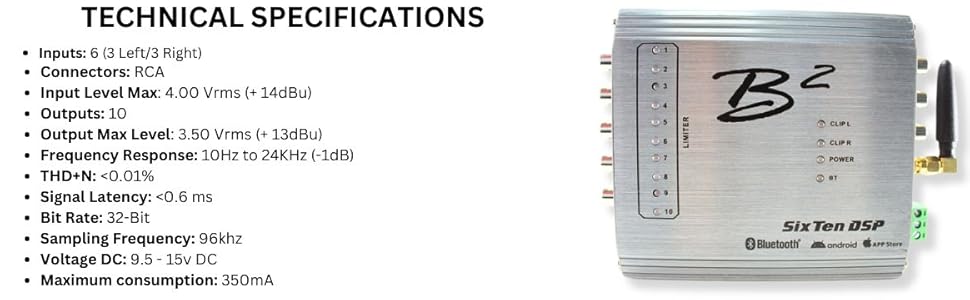
Image: A visual representation of the B2 Audio SixTen DSP's technical specifications, including input/output details and performance metrics.
9. Гарантия и поддержка
For warranty information and technical support, please refer to the official B2 Audio webили обратитесь к авторизованному дилеру. Сохраните чек о покупке в качестве подтверждения покупки для предъявления гарантийных претензий.
Производитель: B2 Audio
Webсайт: www.b2audio.com