
NIMO Nimo N157L
NIMO 15.6" FHD IPS Student Laptop Computer User Manual
Model: Nimo N157L
Введение
Thank you for choosing the NIMO 15.6" FHD IPS Student Laptop Computer. This manual provides essential information for setting up, operating, maintaining, and troubleshooting your new device. Please read this manual thoroughly to ensure optimal performance and longevity of your laptop.
Что в коробке?
Пожалуйста, убедитесь, что все перечисленные ниже предметы включены в ваш пакет:
- 1 x Nimo N157 Laptop
- 1 x Type-C 65W PD Fast Charger
- 1 x Руководство пользователя (этот документ)
- Windows 11 Home Operating System (pre-installed)
- Warranty Information (2 Years Warranty, 90 Days Return)
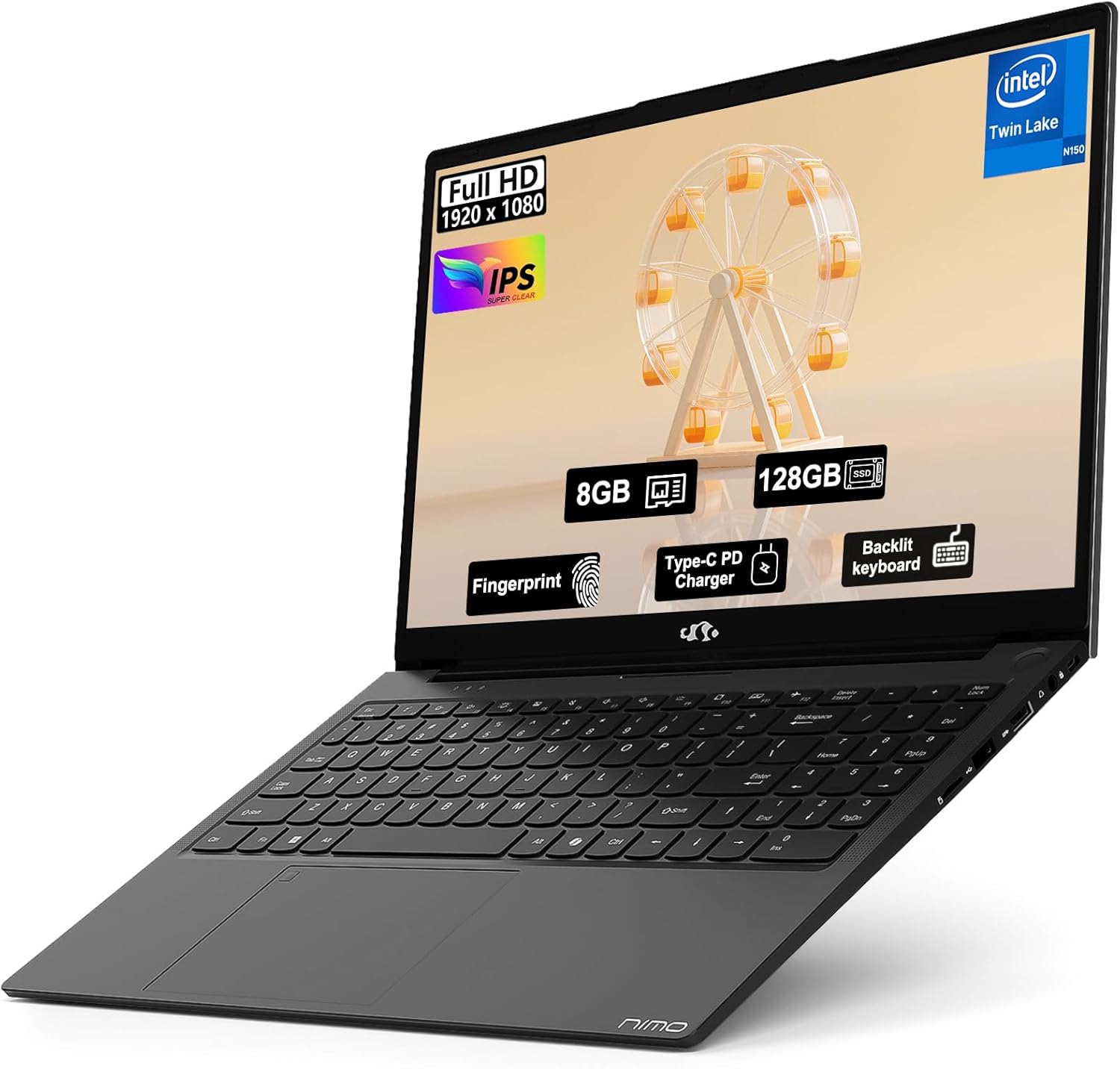
Image: The NIMO 15.6" FHD IPS Student Laptop Computer. The screen highlights key features such as Full HD 1920x1080 resolution, IPS display, 8GB RAM, 128GB SSD, Fingerprint reader, Type-C PD Charger, and Backlit keyboard. The laptop is shown in a sleek black finish.
Руководство по настройке
1. Первоначальное включение и зарядка
Before first use, it is recommended to fully charge your NIMO laptop. Connect the included Type-C 65W PD Fast Charger to the laptop's Type-C port and a power outlet. The charging indicator light will illuminate. A 15-minute charge can provide approximately 2 hours of standby time.
2. Настройка операционной системы
Your NIMO laptop comes with Windows 11 Home pre-installed. Upon first boot, follow the on-screen instructions to complete the initial Windows setup, including language selection, network connection, and user account creation.
3. Настройка считывателя отпечатков пальцев
For enhanced security and convenient login, set up the fingerprint reader. Navigate to Settings > Accounts > Sign-in options > Fingerprint recognition (Windows Hello) and follow the prompts to register your fingerprints. The fingerprint sensor is integrated into the touchpad.
4. Backlit Keyboard Adjustment
The backlit keyboard allows for comfortable typing in low-light environments. Use the dedicated function keys (usually Fn + a specific F-key, refer to keyboard legends) to turn the backlight on/off and adjust its brightness levels.
Инструкция по эксплуатации
1. Функции дисплея
Your laptop features a 15.6-inch Full HD (1920x1080) IPS Anti-Glare Display. This provides wide viewing angles, accurate colors, and reduces reflections for a comfortable viewing experience. The 85% screen-to-body ratio and 16:9 aspect ratio optimize screen real estate.
2. Использование сенсорной панели
The integrated touchpad supports multi-touch gestures for intuitive navigation. Common gestures include:
- Касание одним пальцем: Щелчок левой кнопкой мыши
- Нажатие двумя пальцами: Щелкните правой кнопкой мыши
- Прокрутка двумя пальцами: Прокрутка вверх/вниз или влево/вправо
- Масштабирование с помощью жестов сжатия: Увеличение/уменьшение масштаба
3. Связь
The NIMO laptop supports various connectivity options:
- Wi-Fi 6: Для высокоскоростного беспроводного подключения к интернету.
- Bluetooth 5.2: Для подключения беспроводных периферийных устройств, таких как наушники, мыши и клавиатуры.
- USB-порты: Includes 1 x USB 2.0 port and 3 x USB 3.0 ports for connecting external devices.
- Порт Type-C: Используется для зарядки и передачи данных.
4. Управление батареей
The laptop is equipped with a Lithium Polymer battery providing an average battery life of approximately 5 hours. To maximize battery life, adjust screen brightness, close unused applications, and utilize power-saving modes in Windows settings.
Обслуживание
1. RAM and SSD Upgrade
The NIMO laptop supports user-detachable RAM and SSD, allowing for future upgrades. If you plan to upgrade, ensure you use compatible components (DDR4 RAM, PCIe SSD) and follow proper electrostatic discharge (ESD) precautions. Consult a professional if you are unsure.
2. Чистка ноутбука
Чтобы сохранить внешний вид и функциональность вашего ноутбука:
- Для очистки экрана и внешней поверхности используйте мягкую ткань без ворса.
- Для стойких пятен слегка разотритеampсмочите ткань водой или раствором для чистки экранов.
- Avoid using harsh chemicals, abrasive cleaners, or direct spraying of liquids onto the laptop.
- Регулярно очищайте клавиатуру и тачпад от пыли и мусора.
Поиск неисправностей
В этом разделе приведены решения распространенных проблем, с которыми вы можете столкнуться.
| Проблема | Возможное решение |
|---|---|
| Ноутбук не включается. | Ensure the charger is properly connected and the power outlet is functional. Allow the battery to charge for at least 30 minutes before attempting to power on again. |
| Экран пустой или мерцает. | Check display cable connections (if external monitor is used). Restart the laptop. Update graphics drivers. |
| Проблемы с подключением к Wi-Fi. | Ensure Wi-Fi is enabled in Windows settings. Restart your router/modem. Update Wi-Fi drivers. |
| Клавиатура или тачпад не реагируют. | Restart the laptop. Check for driver updates. Ensure no external devices are interfering. |
If you encounter issues not covered here or require further assistance, please contact NIMO customer support.
Технические характеристики
Detailed technical specifications for your NIMO N157L laptop:
| Особенность | Деталь |
|---|---|
| Название модели | Nimo N157L |
| Размер экрана | 15.6 дюйма |
| Разрешение экрана | 1920 x 1080 pixels (FHD IPS Anti-Glare) |
| Процессор | Intel 4 Core N150 (up to 3.6 GHz) |
| БАРАН | 8 GB DDR4 (3200 MHz, detachable) |
| Жесткий диск | 128 GB PCIe SSD (detachable) |
| Графический сопроцессор | Интегрированная графика |
| Операционная система | Windows 11 Домашняя |
| Тип беспроводной связи | 802.11a/b/g/n/ac (Wi-Fi 6), Bluetooth 5.2 |
| USB-порты | 1 х USB 2.0, 3 х USB 3.0 |
| Другие порты | Type-C (65W PD Fast Charging), Memory Card Slot |
| Особые возможности | Backlit Keyboard, Fingerprint Reader, HD Audio, Numeric Keypad |
| Срок службы батареи | Approx. 5 Hours (Lithium Polymer) |
| Вес товара | 3.8 фунта |
| Размеры продукта | 14.07 x 8.98 x 0.76 дюйма |
| Цвет | Черный |
| Задний WebРазрешение камеры | 2 МП |
Гарантия и поддержка
NIMO Direct Inc. offers a comprehensive Гарантия производителя 2 год for your laptop. This warranty covers defects in materials and workmanship under normal use. Additionally, a 90-Day Hassle-Free Return and Exchange Service Предоставляется с даты покупки.
For warranty claims, technical support, or any concerns regarding your NIMO laptop, please contact the manufacturer's dedicated support team. Refer to the contact information provided on the product packaging or the official NIMO webсайт.
Примечание: The laptop is partially assembled in the USA. Please retain your proof of purchase for warranty purposes.
Ask a question about this manual
Ask about setup, troubleshooting, compatibility, parts, safety, or missing instructions. Manuals+ will review the question and use this page’s manual context to help answer it.