
1. Введение
Thank you for choosing the NIMO 15.6" IPS FHD-Gaming-Laptop. This manual provides essential information for setting up, operating, maintaining, and troubleshooting your new laptop. Designed for versatile performance, this laptop is equipped with an AMD Ryzen 5 6600H processor, 32GB DDR5 RAM, and a 1TB SSD, making it suitable for work, gaming, and everyday use. Please read this manual thoroughly before using your device to ensure optimal performance and longevity.

Figure 1.1: NIMO 15.6" IPS FHD-Gaming-Laptop
The NIMO 15.6" IPS FHD-Gaming-Laptop features a sleek design with a vibrant Full HD IPS display, ideal for both productivity and entertainment.
2. Что в коробке
Пожалуйста, проверьте наличие всех предметов в упаковке:
- 1 x Nimo N153 Laptop
- 1 x Type-C 100W PD Fast Charger
- 1 х Руководство пользователя
- Windows 11 Home (Pre-installed)
- 2 Years Warranty, 90 Days Return Information
3. Руководство по установке
3.1 Первое включение и зарядка
Before first use, ensure your laptop is fully charged. Connect the provided Type-C 100W PD Fast Charger to the laptop's Type-C port and a power outlet. The charge LED indicator will illuminate.
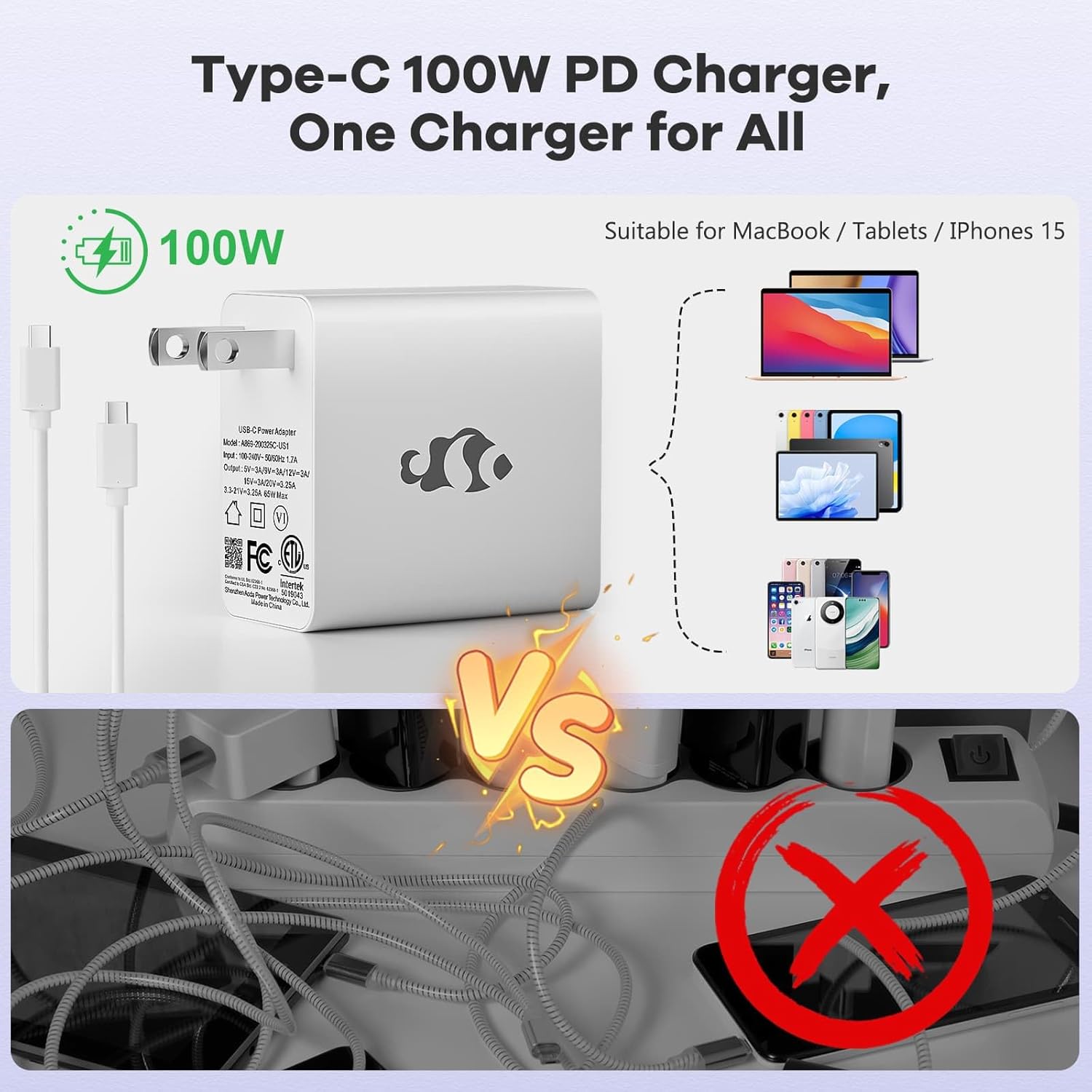
Figure 3.1: Type-C 100W PD Fast Charger
The compact 100W USB-C PD fast charger and 6.56ft cable provide efficient power delivery, compatible with various devices.
3.2 Подключение периферийных устройств
Your NIMO laptop offers multiple ports for enhanced versatility. Refer to the diagram below for port locations and types:
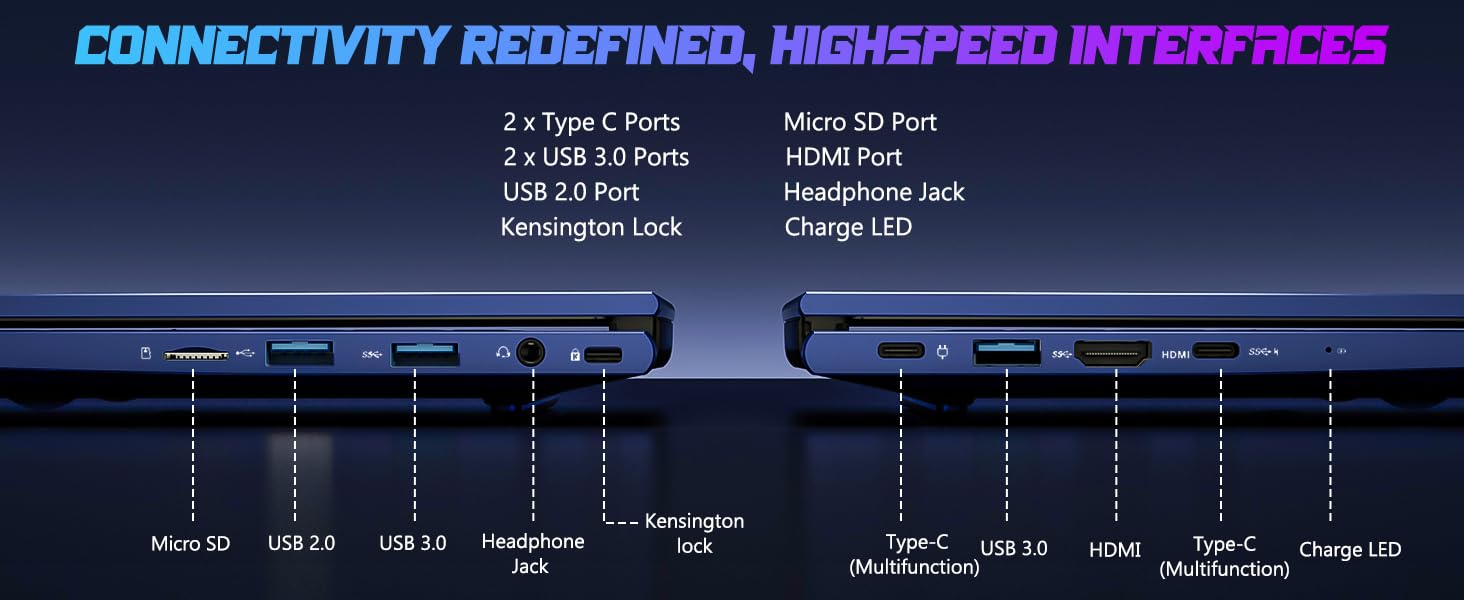
Рисунок 3.2: Порты подключения
The laptop includes 2x Type-C ports, 2x USB 3.0 ports, 1x USB 2.0 port, Micro SD port, HDMI port, Headphone Jack, and Kensington Lock for comprehensive connectivity.
- USB-порты: Connect external devices such as mice, keyboards, or external storage drives.
- Порт HDMI: Подключитесь к внешнему монитору или телевизору для просмотра изображения на большем экране.
- Порт для наушников: Для вывода звука на наушники или внешние динамики.
- Слот для Micro SD: Insert a Micro SD card for additional storage or data transfer.
4. Работа с ноутбуком
4.1 Функции дисплея
The NIMO laptop features a 15.6" FHD IPS (1920x1080) anti-glare display with an 85% screen-to-body ratio, providing clear and vibrant visuals for all your tasks.
4.2 Клавиатура и сканер отпечатков пальцев
The laptop is equipped with a backlit keyboard for comfortable typing in various lighting conditions and a multi-touch touchpad for precise navigation. The built-in fingerprint reader allows for secure, one-touch login.

Figure 4.1: Backlit Keyboard and Fingerprint Reader
The backlit keyboard enhances visibility, while the integrated fingerprint reader provides quick and secure access to your system.
4.3 WebКонфиденциальность камеры
For enhanced privacy, the laptop includes a built-in privacy camera switch, allowing you to easily disable the 2.0M webкамеру, когда она не используется.

Рисунок 4.2: Webcam Shield
The physical webcam shield provides an extra layer of privacy, ensuring your camera is off when you need it to be.
4.4 Производительность вышеview
The NIMO laptop is powered by an AMD Ryzen 5 6600H CPU (6 cores, 12 threads, up to 4.5 GHz) and an integrated AMD Radeon 660M GPU (6nm process, 6 GPU cores, 1900 MHz). This configuration provides balanced performance for productivity and light gaming.

Figure 4.3: Outstanding Performance
The AMD Ryzen 5 6600H processor and Radeon 660M iGPU deliver robust performance for various computing tasks.
With 32GB of DDR5 RAM and a 1TB PCIe 4.0 SSD, the laptop ensures seamless multitasking, faster load times, and ampхранилище для вашего files and applications. The memory is upgradable to 64GB and the SSD is detachable for future expansion.

Figure 4.4: Seamless Multitasking and Ample Хранение
The combination of 32GB DDR5 RAM and a 1TB PCIe 4.0 SSD provides lightning-fast performance and significant storage capacity.
4.5 Срок службы батареи
The laptop is equipped with a 54Wh smart battery, providing up to 5 hours of active use and up to 10 hours of standby time. A 15-minute charge can provide up to 2 hours of standby time with the 100W PD fast charger.

Figure 4.5: 54Wh Smart Battery
The efficient 54Wh smart battery offers extended usage and quick charging capabilities.
5. Техническое обслуживание
To ensure the longevity and optimal performance of your NIMO laptop, follow these maintenance guidelines:
- Соблюдайте чистоту: Регулярно протирайте экран салфеткой из микрофибры, а клавиатуру — сжатым воздухом, чтобы удалить пыль и грязь.
- Обновления программного обеспечения: Keep your Windows 11 operating system and drivers updated to ensure security and performance improvements.
- Уход батареи: Избегайте частой полной разрядки аккумулятора. Для длительного хранения заряжайте аккумулятор примерно до 50-60%.
- Правильная вентиляция: Ensure the laptop's vents are not obstructed to prevent overheating. Use it on a hard, flat surface.
- Безопасное обращение: Не допускайте падений и сильных ударов ноутбука.
6. Поиск Неисправностей
This section addresses common issues you might encounter with your NIMO laptop.
| Проблема | Возможная причина | Решение |
|---|---|---|
| Ноутбук не включается | Разряженная батарея; Проблема с адаптером питания | Connect the charger and wait a few minutes. Ensure the power adapter is securely connected to both the laptop and the outlet. |
| Низкая производительность | Слишком много запущенных приложений; Недостаток места на диске; Устаревшие драйверы | Закройте ненужные приложения. Освободите место на диске. Обновите драйверы Windows и устройств. |
| Проблемы с подключением Wi-Fi | Wi-Fi adapter off; Router issue; Driver issue | Убедитесь, что Wi-Fi включён в настройках Windows. Перезагрузите маршрутизатор. Обновите драйверы Wi-Fi. |
| Подсветка клавиатуры не работает. | Backlight disabled; Driver issue | Press the dedicated backlight key (usually Fn + F key). Check keyboard drivers in Device Manager. |
If you encounter issues not listed here or require further assistance, please contact NIMO customer support.
7. Технические характеристики
Detailed technical specifications for the NIMO 15.6" IPS FHD-Gaming-Laptop:
| Особенность | Деталь |
|---|---|
| Постоянный размер экрана | 15.6 дюйма |
| Максимальное разрешение экрана | 1920 x 1080 пикселей (FHD IPS) |
| Процессор | AMD Ryzen 5 6600H (6 Cores, up to 4.5 GHz) |
| БАРАН | 32 ГБ DDR5 (4800 МГц) |
| Жесткий диск | SSD-накопитель объемом 1 ТБ (PCIe 4.0) |
| Графический сопроцессор | AMD Radeon 660M (интегрированная) |
| Операционная система | Виндовс 11 |
| Тип беспроводной связи | 802.11a/b/g/n/ac |
| USB-порты | 1 порта USB 2.0, 3 порта USB 3.0, 2 порт Type-C |
| Средний срок службы батареи | 5 Hours (active use) |
| Вес товара | 3.8 фунта |
| Размеры продукта | 14.07 x 8.98 x 0.76 дюйма |
| Цвет | Синий |
| Особые возможности | Backlit Keyboard, Fingerprint Reader, HD Audio, Numeric Keypad |
8. Гарантия и поддержка
NIMO is committed to providing high-quality products and excellent customer service.
8.1 Информация о гарантии
Your NIMO laptop comes with a comprehensive Гарантия производителя 2 год. This warranty covers defects in materials and workmanship under normal use. Additionally, we offer a 90-Day Hassle-Free Return Policy с даты покупки.
8.2 Поддержка клиентов
Our dedicated support team is ready to assist you with any questions or issues. For technical support, warranty claims, or general inquiries, please contact us via:
- Электронная почта: service@nimopc.com
- Онлайн: Visit the official NIMO webсайт для ответов на часто задаваемые вопросы и получения ресурсов поддержки.
We strive to resolve any issues swiftly and ensure your satisfaction.
8.3 продукта болееview Видео
Посмотрите это официальное видео для краткого обзора.view of the NIMO laptop's features and benefits:
Video: NIMO Laptop Overview
This video provides a brief look at the NIMO 15.6" laptop, highlighting its key features and user experience, including its display, camera, and overall performance.