
VILCORN SF3000
VILCORN SF3000 Retro Handheld Game Console User Manual
Model: SF3000 | Brand: VILCORN
1. Введение
The VILCORN SF3000 is a retro handheld game console designed to provide a versatile entertainment experience. It features a 4.5-inch IPS HD screen, a dual-core processor, and a Linux operating system, offering smooth gameplay and a wide range of functions beyond gaming.
2. Что в коробке
- Портативная игровая консоль
- Зарядный кабель
- Руководство пользователя
3. Продукт закончилсяview
Ознакомьтесь с расположением элементов управления и интерфейсом консоли.

Изображение: Спереди view of the VILCORN SF3000 Retro Handheld Game Console, displaying a game on its screen.

Image: Detailed diagram of the front buttons on the VILCORN SF3000, including arrow keys, rocker, select, start, and function keys.

Image: Detailed diagram of the back and top buttons and ports on the VILCORN SF3000, showing L/R buttons, expansion keys, TF socket, DC/OTG port, headphone jack, and one-piece brackets.

Image: Close-up of the console highlighting the dual-core high-performance processor, non-slip rocker, and crystal keys.
4. Настройка
4.1 Первоначальная зарядка
Before first use, fully charge the console using the provided charging cable. Connect the cable to the DC/OTG port on the console and a compatible USB power adapter (not included). The charging indicator will show the charging status.
4.2 Включение/выключение питания
- To power on: Press and hold the power button located on the top of the console until the screen illuminates.
- To power off: Press and hold the power button until the power-off options appear, then select to shut down.
5. Инструкция по эксплуатации
5.1 Навигация по меню
Use the directional pad (D-pad) or the analog rockers to navigate through the main menu and game lists. Press the 'A' button (or equivalent action button) to select an option and the 'B' button (or equivalent back button) to return to the previous screen.
5.2 Игра в игры
The console comes pre-loaded with over 25,000 games across various emulators. Select an emulator from the main menu, then browse the game list. Select a game and press the 'A' button to start playing.

Image: Console displaying a menu with various retro game console logos, indicating a large library of built-in games.
5.3 Сохранение и загрузка игрового прогресса
The SF3000 supports instant save functionality. During gameplay, access the in-game menu (usually by pressing a designated 'FN' or 'Menu' button) to save your progress. You can load saved states from the same menu.
5.4 Другие функции
The VILCORN SF3000 offers additional entertainment features:
- Электронная книга: Access and read e-books.
- Видеоплеер: Play various video formats directly from a USB flash drive (via OTG) or internal storage.
- Аварийная зарядка: The console can function as an emergency power bank to charge compatible mobile phones via the DC/OTG port.

Image: Console showcasing its multi-media functions including music, film, and picture playback, and e-book reading.
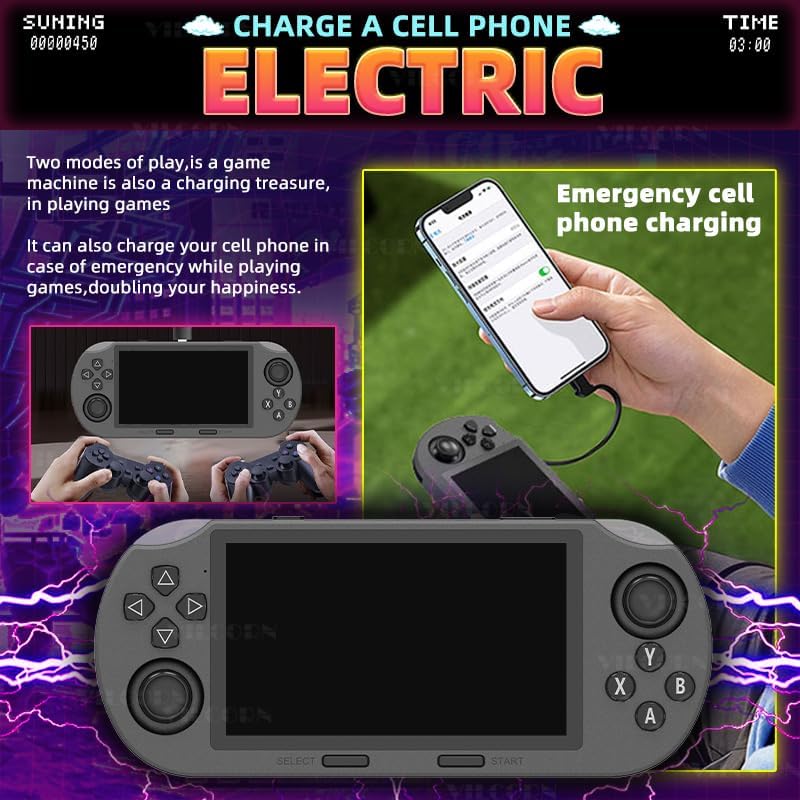
Image: Illustration of the console being used to emergency charge a mobile phone, highlighting its power bank capability.

Image: Console demonstrating direct video playback from a USB flash drive and showing its integrated stand for hands-free viewинж.
6. Multi-Emulator Compatibility
The SF3000 supports a wide array of mainstream emulators, allowing you to enjoy classic games from various platforms. This includes MAME, MD, PCE, PS1, and many more. The device comes pre-loaded with a vast library of games, ensuring a rich and varied gaming experience.
7. Особенности и преимущества
- Создан для игр: 4.5-inch IPS HD screen and dual-core processor for smooth gameplay.
- Multi-Emulator Support: Compatible with MAME, MD, PCE, PS1, and more, with over 25,000 pre-installed games.
- Прочная конструкция: Robust structure for extended gaming sessions.
- Удобный: Intuitive interface for easy navigation and immediate gameplay.
- Универсальное развлечение: Functions as an e-book reader, video player, and emergency phone charger.
- Оптимизированный игровой опыт: Features like instant save, game search, favorite lists, and game history enhance user interaction.

Image: A person using the console for various activities like video watching, music listening, novel reading, and playing games, illustrating its multi-scenario entertainment capabilities.

Image: Close-up of the console highlighting its non-slip rocker, crystal keys, and integrated stand for improved ergonomics and gaming experience.

Image: Visual representation of optimized gaming features such as instant save, game search, favorite game lists, and game history.

Image: A person playing the console in a casual setting, emphasizing its portability and ability to play anytime, anywhere.
8. Технические характеристики
| Особенность | Деталь |
|---|---|
| Размер экрана | 4.5 дюйма |
| Тип дисплея | ИПС |
| Источник питания | Питание от батареи |
| Тип батареи | Lithium-Ion (1 Nonstandard Battery required) |
| Емкость памяти | 128 ГБ |
| Форм-фактор | Ручной |
| Материал | Пластик |
| Размеры продукта | 7.87 x 3.43 x 1.5 дюйма |
| Вес товара | 9.3 унции |
| Рекомендуемый производителем возраст | 3 года и старше |
9. Техническое обслуживание
- Keep the console clean by wiping it with a soft, dry cloth.
- Не подвергайте устройство воздействию экстремальных температур или прямых солнечных лучей.
- Если не используете, храните в сухом и прохладном месте.
- Do not attempt to disassemble the console, as this will void the warranty.
10. Поиск Неисправностей
10.1 Консоль не включается
- Убедитесь, что аккумулятор полностью заряжен. Подключите зарядный кабель и дайте устройству заряжаться не менее 30 минут, прежде чем снова включать его.
- Нажмите и удерживайте кнопку питания в течение 5–10 секунд, чтобы выполнить полный сброс настроек.
10.2 Games Not Loading
- Check if the TF card is properly inserted into its slot.
- Обеспечьте игру files on the TF card are not corrupted.
10.3 Проблемы с экраном
- If the screen is dim, adjust the brightness settings in the console's system menu.
- If the screen is unresponsive or frozen, perform a hard reset.
11. Информация по технике безопасности
Prohibition of water and fire.
To ensure safe operation and prevent damage, keep the device away from water and open flames. Do not expose the console to excessive moisture or high temperatures.
12. Гарантия и поддержка
For warranty information and customer support, please refer to the documentation included with your purchase or contact VILCORN customer service directly. Keep your proof of purchase for any warranty claims.