
Введение
The ATK VXE Dragonfly R1 Wireless Gaming Mouse is engineered for high-performance gaming, offering a lightweight design, advanced sensor technology, and versatile connectivity. This manual provides detailed instructions for setting up, operating, and maintaining your R1 gaming mouse to ensure optimal performance.

Изображение: сверху view of the ATK VXE Dragonfly R1 Wireless Gaming Mouse in black, showcasing его эргономичная форма и расположение кнопок.
Содержимое упаковки
Пожалуйста, проверьте наличие всех предметов в вашей посылке:
- ATK VXE Dragonfly R1 Wireless Gaming Mouse
- Кабель USB-C для зарядки/передачи данных
- Беспроводной приемник 2.4 ГГц (USB-адаптер)
- Руководство пользователя (этот документ)
- Nonstandard Battery (pre-installed)
Настраивать
1. Зарядка мыши
Before first use, it is recommended to fully charge the mouse. Connect the supplied USB-C cable to the mouse's charging port and the other end to a USB power source (e.g., computer USB port, USB wall adapter).
2. Варианты подключения
The ATK VXE Dragonfly R1 supports multiple connection modes:
- Беспроводная связь 2.4 ГГц: For optimal gaming performance. Insert the 2.4GHz USB receiver into an available USB port on your computer. The mouse should automatically connect.
- Bluetooth: For general use and compatibility with various devices. Activate Bluetooth pairing mode on the mouse (refer to operating instructions for specific button combinations) and select "ATK VXE R1" from your device's Bluetooth settings.
- Проводное (USB-C): Подключите мышь напрямую к компьютеру с помощью кабеля USB-C. В этом режиме мышь также заряжается.

Image: Diagram illustrating the Tri-Mode connectivity options: Bluetooth, 2.4GHz wireless, and wired USB-C connection for the ATK VXE Dragonfly R1 mouse.
Инструкция по эксплуатации
1. Включение/выключение питания
Locate the power switch on the underside of the mouse. Slide it to the "ON" position to power on and "OFF" to power off.
2. Регулировка DPI
The mouse features adjustable DPI settings. Press the DPI button (usually located on the underside or top of the mouse, depending on the model) to cycle through preset DPI levels. An indicator light may change color to show the current DPI setting.
3. Программируемые макроклавиши
The ATK VXE Dragonfly R1 includes programmable macro keys. To customize these keys, download and install the official ATKGEAR software from the manufacturer's website. The software allows you to assign functions, macros, and adjust other mouse settings.
Основные характеристики
- Lightweight Design (48g): The R1 mouse is designed for agility and comfort during extended gaming sessions.
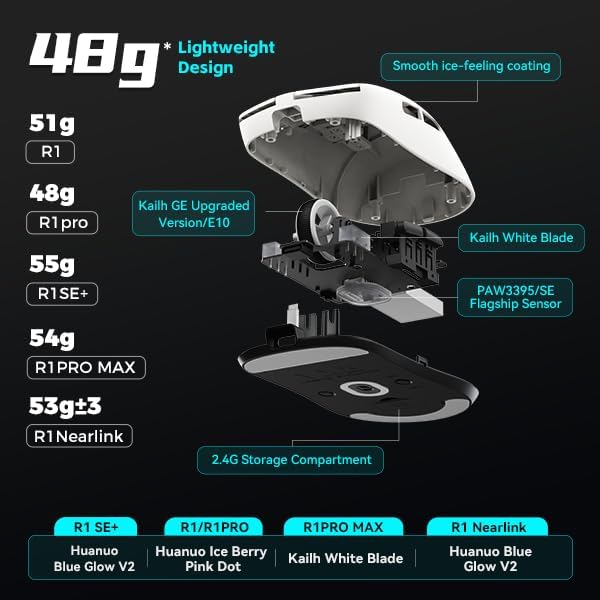
Изображение: В разобранном виде view of the ATK VXE Dragonfly R1 mouse highlighting its lightweight internal components and showing weight comparisons for different R1 series models.
- PAW3395/SE Flagship Sensor: Equipped with a high-end optical sensor for precise tracking and accuracy, essential for competitive gaming.
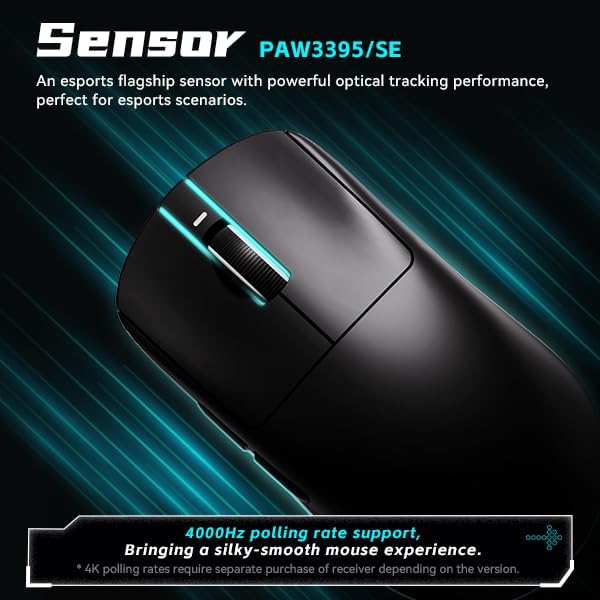
Image: Close-up of the ATK VXE Dragonfly R1 mouse, emphasizing the PAW3395/SE sensor and indicating 4000Hz polling rate support.
- Smart Speed X Transmission Technology: VXE's proprietary wireless technology ensures ultra-low latency and enhanced signal stability, even in environments with interference.

Image: Depiction of the ATK VXE Dragonfly R1 mouse with text highlighting "Smart Speed X" wireless transmission technology for low latency.
- Nordic/BEKEN(compx)/Hisilicon Nearlink MCU: Features a flagship-level chip for powerful performance, low power consumption, and improved interference resistance.

Image: Graphic showing the ATK VXE Dragonfly R1 mouse and its MCU, emphasizing 4K polling rate capability for both office and gaming.
- ATK Micro Switches (Kailh White Blade / Ice Berry Pink Dot): Designed for a consistent click feel and long lifespan.
- Kailh White Blade: 100 Million Click Lifespan, balanced feel.
- Ice Berry Pink Dot: 90 Million Click Lifespan, soft bounce feel.

Image: Detailed illustration comparing Kailh White Blade and Ice Berry Pink Dot micro switches, showing their click lifespan and feel characteristics.
- Гладкое, ледяное покрытие: A dirt-resistant and easy-to-clean surface that provides a comfortable and grippy feel.

Image: Visual representation of the smooth ice-feeling coating on the ATK VXE Dragonfly R1 mouse, contrasting smooth and matte textures available on different R1 series models.
Обслуживание
- Уборка: Протрите поверхность мыши мягкой сухой тканью. Для удаления стойких загрязнений используйте слегка мягкую ткань.amp cloth with mild soap can be used, ensuring no liquid enters the mouse. The "Ice-Feel" coating is designed to be dirt-resistant and easy to clean.
- Уход батареи: Чтобы продлить срок службы батареи, избегайте частой полной разрядки мыши. Заряжайте мышь, когда индикатор заряда батареи показывает низкий уровень. Храните мышь в прохладном, сухом месте, когда она не используется в течение длительного времени.
- Обслуживание датчика: Для точного отслеживания движения необходимо содержать оптический датчик на нижней стороне мыши в чистоте и защищать его от пыли и мусора.
Поиск неисправностей
- Мышь не отвечает:
- Убедитесь, что мышь включена.
- Проверьте уровень заряда батареи и при необходимости зарядите ее.
- For 2.4GHz wireless, ensure the USB receiver is securely plugged in and within range.
- Для использования Bluetooth убедитесь, что на вашем устройстве включен Bluetooth и подключена мышь.
- Попробуйте подключиться через кабель USB-C, чтобы исключить проблемы с беспроводной связью.
- Непоследовательное отслеживание:
- Очистите оптический датчик на нижней стороне мыши.
- Убедитесь, что вы используете мышь на подходящей поверхности (например, на коврике для мыши).
- Check for software updates for the mouse driver or ATKGEAR software.
- Проблемы с подключением:
- Поднесите мышь ближе к приемнику 2.4 ГГц или устройству Bluetooth.
- Avoid sources of strong electromagnetic interference (e.g., Wi-Fi routers, other wireless devices).
- Re-pair the Bluetooth connection or re-insert the 2.4GHz receiver.
Технические характеристики
| Особенность | Деталь |
|---|---|
| Модель | R1 |
| Размеры | 6.3 x 4.72 x 2.36 дюйма (упаковка) |
| Вес товара | 7 ounces (approx. 48g for mouse only) |
| Датчик | PAW3395/SE Оптический |
| Связность | Bluetooth, беспроводная связь 2.4 ГГц, проводное подключение USB-C. |
| Скорость опроса | Up to 4000Hz (requires separate receiver for some versions) |
| Микропереключатели | Kailh White Blade (100M clicks) / Ice Berry Pink Dot (90M clicks) |
| Покрытие | Ощущение гладкого льда |
| Аккумулятор | Нестандартная батарея (в комплекте) |
| Производитель | ATKGEAR |

Image: Detailed table outlining specifications for various models within the VXE Dragonfly R1 series, including dimensions, coating, sensor, chip, polling rate, battery life, weight, microswitches, scroll wheel, mouse feet, and connection methods.
Гарантия и поддержка
For warranty information and technical support, please refer to the official ATKGEAR website or contact their customer service. Specific warranty terms may vary by region and retailer. Keep your proof of purchase for warranty claims.
Manufacturer: ATKGEAR