
anyloop Smart Watch B0FC627FXZ
Руководство пользователя умных часов
Model: Smart Watch B0FC627FXZ
Бренд: anyloop
1. Введение
Thank you for choosing the anyloop Smart Watch. This manual provides detailed instructions on how to set up, operate, and maintain your new device. Please read this manual carefully before use to ensure optimal performance and longevity of your smartwatch.

Figure 1.1: The anyloop Smart Watch, showcasing его элегантный дизайн и яркий дисплей.
2. Руководство по установке
2.1 Содержимое упаковки
Прежде чем начать, убедитесь, что в упаковке присутствуют все предметы:
- anyloop Smart Watch
- Зарядный кабель
- Руководство пользователя
2.2 Зарядка устройства
For first-time use, fully charge your smartwatch. Connect the magnetic charging cable to the charging contacts on the back of the watch and plug the USB end into a power adapter (not included) or a computer's USB port.

Figure 2.1: The smartwatch display showing battery level and charging indicators. A full charge typically takes 1-1.5 hours.
A full charge provides approximately 5-7 days of normal use or up to 21 days in standby mode.
2.3 Установка и сопряжение приложения
To unlock the full potential of your smartwatch, download the dedicated "Fitbeing" app on your smartphone.
- Scan the QR code in the manual or search for "Fitbeing" in your smartphone's app store (compatible with iPhone iOS 13.0+ and Android 9.0+).
- Install and open the "Fitbeing" app.
- Создайте учетную запись или войдите в систему.
- Включите Bluetooth на вашем смартфоне.
- In the app, navigate to "Device" or "Add Device" and select your smartwatch from the list of available devices.
- Подтвердите запрос на сопряжение на смартфоне и умных часах.

Figure 2.2: The Fitbeing app interface, used for managing health data, notifications, and watch settings.
3. Инструкция по эксплуатации
3.1 Базовая навигация
- Сенсорный экран: Для навигации по меню и экранам проведите пальцем влево/вправо или вверх/вниз. Коснитесь экрана для выбора.
- Боковая кнопка/Цифровая заводная головка: Press to wake/sleep the screen, return to the home screen, or access the app menu. Rotate the digital crown to scroll through lists or adjust settings.

Figure 3.1: Key physical features of the smartwatch, including the digital crown for navigation.
3.2 Функция вызова Bluetooth
With Bluetooth 5.3 technology, you can make and receive calls directly from your wrist.
- Убедитесь, что ваши умные часы подключены к смартфону через Bluetooth.
- При входящем звонке на часах отобразится идентификатор звонящего. Нажмите на зелёный значок, чтобы ответить, или на красный, чтобы отклонить звонок.
- During a call, you can use the watch's built-in microphone and speaker for hands-free communication.
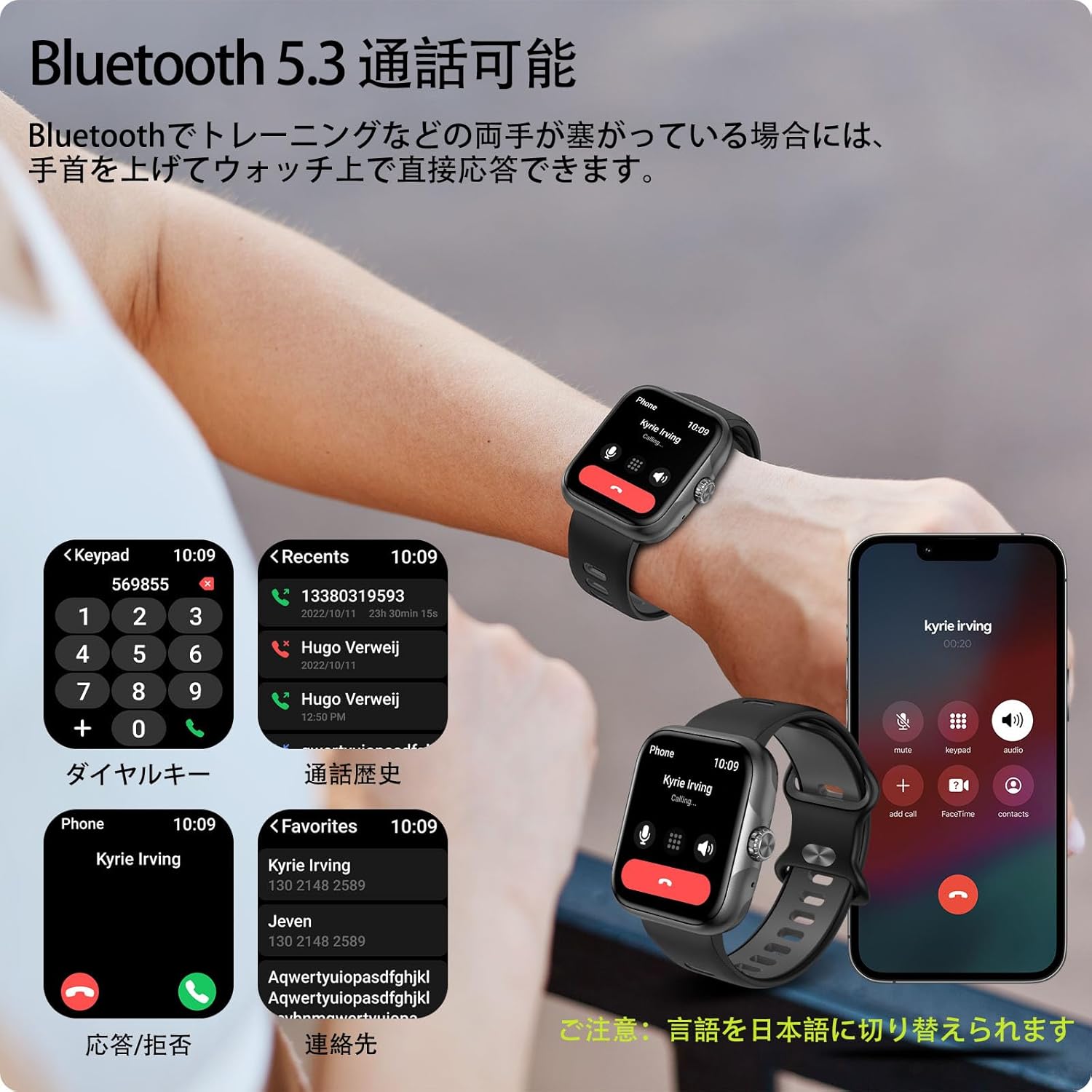
Figure 3.2: Hands-free calling feature, showing call interface on the watch and smartphone.
The advanced noise-canceling technology ensures clear audio quality during calls.
3.3 Уведомления
Receive real-time notifications for calls, SMS, and various social media apps (LINE, Twitter, etc.) directly on your watch.
- Ensure notifications are enabled in the Fitbeing app and your smartphone's settings.
- Проведите пальцем вниз от верхней части циферблата, чтобы view последние уведомления.

Figure 3.3: Smartwatch receiving notifications from various applications.
4.Основные характеристики
4.1 Дисплей
The smartwatch features a 1.78-inch high-resolution AMOLED display (368x448 pixels), providing vivid colors and excellent clarity. The large screen and intuitive touch interface make it easy to read and operate.

Figure 4.1: The 1.78-inch AMOLED display offers superior visual quality.
4.2 Отслеживание активности и спортивные режимы
Track your daily activities and exercise performance with precision. The watch records steps, exercise duration, distance, and calories burned. With built-in GPS, it can accurately map your outdoor activities.
- 60+ спортивных режимов: Supports various activities including running, swimming, yoga, and more.
- Отслеживание GPS: Visualize your running or cycling routes on a map within the app.
- Визуализация данных: The Fitbeing app provides detailed analysis of your performance, helping you set and achieve fitness goals.

Figure 4.2: GPS tracking in action during an outdoor run, displaying real-time data.

Figure 4.3: Detailed activity data and route mapping available through the Fitbeing app.
4.3 Мониторинг здоровья
The smartwatch provides comprehensive health monitoring features to help you stay informed about your well-being.
- Обнаружение сердечного ритма: Непрерывно контролирует частоту вашего пульса в течение дня.
- Blood Oxygen Concentration: Измеряет уровень кислорода в крови.
- Отслеживание сна: Анализирует фазы вашего сна, включая глубокий сон, легкий сон и время бодрствования.
- Стресс-мониторинг: Помогает понять и контролировать уровень стресса.
- Управление женским здоровьем: Provides features for menstrual cycle prediction and ovulation reference.

Figure 4.4: Health monitoring features including heart rate, blood oxygen, and women's health tracking.

Figure 4.5: Detailed sleep data recording and analysis.
НИКОГДА
Personalize your smartwatch with a wide range of watch faces and interchangeable bands.
- 100+ циферблатов: Choose from a rich selection of watch faces available in the Fitbeing app to match your style or mood.
- Циферблаты своими руками: Upload your favorite photos (family, pets, loved ones) to create unique, personalized watch faces.
- Сменные полосы: The watch supports standard 22mm bands, allowing for easy replacement with commercially available options.

Figure 4.6: Customize your watch with over 100 watch faces or your own photos.
4.5 Водостойкость
The smartwatch boasts 3ATM water resistance, making it suitable for daily use, including sweating during workouts, washing hands, and even unexpected rain. It is not recommended for hot water activities or deep diving.

Figure 4.7: The smartwatch is suitable for swimming and other water-related activities due to its 3ATM water resistance.
4.6 Другие интеллектуальные функции
The smartwatch integrates various practical features to enhance your daily life:
- Прогноз погоды: Получайте обновления о погоде в режиме реального времени.
- Тревога: Устанавливайте будильники прямо с запястья.
- Напоминание о сидячем образе жизни: Побуждает вас двигаться после периодов бездействия.
- Найти телефон: Помогает найти потерянный смартфон.
- Управление музыкой: Управляйте воспроизведением музыки на вашем смартфоне (воспроизведение, пауза, пропуск треков).
- Управление камерой: Используйте часы в качестве пульта дистанционного спуска затвора камеры вашего смартфона.
- Функция SOS: Для экстренных ситуаций.
- Голосовой помощник: Control watch functions using voice commands.

Figure 4.8: A variety of smart functions available on the smartwatch.
5. Техническое обслуживание
- Уборка: Regularly clean the watch screen and strap with a soft, dry cloth. For stubborn dirt, use a slightly damp тканью и тщательно высушите.
- Зарядные контакты: Ensure the charging contacts on the back of the watch are clean and free of debris to ensure proper charging.
- Хранилище: Если часы не используются в течение длительного времени, храните их в прохладном, сухом месте.
- Избегайте экстремальных температур: Do not expose the watch to extremely high or low temperatures, as this can affect battery life and performance.
- Химические вещества: Avoid contact with harsh chemicals, detergents, or solvents, as they may damage the watch's finish or internal components.
6. Поиск Неисправностей
| Проблема | Возможное решение |
|---|---|
| Часы не включаются. | Ensure the watch is fully charged. Press and hold the side button for a few seconds. |
| Невозможно подключиться к смартфону. |
|
| Уведомления не приходят. |
|
| Неточные данные об активности. | Ensure the watch is worn snugly on your wrist. Calibrate settings in the Fitbeing app if available. |
| Короткое время работы батареи. |
|
7. Технические характеристики
| Особенность | Деталь |
|---|---|
| Название модели | Smart Watch B0FC627FXZ |
| Бренд | любой цикл |
| Отображать | 1.78-inch AMOLED (368x448 resolution) |
| Связность | Блютус 5.3 |
| Емкость аккумулятора | 350 мАч литий-ионный |
| Срок службы батареи (типичное использование) | 5-7 дней |
| Срок службы батареи (в режиме ожидания) | До 21 дней |
| Водостойкость | 3ATM |
| Совместимость | iPhone iOS 13.0+, Android 9.0+ |
| Размеры | 28.6 x 9.3 x 1.9 cm; 180 g (Package Size) |
| Ширина полосы | 22 мм (стандарт) |
| Включенные компоненты | Умные часы |
8. Гарантия и поддержка
For warranty information and customer support, please refer to the contact details provided with your purchase or visit the official anyloop webСохраните чек о покупке в качестве подтверждения покупки для предъявления гарантийных претензий.
Если у вас возникнут какие-либо проблемы, не описанные в данном руководстве, обратитесь за помощью в нашу службу поддержки клиентов.