
Введение
This manual provides detailed instructions for the setup, operation, maintenance, and troubleshooting of your Azeyou 12 Inch Android 15 Tablet, model T12. Please read this manual thoroughly to ensure proper use and to maximize your device's performance and longevity.
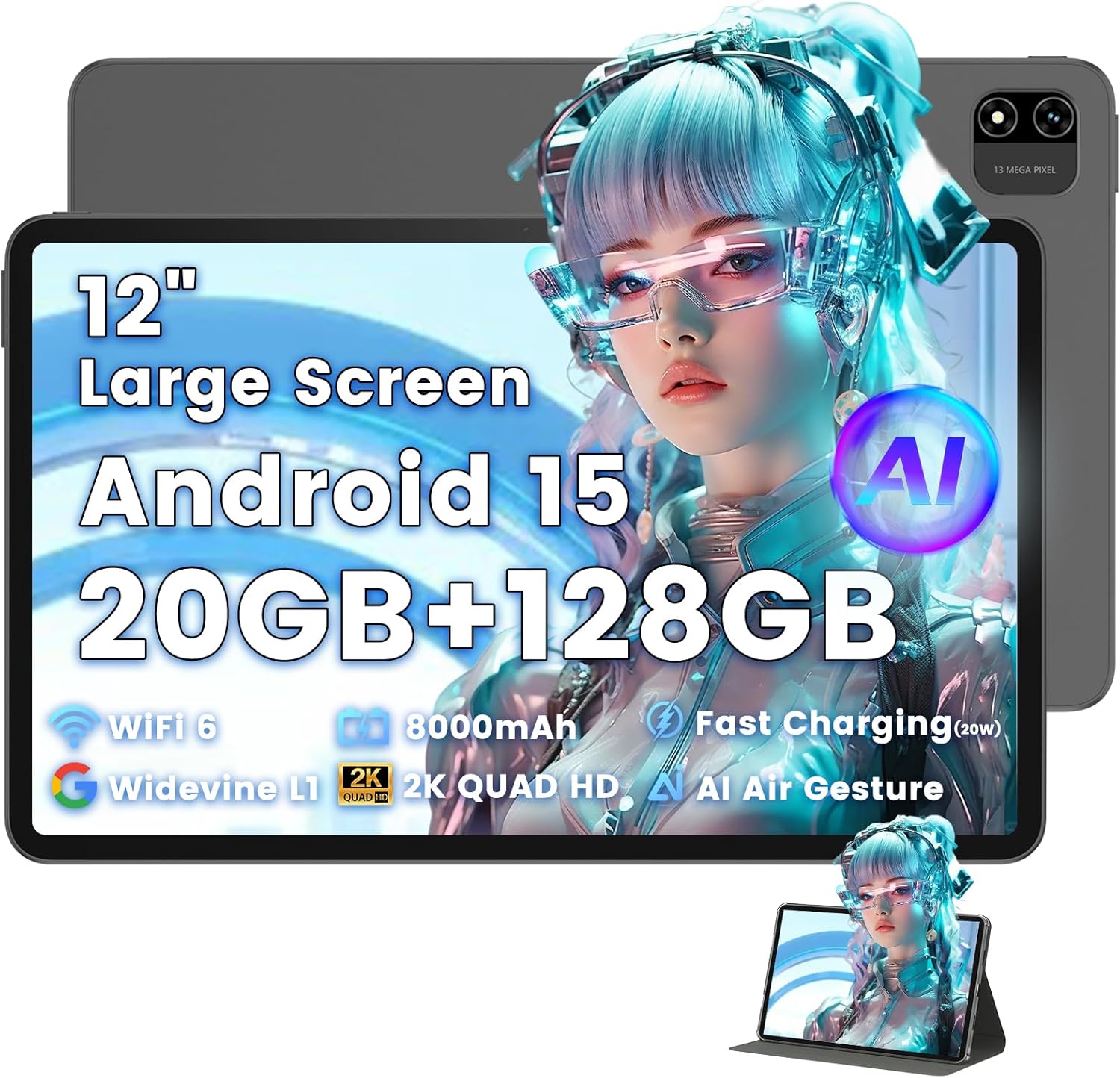
Image: The Azeyou T12 tablet, shown with its protective case, highlighting its large display and sleek design.
Что в коробке?
Проверьте наличие всех предметов в упаковке:
- 1x Azeyou Tablet (T12)
- 1x зарядный кабель (Type-C)
- 1x Руководство пользователя
- 1x чехол для планшета
Настраивать
1. Первоначальная зарядка
Before first use, fully charge the tablet. Connect the provided Type-C charging cable to the tablet's charging port and the other end to a compatible 20W Power Delivery (PD) charger. The battery indicator on the screen will show charging status.

Image: An infographic detailing key features of the Azeyou T12 tablet, including its Android 15 operating system, AI octa-core processor, Wi-Fi 6, Bluetooth 5.0, dual cameras, storage capacity, Widevine L1 support, parental control, split-screen function, and 8000mAh battery.
2. Включение и выключение
- Для включения: Press and hold the Power button located on the side of the tablet until the Azeyou logo appears.
- Чтобы выключить: Нажмите и удерживайте кнопку питания, пока на экране не появятся параметры питания, затем выберите «Выключить».
- Начать заново: Нажмите и удерживайте кнопку питания, пока не появятся параметры питания, затем выберите «Перезапустить».
3. Мастер первоначальной настройки
При первом включении планшет проведет вас через процесс первоначальной настройки:
- Выбор языка: Выберите желаемый язык.
- Wi-Fi-соединение: Выберите свою сеть Wi-Fi и введите пароль для подключения к Интернету.
- Аккаунт Google: Войдите в свою учетную запись Google или создайте новую. Это необходимо для загрузки приложений из Google Play Store и синхронизации данных.
- Дата и время: Установите правильную дату и время или позвольте сети установить их автоматически.
- Безопасность: Set up a screen lock (PIN, pattern, password, or face unlock).
4. Установка карты TF (опционально)
The tablet supports storage expansion up to 1TB via a TF (microSD) card. Locate the TF card slot, gently insert the card until it clicks into place. Ensure the tablet is powered off before inserting or removing the TF card.

Image: A visual representation of the tablet's memory and storage, indicating 20GB RAM (6GB physical + 14GB virtual), 128GB internal storage, and support for up to 1TB TF card expansion, alongside popular application icons.
Инструкция по эксплуатации
1. Basic Navigation and Gestures
- Кран: Выберите элемент или откройте приложение.
- Нажмите и удерживайте: Доступ к контекстным меню или перемещение значков.
- Проведите пальцем по экрану: Прокручивайте экраны или списки.
- Масштабирование сведением пальцев: Увеличивайте или уменьшайте масштаб изображений и web страниц.
2. Функции дисплея
The Azeyou T12 features an 11.97-inch 2K FHD (2000x1200) display with a 90Hz refresh rate for smooth visuals.
- Регулировка яркости: Проведите пальцем вниз от верхнего края экрана, чтобы открыть панель быстрых настроек и отрегулировать ползунок яркости.
- Фильтр синего света: The tablet includes a built-in blue light filter that automatically adjusts brightness to reduce eye strain. This can be managed in Display Settings.
- Widevine L1: Enjoy high-definition content from streaming services like Netflix and Prime Video due to Widevine L1 certification.

Image: A visual representation of the tablet's display specifications, emphasizing its 12-inch screen, 16:10 aspect ratio, 2000x1200 resolution, and 90Hz refresh rate, with a child watching content on the screen.

Image: An illustration demonstrating the tablet's Widevine L1 certification for HD streaming and its quad-speaker system for rich, immersive audio, surrounded by logos of popular streaming services.
3. Производительность и многозадачность
The tablet is equipped with an A733 octa-core processor and 20GB RAM (6GB physical + 14GB virtual) for smooth operation.
- Режим разделенного экрана: To use two apps simultaneously, open one app, then swipe up from the bottom of the screen and hold to access recent apps. Tap the app icon at the top of the window and select "Split screen". Choose a second app to open in the other half of the screen.
- Управление приложениями: Close background apps from the recent apps menu to optimize performance.
4. AI Smart Features
The A733 octa-core processor includes an AI chip that enables several intelligent functions:
- AI Posture Reminder: The tablet can monitor your sitting posture and provide gentle reminders to encourage better habits, especially useful for online learning or extended use.
- Управление жестами ИИ: Navigate the tablet without touching the screen. Use simple hand movements in front of the camera to flip pages, pause videos, or browse content.
- Улучшение изображений с помощью ИИ: The AI engine can enhance low-resolution photos and videos in real-time, improving clarity, detail, and overall visual quality.

Image: A collage demonstrating the tablet's AI capabilities, including an AI Posture Reminder for healthy habits, AI Gesture Control for touch-free navigation, and AI Image Enhancement for improved photo and video quality.
5. Камеры
The tablet features a 5MP front camera and a 13MP rear camera with autofocus and flash.
- Фронтальная камера: Ideal for video calls, online classes, and selfies.
- Задняя камера: Suitable for capturing photos and videos. Features autofocus and flash for improved image quality.
- Разблокировка по лицу: Используйте фронтальную камеру для быстрого и безопасного доступа к вашему устройству.

Image: A graphic highlighting the tablet's 5MP front camera and 13MP AI rear camera, showcasing features like AI-enhanced photos and Face Unlock for secure access.
6. Связь
- Wi-Fi 6: Connect to high-speed Wi-Fi networks for stable streaming and low-latency online activities. Access Wi-Fi settings via the Quick Settings panel or the Settings app.
- Bluetooth 5.0: Pair with wireless keyboards, headphones, and other Bluetooth accessories. Enable Bluetooth in Quick Settings or the Settings app.
- Порт Type-C: Used for charging, fast data transfer, and audio output with compatible Type-C headphones.

Image: A visual representation of the tablet's connectivity features, including Wi-Fi 6, Bluetooth 5.0, and support for Type-C headsets, illustrating seamless integration with various devices and networks.
7. Управление батареей
Аккумулятор ёмкостью 8000 мА·ч обеспечивает длительное время работы. Чтобы оптимизировать время работы аккумулятора:
- Уменьшите яркость экрана.
- Отключайте Wi-Fi и Bluetooth, когда они не используются.
- Закройте ненужные фоновые приложения.
- Use power-saving modes available in Battery Settings.
8. Родительский контроль
The tablet includes a parental control mode to manage screen time, restrict content, and control app access for children. This feature can be configured in the tablet's settings under 'Digital Wellbeing & parental controls'.

Image: A screenshot of the Android 15 interface on the tablet, highlighting features such as HD streaming, parental control, and split-screen functionality, with various app icons visible.
Обслуживание
1. Очистка планшета
- Для очистки экрана и корпуса планшета используйте мягкую безворсовую ткань.
- Для стойких пятен слегка разотритеampСмочите ткань водой или средством для чистки экранов, предназначенным для электронных устройств.
- Избегайте использования едких химикатов, абразивных материалов и чрезмерной влажности.
2. Обновления программного обеспечения
Регулярно проверяйте наличие обновлений программного обеспечения и устанавливайте их, чтобы обеспечить оптимальную производительность, безопасность и доступ к новым функциям. Перейти к Настройки > Система > Обновление системы.
3. Управление хранением
Для поддержания производительности периодически управляйте хранилищем планшета:
- Удалите ненужные приложения и files.
- Очистить данные кэша для приложений в Настройки > Приложения и уведомления > [Название приложения] > Хранилище и кэш.
- Utilize cloud storage or transfer large files to an external TF card or computer.
Поиск неисправностей
If you encounter issues with your Azeyou T12 tablet, refer to the following common solutions:
- Планшет не включается:
- Убедитесь, что аккумулятор заряжен. Подключите зарядное устройство и подождите несколько минут, прежде чем пытаться включить устройство.
- Для принудительной перезагрузки удерживайте кнопку питания в течение 10-15 секунд.
- Низкая производительность или зависание:
- Закройте ненужные фоновые приложения.
- Clear app cache and data.
- Перезагрузите планшет.
- Проверьте наличие доступных обновлений системы.
- Проблемы с подключением к Wi-Fi:
- Убедитесь, что на планшете включен Wi-Fi.
- Перезагрузите ваш Wi-Fi-роутер.
- Забудьте сеть в настройках Wi-Fi и подключитесь заново.
- Приложения зависают или не отвечают:
- Принудительно закрыть приложение (Settings > Apps & notifications > [App Name] > Force stop).
- Очистите кэш и данные приложения.
- Удалите и переустановите приложение.
- Убедитесь, что приложение обновлено до последней версии.
- Экран не отвечает:
- Выполните принудительную перезагрузку.
- Убедитесь, что экран чистый и на нем нет мусора.
Технические характеристики
- Название модели:
- T12 Tablet
- Операционная система:
- Андроид 15
- Процессор:
- A733 Octa-Core Processor (Unisoc)
- БАРАН:
- 20 ГБ (6 ГБ физической памяти + 14 ГБ виртуальной памяти)
- Внутреннее хранилище (ПЗУ):
- 128 ГБ
- Расширяемое хранилище:
- До 1 ТБ через TF-карту
- Размер экрана:
- 11.97 дюйма
- Разрешение экрана:
- 2000x1200 FHD
- Частота обновления:
- 90 Гц
- Графический сопроцессор:
- Imagination Technologies BXM-4-64 MC1
- Задняя камера:
- 13MP с автофокусом и вспышкой
- Фронтальная камера:
- 5МП
- Емкость аккумулятора:
- 8000мАч
- Зарядка:
- 20W Power Delivery (PD) Fast Charging via Type-C
- Беспроводное подключение:
- Wi-Fi 6 (802.11a/b/g/n/ac), Bluetooth 5.0
- Аудио:
- Quad-Speakers, Type-C Audio Output
- Размеры (ДxШxВ):
- 11 x 7 x 0.3 дюйма
- Вес товара:
- 3.1 фунта
- Цвет:
- Серый
- Особые характеристики:
- AI Posture Reminder, AI Gesture Control, AI Image Enhancement, Widevine L1, Parental Control, Split-Screen Mode, Face Unlock
Гарантия и поддержка
Информация о гарантии
Azeyou products typically come with a standard manufacturer's warranty. Please refer to the warranty card included in your product packaging or visit the official Azeyou website for specific warranty terms and conditions. The warranty generally covers manufacturing defects but does not cover damage caused by misuse, accidents, or unauthorized modifications.
Поддержка клиентов
For technical assistance, troubleshooting beyond this manual, or warranty claims, please contact Azeyou customer support. Contact details can usually be found on the official Azeyou website or on the product packaging. When contacting support, please have your tablet's model number (T12) and purchase information ready.
Вы можете посетить Azeyou Store on Amazon для получения дополнительной информации о продукте и ресурсов поддержки.