
SIMO SolHero24
Руководство по эксплуатации портативной мобильной точки доступа SIMO Solis Hero 4G LTE
Model: SolHero24 | Brand: SIMO
1. Продукт закончилсяview
The SIMO Solis Hero is a versatile 2-in-1 device designed to provide reliable global Wi-Fi connectivity and serve as a portable power bank. It offers seamless internet access in over 140 countries without the need for a SIM card or contract, automatically connecting to the strongest available network. Its robust design is suitable for various travel and remote work scenarios.
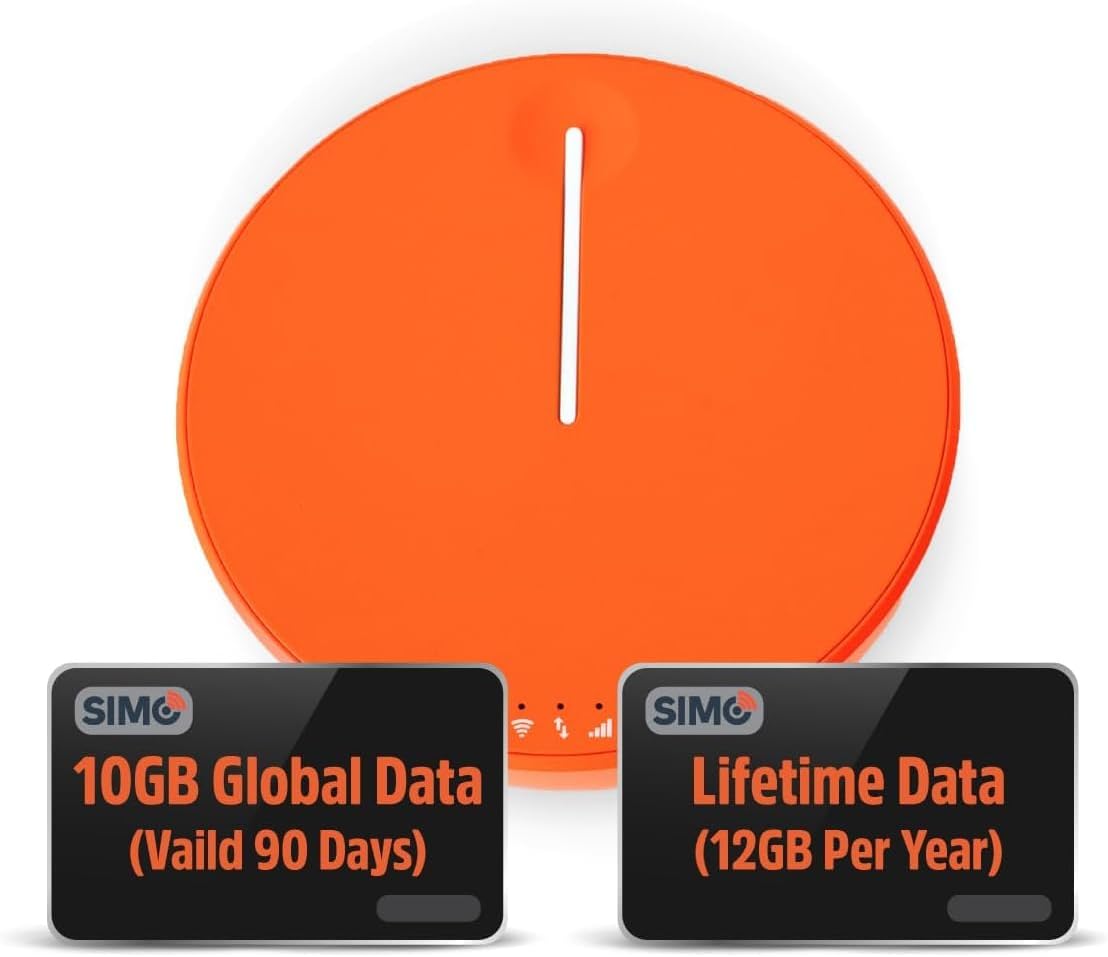
Figure 1.1: SIMO Solis Hero 4G LTE Portable Mobile Hotspot device.
Основные характеристики:
- Устройство 2-в-1: Functions as a mobile hotspot and a 5250mAh power bank.
- Глобальная связь: Access to 300+ mobile networks in 140+ countries with SignalScan technology.
- No SIM Card or Contract: Utilizes virtual SIM technology for hassle-free connection.
- Lifetime Data Plan: Includes 1GB of global data every month for the life of the device.
- Прочная конструкция: IP68-rated for dust, water, and drop protection.
- Поддержка нескольких устройств: Поддерживает одновременное подключение до 10 устройств.

Рисунок 1.2: Болееview of Solis Hero key features.
2. Что входит в комплект поставки
Upon opening your SIMO Solis Hero package, you will find the following components:
- SIMO Solis Hero Hotspot Device
- Чехол для переноски
- Зарядный кабель USB-C
- Краткое руководство пользователя
- Registration & Support Card
Video 2.1: Official unboxing and setup guide for the SIMO Solis Hero. This video demonstrates the contents of the box and initial steps to get started.

Figure 2.1: Visual representation of the Solis Hero components and initial setup steps.
3. Руководство по установке
3.1 Первоначальная активация устройства
- Зарядите устройство: Before first use, fully charge your Solis Hero using the provided USB-C charging cable. Connect the cable to the device and a compatible USB power adapter (not included).
- Включение питания: Press and hold the power button on the device until the indicator lights illuminate.
- Download the Solis App: Scan the QR code on the Registration & Support Card or search for 'Solis Wi-Fi' in your device's app store (available for iOS and Android).
- Зарегистрируйте свое устройство: Open the Solis app and follow the on-screen instructions to create an account and register your Solis Hero using its serial number. This step is crucial for activating your Lifetime Data plan and any included global data.
3.2 Подключение к Wi-Fi
- Locate Wi-Fi Network: На своем смартфоне, планшете или ноутбуке перейдите в настройки Wi-Fi.
- Select Solis Hero Network: Find the Wi-Fi network name (SSID) broadcast by your Solis Hero device. The SSID and password are typically found on a sticker on the device or in the Quick Start Guide.
- Введите пароль: Введите пароль от Wi-Fi, когда появится соответствующий запрос.
- Соединять: Your device should now be connected to the Solis Hero's Wi-Fi network.
4. Инструкция по эксплуатации
4.1 Подключение по Wi-Fi
- The Solis Hero automatically connects to the strongest 4G LTE network available in your location using SignalScan technology.
- You can manage connected devices and monitor data usage through the Solis app.
4.2 Функциональность портативного зарядного устройства
- The built-in 5250mAh battery allows you to charge other devices.
- Connect your device to the Solis Hero using a compatible charging cable.
- The Solis Hero can provide over 16 hours of battery life for its own operation, or it can be used to charge external devices.
4.3 Data Plans and Management
Your Solis Hero comes with a Lifetime Data plan (1GB per month) and an additional 10GB of global data (valid for 90 days). Additional data can be purchased as needed via the Solis app.

Figure 4.1: Flexible data plans are available through the Solis app to suit various usage needs.
5. Техническое обслуживание и уход
- Уборка: Для чистки устройства используйте мягкую сухую ткань. Избегайте использования абразивных чистящих средств и растворителей.
- Хранилище: Храните устройство в прохладном, сухом месте, вдали от прямых солнечных лучей и экстремальных температур.
- Уход батареи: Чтобы продлить срок службы аккумулятора, избегайте частой полной разрядки устройства. Регулярно заряжайте его, даже если вы не используете устройство в течение длительного времени.
- Водо- и пыленепроницаемость: While IP68-rated, avoid intentional submersion or exposure to harsh environments to maintain device integrity.
6. Устранение распространенных неполадок
| Проблема | Возможная причина | Решение |
|---|---|---|
| Нет подключения к интернету | No data plan active or data exhausted. Weak signal. Device not powered on. | Check data plan status in Solis app. Move to an area with better signal. Ensure device is powered on and fully charged. |
| Устройство не заряжается | Faulty cable or adapter. Charging port obstruction. | Try a different USB-C cable and power adapter. Check charging port for debris. |
| Низкая скорость интернета | Congested network. Data throttling after high usage. Too many connected devices. | Move to a less congested area. Check data plan details for speed limitations. Disconnect unused devices. |
| Невозможно подключиться к сети Wi-Fi | Incorrect Wi-Fi password. Device too far from hotspot. | Verify Wi-Fi password. Move closer to the Solis Hero device. |
7. Технические характеристики
| Особенность | Деталь |
|---|---|
| Номер модели | SolHero24 |
| Емкость аккумулятора | 5250 мАч литий-ионный (в комплекте) |
| Размеры | 4.41 x 4.37 x 2.05 дюйма |
| Вес товара | 9.7 унции |
| Связность | 4G LTE, Wi-Fi (connects to 300+ mobile networks) |
| Максимальное количество подключенных устройств | 10 |
| Рейтинг долговечности | IP68 (Dust, Water, Drop Protection) |
8. Гарантия и поддержка клиентов
SIMO products are backed by responsive customer service. For any inquiries, technical assistance, or warranty claims, please refer to the contact information provided on your Registration & Support Card or visit the official SIMO webсайт.
Вы также можете посетить SIMO Store on Amazon для получения дополнительной информации и ресурсов поддержки.
Ask a question about this manual
Ask about setup, troubleshooting, compatibility, parts, safety, or missing instructions. Manuals+ will review the question and use this page’s manual context to help answer it.