
NIMO NIMO N152
NIMO 15.6-inch FHD Student Laptop Instruction Manual
Model: NIMO N152
Введение
This manual provides essential information for setting up, operating, maintaining, and troubleshooting your NIMO 15.6-inch FHD Student Laptop. Please read this manual thoroughly to ensure proper use and to maximize the lifespan of your device. The NIMO N152 laptop is designed for work, study, and daily life, featuring a powerful AMD Ryzen 5 3500U processor, ample memory and storage, and user-friendly features like a backlit keyboard and fingerprint reader.

Figure 1: NIMO 15.6-inch FHD Student Laptop. This image displays the silver laptop with its screen showing a vibrant desktop background, highlighting its full HD display, 32GB RAM, 1TB SSD, fingerprint reader, Type-C PD charger, and backlit keyboard features.
1. Настройка
1.1 Распаковка и первоначальный осмотр
Carefully remove all components from the packaging. Verify that all items listed below are present and undamaged. If any item is missing or damaged, please contact NIMO customer support immediately.
Что в коробке:
- 1 x NIMO N152 Laptop
- 1 x Type-C 65W PD Fast Charger
- 1 x Руководство пользователя (этот документ)
- Windows 11 Домашняя (предустановленная)
- Информация о гарантии
1.2 Первоначальное включение и зарядка
Before first use, it is recommended to fully charge your laptop. Connect the provided Type-C 65W GaN PD fast charger to the laptop's Type-C charging port and then to a power outlet. The charge LED indicator will illuminate to confirm charging. A full charge typically takes a few hours, but the fast charging feature allows for significant battery life with short charging times.

Figure 2: Type-C 65W PD Fast Charger. This image shows the compact 65W GaN PD charger and its versatility in charging not only the NIMO laptop but also other devices like tablets and smartphones, emphasizing its "One Charger for All" capability.
1.3 Operating System Setup (Windows 11)
Upon first power-on, the laptop will guide you through the Windows 11 initial setup process. Follow the on-screen prompts to configure language, region, network connection, user accounts, and privacy settings. An internet connection is required for activation and updates.
1.4 Настройка считывателя отпечатков пальцев
For enhanced security and quick login, set up the integrated fingerprint reader. Navigate to Windows Settings > Accounts > Sign-in options > Fingerprint Recognition (Windows Hello Fingerprint) and follow the instructions to register your fingerprints. This allows for password-free login with a single touch.
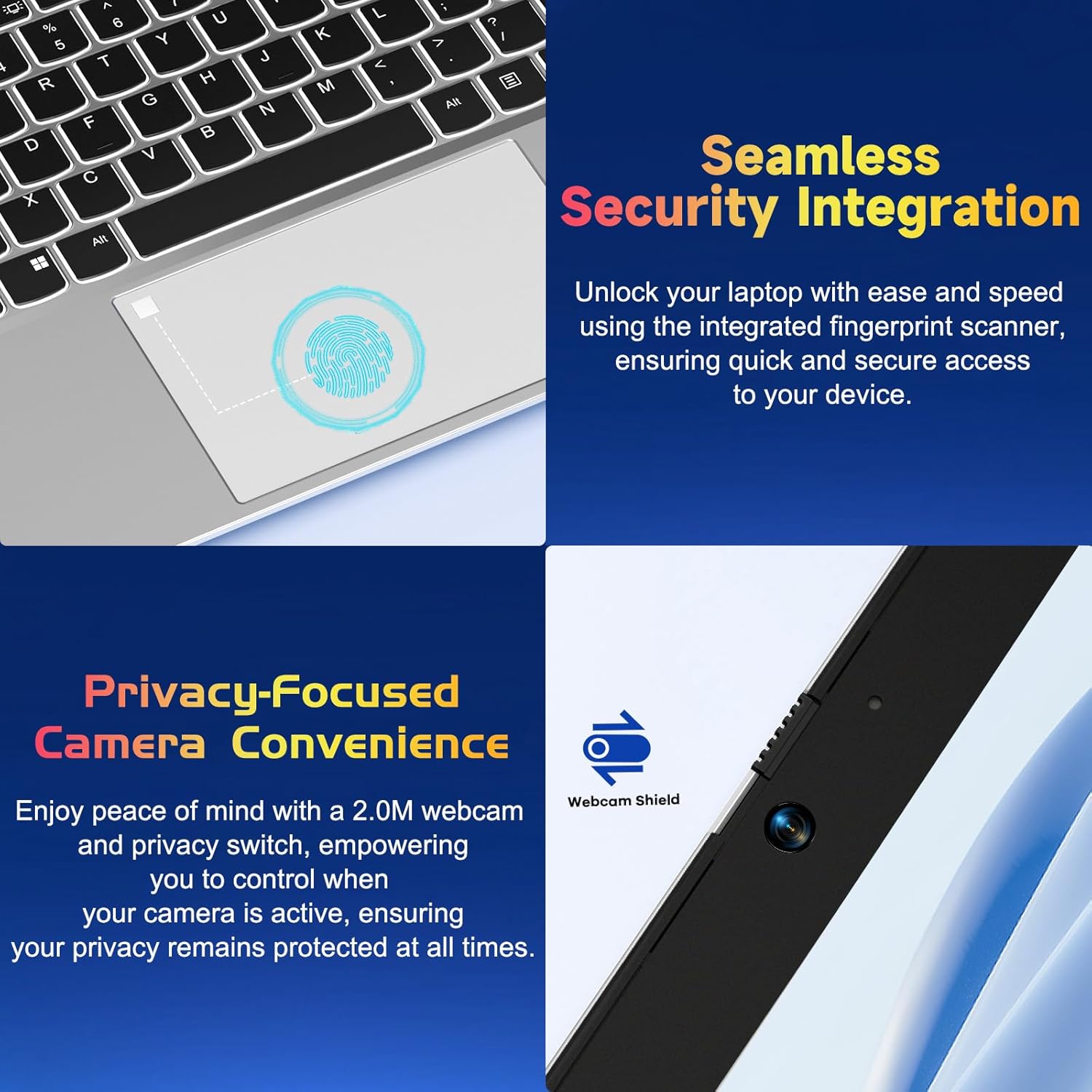
Figure 3: Seamless Security Integration and Privacy-Focused Camera. This image highlights the integrated fingerprint scanner on the touchpad for quick and secure access, and the 2.0M webcam with a privacy switch for enhanced user privacy.
2. Работа с ноутбуком
2.1 Управление питанием
- Включение питания: Нажмите кнопку питания, расположенную в правом верхнем углу клавиатуры.
- Спящий режим: Закройте крышку или кратковременно нажмите кнопку питания.
- Неисправность: Go to Start > Power > Shut down in Windows.
- Перезапуск: Go to Start > Power > Restart in Windows.
2.2 Клавиатура и сенсорная панель
The NIMO N152 features a full-size keyboard with a numeric keypad for efficient data entry. The backlit keyboard can be adjusted or turned off using the dedicated function keys (refer to keyboard legends for specific key combinations), allowing for comfortable typing in various lighting conditions.
The precision touchpad supports multi-touch gestures for intuitive navigation, including scrolling, zooming, and switching applications. Refer to Windows settings for customizing touchpad gestures.

Figure 4: Effortless Typing in Any Environment. This image showcases the laptop's backlit keyboard, responsive touchpad, integrated fingerprint reader, and numeric keypad, emphasizing ease of use in various lighting conditions.
2.3 Функции дисплея
Your laptop is equipped with a 15.6-inch Full HD (1920x1080) IPS Anti-Glare display. This screen offers vibrant visuals, wide viewing angles, and reduced reflections for a comfortable viewing experience. The 85% screen-to-body ratio and micro-edge design maximize your viewing область.

Figure 5: Vivid Full HD Display. This image highlights the laptop's 15.6-inch FHD IPS display with 1920x1080 resolution, bright view, and eye protection features, showcasing its immersive visual quality.
The laptop also features a 180-degree lay-flat hinge, allowing the screen to lie completely flat. This feature is useful for sharing content with others or collaborating in various settings.

Figure 6: 180-degree Lay-Flat Hinge. This image demonstrates the laptop's ability to open flat, expanding usage scenarios and making content sharing easier.
2.4 Варианты подключения
The NIMO N152 offers a variety of ports for connecting peripherals and external devices:
- Type-C (только для зарядки): Для ввода мощности.
- Порты USB 3.0 (x3): Для высокоскоростной передачи данных с использованием совместимых устройств.
- Порт USB 2.0 (1 шт.): Для подключения стандартных USB-устройств.
- HDMI: Для подключения к внешним мониторам или проекторам.
- Тип C (полный функционал): Supports data, video output, and power delivery.
- Micro SD Reader: Для расширения хранилища или переноса fileс карт памяти.
- Headphone Combo Jack: Для подключения наушников или гарнитуры.
- Слот для замка Кенсингтона: Для физической безопасности.

Figure 7: Expanded Connectivity Options. This image illustrates the various ports available on the NIMO laptop, including USB, HDMI, Type-C, Micro SD reader, and headphone jack, providing versatile connectivity.
2.5 Webкамера и конфиденциальность
The laptop includes a 2.0 MP webcam for video calls and conferencing. For privacy, a physical privacy switch is integrated, allowing you to disable the webcam when not in use, ensuring your privacy is protected.
2.6 Производительность вышеview
Powered by an AMD Ryzen 5 3500U processor with 4 cores and 8 threads, the NIMO N152 delivers reliable performance for daily tasks, entertainment, and light gaming. Coupled with 32GB DDR4 RAM and a 1TB PCIe SSD, it offers fast startup times, quick application loading, and efficient multitasking.

Figure 8: AMD R5 Processor. This image highlights the laptop's AMD Ryzen 5 processor, detailing its 4 cores, 8 threads, 15W power consumption, and 3.7 GHz turbo boost, indicating its capability for daily tasks and light gaming.
3. Техническое обслуживание
3.1 Чистка ноутбука
To maintain the laptop's appearance and functionality, regularly clean the screen, keyboard, and chassis. Use a soft, lint-free cloth slightly dampened with water or a screen-cleaning solution for the display. For the keyboard and chassis, use a dry or slightly damp Ткань. Избегайте использования едких химикатов и абразивных материалов.
3.2 Уход за аккумулятором
Для продления срока службы батареи избегайте частой полной разрядки. Рекомендуется по возможности поддерживать уровень заряда батареи в пределах от 20% до 80%. Если ноутбук не используется в течение длительного времени, храните его в прохладном, сухом месте.
3.3 Обновление оперативной памяти и SSD
The NIMO N152 laptop supports user-detachable RAM and SSD, allowing for future upgrades. If you plan to upgrade, ensure you use compatible components and follow proper anti-static precautions. Consult a professional if you are unsure about the upgrade process.

Figure 9: Expandable Memory Support. This image illustrates the laptop's support for memory expansion, showing a Micro SD card slot, indicating flexibility for storage upgrades.
4. Поиск Неисправностей
If you encounter issues with your NIMO N152 laptop, please refer to the following common troubleshooting steps:
- Нет питания: Ensure the charger is properly connected and the power outlet is functional. Try a different outlet.
- Проблемы с отображением: If the screen is blank or flickering, try connecting an external monitor to check if the issue is with the laptop's display or graphics output. Adjust display settings in Windows.
- Клавиатура/тачпад не реагируют: Restart the laptop. Check for any physical obstructions. Ensure drivers are up to date via Windows Update or NIMO support webсайт.
- Низкая производительность: Close unnecessary applications. Check for background processes. Ensure sufficient free space on the SSD. Consider running a disk cleanup or antivirus scan.
- Проблемы с подключением: For Wi-Fi, ensure the router is working and the laptop is within range. For USB devices, try different ports.
For more complex issues or if the problem persists, please contact NIMO customer support.
5. Технические характеристики
| Особенность | Спецификация |
|---|---|
| Название модели | NIMO N152S |
| Размер экрана | 15.6 дюйма |
| Максимальное разрешение экрана | 1920 x 1080 пикселей (FHD IPS) |
| Процессор | AMD Ryzen 5 3500U (3.7 ГГц) |
| БАРАН | 32 ГБ DDR4 (3200 МГц) |
| Жесткий диск | 1 TB PCIe SSD |
| Графический сопроцессор | AMD Integrated Graphics |
| Операционная система | Windows 11 Домашняя |
| Тип беспроводной связи | 802.11a/b/g/n/ac |
| USB-порты | 3 x USB 3.0, 1 x USB 2.0, 2 x Type-C (1 Charge Only, 1 Full Function) |
| Средний срок службы батареи | 5 часов |
| Вес товара | 3.8 фунта |
| Размеры продукта | 14.07 x 8.98 x 0.76 дюйма |
| Цвет | Серебро |
| Задний WebРазрешение камеры | 2 МП |
| Особые возможности | Backlit Keyboard, Fingerprint Reader, HD Audio, Numeric Keypad |
6. Гарантия и поддержка
NIMO is committed to providing excellent customer service and product support. Your NIMO N152 laptop comes with the following:
- 2-летняя гарантия производителя: Покрывает дефекты материалов и изготовления при нормальной эксплуатации.
- Возврат товара без лишних хлопот в течение 90 дней: You may return any NIMO product for any reason within 90 days of purchase.
- Partial Assembly in the USA: Demonstrates commitment to quality and local support.
For any questions, technical assistance, or warranty claims, please contact NIMO customer support. Our dedicated team is ready to assist you.

Figure 10: NIMO Customer Service. This image depicts a customer service representative with a headset, symbolizing NIMO's commitment to providing professional after-sales support.
You can also find more information and support resources on the official NIMO webсайт.
Важная информация по безопасности
Please read and follow all safety instructions provided with your laptop to prevent injury or damage. This product contains chemicals known to the State of California to cause cancer and birth defects or other reproductive harm (Proposition 65 warning).
Ask a question about this manual
Ask about setup, troubleshooting, compatibility, parts, safety, or missing instructions. Manuals+ will review the question and use this page’s manual context to help answer it.