
Введение
This manual provides essential information for setting up, operating, and maintaining your NIMO 15.6" FHD Laptop Computer (Model NIMO N157). Please read this manual thoroughly before using your device to ensure optimal performance and longevity.
Что в коробке?
- 1 x NIMO N157 Laptop
- 1 x Type-C 65W PD Fast Charger
- 1 x Руководство пользователя (этот документ)
- Windows 11 Домашняя (предустановленная)
- 2 Years Warranty, 90 Days Return information
Руководство по настройке
1. Первоначальное включение и зарядка
Before first use, ensure your NIMO laptop is fully charged. Connect the provided Type-C 65W PD Fast Charger to the laptop's Type-C charging port and a power outlet. The charge LED indicator will illuminate. A full charge is recommended for optimal battery calibration.

Image: NIMO laptop connected to its Type-C 65W GaN II PD charger. This charger provides fast charging capabilities.
2. Operating System Setup (Windows 11 Home)
Upon first power-on, the laptop will guide you through the Windows 11 Home setup process. Follow the on-screen instructions to configure language, region, network settings, and create a user account. An internet connection (Wi-Fi 6 supported) is recommended for the initial setup to download necessary updates.

Image: The NIMO laptop screen showing the Windows 11 desktop interface.
3. Настройка считывателя отпечатков пальцев
For enhanced security and quick login, set up the integrated fingerprint reader. Navigate to Windows Settings > Accounts > Sign-in options and follow the prompts to register your fingerprint. This allows for secure one-touch login.

Изображение: крупный план view of the fingerprint reader on the NIMO laptop, illustrating its use for secure login.
Инструкция по эксплуатации
1. Keyboard and Backlight
The NIMO laptop features a full-size keyboard with a numeric keypad and a backlit function. To activate or adjust the keyboard backlight, use the dedicated function keys (Fn + Fx, refer to your keyboard layout for specific key). This feature allows for comfortable typing in low-light environments.
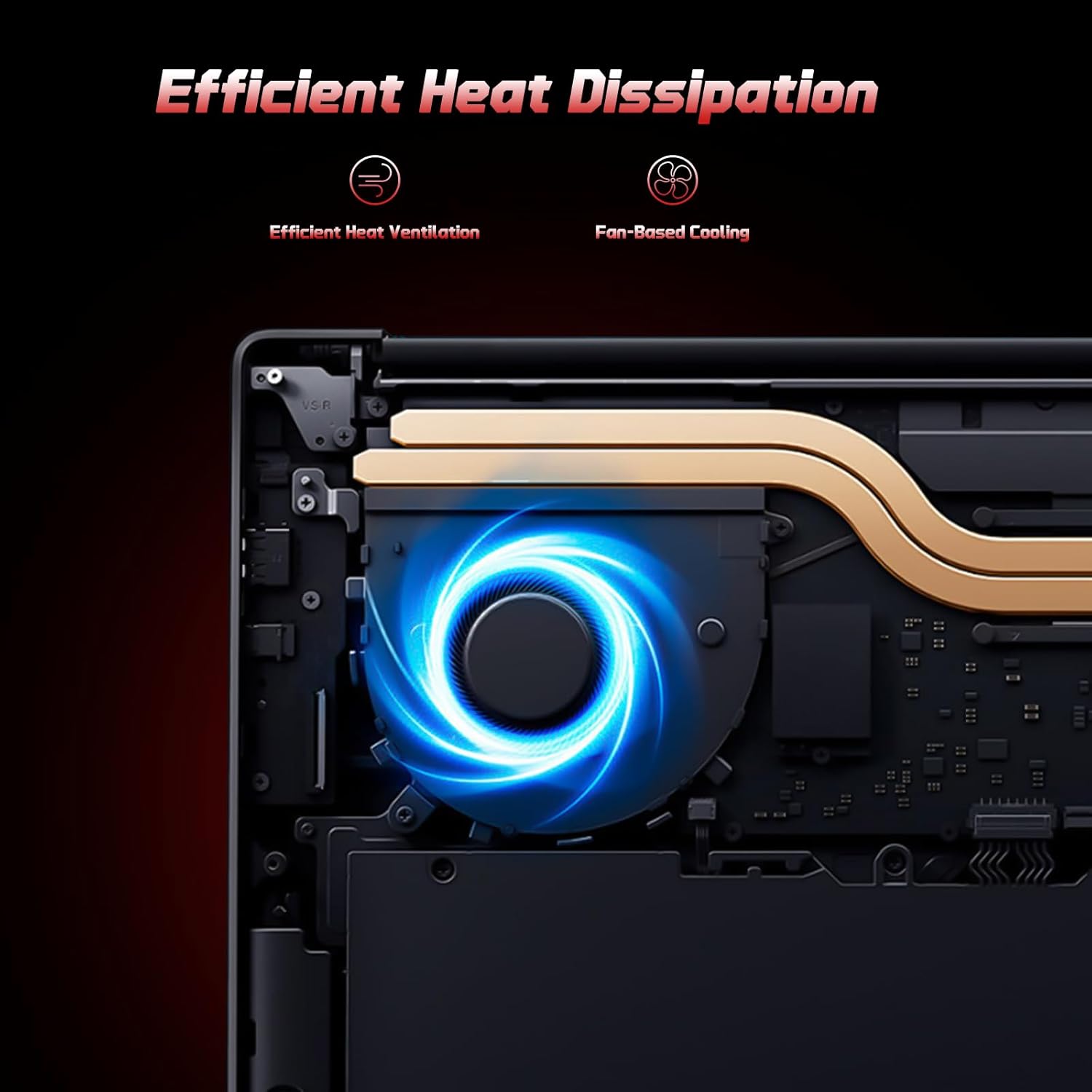
Image: A user typing on the NIMO laptop's backlit keyboard in a dim environment.
2. Подключение периферийных устройств
The laptop is equipped with multiple ports for various peripherals:
- USB-порты: Подключайте USB-устройства, такие как внешние накопители, мыши или клавиатуры.
- Порт HDMI: Подключитесь к внешнему монитору или телевизору для расширения зоны отображения.
- Порты Type-C: One port supports 65W PD fast charging, and another is a multifunction port for data transfer and display output.
- Слот для Micro SD: Insert a Micro SD card for expandable storage.
- Порт для наушников: Подключите наушники или внешние динамики.
- Слот для замка Кенсингтона: Для физической безопасности.
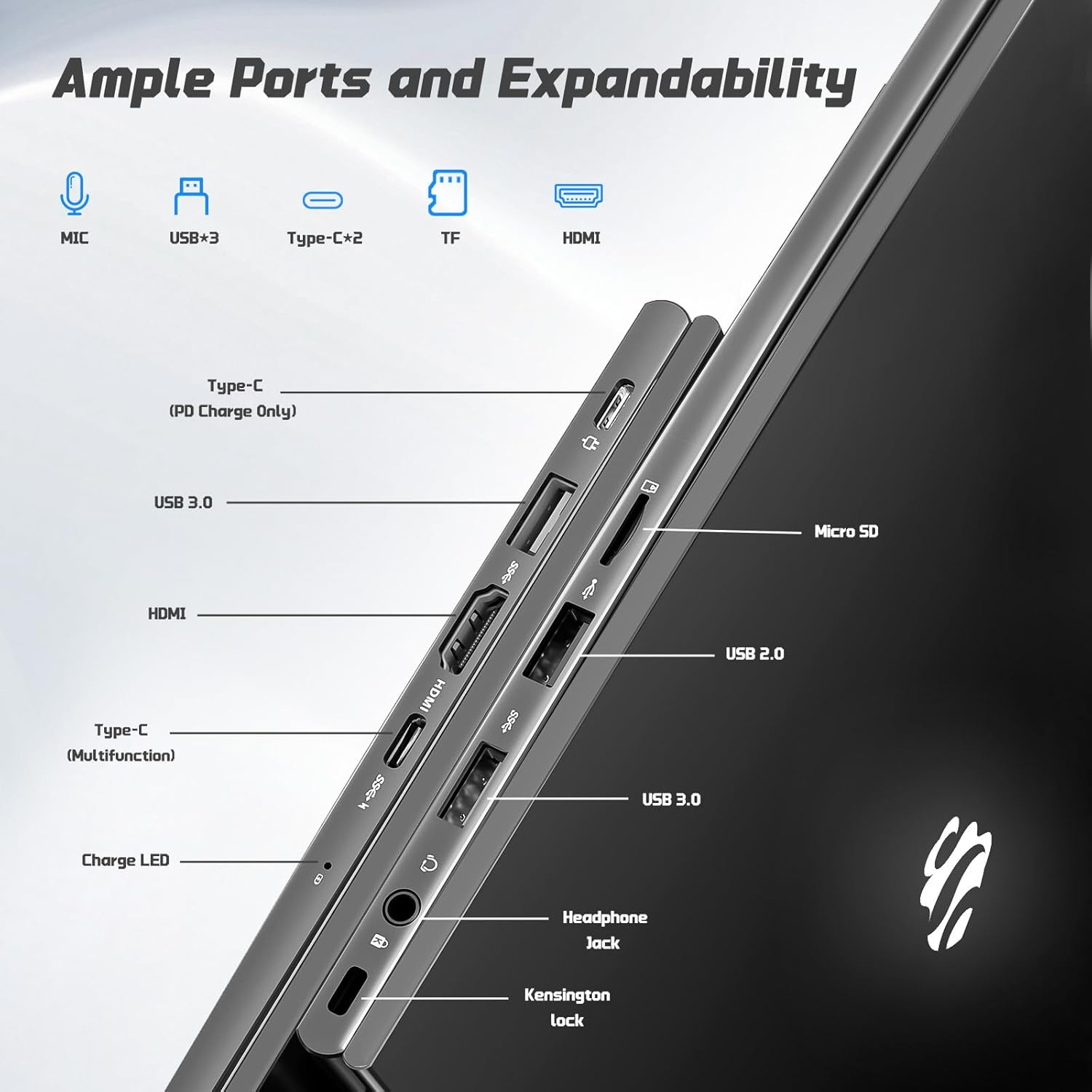
Изображение: сбоку view of the NIMO laptop highlighting the available ports including USB, HDMI, Type-C, Micro SD, and headphone jack.
3. Webкамера и конфиденциальность
Встроенная 2-мегапиксельная камера webcam is suitable for video calls and online meetings. For privacy, ensure the camera is covered or disabled when not in use, if a physical privacy shutter is present (refer to product images for confirmation).
Video: This video demonstrates the NIMO laptop's features, including the webcam and various ports. It shows the laptop being used for work, school, and play, highlighting the backlit keyboard and fingerprint unlock feature.
Video: This video showcases the NIMO laptop's versatility for different users, including students and professionals. It highlights the 15.6" FHD display, backlit keyboard, and multiple connectivity options.
Video: A comprehensive introduction to the NIMO 15.6" laptop, detailing its design, performance, and user experience for various tasks.
Video: This video emphasizes the efficiency and convenience of the NIMO laptop, showcasing its features that contribute to productivity and ease of use.
Video: This video highlights the NIMO 15.6" FHD laptop's suitability for students, home use, and work, demonstrating its performance in various daily scenarios.
Обслуживание
1. Чистка ноутбука
To clean the screen, use a soft, lint-free cloth specifically designed for electronics. For the keyboard and chassis, a slightly damp cloth with mild cleaning solution can be used. Avoid excessive moisture and abrasive materials. Ensure the laptop is powered off before cleaning.
2. Уход за аккумулятором
The NIMO laptop features a 53.58 Watt Hours Lithium Polymer battery. To prolong battery life, avoid fully discharging the battery frequently. It is recommended to keep the battery charge between 20% and 80% when possible. Store the laptop in a cool, dry place when not in use for extended periods.
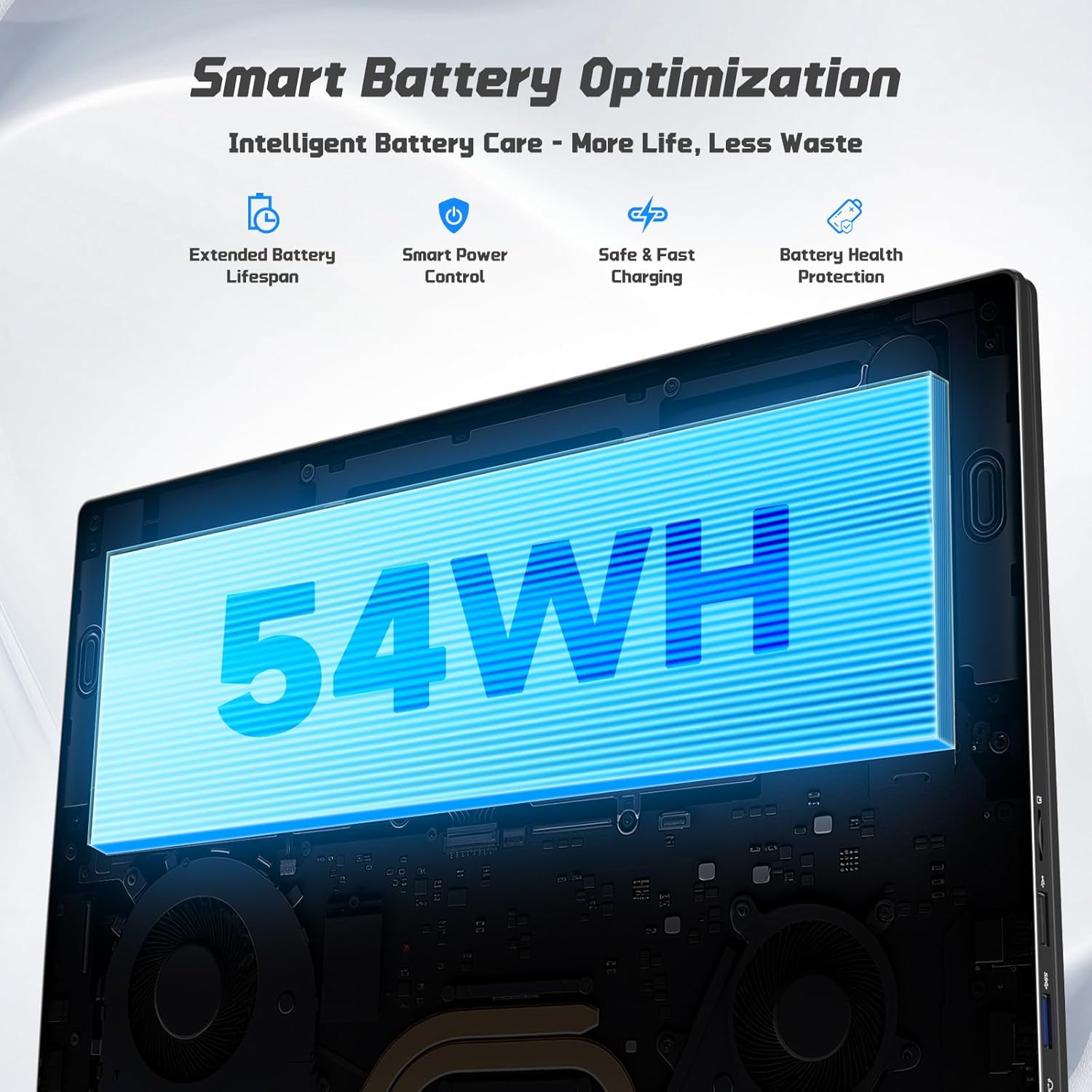
Image: Diagram illustrating the NIMO laptop's smart battery optimization features, including extended lifespan, smart power control, safe and fast charging, and battery health protection.
3. Обновления программного обеспечения
Регулярно проверяйте наличие обновлений Windows и устанавливайте их, чтобы ваша система была оснащена последними исправлениями безопасности и улучшениями производительности. Для управления обновлениями перейдите в «Параметры» > «Центр обновления Windows».
4. Рассеивание тепла
The laptop is designed with efficient heat ventilation and fan-based cooling. To prevent overheating, ensure that the ventilation openings are not blocked during use. Avoid placing the laptop on soft surfaces like beds or couches that can obstruct airflow.
Изображение: Внутренний view of the NIMO laptop showing its efficient heat dissipation system with fan-based cooling.
Поиск неисправностей
1. Ноутбук не включается
- Убедитесь, что зарядное устройство надежно подключено как к ноутбуку, так и к исправной розетке.
- Check the charge LED indicator. If it's not lit, try a different outlet or charger.
- Нажмите и удерживайте кнопку питания в течение 10–15 секунд, чтобы выполнить полный сброс настроек.
2. Screen Issues (No Display, Flickering)
- Connect an external monitor via the HDMI port to check if the issue is with the laptop's display or graphics output.
- Перезагрузите ноутбук.
- Ensure display drivers are up to date via Windows Update or NIMO's support webсайт.
3. Низкая производительность
- Закройте ненужные приложения, работающие в фоновом режиме.
- Проверьте наличие и установите все ожидаемые обновления Windows.
- Ensure sufficient free space on the 128GB SSD. Consider expanding storage using the Micro SD slot or upgrading the SSD if needed.
- Запустите проверку на вирусы.
4. Проблемы с подключением по Wi-Fi или Bluetooth
- Ensure Wi-Fi and Bluetooth are enabled in Windows Settings.
- Перезагрузите маршрутизатор/модем для устранения проблем с Wi-Fi.
- Update network drivers via Windows Update or NIMO's support webсайт.
Технические характеристики
| Особенность | Деталь |
|---|---|
| Бренд | NIMO |
| Название модели | NIMO N157G |
| Размер экрана | 15.6 дюйма |
| Разрешение дисплея | 1920x1080 пикселей (FHD) |
| Тип дисплея | IPS LCD, Anti-glare |
| Процессор | Intel Pentium N150 (4-Core, up to 3.6 GHz) |
| БАРАН | 4 ГБ DDR4 (с возможностью расширения до 16 ГБ) |
| Хранилище | 128 GB SSD (Expandable via Micro SD) |
| Операционная система | Windows 11 Домашняя |
| Графика | Интегрированный Intel Graphics |
| Webкулачок | Фронтальная камера 2 МП |
| Связность | Wi-Fi 6, Bluetooth 5.3 |
| Порты | 2x USB 3.0, 1x USB 2.0, 2x Type-C (1x PD Charge Only, 1x Multifunction), 1x HDMI, 1x Micro SD Slot, 1x Headphone Jack, 1x Kensington Lock |
| Аккумулятор | 53.58 Wh Lithium Polymer (Up to 12.75 hours life) |
| Зарядное устройство | 65W Type-C PD Fast Charger |
| Особые возможности | Backlit Keyboard, Fingerprint Reader, HD Audio, Numeric Keypad |
| Размеры | 14.07 дюйма (Д) x 8.98 дюйма (Ш) x 0.76 дюйма (Т) |
| Масса | 3.75 фунта |
Гарантия и поддержка
Your NIMO laptop comes with a Гарантия 2 год from NIMO Direct Inc. Additionally, a 90-Day Hassle-Free Return Policy is provided. For any product-related questions, technical assistance, or warranty claims, please contact NIMO customer support.
Контактная информация:
- Электронная почта: service@nimopc.com
- Онлайн поддержка: Refer to the official NIMO webСайт с дополнительными ресурсами поддержки.
Please have your model number (NIMO N157) and purchase details ready when contacting support.