
Введение
Спасибо за покупкуasing the Dsoon HDV920Pro 4K Camcorder. This manual provides essential information for setting up, operating, and maintaining your device. Please read it thoroughly before use to ensure proper functionality and to maximize your recording experience.
The Dsoon HDV920Pro is a versatile 4K camcorder designed for capturing high-quality video and photos. Key features include 4K 60FPS video recording, 48MP photo resolution, night vision capabilities, an 18X digital zoom, and a rotatable touch screen for ease of use.
Что включено
Проверьте наличие всех предметов в упаковке:
- Dsoon HDV920Pro 4K Camcorder
- 2 x Lithium Batteries
- Дистанционное управление
- Кабель USB-C
- Карточка 64GB TF
- Внешний микрофон
- Крышка объектива
- Руководство пользователя (этот документ)

Image: All components included with the Dsoon HDV920Pro camcorder, laid out for inspection.
Продукт болееview
Ознакомьтесь с основными частями вашей видеокамеры.
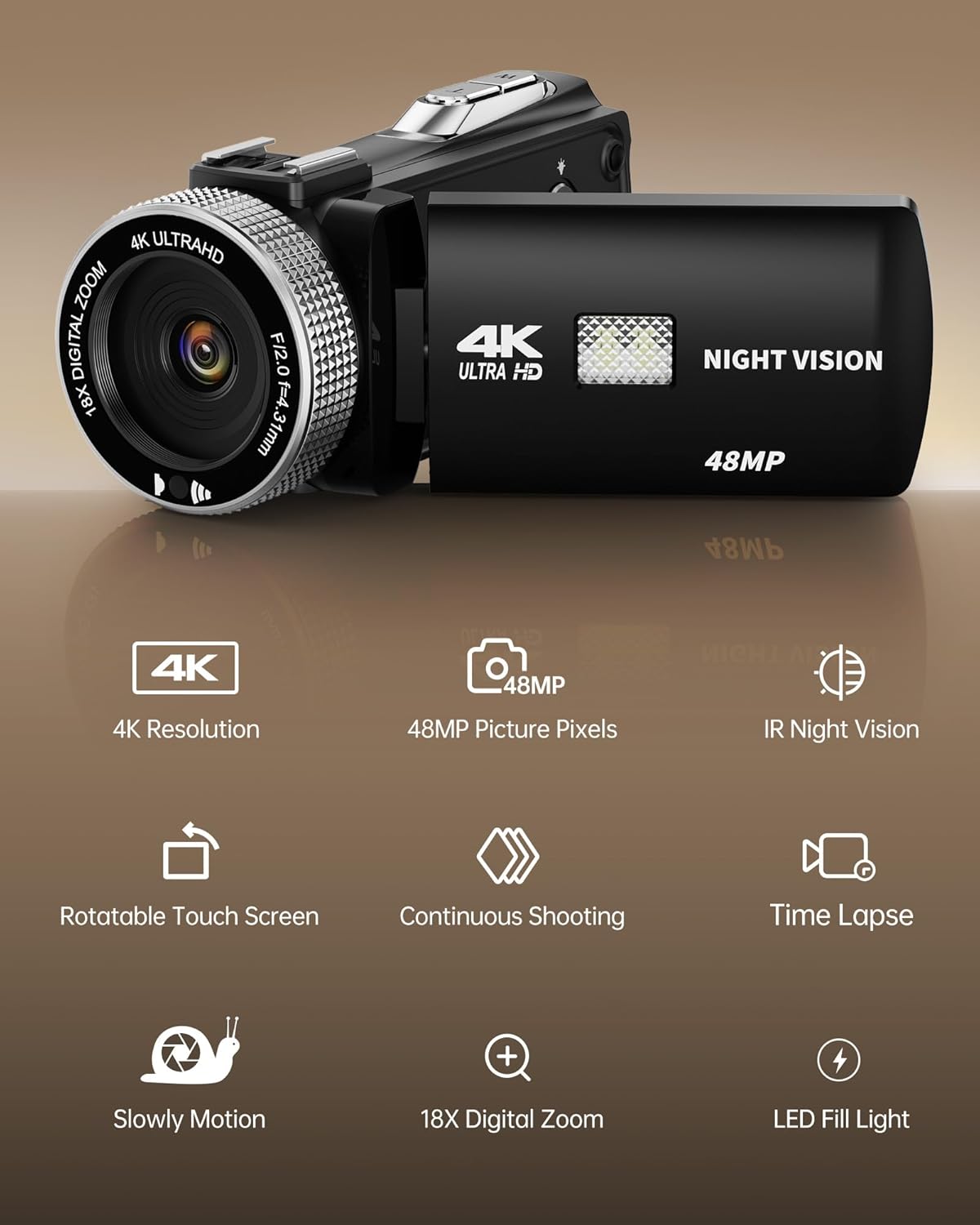
Изображение: Спереди view of the camcorder with its lens, night vision light, and the flip-out screen displaying key features like 4K resolution, 48MP, IR night vision, rotatable touch screen, continuous shooting, time lapse, slow motion, 18X digital zoom, and LED fill light.
Основные характеристики:
- Видео 4K Ultra HD: Records video at 4K resolution and 60 frames per second (FPS).
- Фотографии с разрешением 48 мегапикселя: Делает снимки высокого разрешения.
- Ночное видение: Infrared (IR) night vision for recording in low-light conditions.
- 18-кратный цифровой зум: Allows for magnification of subjects.
- 3.0-inch Rotatable Touch Screen: Provides intuitive control and flexible viewуглы.
- Поддержка внешнего микрофона: Enhances audio recording quality.
- Светодиодная подсветка: Provides additional illumination for close-up shots.
Настраивать
1. Установка аккумулятора
- Откройте крышку батарейного отсека в нижней части видеокамеры.
- Insert a fully charged lithium battery, ensuring the correct polarity.
- Плотно закройте крышку батарейного отсека.
2. Установка tf-карты
The camcorder supports Micro SD (TF) cards for storage. A 64GB TF card is included.
- Locate the TF card slot, usually on the side or bottom of the camcorder.
- Insert the TF card with the gold contacts facing the correct direction (refer to the diagram near the slot). Push until it clicks into place.
- Чтобы вынуть карту, аккуратно нажмите на нее еще раз, пока она не выскочит.
3. Установка внешнего микрофона
For improved audio quality, attach the external microphone.
- Mount the microphone onto the hot shoe mount on top of the camcorder.
- Connect the microphone's 3.5mm audio jack into the microphone input port on the camcorder.

Image: The camcorder with an external microphone for clear voice recording and a user interacting with the 270-degree rotatable touch screen.
4. Включение и выключение
- Для включения: Open the LCD screen. The camcorder will automatically power on.
- Чтобы выключить: Close the LCD screen. The camcorder will automatically power off. Alternatively, press and hold the power button.
5. Начальные настройки
Upon first use or after a factory reset, you may need to set the date, time, and language. Navigate through the menu using the touch screen or physical buttons to adjust these settings.
Инструкция по эксплуатации
1. Запись видео
- Ensure the camcorder is in video mode (indicated by an icon on the screen).
- Скомпонуйте кадр с помощью ЖК-экрана.
- Нажмите Запись/Стоп button to start recording. A red indicator light or on-screen icon will show that recording is in progress.
- Нажмите Запись/Стоп еще раз, чтобы остановить запись.
2. Фотографирование
- Переключите видеокамеру в режим фотосъемки.
- Скомпонуйте кадр.
- Нажмите Фото button (often a separate button or a half-press of the record button) to capture a still image.
3. Функция масштабирования
Use the zoom lever or on-screen controls to adjust the 18X digital zoom.
- Push the zoom lever forward (T) to zoom in.
- Pull the zoom lever backward (W) to zoom out.

Image: A visual representation of the 18X digital zoom capability, showing how a distant object can be magnified from 6X to 18X.
4. Режим ночного видения
Activate night vision for recording in dark environments.
- Access the menu and select the Night Vision option.
- Toggle Night Vision to ON. The camcorder will switch to infrared mode, displaying images in monochrome.

Image: A split image demonstrating the effect of night vision, showing a city bridge scene in color (off) and in black and white (on).
5. Управление с помощью сенсорного экрана
The 3.0-inch LCD screen is touch-sensitive for easy navigation.
- Tap icons to select options or confirm actions.
- Swipe to scroll through menus or review СМИ.
- Экран может вращаться на 270 градусов для съемки под разными углами, включая автопортрет.
Image: A user interacting with the 270-degree rotatable touch screen while the camcorder is equipped with an external microphone.
6. Воспроизведение
- Switch the camcorder to playback mode.
- Используйте сенсорный экран или кнопки навигации для просмотра записанных видео и фотографий.
- Tap or select a file к view это.
7. Connecting to Computer (USB)
Для передачи files, connect the camcorder to a computer using the provided USB-C cable.
- Connect one end of the USB-C cable to the camcorder and the other to your computer.
- The camcorder will appear as a removable disk drive on your computer.
- Перетащите и отпустите files для их передачи.
8. Использование дистанционного управления
Входящий в комплект пульт дистанционного управления позволяет удобно управлять устройством на расстоянии.
- Point the remote control towards the camcorder's IR receiver.
- Use the buttons on the remote to start/stop recording, take photos, zoom, and navigate menus.
Обслуживание
1. Уборка
- Для очистки корпуса видеокамеры используйте мягкую сухую ткань.
- Для чистки линз используйте специальную салфетку и раствор. Избегайте прикосновения к линзам пальцами.
- Не используйте агрессивные химикаты или абразивные материалы.
2. Уход за аккумулятором
- Перед первым использованием полностью зарядите аккумуляторы.
- Когда батарейки не используются, храните их в прохладном сухом месте.
- Не подвергайте батареи воздействию экстремальных температур или прямых солнечных лучей.
3. Хранение
- Если устройство не используется в течение длительного времени, извлеките батарею.
- Store the camcorder in a dry, dust-free environment, preferably in its original packaging or a protective case.
Поиск неисправностей
| Проблема | Возможная причина | Решение |
|---|---|---|
| Видеокамера не включается. | Батарея разряжена или неправильно вставлена. | Зарядите аккумулятор или правильно вставьте его обратно. |
| Невозможно записать видео/сделать фотографии. | Карта памяти TF заполнена, не вставлена или повреждена. | Insert a TF card, delete files или отформатируйте карту (это приведет к удалению всех данных). |
| Плохое качество изображения/видео. | Объектив загрязнен; недостаточное освещение; неправильные настройки. | Clean the lens; use LED fill light or night vision; adjust resolution settings. |
| No sound during playback or recording. | Microphone not connected; volume too low; microphone settings. | Ensure external microphone is connected and enabled; check volume settings. |
| Пульт дистанционного управления не работает. | Battery dead; not pointing at IR receiver; obstruction. | Replace remote battery; ensure clear line of sight to camcorder. |
Технические характеристики
| Особенность | Деталь |
|---|---|
| Номер модели | HDV920Pro |
| Разрешение видеозахвата | 6K/12FPS, 5K/17FPS, 4K/60FPS, 4K/30FPS, 2.7K/60FPS, 2.7K/30FPS, 1080P/120FPS, 1080P/60FPS, 1080P/30FPS, 720P/240FPS, 720P/120FPS, 720P/60FPS, 720P/30FPS |
| Разрешение фото | 48МП |
| Цифровой зум | 18X |
| Размер экрана | 3.0 Inches (270° Rotatable Touch Screen) |
| Особые возможности | 48MP Photo, Built-In Flash, Night Vision, Time Lapse, Touchscreen |
| Носители информации | Micro SD (TF) карта |
| Связность | USB |
| Тип батареи | Lithium (2 included) |
| Вес товара | 9.9 унции |
| Размеры продукта | 7.08 x 6.5 x 2.75 дюйма |
Гарантия и поддержка
For warranty information and technical support, please refer to the documentation provided with your purchase or contact Dsoon customer service directly. Keep your proof of purchase for warranty claims.
If you encounter issues not covered in the troubleshooting section, please visit the official Dsoon webсайте или обратитесь за помощью в их службу поддержки.