
Samsung QE55QN85FAU
Samsung Neo QLED 4K Vision AI Smart TV 55-inch QE55QN85FAUXZT User Manual
Model: QE55QN85FAU
1. Введение
This manual provides essential information for the safe and efficient use of your Samsung Neo QLED 4K Vision AI Smart TV, model QE55QN85FAUXZT. Please read these instructions thoroughly before operating your TV and retain them for future reference.
Your new Samsung Neo QLED TV features a 55-inch display with a NQ4 AI Gen2 Processor, offering 4K AI Upscaling for vivid and realistic colors. It includes advanced audio technologies like Dolby Atmos & OTS Lite for an immersive sound experience, and smart features such as Smart Hub, Gaming Hub, and SmartThings for comprehensive entertainment and home management.
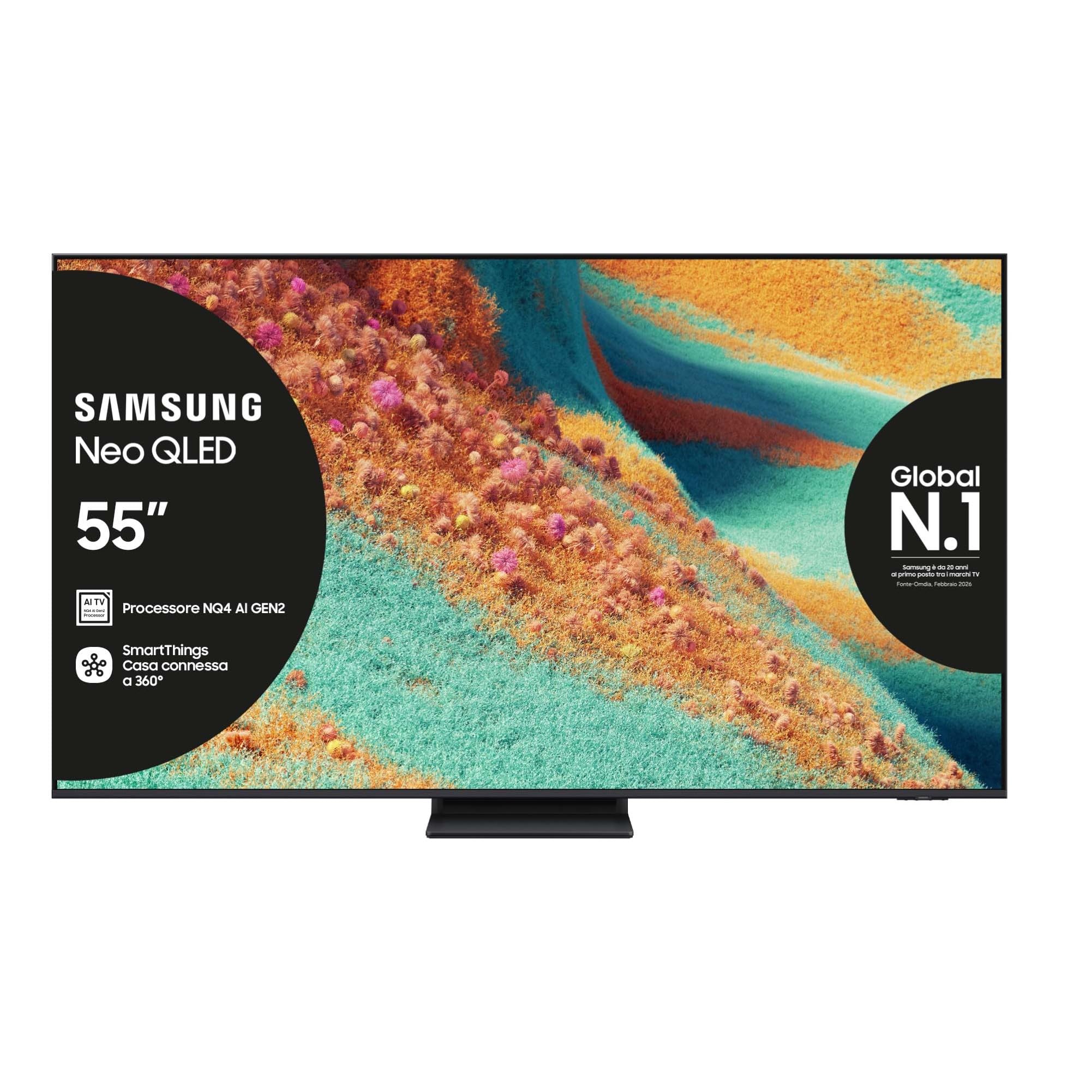
Передний view of the Samsung Neo QLED 4K Vision AI Smart TV 55-inch.

Сторона view of the Samsung Neo QLED 4K Vision AI Smart TV 55-inch, highlighting its slim design.
2. Настройка
2.1 Распаковка и комплектация
Carefully unpack your TV and check that all components are present. The package should include:
- 1x Samsung Smart TV 55" Serie QN85F
- 2x Remote Controls (one solar-powered, one standard)
- Силовой кабель
- Руководство пользователя (этот документ)

Contents of the TV package, including the power cable, user manual, solar remote, and standard remote.
2.2 Физическая установка
Place the TV on a stable, flat surface or mount it on a wall using a compatible VESA mount (200 x 200 mm). Ensure adequate ventilation around the TV.

Detailed dimensions of the 55-inch TV, including width, height, and depth with stand.
2.3 Подключение периферийных устройств
Connect your external devices to the appropriate ports on the back of the TV. The TV features multiple connectivity options:
- Порты HDMI: 4 ports for connecting devices like Blu-ray players, game consoles, or set-top boxes. One port supports eARC.
- USB-порты: 2 ports (1x USB 3.0, 1x USB 2.0) for connecting USB storage devices.
- Порт Ethernet (LAN): Для проводного подключения к Интернету.
- Antenna (ANT) Input: Для подключения эфирной или кабельной антенны.
- Оптический цифровой аудиовыход: Для подключения к звуковой панели или аудиоресиверу.

Rear panel of the TV displaying the HDMI, USB, LAN, and antenna input ports.
2.4 Первоначальное включение и настройка сети
После подключения кабеля питания нажмите кнопку питания на пульте дистанционного управления. Следуйте инструкциям на экране для завершения первоначальной настройки, включая выбор языка, подключение к сети (Wi-Fi или Ethernet) и поиск каналов.
3. Инструкция по эксплуатации
3.1 Использование дистанционного управления
Your TV comes with two remote controls. The solar-powered remote offers convenient charging via ambient light, while the standard remote provides traditional battery operation. Both remotes allow full control over TV functions, including navigation, volume, channel selection, and smart features.

The remote control interacting with the Samsung Vision AI Companion interface, demonstrating voice command capabilities.
3.2 Smart Features (Smart Hub, Gaming Hub, SmartThings)
Access a world of entertainment and smart home control through your TV's integrated smart features:
- Смарт-хаб: Your central portal for streaming apps (Disney Plus, Netflix, Prime Video, YouTube), live TV, and connected devices.
- Игровой центр: Provides access to cloud gaming services and optimizes settings for a smooth gaming experience (Motion Xcelerator 144 Hz).
- Умные вещи: Control compatible smart home devices directly from your TV, creating a connected living environment.

The Smart Hub interface displaying various streaming content and navigation options.

The Gaming Hub interface, optimized for gaming with various game titles displayed.

The SmartThings interface showing control options for various smart home devices.
3.3 Технологии изображения и звука
Your TV incorporates advanced technologies for an enhanced viewвпечатления от прослушивания и прослушивания:
- NQ4 AI Gen2 Processor & 4K AI Upscaling: Utilizes artificial intelligence to optimize picture quality, enhancing details and colors to near-4K resolution, regardless of the original source.
- Quantum Matrix Plus: Precisely controls the TV's Mini LEDs for ultra-fine light and dark areas, delivering exceptional contrast and detail.
- Neo Quantum HDR+: Provides extraordinary brightness and vivid colors, enhancing the dynamic range of content.
- Dolby Atmos и OTS Lite: Object Tracking Sound Lite creates a 3D audio experience where sound follows the action on screen, complemented by Dolby Atmos for immersive surround sound.
- Адаптивный звук Pro: Automatically calibrates sound based on the content and room acoustics for optimal audio delivery.
- Q-Symphony: Synchronizes the TV's speakers with a compatible Samsung soundbar (not included) for a richer, more expansive soundstage.

The NQ4 AI Gen2 Processor, the brain behind the TV's advanced AI features and 4K upscaling.

Visual representation of 4K AI Upscaling, showing how lower resolution content is enhanced.

Quantum Matrix Plus technology illustrated with a surfing scene, highlighting precise light control.

Comparison showing the enhanced brightness and color of Neo Quantum HDR+ versus standard dynamic range (SDR).

Dolby Atmos and OTS Lite audio technology creating a three-dimensional sound experience with a wave scene.

Object Tracking Sound Lite (OTS Lite) visually represented with sound waves emanating from a train on screen.

Adaptive Sound Pro adjusting audio based on different content types, from nature sounds to sports commentary.
4. Техническое обслуживание
4.1 Чистка телевизора
Чтобы очистить экран, аккуратно протрите его мягкой тканью без ворса. Для удаления стойких загрязнений слегка потрите.ampСмочите ткань водой или специальным средством для чистки экранов. Избегайте использования агрессивных химикатов, абразивных материалов или прямого распыления на экран.
Протрите рамку и подставку телевизора мягкой сухой тканью. Перед чисткой убедитесь, что телевизор отключен от сети.
4.2 Общий уход
- Не размещайте телевизор под прямыми солнечными лучами или вблизи источников тепла.
- Ensure proper ventilation by not blocking the TV's vents.
- Берегите экран от острых предметов и чрезмерного давления.
- Отключайте телевизор от сети во время грозы или если он не будет использоваться в течение длительного времени.
5. Поиск Неисправностей
Если у вас возникли проблемы с телевизором, прежде чем обращаться в службу поддержки, ознакомьтесь со следующими общими шагами по устранению неполадок.
5.1 Нет питания / Нет изображения
- Проверьте, надежно ли подключен кабель питания к телевизору и розетке.
- Убедитесь, что розетка работает, подключив к ней другое устройство.
- Press the power button on the remote control or directly on the TV.
5.2 Низкое качество изображения
- Убедитесь, что источник входного сигнала выбран правильно.
- Check the quality of the signal from your antenna or external device.
- Отрегулируйте настройки изображения (яркость, контрастность, резкость) в меню телевизора.
- Обратите внимание, что viewing from extreme horizontal angles may show some image degradation, which is characteristic of certain display technologies.
5.3 Нет звука
- Увеличьте громкость с помощью пульта дистанционного управления.
- Проверьте, отключен ли звук на телевизоре.
- Ensure external audio devices (soundbars, receivers) are properly connected and powered on.
- Проверьте настройки аудиовыхода в меню телевизора.
5.4 Пульт дистанционного управления не работает
- For the solar remote, ensure it has sufficient light exposure to charge.
- For the standard remote, replace the batteries if necessary.
- Убедитесь, что между пультом ДУ и телевизором нет препятствий.
6. Технические характеристики
| Особенность | Деталь |
|---|---|
| Название модели | QE55QN85FAU |
| Размер экрана | 55 дюйма |
| Технология отображения | QLED |
| Разрешение | 4К (3840 x 2160) |
| Частота обновления | 120 Hz (Motion Xcelerator 144 Hz) |
| Процессор | Процессор NQ4 AI Gen2 |
| Поддерживаемый формат HDR | Нео Квантовый HDR+ |
| Режим аудиовыхода | Объемный звук (2.1 канала) |
| Surround Sound Format | Долби Атмос |
| Связность | Bluetooth, Ethernet, HDMI (4 порта), USB (2 порта), Wi-Fi |
| Операционная система | Тизен |
| Метод контроля | App, Remote, Voice (Amazon Alexa, Google Assistant, SmartThings) |
| Стандарт крепления VESA | 200 х 200 мм |
| Размеры продукта (ДxШxВ) | 122.8P x 24.7l x 76.1H cm (with stand) |
| Вес товара | 18 Килограмма |
| Цвет | Eclipse Silver |
| Страна происхождения | Словакия |
6.1 Энергоэффективность
The TV's energy efficiency information is provided on the energy label.
EU Energy Label for model QE55QN85FAU. For detailed information, refer to the База данных EPREL.
7. Гарантия
This Samsung TV comes with a 2-летняя гарантия производителя. Please retain your proof of purchase for warranty claims. The warranty covers manufacturing defects under normal use conditions. For full terms and conditions, please refer to the warranty card included in your package or visit the official Samsung support webсайт.
8 Поддержка
Для получения дополнительной помощи, технической поддержки или загрузки полного руководства пользователя посетите официальный сайт поддержки Samsung. webПосетите сайт или обратитесь к предоставленному PDF-руководству:
- Загрузить руководство пользователя (PDF)
- Посетите Магазин Samsung на Amazon для получения информации о продукте и аксессуарах.
You can also contact Samsung customer service for personalized support.
Ask a question about this manual
Ask about setup, troubleshooting, compatibility, parts, safety, or missing instructions. Manuals+ will review the question and use this page’s manual context to help answer it.