
1. Введение
Welcome to the user manual for your new Nubia Flip 5G smartphone. This guide provides essential information to help you set up, operate, and maintain your device. The Nubia Flip 5G combines a compact, foldable design with advanced features, including a dual AMOLED display, a versatile external screen, and AI-powered functionalities.
Key features of your Nubia Flip 5G include:
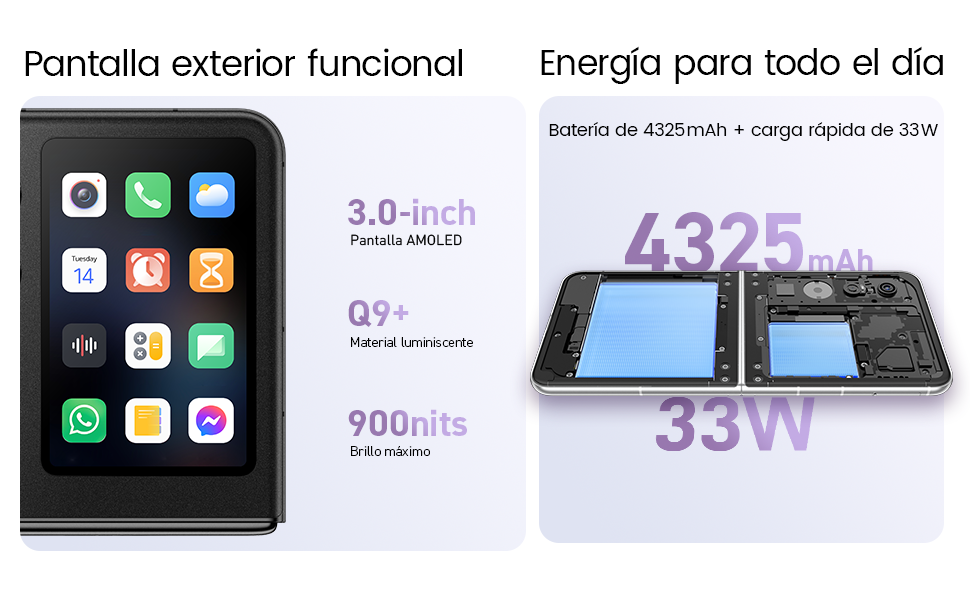
- Dual AMOLED Displays: Enjoy a fluid 120 Hz refresh rate on both the 6.9-inch internal display and the 3-inch external display.
- Fully Functional External Display: Access 100% of your applications directly from the external screen without unfolding the phone.
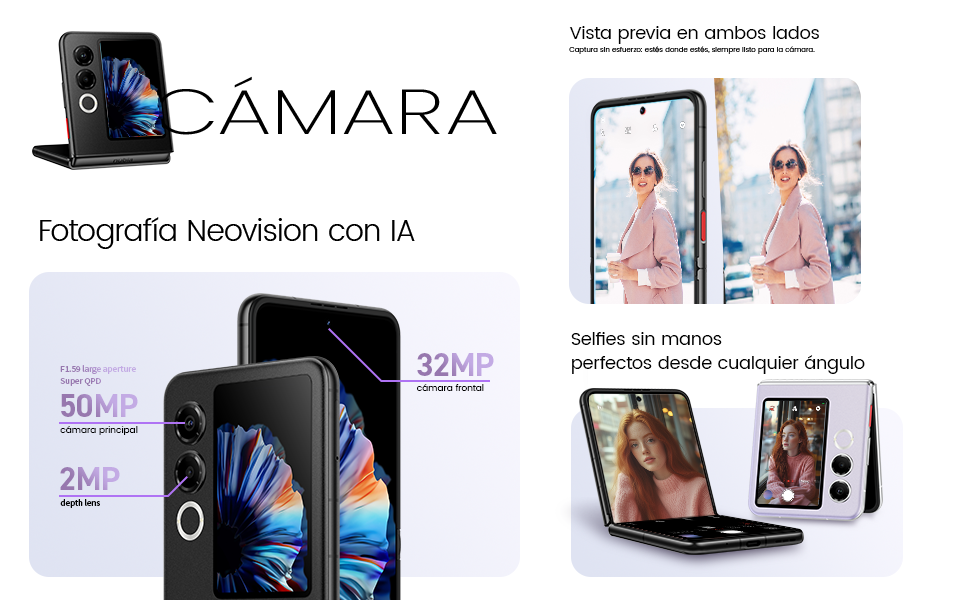
- Усовершенствованная система камер: Capture high-quality photos with the 50 MP main camera, supported by AI features and 4K stabilized video recording. Utilize the external screen for high-resolution selfies.
- AI-Powered Enhancements: Benefit from features like AI Magic Photos for editing and live translation for voice calls.
- Длительный срок службы аккумулятора: Equipped with a 4325 mAh battery and 33W fast charging, allowing 50% charge in under 20 minutes.
2. Настройка
2.1. Распаковка и первоначальный осмотр
Аккуратно извлеките все предметы из упаковки. Убедитесь в наличии следующих компонентов:
- Смартфон Nubia Flip 5G
- USB-кабель
- Чехол для телефона
- Защитная пленка
Inspect the device for any visible damage. If any components are missing or damaged, contact customer support.
2.2. Установка SIM-карты
- Выключите устройство.
- Найдите лоток для SIM-карты на боковой панели телефона.
- Use the SIM ejector tool (not included, typically found with your SIM card) to open the tray.
- Вставьте вашу Nano-SIM-карту (или карты) в лоток золотыми контактами вниз. Данное устройство поддерживает две SIM-карты.
- Аккуратно вставьте лоток обратно в телефон.
2.3. Включение и начальная настройка
- Press and hold the Power button until the Nubia logo appears.
- Следуйте инструкциям на экране, чтобы выбрать язык, подключиться к сети Wi-Fi и настроить учетную запись Google.
- Вам помогут настроить функции безопасности, такие как разблокировка по отпечатку пальца и распознавание лиц.
3. Управление устройством
3.1. Understanding the Dual Display

Your Nubia Flip 5G features two displays: a large 6.9-inch internal foldable AMOLED screen and a compact 3-inch external AMOLED screen. Both screens offer a smooth 120 Hz refresh rate for an enhanced visual experience.
- Внутренний дисплей: Ideal for immersive content consumption, gaming, and detailed tasks.
- Внешний дисплей: Provides quick access to notifications, widgets, music controls, and even full applications without needing to unfold the phone. Swipe left or right to navigate through different functions.
3.2. Функциональность камеры

The Nubia Flip 5G is equipped with a powerful 50 MP main camera and a secondary portrait camera, enhanced with AI for superior image quality. The 32 MP front camera ensures clear video calls and selfies.
- High-Resolution Selfies: Use the external screen as a viewfinder to take selfies with the high-quality rear cameras.
- Фотосъемка без помощи рук: Partially fold the phone and place it on a flat surface to capture photos and videos without needing a tripod.
- 4K Stabilized Video: Record smooth, high-definition videos with advanced stabilization.
3.3. Функции ИИ
The device integrates several AI functions to enhance user experience:
- AI Magic Photos: Utilize AI for intelligent photo editing and enhancement.
- Live Call Translation: Experience real-time translation during voice calls, breaking down language barriers.
3.4. Видео завершеноview
Официальная видеопрезентация продуктаasing the Nubia Flip 5G's design, versatile external display, hands-free selfie capabilities, and long-lasting battery.
4. Аккумулятор и зарядка

The Nubia Flip 5G is equipped with a 4325 mAh battery, designed to provide extended usage. It supports 33W fast charging, allowing you to quickly replenish the battery. A 50% charge can be achieved in less than 20 minutes.
- Use the provided USB cable and a compatible 33W charger for optimal fast charging.
- Avoid using non-certified chargers or cables to prevent damage to the device.
5. Техническое обслуживание
Proper care ensures the longevity and optimal performance of your Nubia Flip 5G.
- Уход за экраном: The foldable screen is delicate. Avoid pressing hard on the screen, especially near the crease. Keep sharp objects away from the display.
- Уборка: Для очистки экрана и корпуса используйте мягкую ткань без ворса. Избегайте использования едких химикатов и абразивных материалов.
- Водостойкость: While the device may have some level of splash resistance, it is not fully waterproof. Avoid submerging the phone in water or exposing it to excessive moisture.
- Температура: Эксплуатируйте устройство в пределах рекомендованного температурного диапазона. Экстремальные температуры (жара или холод) могут повлиять на срок службы батареи и производительность.
- Обновления программного обеспечения: Regularly update your device's software to ensure you have the latest features, security patches, and performance improvements.
6. Поиск Неисправностей
If you encounter issues with your Nubia Flip 5G, try the following common troubleshooting steps:
- Устройство не включается: Убедитесь, что аккумулятор заряжен. Подключите зарядное устройство и подождите несколько минут, прежде чем снова попытаться включить устройство.
- Экран не отвечает: Restart the device by pressing and holding the Power button. If unresponsive, perform a forced restart (refer to device-specific instructions if standard restart fails).
- Сбои приложений: Очистите кэш проблемного приложения или переустановите его. Убедитесь, что программное обеспечение вашего устройства обновлено.
- Плохое время автономной работы: Adjust screen brightness, disable unnecessary background apps, and turn off features like GPS or Bluetooth when not in use.
- Проблемы с подключением (Wi-Fi/Bluetooth): Toggle Wi-Fi or Bluetooth off and on. Restart your router or the connected device.
- Перегрев: Close demanding applications, reduce screen brightness, and avoid direct sunlight. If overheating persists, contact support.
For more complex issues, refer to the official Nubia support webсайт или свяжитесь с их службой поддержки.
7. Технические характеристики
Below are the detailed technical specifications for the Nubia Flip 5G (Model: 123447101014):
| Особенность | Спецификация |
|---|---|
| Операционная система | Андроид 14 |
| Вес товара | 193 г |
| Размеры упаковки | 21.1 x 9 x 3.2 см; 193 грамм |
| Аккумуляторы | Требуются 1 батареи C. (в комплекте) |
| Номер модели | 123447101014 |
| Технологии подключения | Bluetooth, NFC, USB, Wi-Fi |
| GPS | Истинный |
| Особые возможности | Stereo speakers, Mobile Hotspot capability, Dual SIM, Built-in GPS |
| Другие функции дисплея | Беспроводной |
| Ввод через человеческий интерфейс | Сенсорный экран |
| Разрешение сканера | 2790 х 1188 |
| Другие функции камеры | Передний задний |
| Аудиоразъем | Неизвестный |
| Форм-фактор | Складной экран |
| Цвет | Черный |
| Номинальная мощность аккумулятора | 4325 мАч |
| Время разговора по телефону | 24 часов |
| Размер оперативной памяти | 8 ГБ |
| Модель ЦП | MediaTek Dimensity 9000 |
| Скорость ЦП | 2 ГГц |
| Емкость памяти | 8 ГБ |
| Размер экрана | 6.9 дюйма |
| Частота обновления | 120 Гц |
| Название модели | ZTE Nubia Flip |
8. Гарантия и поддержка
Your Nubia Flip 5G smartphone comes with a standard manufacturer's warranty. Please refer to the warranty card included in your product packaging for specific terms and conditions, including coverage duration and claim procedures.
For technical support, service, or additional information, please visit the official Nubia website or contact their authorized customer service channels. Keep your purchase receipt and device serial number handy when seeking support.