
WMic-T1
WMic-T1 UHF Wireless Microphone System User Manual
Model: WMic-T1
1. Введение
Thank you for choosing the WMic-T1 UHF Wireless Microphone System. This manual provides detailed instructions for the proper setup, operation, and maintenance of your new microphone system. Please read this manual thoroughly before using the product to ensure optimal performance and longevity. This system is designed for high-quality audio capture in various applications, including vlogging, live streaming, interviewа также видеозапись.
2. Содержимое упаковки
Пожалуйста, убедитесь, что все перечисленные ниже товары включены в вашу посылку. Если какие-либо товары отсутствуют или повреждены, пожалуйста, свяжитесь с продавцом.

Изображение: Оверview of the WMic-T1 UHF Wireless Microphone System package contents, including the transmitter, receiver, and accessories.
- 1 х передатчик
- 1 х Приемник
- 1 x адаптер для холодного башмака
- 1 х петличный микрофон
- 1 x 3.5mm TRRS Output Cable (for smartphones)
- 1 x 3.5mm TRS Output Cable (for cameras)
- 2 x поясные клипы
- 1 х сумка для хранения
- 1 x Руководство пользователя (на английском языке)
3. Продукт закончилсяview
The WMic-T1 system consists of a transmitter and a receiver, both compact and lightweight, designed for portability and ease of use. They feature a clear display for channel and battery status.
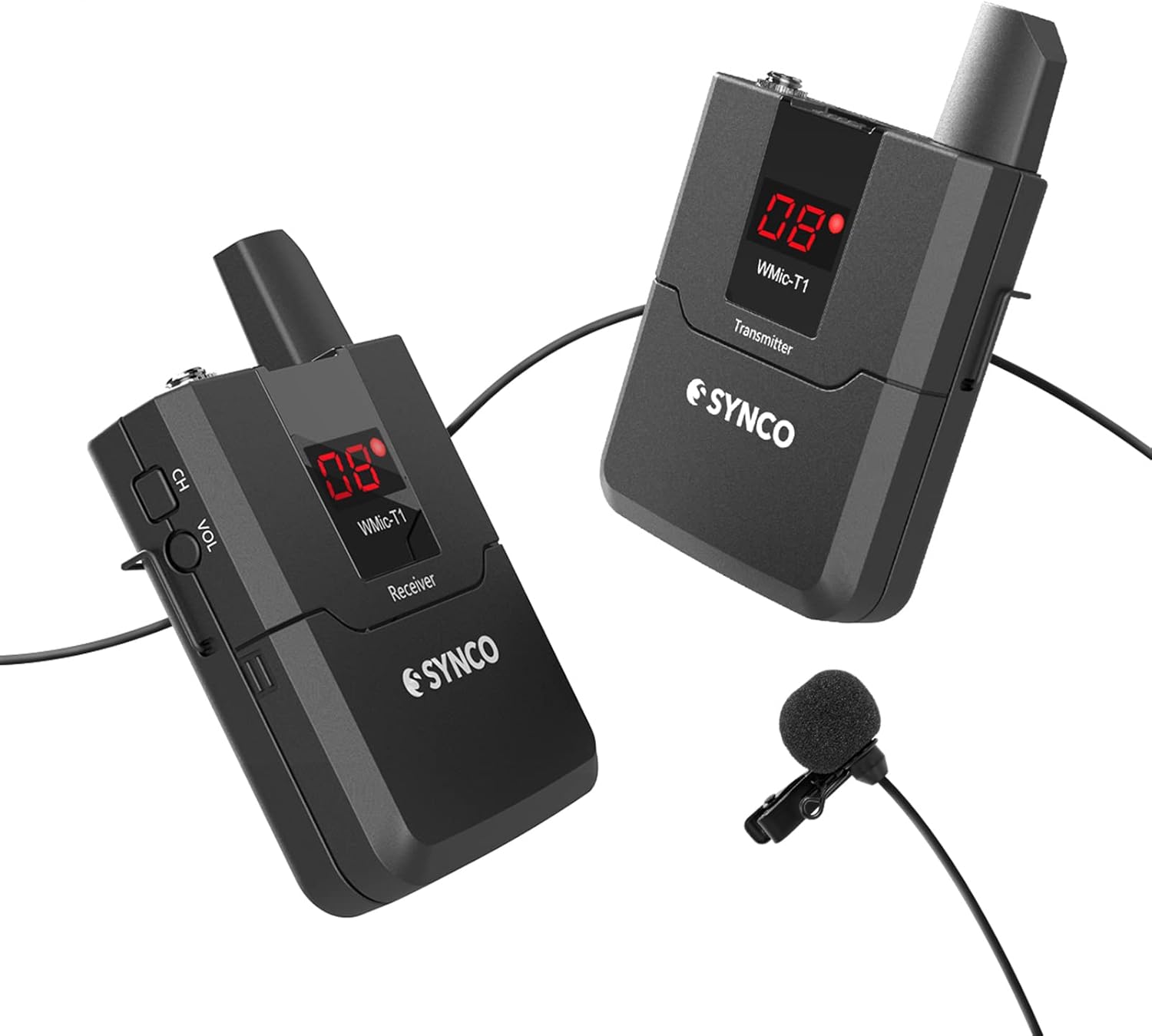
Image: The WMic-T1 wireless microphone system, showing both the transmitter and receiver units along with the lavalier microphone.
3.1 Основные характеристики
- Беспроводная передача в диапазоне УВЧ: Supports 16 switchable channels for stable and interference-free audio.
- Расширенный диапазон: Effective transmission distance of up to 50 meters (164 feet) in open areas.
- Низкий уровень шума: Utilizes DSP technology to minimize signal noise, achieving a Signal-to-Noise Ratio (SNR) of 70dB.
- Omnidirectional Lavalier Microphone: Captures sound from all directions with high detail, ideal for hands-free operation.
- Универсальные возможности подключения: Includes 3.5mm TRRS and TRS output cables for compatibility with smartphones, cameras, camcorders, and audio recorders.
- Компактная и легкая конструкция: Easy to carry and mount with included cold shoe adapter and belt clips.
3.2 Компоненты и элементы управления
Изображение: подробное views of the WMic-T1 units, highlighting the cold shoe mount, display screen, battery compartment, and belt clip attachment points.
- Выключатель: Включает и выключает устройство.
- Кнопка канала (CH): Used to select and switch between the 16 available UHF channels.
- Volume (VOL) Control: Регулирует уровень вывода звука ресивера.
- 3.5mm Mic Input (Transmitter): Connects the lavalier microphone.
- 3.5mm Audio Output (Receiver): Connects to your recording device (camera, phone, etc.).
- Экран дисплея: Shows current channel, battery status, and signal strength.
- Отсек для батареи: Для работы требуются две батарейки типа АА.
- Зажим для ремня: Для крепления устройства к одежде или поясу.
- Адаптер для холодного башмака: For mounting the receiver onto a camera's hot shoe.

Image: Illustrates the compact size of the WMic-T1 units compared to a smartphone, along with explanations of the multiple indicator lights (battery, IR/RF, audio).
3.3 Индикаторные лампы
- Индикатор заряда батареи: Turns red and flickers when power is low.
- IR/RF Light: Stays on when the channel is successfully matched between transmitter and receiver.
- Audio Green Light: Flickers when audio input is detected.
4. Настройка
4.1 Установка аккумулятора
Both the transmitter and receiver require two AA batteries (not included). Ensure correct polarity when inserting the batteries.

Image: Diagram showing the battery compartment of the WMic-T1 units and how to correctly insert two AA batteries.
- Open the battery compartment cover on the back of the transmitter/receiver.
- Вставьте две батарейки типа АА, совместив положительный (+) и отрицательный (-) полюса, как указано внутри отсека.
- Плотно закройте крышку батарейного отсека.
4.2 Connecting the Microphone and Output Cables
Connect the lavalier microphone to the transmitter and the appropriate output cable to the receiver based on your recording device.
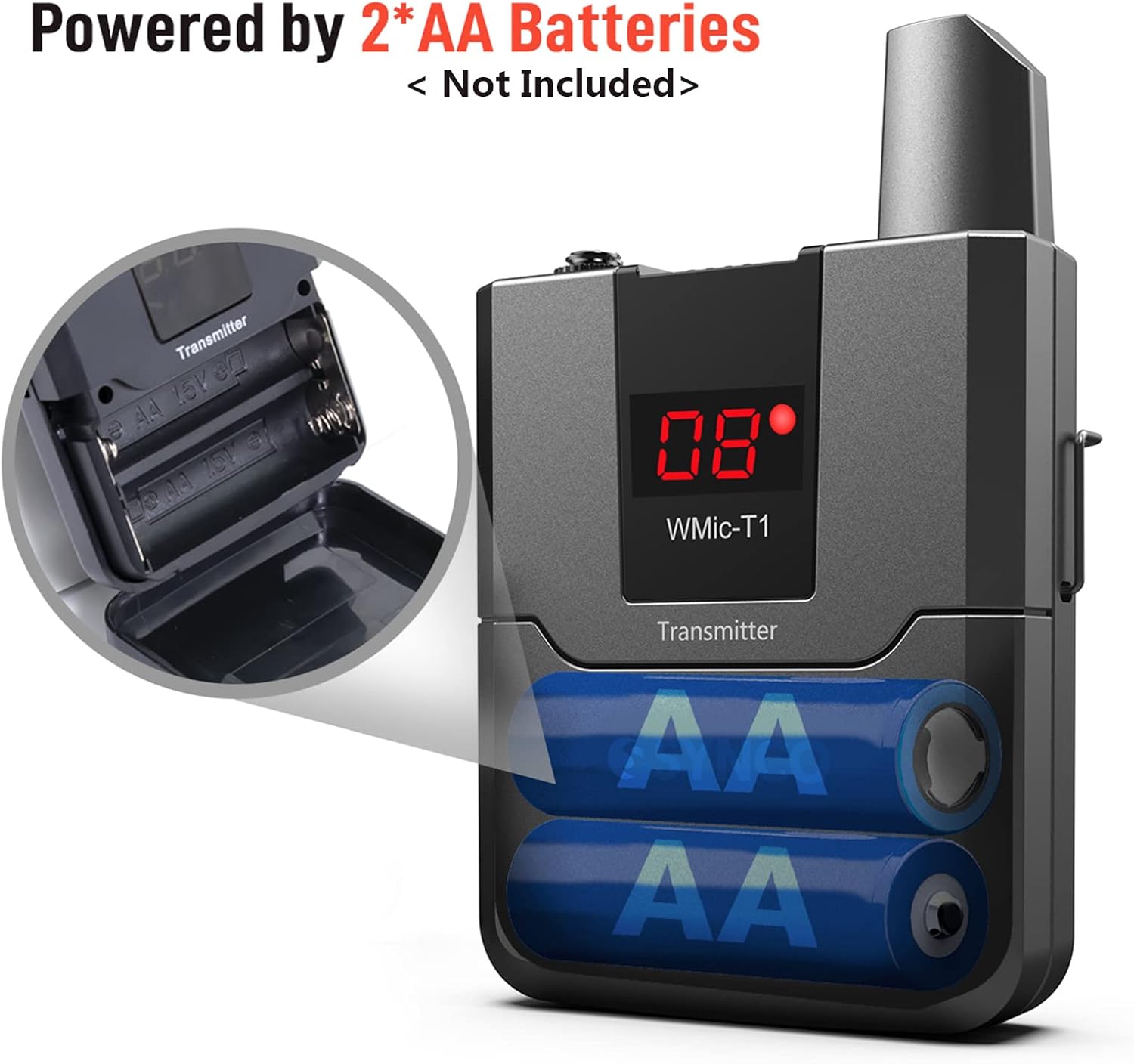
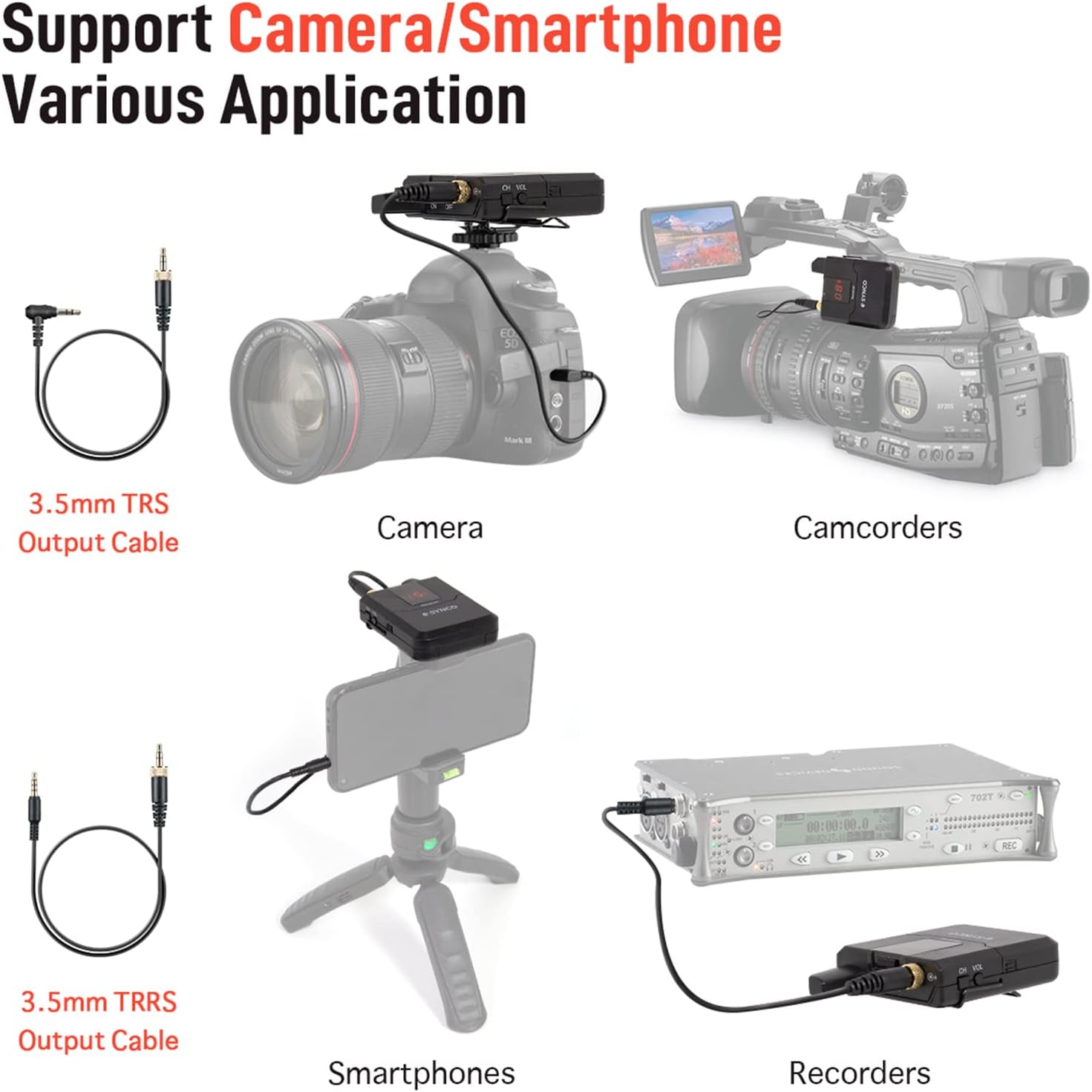
Image: Illustrations demonstrating how to connect the WMic-T1 receiver to various devices like cameras, camcorders, smartphones, and audio recorders using the 3.5mm TRS and TRRS cables.
- Plug the 3.5mm jack of the lavalier microphone into the MIC input port on the transmitter.
- For smartphones, use the 3.5mm TRRS output cable. Connect one end to the receiver's audio output and the other end to your smartphone's 3.5mm audio jack.
- For cameras, camcorders, or audio recorders, use the 3.5mm TRS output cable. Connect one end to the receiver's audio output and the other end to your device's 3.5mm audio input.
4.3 Монтаж устройств
Use the provided accessories to conveniently mount the transmitter and receiver.
- Зажим для ремня: Attach the belt clip to the back of both the transmitter and receiver. This allows you to clip them onto clothing, belts, or pockets for hands-free operation.
- Адаптер для холодного башмака: Attach the cold shoe adapter to the receiver. This allows you to slide the receiver onto the hot shoe mount of your camera or camcorder.
5. Инструкция по эксплуатации
5.1 Включение/выключение питания
Slide the power switch on both the transmitter and receiver to the 'ON' position to power them on. Slide to 'OFF' to power them off.
5.2 Выбор и сопряжение каналов
The WMic-T1 system supports 16 switchable channels to avoid interference. The transmitter and receiver must be on the same channel to communicate.

Image: Visual representation of the 50-meter transmission range and the 16 switchable channels feature of the WMic-T1 system.
- Включите передатчик и приемник.
- Press the 'CH' button on either the transmitter or receiver to cycle through the available channels (01-16).
- Ensure that both units are set to the same channel number. The IR/RF light on the display will remain solid when a successful connection is established.
- If you experience interference, switch to a different channel until a clear signal is found.
5.3 Регулировка громкости
Adjust the output volume of the receiver using the 'VOL' control to match the input level requirements of your recording device. It is recommended to start with a lower volume and gradually increase it to avoid clipping.
5.4 Использование микрофона
The omnidirectional lavalier microphone is designed to pick up sound from all directions, making it versatile for various speaking positions.

Image: Close-up of the omnidirectional lavalier microphone being clipped onto clothing, illustrating its 360-degree sound pickup capability.
- Clip the lavalier microphone to your collar, tie, or other clothing, approximately 15-20 cm (6-8 inches) from your mouth for optimal sound capture.
- Ensure the microphone is not covered by clothing to prevent muffled sound.
5.5 Шумоподавление
The WMic-T1 incorporates DSP technology to effectively reduce background noise, ensuring clear audio recordings.

Image: Graphic illustrating the 70dB Signal-to-Noise Ratio (SNR) and extremely low noise performance of the WMic-T1, highlighting its DSP technology.
While the system is designed for low noise, always try to record in a quiet environment to achieve the best possible audio quality.
6. Техническое обслуживание
Proper maintenance will extend the life of your WMic-T1 system.
- Уборка: Use a soft, dry cloth to clean the units. Do not use liquid cleaners or solvents, as they may damage the components.
- Хранилище: When not in use, store the system in the provided storage bag in a cool, dry place, away from direct sunlight and extreme temperatures.
- Уход батареи: Remove batteries from the units if they will not be used for an extended period to prevent battery leakage and damage.
- Уход за кабелем: Избегайте резких изгибов или перегибов кабелей, чтобы предотвратить повреждение проводов изнутри.
7. Поиск Неисправностей
If you encounter issues with your WMic-T1 system, refer to the following troubleshooting guide:
| Проблема | Возможная причина | Решение |
|---|---|---|
| Нет звука | Устройства не включены Низкий заряд батареи Incorrect channel pairing Кабели подключены неправильно. Recording device input issue | Убедитесь, что оба блока включены. Заменить батареи Verify transmitter and receiver are on the same channel Проверьте все кабельные соединения Test recording device with another audio source |
| Низкое качество звука / Помехи | Помехи от других беспроводных устройств Слишком далеко от приемника Препятствия между блоками Низкий заряд батареи | Switch to a different channel Уменьшите расстояние между передатчиком и приемником. Обеспечьте свободную видимость Заменить батареи |
| Lavalier mic not picking up sound | Mic not plugged in correctly Mic damaged Transmitter issue | Ensure mic is fully inserted into transmitter Try another lavalier mic if available Check transmitter's power and channel |
| Battery indicator flickering red | Низкий заряд батареи | Replace both AA batteries immediately |
8. Технические характеристики
Technical specifications for the WMic-T1 UHF Wireless Microphone System:
- Модель: WMic-T1
- Цвет: Черный
- Каналы: 16 (УВЧ)
- Соотношение сигнал/шум (SNR): 70дБ
- Расстояние передачи: До 50 метров (164 фута)
- Источник питания: 2 x AA batteries (not included) for each unit (Transmitter and Receiver)
- Выходные кабели: 3.5mm TRRS (for phone), 3.5mm TRS (for camera)
9. Гарантия и поддержка
Информацию о гарантии, техническую поддержку или вопросы обслуживания можно получить, обратившись к документации, предоставленной при покупке, или к продавцу. Сохраните чек на случай предъявления гарантийных претензий.
Ask a question about this manual
Ask about setup, troubleshooting, compatibility, parts, safety, or missing instructions. Manuals+ will review the question and use this page’s manual context to help answer it.