
1. Введение и окончаниеview
The SONICAKE Pocket Master is a portable multi-effects pedal designed for guitar, bass, and acoustic instruments. It integrates a wide range of effects, amp modeling, IR cabinet simulations, and a USB audio interface into a compact, rechargeable unit. This manual provides essential information for setting up, operating, and maintaining your device.

Figure 1: SONICAKE Pocket Master Multi-Effects Pedal (Transparent Green)
2.Основные характеристики
- White-Box Digital Modeling Technology: Delivers organic, living tone with support for 3rd party IRs (5 user slots) for custom sound creation.
- Обширная библиотека эффектов: Более 100 встроенных эффектов для гитары, баса и акустической гитары, включая 20 легендарных. amp модели.
- Высококачественная обработка сигналов: 24-bit 44.1kHz signal processing ensures clear audio.
- Функции ритма и петлителя: Features 99 built-in drum rhythms and a looper function.
- Предварительные настройки: 100 customizable presets with an adjustable signal chain, allowing up to 9 simultaneous effect blocks.
- USB-аудиоинтерфейс: Stereo audio streaming with OTG function for direct connection to iOS/Android mobile devices.
- Bluetooth-подключение: For audio connection and control.
- Удобный для пользователя дисплей: Clear LCD color screen for easy navigation through effects and settings.
- Портативная конструкция: Compact, pocket-sized, and features a built-in rechargeable battery for on-the-go use.
- Поддержка программного обеспечения: Free Mac/Windows/iOS/Android software for sound editing and preset management.
3. Расположение продукта и элементы управления
Familiarize yourself with the physical layout and controls of your Pocket Master unit.

Рисунок 2: Элементы управления на верхней панели
- 1. ЖК-экран: Displays current preset, effects chain, and settings.
- 2. VALUE/VOL Knob: Adjusts volume and navigates menu options.
- 3. Footswitches: Used for preset changes, tuner activation, and looper control.
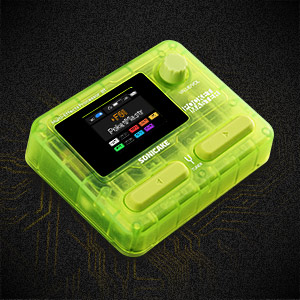
Рисунок 3: Разъемы на боковой панели
- 4. IN Jack: Вход 1/4 дюйма для вашего инструмента.
- 5. OUT/PHONES Jack: 1/4" output for ampлифер или наушники.
- 6. USB-C (OTG) Port: Для подключения к мобильным устройствам.
- 7. USB-C (Charging/Data) Port: Для зарядки и подключения к компьютерам.
4. Настройка
4.1 Первоначальная зарядка
Before first use, fully charge the Pocket Master using the provided USB-C cable and a compatible 5V USB power adapter (not included). The battery indicator on the LCD screen will show charging status.
4.2 Базовое подключение
- Connect your instrument (guitar, bass, or acoustic) to the IN jack (4) using a 1/4" instrument cable.
- Подключите ВЫХ/ТЕЛЕФОНЫ jack (5) to your amplifier, audio interface, or headphones.
- Press and hold the power button (usually integrated with a footswitch or knob, refer to the quick start guide for exact location) to turn on the device.
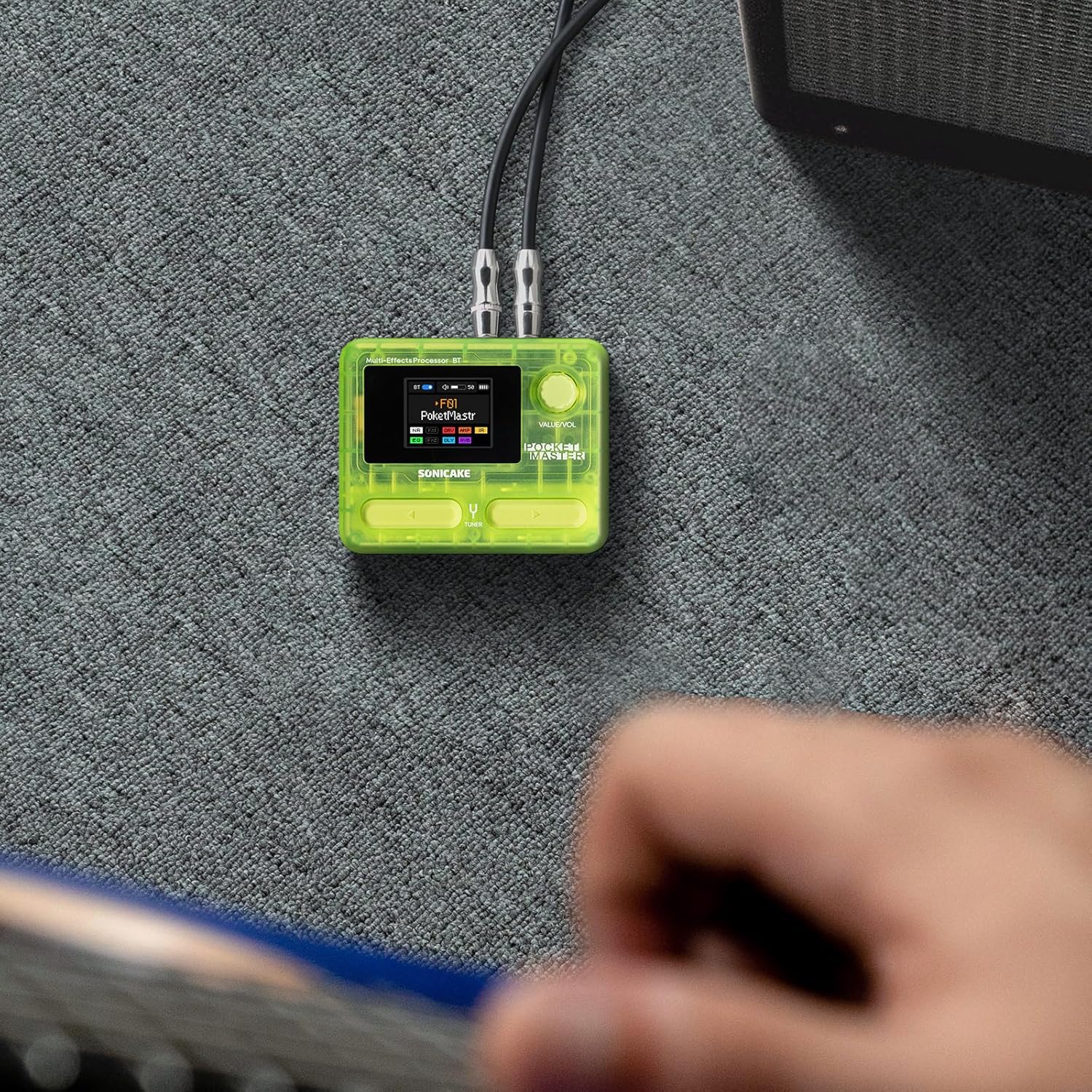
Figure 4: Connecting the Pocket Master to an instrument and ampпожизненнее.
4.3 Настройка USB-аудиоинтерфейса
To use the Pocket Master as a USB audio interface for recording or playback:
- Connect the Pocket Master to your computer or mobile device using a USB-C cable via the dedicated USB-C (Charging/Data) port (7) or USB-C (OTG) port (6) for mobile devices.
- Install the necessary drivers and software from the official SONICAKE website for your operating system (Mac/Windows). For iOS/Android, download the companion app.
- Select the Pocket Master as your audio input/output device in your DAW or system settings.
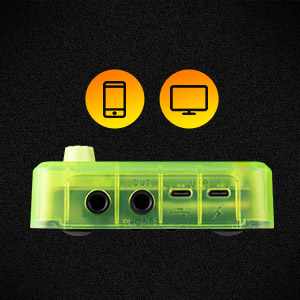
Figure 5: USB connection for audio interface functionality.
5. Инструкция по эксплуатации
5.1 Навигация по предустановкам
Use the footswitches (3) to cycle through the 100 available presets. The LCD screen (1) will display the current preset number and name.
5.2 Adjusting Volume and Parameters
The VALUE/VOL knob (2) controls the overall output volume. When editing effects, this knob is used to adjust specific parameters. Pressing the knob may confirm selections or enter sub-menus.
5.3 Функция тюнера
Hold down a specific footswitch (refer to the quick start guide for exact assignment) to activate the built-in tuner. The LCD screen will display tuning information.
5.4 Лупер и драм-машина
The Pocket Master includes a looper and drum machine. Specific footswitch combinations or menu navigation are used to activate and control these features. The LCD screen provides visual feedback for recording, playback, and drum rhythm selection.
5.5 Bluetooth Audio and App Control
Pair your mobile device with the Pocket Master via Bluetooth to stream audio or use the dedicated app for deeper editing and preset management.
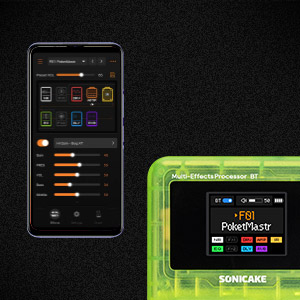
Figure 6: App control interface for the Pocket Master.
6. Эффекты и Amp Модели
The Pocket Master features a versatile effects matrix with up to 9 simultaneous effect blocks and over 100 high-quality effects. These include Noise Reduction (NR), two FX modules (FX1, FX2), Drive (DRV), Amp Modeling (AMP), Impulse Response (IR) cabinets, Equalizer (EQ), Delay (DLY), and Reverb (RVB).
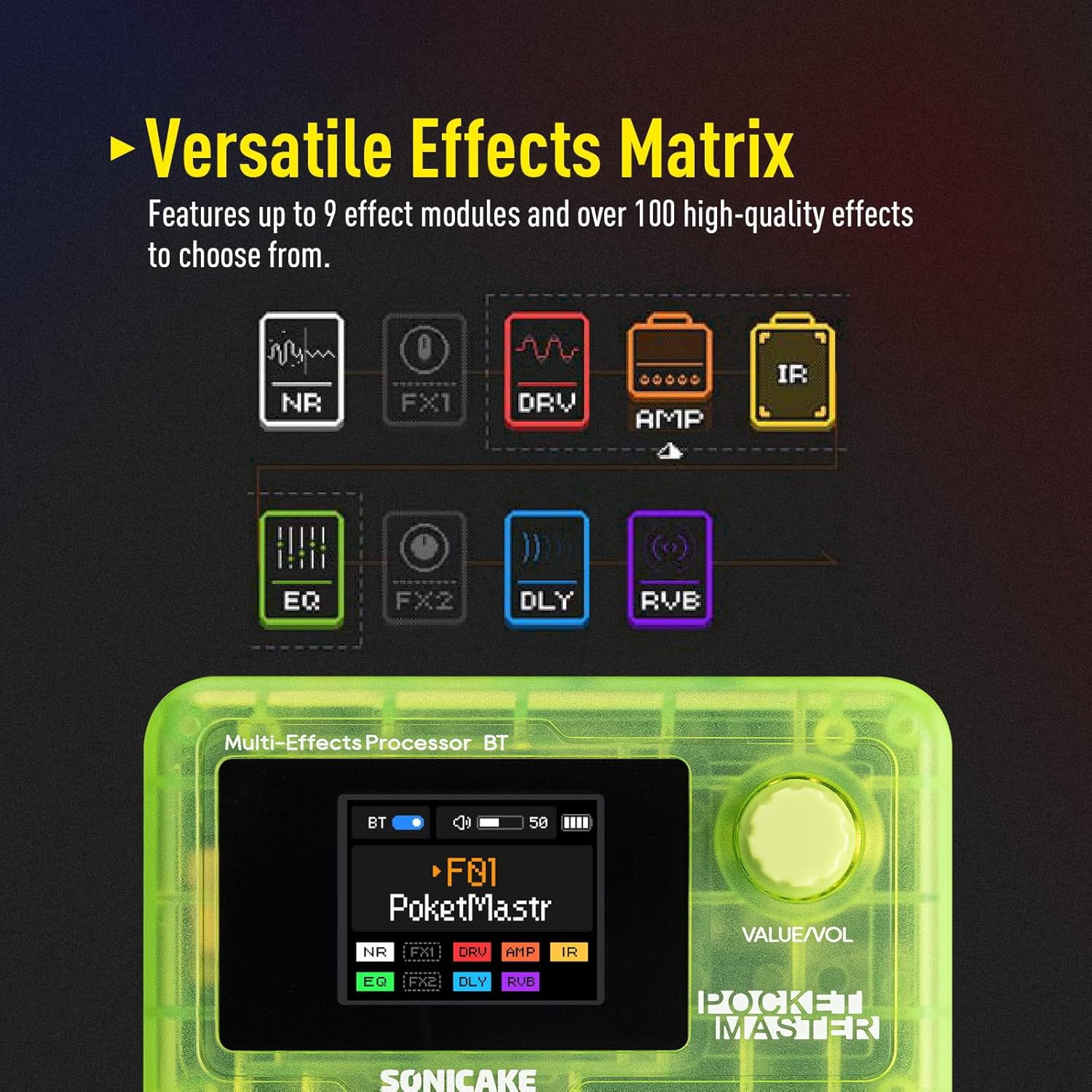
Figure 7: Visual representation of the effects chain.
You can customize the order and parameters of these effects within each preset using the device's controls or the companion software.
7. Техническое обслуживание
- Уборка: Для чистки устройства используйте мягкую сухую ткань. Избегайте использования абразивных чистящих средств и растворителей.
- Хранилище: Храните устройство в прохладном, сухом месте, вдали от прямых солнечных лучей и экстремальных температур.
- Уход батареи: To prolong battery life, avoid fully discharging the unit frequently. Charge regularly, even if not in use for extended periods.
- Обновления прошивки: Периодически проверяйте официальный сайт SONICAKE. website for firmware updates to ensure optimal performance and access new features.
8. Поиск Неисправностей
| Проблема | Возможная причина | Решение |
|---|---|---|
| Нет звука | Incorrect cable connections, low volume, dead battery, incorrect preset. | Check all cable connections. Ensure volume is up on both Pocket Master and amplifier/headphones. Charge the unit. Select a different preset. |
| Устройство не включается | Dead battery, faulty power button. | Charge the unit for at least 30 minutes. If still unresponsive, contact support. |
| Effects not working as expected | Incorrect effect parameters, outdated firmware. | Adjust effect parameters via the knob or app. Check for and install any available firmware updates. |
| Проблемы с подключением Bluetooth | Device not in pairing mode, interference, outdated app. | Ensure Pocket Master Bluetooth is enabled and in pairing mode. Move closer to the device. Update the companion app. |
9. Технические характеристики
- Вес товара: 7.3 унции (208 граммов)
- Размеры продукта: 2.44 x 4.13 x 2.44 дюйма
- Номер модели товара: QME-10TGN
- Аккумуляторы: 1 нестандартная батарея (перезаряжаемая)
- Название цвета: Прозрачный зеленый
- Тип разъема: USB
- Аппаратный интерфейс: USB
- Формат сигнала: Цифровой
- Тип материала: Пластик
- Источник питания: Battery Powered, DC Powered
- Томtage: 5 Вольт
- Стиль: Multi-effects, Acoustic, Bass
10. Что в коробке
- Многофункциональная педаль эффектов SONICAKE Pocket Master
- Зарядный кабель USB-C
- Руководство пользователя (этот документ)
- Footswitch, 1/4" stereo/headphone outputs (implied by product description, often integrated or part of the unit)
11. Гарантия и поддержка
For warranty information, technical support, and further assistance, please visit the official SONICAKE webсайт или свяжитесь со службой поддержки клиентов напрямую. Сохраните чек о покупке в качестве доказательства покупки для гарантийных претензий.
Официально Webсайт: SONICAKE Store on Amazon