
Технакс TX-315
Technaxx TX-315 10000mAh 3-in-1 Wireless Fast Charging Power Bank User Manual
Модель: TX-315
Введение
This user manual provides important information for the safe and efficient operation of your Technaxx TX-315 10000mAh 3-in-1 Wireless Fast Charging Power Bank. Please read this manual thoroughly before using the device and keep it for future reference.
Инструкции по технике безопасности
- Не подвергайте внешний аккумулятор воздействию экстремальных температур, прямых солнечных лучей или огня.
- Не разбирайте, не ремонтируйте и не модифицируйте устройство самостоятельно. По всем вопросам обслуживания обращайтесь к квалифицированному персоналу.
- Держите аккумулятор вдали от воды и других жидкостей.
- Do not drop, hit, or subject the device to strong impacts.
- При зарядке или разрядке обеспечьте надлежащую вентиляцию.
- Хранить в недоступном для детей месте.
- Утилизируйте внешний аккумулятор в соответствии с местными правилами утилизации электронных отходов.
Продукт болееview
Familiarize yourself with the components of your Technaxx TX-315 power bank:
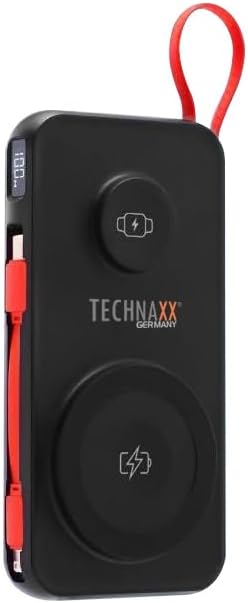
Image: The Technaxx TX-315 power bank, a black rectangular device with a red lanyard. It features a digital display on the side, a USB-C port, a USB-A port, a built-in red USB-C cable, a magnetic wireless charging pad for smartphones, and a smaller wireless charging pad for smartwatches. The Technaxx logo is visible on the front.
- Цифровой дисплей: Показывает процент заряда батареиtage.
- Magnetic Wireless Charging Pad (15W): Для совместимых смартфонов.
- Smartwatch Wireless Charging Pad (3W): For compatible smartwatches.
- USB-A Output Port (22.5W): For wired charging of various devices.
- Порт USB-C (мощность 20 Вт): For charging the power bank or wired charging of devices.
- Встроенный кабель USB-C: Удобен для зарядки устройств.
- Кнопка питания: Activates the display and charging functions.
Настраивать
Зарядка Power Bank
- Connect the power bank to a USB wall charger (not included) using the built-in USB-C cable or a separate USB-C to USB-C cable via the USB-C port.
- Цифровой дисплей будет показывать ход зарядки, указывая процент заряда батареи.tage.
- Внешний аккумулятор полностью заряжен, когда на дисплее отображается "100%".
Операционная
Charging Smartphones Wirelessly (15W)
- Нажмите кнопку питания, чтобы активировать банк питания.
- Place your MagSafe-compatible or Qi-enabled smartphone onto the larger magnetic wireless charging pad. Ensure proper alignment for optimal charging.
- The phone's charging indicator will confirm charging has begun.
Charging Smartwatches Wirelessly (3W)
- Нажмите кнопку питания, чтобы активировать банк питания.
- Place your compatible smartwatch onto the smaller wireless charging pad.
- The smartwatch's display will indicate that it is charging.
Wired Charging via USB-A or USB-C Ports
- Нажмите кнопку питания, чтобы активировать банк питания.
- Connect your device to the USB-A port or the USB-C port using an appropriate charging cable.
- Внешний аккумулятор автоматически начнет заряжать ваше устройство.
- The built-in USB-C cable can also be used for convenient wired charging.
Понимание цифрового дисплея
Цифровой дисплей отображает текущий процент заряда батареи.tage of the power bank. This allows you to monitor the remaining power and know when to recharge the unit.
Обслуживание
- Протирайте внешний аккумулятор мягкой сухой тканью. Не используйте абразивные чистящие средства или растворители.
- Храните внешний аккумулятор в прохладном, сухом месте, вдали от прямых солнечных лучей и экстремальных температур.
- Если вы не используете внешний аккумулятор в течение длительного времени, заряжайте его не реже одного раза в три месяца, чтобы поддерживать его работоспособность.
Поиск неисправностей
| Проблема | Возможная причина | Решение |
|---|---|---|
| Внешний аккумулятор не заряжается. | Cable not connected properly; charger not working; power bank battery depleted. | Check cable connections; try a different charger; allow power bank to charge for a few minutes. |
| Устройство не заряжается от внешнего аккумулятора. | Power bank not activated; device not compatible; cable faulty; power bank battery low. | Press power button; ensure device supports wireless/wired charging; try a different cable; recharge power bank. |
| Wireless charging is slow or intermittent. | Misalignment of device; thick phone case; foreign objects between device and pad. | Realign device on charging pad; remove thick phone case; remove any metal objects or cards. |
| Цифровой дисплей не работает. | Power bank battery depleted; internal fault. | Recharge power bank; if issue persists, contact support. |
Технические характеристики
- Название модели: ТХ-315
- Емкость аккумулятора: 10000мАч
- Состав аккумуляторной батареи: Литий-полимерный
- Wireless Charging (Smartphone): 15 Вт (магнитный)
- Wireless Charging (Smartwatch): 3W
- Выход USB-A: 22.5 Вт
- USB-C вход/выход: Подача мощности 20 Вт (PD)
- Размеры продукта: 144 x 73 x 16 mm (approx. 7.2L x 2W x 14Th centimetres)
- Вес товара: 250g (approx. 0.56 Pounds)
- Производитель: Технакс
- Страна происхождения: Китай
Гарантия и поддержка
Your Technaxx TX-315 Power Bank comes with a standard manufacturer's warranty. For detailed warranty information, please refer to the warranty card included in the product packaging or visit the official Technaxx website. If you encounter any issues or require technical assistance, please contact Technaxx customer support or your retailer.
The product package includes the Powerbank 10000mAh TX-315 and this user manual.
Связанные документы - ТХ-315
 |
Technaxx Solar Balkonkraftwerk 600 Вт WiFi TX-248 Gebrauchsanleitung Gebrauchsanleitung für das Technaxx Solar Balkonkraftwerk 600 Вт WiFi TX-248. Enthält wichtige Hinweise, Sicherheitshinweise, Installationsanleitungen, technische Spezifikationen und Fehlerbehebung. |
 |
Кронштейн для солнечной панели TECHNAXX TX-246: универсальное решение для монтажа Откройте для себя кронштейн для солнечных панелей TECHNAXX TX-246 — универсальную систему крепления солнечных панелей. Этот кронштейн обеспечивает регулируемый угол наклона, множество вариантов крепления (балкон, пол, стена), прочную конструкцию и совместимость со стандартными рамами солнечных панелей. Ключевые особенности включают устойчивость к атмосферным воздействиям и простоту сборки. Технические характеристики включают грузоподъемность, размеры и используемые материалы. |
 |
Technaxx Starter BiDo Flexi Solarzaun TX-356 & Erweiterung TX-357 User Manual Comprehensive user manual for the Technaxx Starter BiDo Flexi Solarzaun TX-356 and Extension TX-357. Learn about installation, operation, safety, technical specifications, and troubleshooting for your solar fence system. |
 |
Manuel d'utilisation Technaxx Panneau Solaire Plug & Play 600 W WiFi TX-355 Guide d'installation et d'utilisation complet pour le panneau solaire Plug & Play 600 W WiFi Technaxx TX-355. Instructions de sécurité, configuration Wi-Fi et dépannage. |
 |
Technaxx BiDo Flexi Solarzaun TX-356 и TX-357: Gebrauchsanleitung & Montage Официальное описание системы Technaxx BiDo Flexi Solarzaun (TX-356 Starter, TX-357 Erweiterung). Enthält Informationen zur Installation, Inbetriebnahme und Technischen Spezifikationen des Solarzauns. |
 |
Руководство по обновлению прошивки для веб-камеры Nature Wild Cam TX-69 Инструкция по обновлению прошивки веб-камеры Nature Wild Cam TX-69, включая устранение неполадок и ссылку для скачивания. |
Ask a question about this manual
Ask about setup, troubleshooting, compatibility, parts, safety, or missing instructions. Manuals+ will review the question and use this page’s manual context to help answer it.