
1. Введение
This manual provides detailed instructions for the Symcode Wearable Glove Barcode Scanner. This device is designed for efficient, hands-free barcode scanning, featuring dual wireless connectivity (Bluetooth 6.0 & 2.4G) and a long-lasting battery. It is suitable for various applications including warehouses, retail, and logistics, offering fast decoding of 1D, 2D, and QR codes.
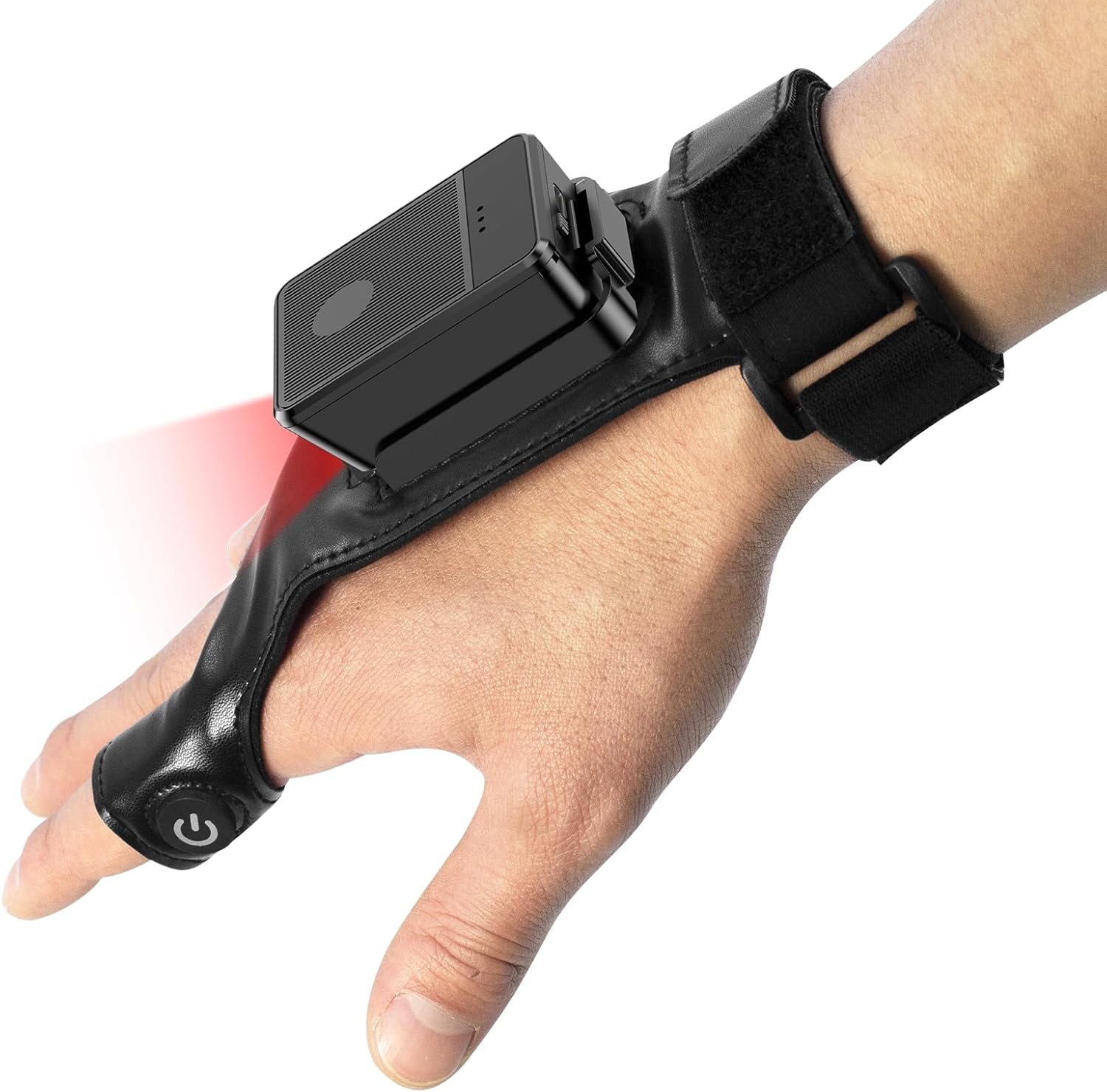
This image shows the Symcode Wearable Glove Barcode Scanner attached to a user's hand, demonstrating its ergonomic, hands-free design. The scanner unit is positioned on the back of the hand, with the scanning beam visible.
2. Информация по технике безопасности
- Не подвергайте устройство воздействию экстремальных температур, влаги или коррозионных веществ.
- Избегайте прямого попадания сканирующего света в глаза.
- Не пытайтесь разбирать или ремонтировать устройство самостоятельно. Обратитесь к квалифицированному специалисту для обслуживания.
- Во избежание повреждений используйте только прилагаемый зарядный кабель и адаптер.
3. Содержимое упаковки
Пожалуйста, проверьте комплектность товара при получении. Если какие-либо предметы отсутствуют или повреждены, обратитесь к продавцу.
- Symcode Wearable Glove Barcode Scanner
- USB-кабель для зарядки
- Беспроводной адаптер 2.4G
- Руководство пользователя
4. Продукт закончилсяview
The Symcode Wearable Glove Barcode Scanner consists of a compact scanning unit and an adjustable glove-style strap. The scanning unit features a durable trigger button, indicator lights, and a charging port. The glove is designed for comfort and secure fit, allowing for hands-free operation.

крупный план view of the scanner on a hand, highlighting the red scanning beam and the durable resin material of the trigger button located on the index finger. The image also shows a roll of barcode labels, indicating its primary function.
5. Настройка
5.1 Зарядка устройства
Before first use, fully charge the scanner. Connect the USB charging cable to the scanner's charging port and to a power source (e.g., computer USB port or USB wall adapter). The charging indicator light will show charging status. A full charge takes approximately 5 hours.
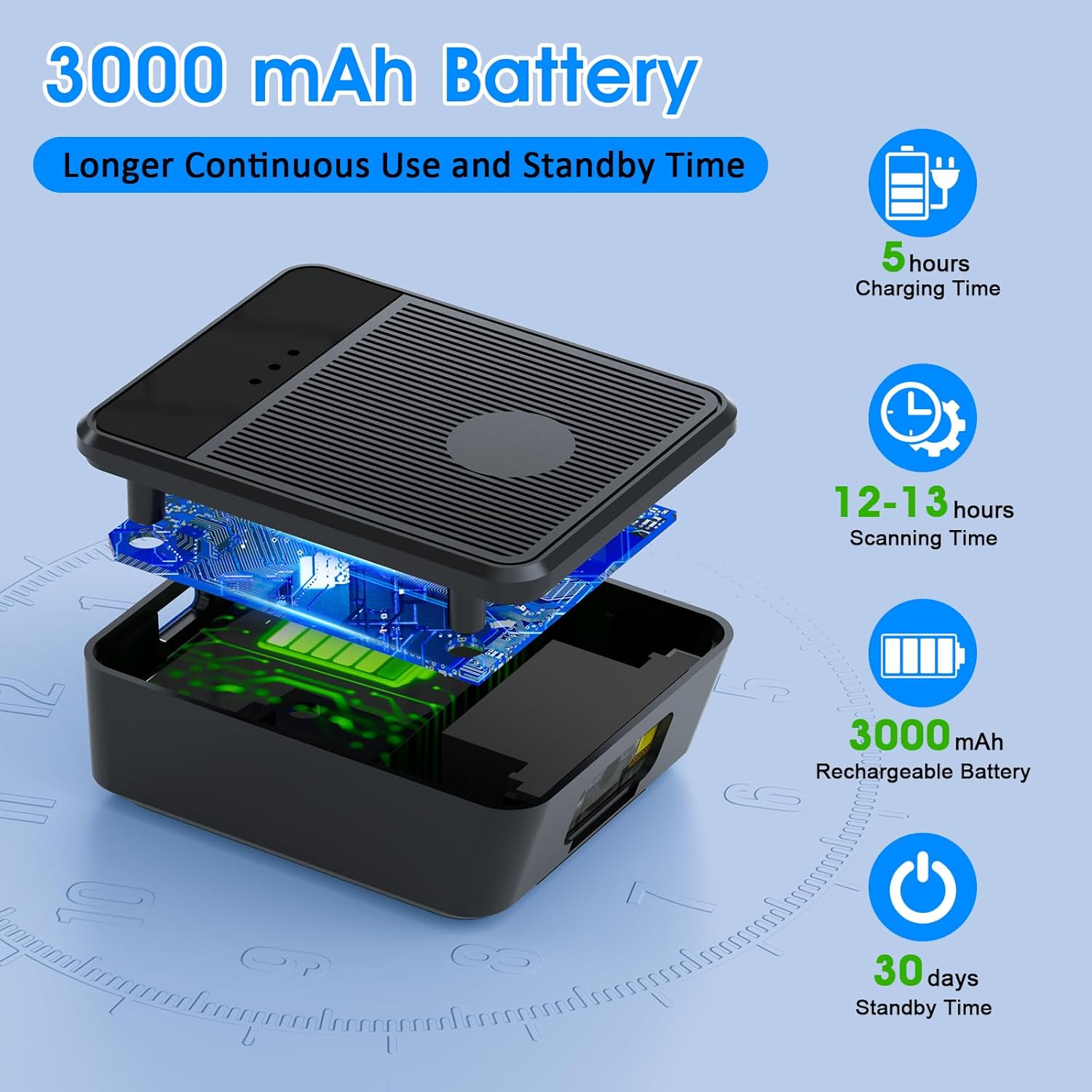
Взорванный view diagram of the scanner unit, emphasizing its 3000 mAh rechargeable battery. Accompanying text indicates a 5-hour charging time, 12-13 hours of continuous scanning, and 30 days of standby time.
5.2 Ношение сканера
Slide your hand into the glove, ensuring the scanner unit is positioned comfortably on the back of your hand. Adjust the strap for a secure fit. The trigger button should align with your index finger for easy access.

Two workers are shown in a warehouse environment, handling boxes. One worker is actively using the wearable barcode scanner on their hand to scan a package, demonstrating the hands-free benefit of the device during logistics operations.
5.3 Подключение к устройству
The scanner supports two wireless connection methods:
5.3.1 2.4G Wireless Dongle Connection
- Plug the 2.4G wireless dongle into a USB port on your computer or compatible device.
- Включите сканер. Он должен автоматически подключиться к модулю.
- A successful connection is indicated by a specific light pattern or sound (refer to device indicators).
5.3.2 Подключение Bluetooth 6.0
- Включите сканер.
- Активируйте Bluetooth на хост-устройстве (например, смартфоне, планшете, компьютере).
- Искать available Bluetooth devices and select the Symcode scanner from the list.
- Pairing may require a confirmation or a default PIN (check device documentation for specific PIN if required).
6. Инструкция по эксплуатации
6.1 Базовое сканирование
To scan a barcode, point the scanner's beam at the barcode and press the trigger button located on your index finger. A successful scan will typically be indicated by a beep, a vibration, or a change in the indicator light.
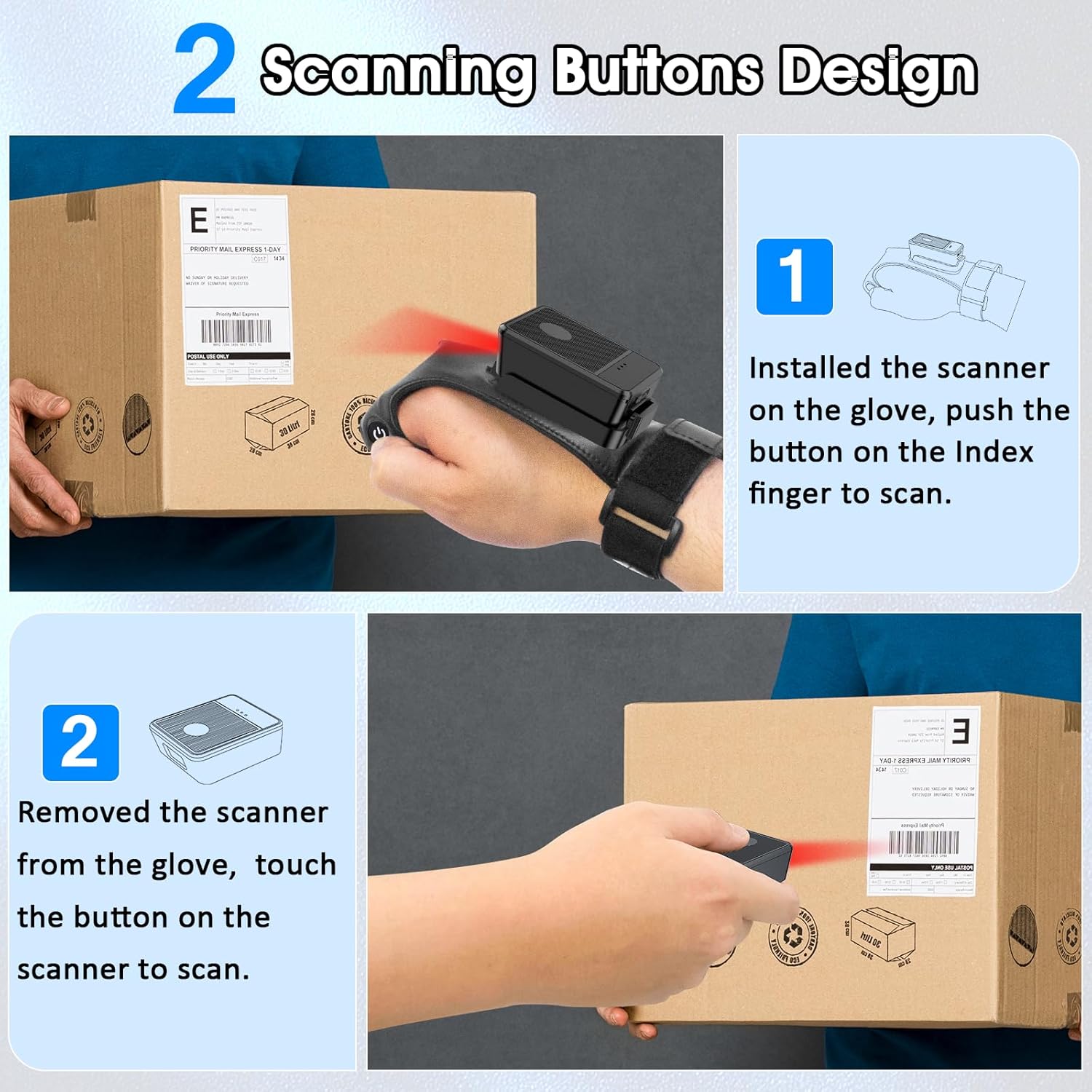
This diagram illustrates two ways to use the scanner: 1) installed on the glove, scanning with the index finger button, and 2) removed from the glove, scanning by touching the button directly on the scanner unit. Both methods are shown with the scanner pointed at a package.
6.2 Режимы работы
The scanner supports two operational modes:
6.2.1 Режим мгновенной загрузки
In this mode, scanned barcode data is immediately transmitted to the connected host device. This is ideal for real-time inventory updates or point-of-sale transactions.
6.2.2 Автономный режим хранения
This mode allows the scanner to store up to 50,000 barcodes internally when not connected to a host device or when connectivity is intermittent. Data can then be uploaded to a computer or POS system at a later time.
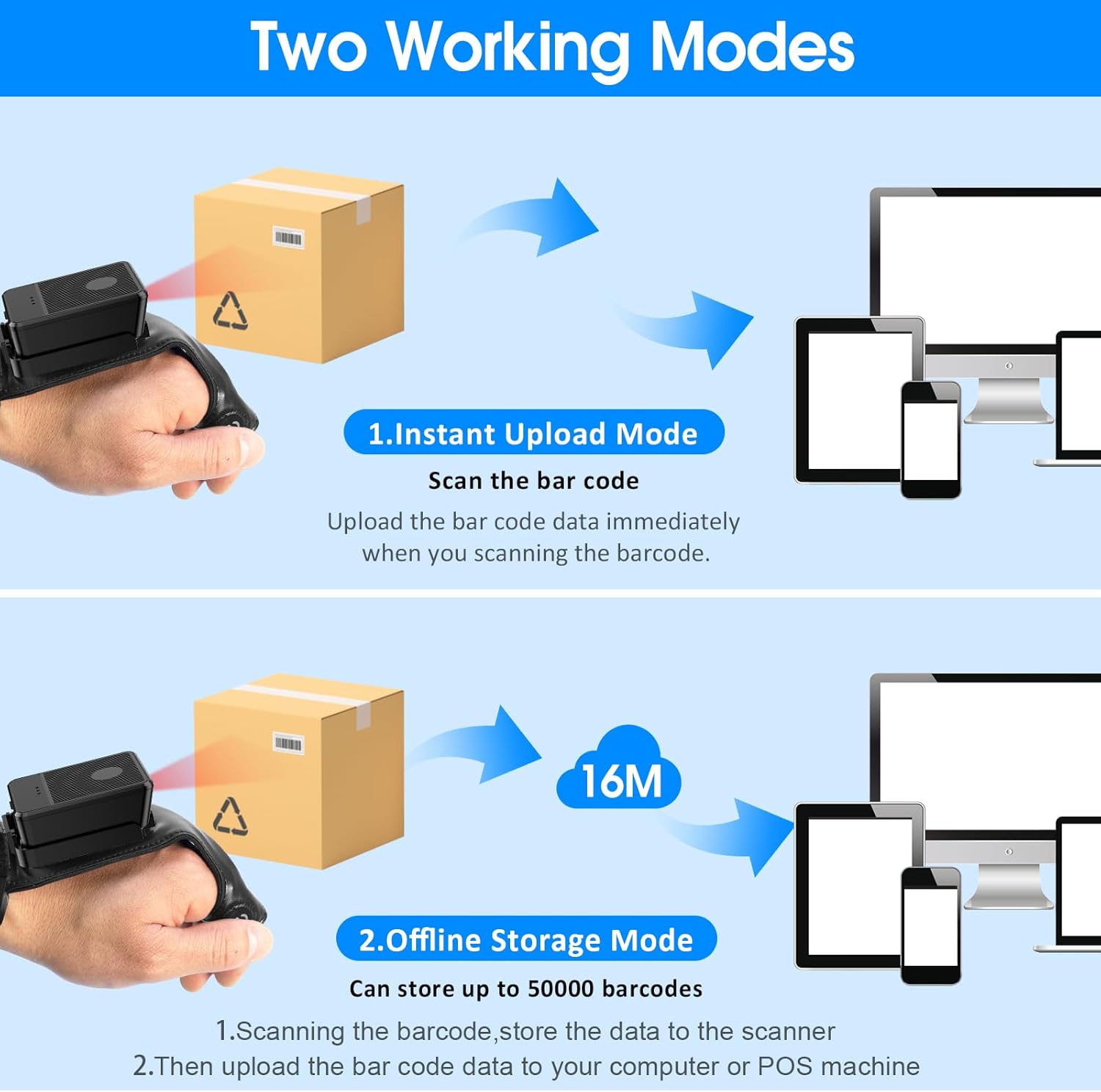
This image explains the two operational modes: Instant Upload Mode, where scanned data is immediately sent to a connected device, and Offline Storage Mode, which allows storing up to 50,000 barcodes internally before uploading them to a computer or POS system.
6.3 Настройка параметров
The scanner allows for customization of various settings, including:
- Звук: Enable or disable the audible beep for successful scans.
- Вибрация: Enable or disable vibration alerts for successful scans, useful in quiet environments.
- Функции клавиатуры: Add keyboard functions such as TAB or Enter after each scan for seamless data entry into applications.
Refer to the quick setup guide or manufacturer's website for specific programming barcodes to adjust these settings.
7. Техническое обслуживание
- Уборка: Use a soft, dry cloth to clean the scanner's exterior. For stubborn dirt, slightly dampСмочите ткань водой. Не используйте едкие химикаты или абразивные чистящие средства.
- Хранилище: Когда сканер не используется, храните его в прохладном, сухом месте, вдали от прямых солнечных лучей и экстремальных температур.
- Уход батареи: Чтобы продлить срок службы аккумулятора, избегайте его частой полной разрядки. Регулярно заряжайте устройство, даже если оно не используется постоянно.
8. Поиск Неисправностей
8.1 Сканер не включается
- Ensure the battery is charged. Connect the scanner to a power source and allow it to charge for at least 30 minutes before attempting to turn it on again.
8.2 Unable to Connect Wirelessly
- 2.4G соединение: Verify the 2.4G dongle is securely plugged into the host device. Try plugging it into a different USB port. Ensure the scanner is within range of the dongle.
- Подключение Bluetooth: Ensure Bluetooth is enabled on your host device. Delete any previous pairings for the scanner and attempt to pair again. Ensure the scanner is in pairing mode (refer to device indicators).
- Restart both the scanner and the host device.
8.3 Сканер не считывает штрихкоды
- Убедитесь, что штрих-код чистый, неповрежденный и четко напечатан.
- Отрегулируйте расстояние и угол между сканером и штрих-кодом.
- Check if the scanner is in the correct working mode (Instant Upload or Offline Storage).
- Verify that the barcode type is supported by the scanner (1D, 2D, QR codes are supported).
9. Технические характеристики
| Бренд | символьный код |
| Модель | Wearable Glove Barcode Scanner (B0F1FSMWCD) |
| Технология связи | 2.4G, Bluetooth 6.0 |
| Совместимые устройства | Desktop, Laptop, Tablet, Smartphone (Windows XP/7/8/10, Android, iOS) |
| Источник питания | Питание от батареи |
| Тип батареи | 1 литий-полимерный аккумулятор (входит в комплект) |
| Емкость аккумулятора | 1100mAh (Product Description) / 3000mAh (Image) - Note: Discrepancy in source data, refer to product packaging for accurate capacity. |
| Время непрерывной работы | Up to 10 hours (Product Description) / 12-13 hours (Image) - Note: Discrepancy in source data, refer to product packaging for accurate time. |
| Время зарядки | Приблизительно 5 часов |
| Время в режиме ожидания | До 30 дней |
| Скорость сканирования | До 300 сканирований в секунду |
| Диапазон сканирования | 2–4.9 футов |
| Автономная емкость хранилища | До 50 000 штрихкодов |
| Вес товара | 5 унции |
| Размеры упаковки | 7.48 x 3.74 x 2.44 дюйма |
10. Информация о гарантии
This Symcode product is covered by a manufacturer's warranty. For specific warranty terms, duration, and conditions, please refer to the warranty card included with your product or visit the official Symcode webСохраните чек о покупке для предъявления гарантийных претензий.
11. Поддержка клиентов
If you encounter any issues or have questions regarding your Symcode Wearable Glove Barcode Scanner, please contact Symcode customer support. Contact details can typically be found on the product packaging, the official Symcode webсайте или через вашего розничного продавца.