Продукт болееview
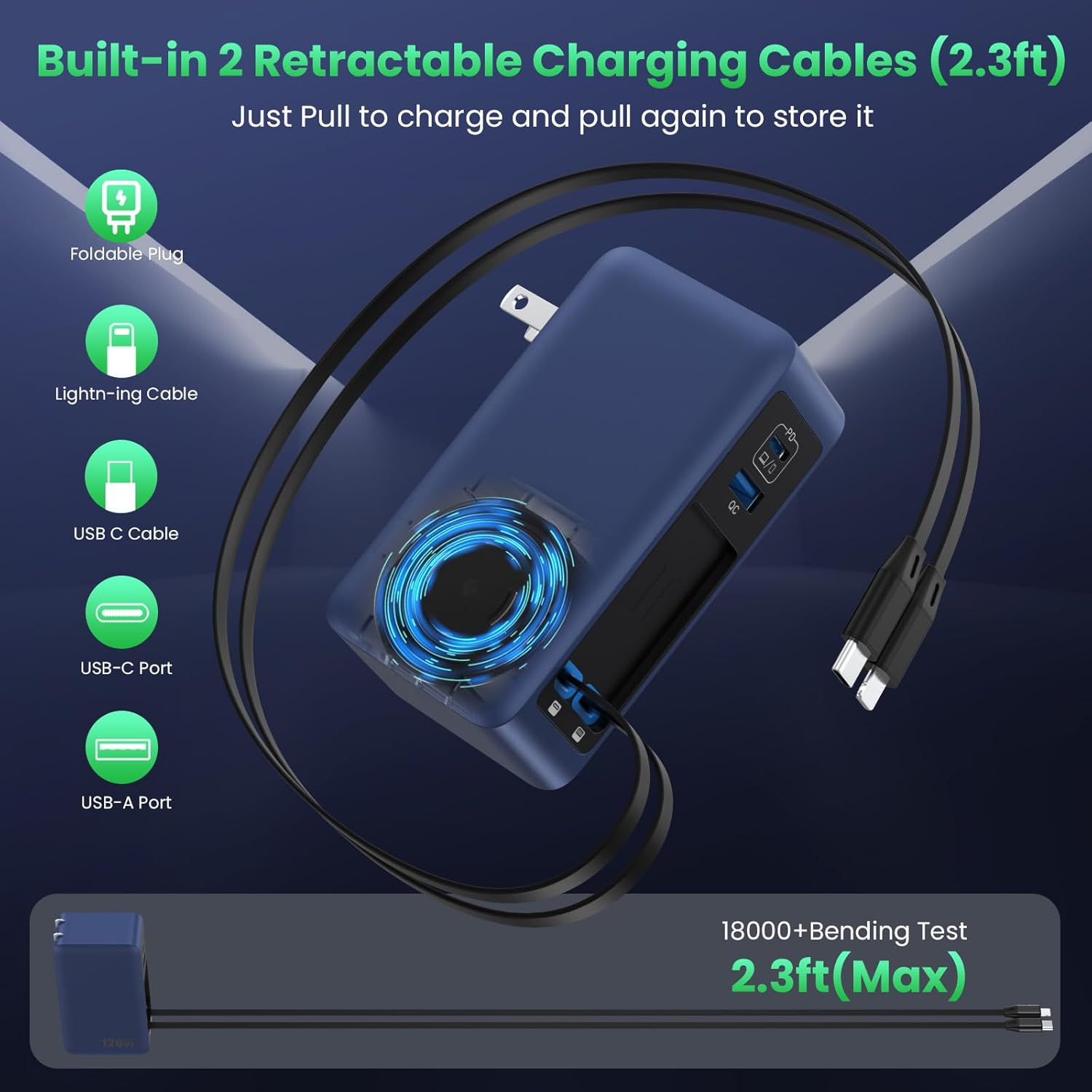
The FOCHEW 120W 4-Port GaN IV USB C Charger Block is a versatile and compact charging solution designed to power multiple devices simultaneously. Featuring two built-in retractable cables (USB-C and Lightning), a dedicated 65W Power Delivery (PD) USB-C port, and an additional USB-A port, this charger offers efficient and clutter-free charging for laptops, tablets, smartphones, and other electronic devices. Its advanced GaN IV technology ensures high power output in a smaller, cooler, and safer design.
Основные характеристики
- All-in-One Design with 2 Built-in Retractable Cables: Eliminates cable clutter with integrated USB-C and Lightning cables that retract neatly into the charger.
- Extended Reach with Reel Charger: Retractable cables extend up to 27.56 inches (70 cm) for flexible use and retract smoothly for tidy storage.
- 120W Multi-Port Charging: Powers up to 4 devices concurrently with a total output of 120W, compatible with PD and PPS protocols.
- Upgraded 65W Laptop Charging: The top USB-C1 port delivers 65W PD, capable of fast charging laptops like a MacBook Pro 13" to 46% in 30 minutes.
- GaN IV Technology: Utilizes advanced Gallium Nitride (GaN IV) chip for a 50% reduction in size and weight compared to traditional chargers, while enhancing efficiency and minimizing heat.
- Широкая совместимость: Supports a broad range of USB-C devices, including MacBooks, Galaxy Books, Lenovo IdeaPads, ASUS Vivobooks, HP Chromebooks, Google Pixelbooks, Dell XPS, iPads, Samsung Tabs, Google Pixel Slates, Amazon Fire HD10, iPhones (16/15/14/13/12/11 series), Samsung Galaxy (S25/24/23/22/21 series), Google Pixel, LG, and other Android cellphones.
Инструкции по установке
1. Распаковка
Carefully remove the FOCHEW 120W USB C Charger Block and any included accessories from its packaging. Verify that all components listed in the 'What You Will Get' section are present.
2. Подключение к источнику питания
Locate a standard wall outlet. Unfold the charger's prongs and plug the unit firmly into the outlet. The foldable plug design allows for easy storage and portability.
3. Extending Retractable Cables
To use a built-in retractable cable (USB-C or Lightning), gently pull both ends of the cable simultaneously until it reaches the desired length. Avoid pulling only one side, as this may cause uneven retraction or damage. To retract the cable, pull it slightly further, and it will automatically coil back into the charger.
4. Подключение устройств
Connect your electronic devices to the appropriate charging ports:
- For fast charging laptops or high-power devices, use the dedicated USB-C1 (PD) port.
- For other USB-C compatible devices, use the second USB-C port or the built-in retractable USB-C cable.
- For devices requiring a Lightning connector, use the built-in retractable Lightning cable.
- For standard USB-A devices, use the порт USB-A.
Инструкция по эксплуатации
1. Зарядные устройства
Once connected to a power source and your devices, the charger will automatically begin charging. The intelligent GaN IV chip optimizes power distribution across all connected ports to ensure efficient and safe charging.
2. Optimal Charging Performance
For the fastest charging of a single high-power device (e.g., a laptop), it is recommended to use the 65W USB-C1 (PD) port. When multiple devices are connected, the total 120W output is shared, which may adjust individual charging speeds.
Обслуживание
- Уборка: Disconnect the charger from the power outlet before cleaning. Use a dry, soft cloth to wipe the surface. Avoid liquid cleaners or abrasive materials.
- Хранилище: When not in use, ensure the retractable cables are fully retracted and the foldable plug is folded for compact storage. Store in a cool, dry place away from direct sunlight and extreme temperatures.
- Уход за кабелем: Always pull both ends of the retractable cables simultaneously to extend or retract. Avoid sharp bends or excessive force on the cables to prevent damage.
Поиск неисправностей
1. Устройство не заряжается
- Проверьте подключение питания: Убедитесь, что зарядное устройство надежно подключено к работающей розетке.
- Проверьте подключение кабеля: Make sure the charging cable is firmly connected to both the charger and your device.
- Попробуйте другой порт/кабель: Test with a different port on the charger or a different charging cable to rule out a faulty port or cable.
- Совместимость с устройством: Убедитесь, что ваше устройство совместимо с выходными характеристиками зарядного устройства.
2 Медленная зарядка
- Качество кабеля: Ensure you are using high-quality cables that support fast charging.
- Распределение мощности: If multiple devices are connected, the total 120W output is shared. Disconnect less critical devices to prioritize charging speed for essential ones.
- Требования к устройству: Some devices may have specific fast-charging protocols. Ensure your device supports PD or PPS for optimal speed.
3. Перегрев
- Вентиляция: Ensure the charger is placed in a well-ventilated area and not covered by anything that could trap heat.
- Уменьшите нагрузку: If the charger feels excessively hot, disconnect some devices to reduce the power load.
- Факторы окружающей среды: Avoid using the charger in extremely hot environments.
Технические характеристики продукта
| Особенность | Деталь |
|---|---|
| Бренд | ФОШЬЮ |
| Номер модели | HX-P27 |
| Ватtage | 120 Вт (общая выходная мощность) |
| Тип разъема | USB Type A, USB Type C, Built-in USB-C, Built-in Lightning |
| Vol входtage | 240 Вольт |
| Выходной ток | 3 Ampс (макс.) |
| Выход Voltage | 20 Вольт (макс.) |
| Специальная характеристика | 2 Built-in Retractable Cables, 4-in-1 GaN IV Foldable Plug, Fast Charging Station, PD 65W Laptop Adapter |
| Включенные компоненты | 1x USB C Charger, 1x Product Instruction |
| Материал | Пластик |
| Цвет | Темно-синий |
Гарантия и поддержка
This FOCHEW 120W 4-Port GaN IV USB C Charger Block (Model HX-P27) comes with a Гарантия 3 год from the manufacturer, Dongguan Yuanhaoxun Technology Co., Ltd. If you encounter any issues with the product or require assistance, please refer to the contact information provided in your product packaging or reach out to FOCHEW customer service for support.
Визуальные изображения продукта
Изображения продукта