
1. Введение
This manual provides detailed instructions for the setup, operation, and maintenance of your WAVLINK 13-in-1 USB-C Triple Display Docking Station. Please read this manual thoroughly before using the product to ensure proper functionality and to prevent damage.
2. Продукт закончилсяview
The WAVLINK 13-in-1 USB-C Triple Display Docking Station expands your laptop's connectivity, offering multiple ports for displays, peripherals, network, and power delivery. It is designed to enhance productivity by supporting various display configurations.
Содержимое упаковки
- WAVLINK 13-in-1 USB-C Triple Display Docking Station
- Кабель USB-C-C
- Адаптер питания 130 Вт
- Кабель питания переменного тока
- Краткое руководство пользователя

Image: Contents of the WAVLINK 13-in-1 USB-C Triple Display Docking Station package, including the docking station, cables, power adapter, and quick start guide.
Схема порта
The docking station features a comprehensive array of ports to connect various devices:

Image: Diagram showing the front and rear ports of the WAVLINK 13-in-1 USB-C Triple Display Docking Station, with each port clearly labeled.
- Разъем питания (20 В постоянного тока): Подключается к прилагаемому адаптеру питания мощностью 130 Вт.
- Upstream USB-C Port: Connects to your host laptop for data, video, and power delivery.
- Порт HDMI: Connects to an HDMI display.
- 2 x DisplayPort: Connects to DisplayPort displays.
- Гигабитный порт Ethernet (RJ45): Обеспечивает стабильное проводное сетевое соединение.
- 4 порта USB 3.0: For connecting USB peripherals, with one supporting BC 1.2 fast charging.
- Устройство чтения SD-карт: Для чтения стандартных SD-карт.
- Устройство чтения карт памяти Micro SD: For reading Micro SD cards.
- 4-Pole Phone Jack (3.5mm Audio): Для подключения наушников или колонок.
- Кнопка питания: Для включения/выключения док-станции.
3. Инструкции по настройке
Выполните следующие шаги для настройки док-станции WAVLINK:
- Подключите питание: Connect the included 130W power adapter to the DC 20V power port on the docking station, then plug the AC power cable into a wall outlet.
- Подключение к хост-ноутбуку: Use the provided USB-C to C cable to connect the upstream USB-C port on the docking station to a compatible USB-C port on your laptop. Ensure your laptop's USB-C port supports DisplayPort Alternate Mode and Power Delivery.
- Подключить дисплеи: Connect your external monitors to the HDMI and DisplayPort outputs on the docking station using appropriate cables.
- Подключите периферийные устройства: Подключите USB-устройства (клавиатуру, мышь, внешние накопители), кабель Ethernet и аудиоустройства к соответствующим портам док-станции.
- Включение питания: Press the power button on the docking station. Your laptop should detect the connected devices and displays automatically.
4. Инструкция по эксплуатации
Режимы отображения
Док-станция поддерживает различные конфигурации дисплея в зависимости от вашей операционной системы.
Системы Windows
В системах Windows поддерживаются режимы «Зеркальное отображение» и «Расширение» для работы с несколькими дисплеями.

Image: Illustration of Windows multi-display modes, showing a laptop connected to three external monitors in both Extend Mode (each monitor displays unique content) and Mirror Mode (all monitors display the same content).
- Расширенный режим: Каждый внешний монитор может отображать разный контент, расширяя рабочее пространство рабочего стола.
- Зеркальный режим: All external monitors will display the same content as your primary display.
macOS Systems
macOS systems support Mirror mode and a non-mirror mode. They do not support Multi-Stream Transport (MST) for extended displays with unique content on each external monitor.
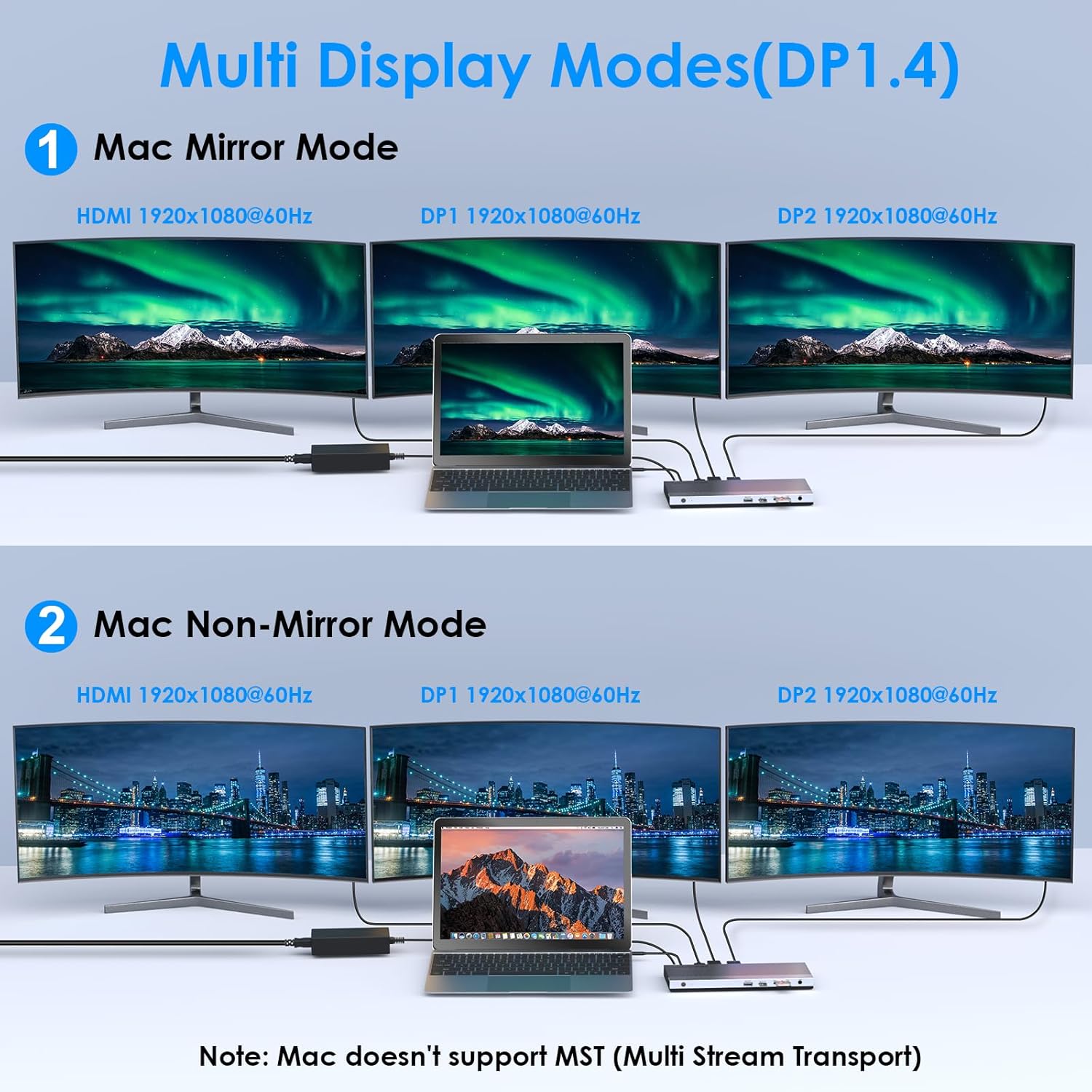
Image: Illustration of Mac multi-display modes, showing a laptop connected to three external monitors in both Mirror Mode (all monitors display the same content) and Non-Mirror Mode (all external monitors display the same content, but different from the laptop screen).
- Зеркальный режим: All external monitors will display the same content as your primary display.
- Режим без зеркального отображения: The three external monitors (HDMI+DP+DP) will display the same content, which is different from the laptop's built-in screen.
Возможности разрешения
- Single HDMI/DP display: Up to 4K@60Hz (with DP1.3/DP1.4 source).
- Dual displays simultaneously: Up to 2K@60Hz.
- Triple displays (HDMI + DP + DP) simultaneously: Up to 1920x1080@60Hz.
Зарядка Power Delivery (PD)
The upstream USB-C port provides up to 100W Power Delivery 3.0 to charge your connected laptop. Additionally, one USB 3.0 port supports BC 1.2 fast charging, delivering up to 7.5W for mobile devices.

Image: A laptop and a smartphone connected to the docking station, illustrating 100W Power Delivery to the laptop and BC 1.2 fast charging to the smartphone.
Передача данных
The docking station features four USB 3.0 ports, offering data transfer speeds up to 5Gbps. The built-in SD and Micro SD card readers support speeds up to 104MBps and can operate simultaneously.

Image: A laptop connected to the docking station, with USB flash drives and an SD card inserted, highlighting 5Gbps USB 3.0 speeds and 104MB/s SD/TF card reader speeds.
Гигабитный Ethernet
The RJ45 Ethernet port provides a stable and high-speed wired network connection up to 1000Mbps, ideal for reliable internet access.
5. Совместимость
This docking station is compatible with most Type-C and Thunderbolt 3/4 devices running Windows, macOS, Chrome OS, Linux, and Android.

Image: Visual representation of the docking station's compatibility with various devices like smartphones, tablets, laptops, desktops, and cameras, as well as operating systems including Windows, Chrome OS, Mac OS, Linux, and Android.
Важные примечания по совместимости
Перед покупкойasing or using, ensure your host system's USB-C interface supports:
- DisplayPort Alternate Mode (Alt Mode): Essential for video output.
- USB Power Delivery (PD) Protocol: Required for laptop charging via the docking station.
- Передача данных: For USB peripheral functionality.
If your USB-C port only supports data transfer or charging without DisplayPort Alt Mode, video output will not function.

Image: A visual guide showing various types of USB-C ports (Thunderbolt 3, Data+DisplayPort+Power Delivery, Data Transfer only, Data+Power Delivery only, Data+DisplayPort only, Charging only) and indicating which are compatible with the docking station for full functionality.
6. Технические характеристики
| Особенность | Деталь |
|---|---|
| Модель | B0DXF92DL1 |
| Бренд | WAVLINK |
| аппаратный интерфейс | Ethernet, HDMI, USB 3.0, DisplayPort, USB-C, SD/TF Card Reader, 3.5mm Audio Jack |
| Количество портов | 13 |
| Общее количество портов USB | 4 (USB 3.0) |
| Скорость передачи данных | 5 Gbps (USB 3.0), 104 MBps (SD/TF Card Reader) |
| Подача электроэнергии | Up to 100W (Host Charging), 7.5W (BC 1.2 USB 3.0 Port) |
| Видеовыход | 1x HDMI (4K при 60 Гц), 2x DisplayPort (4K при 60 Гц) |
| Ethernet | Гигабит (10/100/1000 Мбит/с) |
| Совместимость с операционными системами | Windows, macOS, Chrome OS, Linux, Android |
| Материал корпуса | Пластик |
Размеры

Image: Technical drawing showing the dimensions of the WAVLINK 13-in-1 USB-C Triple Display Docking Station: 8.15 inches (207mm) length, 3.27 inches (83mm) width, and 0.71 inches (18mm) height.
7. Поиск Неисправностей
Если у вас возникли проблемы с док-станцией, ознакомьтесь со следующими распространенными проблемами и решениями:
- Нет вывода на дисплей:
- Убедитесь, что порт USB-C вашего ноутбука поддерживает альтернативный режим DisplayPort.
- Verify all display cables are securely connected to both the docking station and monitors.
- Check monitor input settings to ensure the correct input source (HDMI/DisplayPort) is selected.
- Перезагрузите ноутбук и док-станцию.
- For triple display, ensure your graphics card supports at least 4 displays (including your laptop's screen).
- Ноутбук не заряжается:
- Убедитесь, что адаптер питания мощностью 130 Вт правильно подключен к док-станции и к исправной розетке.
- Ensure your laptop's USB-C port supports USB Power Delivery (PD) protocol.
- Verify the USB-C cable connecting the laptop to the docking station is capable of PD.
- USB-устройства не распознаны:
- Убедитесь, что док-станция включена и подключена к вашему ноутбуку.
- Try connecting the USB device to a different USB 3.0 port on the docking station.
- Подключите USB-устройство напрямую к ноутбуку, чтобы убедиться в его работоспособности.
- Нет подключения Ethernet:
- Убедитесь, что кабель Ethernet надежно подключен как к док-станции, так и к вашему маршрутизатору/модему.
- Проверьте сетевые настройки на вашем ноутбуке.
- Убедитесь, что ваш маршрутизатор/модем работает правильно.
- Прерывистое подключение:
- Убедитесь, что все кабели надежно подключены.
- Избегайте размещения док-станции вблизи источников сильных электромагнитных помех.
- Update your laptop's USB-C port drivers if available.
8. Техническое обслуживание
Для обеспечения долговечности и оптимальной работы вашей док-станции WAVLINK следуйте этим рекомендациям по техническому обслуживанию:
- Уборка: Для очистки внешней поверхности док-станции используйте мягкую сухую ткань. Не используйте жидкие чистящие средства или аэрозоли.
- Хранилище: Храните док-станцию в прохладном, сухом месте, вдали от прямых солнечных лучей и экстремальных температур.
- Умение обращаться: Не роняйте устройство и не подвергайте его сильным ударам.
- Вентиляция: Ensure the docking station has adequate ventilation to prevent overheating, especially during prolonged use with multiple connected devices.
9. Гарантия и поддержка
Информация о гарантии
This WAVLINK product comes with an 18-month warranty from the date of purchase. An additional 6 months of warranty may be available for registered members. Please retain your proof of purchase for warranty claims.
Поддержка клиентов
For technical assistance or support, please contact WAVLINK customer service:
- Телефон: +1 8889730883 (UTC -5) Понедельник - пятница, 9:00 - 18:00
- Электронная почта: Contact@wavlink.com