
1. Введение
This manual provides detailed instructions for the FOPATO P98 Tri-Mode Mechanical Gaming Keyboard. Please read this manual thoroughly before using the product to ensure proper operation and to maximize your user experience. Keep this manual for future reference.

Изображение 1.1: оконченоview of the FOPATO P98 Tri-Mode Mechanical Gaming Keyboard.
2. Содержимое упаковки
Проверьте наличие всех предметов в упаковке:
- P98 Keyboard × 1
- USB-кабель для зарядки × 1
- Съемник клавишных колпачков × 1
- Инструмент для снятия выключателей × 1
- TTC Gold Pink Switch × 4 (Spare)
3. Настройка
3.1 Зарядка клавиатуры
Before first use, fully charge the keyboard. Connect the provided USB-A to C cable to the keyboard's Type-C port and the other end to a computer's USB port or a 5V USB charger. The keyboard is equipped with a 3000mAh battery.

Image 3.1: Illustration of battery life with and without backlight. The keyboard can last up to 250 hours with the backlight off.
3.2 Подключение клавиатуры
The FOPATO P98 supports three connection modes: Bluetooth (BT), 2.4GHz Wireless, and USB-A to C Wired. It can connect to up to 5 devices simultaneously.
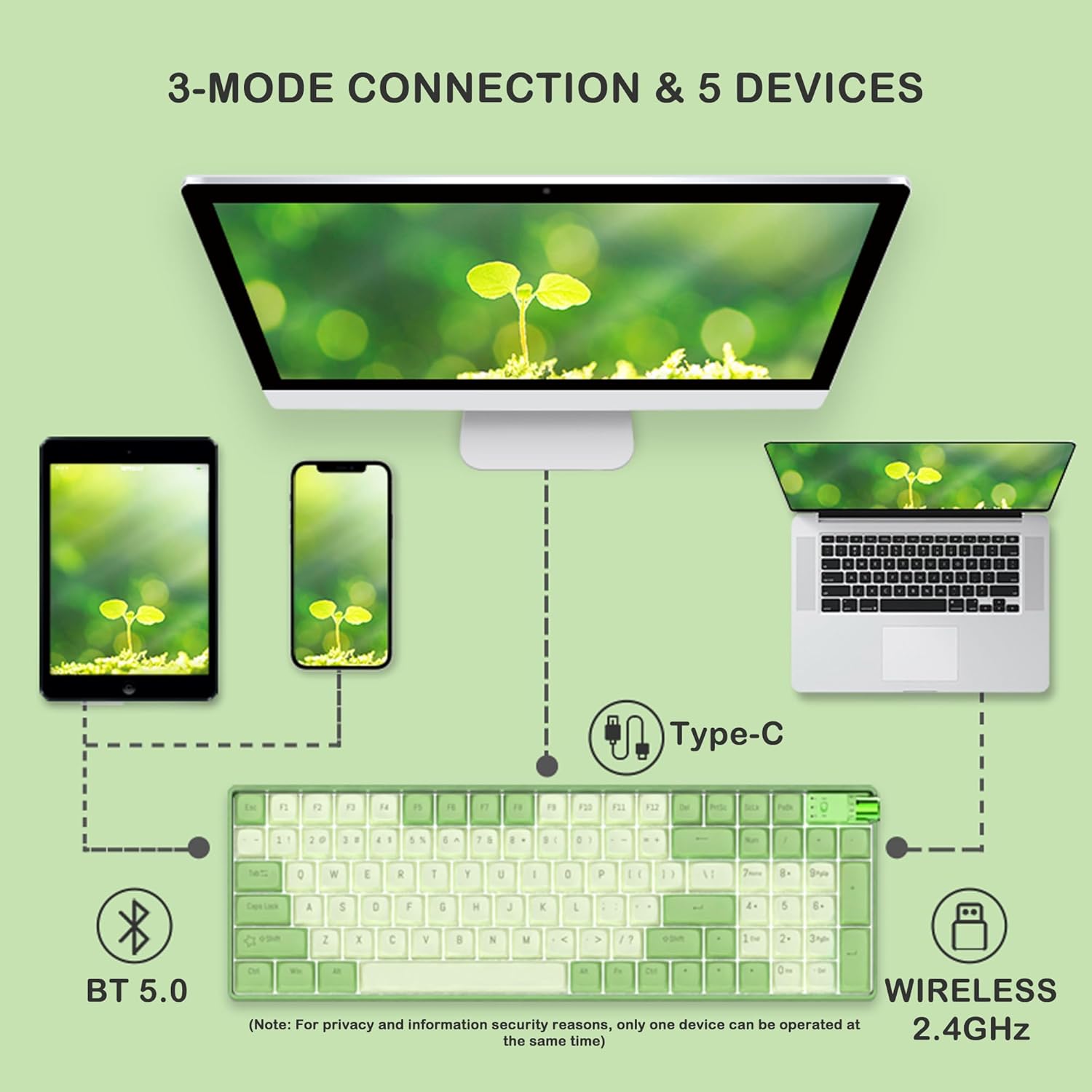
Image 3.2: The keyboard supports Bluetooth 5.0, 2.4GHz wireless, and wired Type-C connections to various devices like PCs, laptops, tablets, and smartphones.
3.2.1 Проводное соединение
- Connect the USB-A to C cable to the keyboard and your device.
- Rotate the knob on the keyboard to the 'Wired' position.
- The keyboard will be recognized automatically by your device.
3.2.2 Беспроводное соединение 2.4 ГГц
- Locate the 2.4GHz receiver stored on the side of the keyboard.
- Insert the receiver into a USB port on your device.
- Rotate the knob on the keyboard to the '2.4G' position.
- Клавиатура будет подключаться к вашему устройству по беспроводной связи.
3.2.3 Bluetooth-соединение
- Rotate the knob on the keyboard to the 'BT' position.
- На вашем устройстве включите Bluetooth и выполните поиск новых устройств.
- Select 'FOPATO P98' from the list of available devices to pair.
- Клавиатура может хранить до 3 модулей Bluetooth Pro.files. To switch between profiles, нажмите Fn + Q, Fn + W, или Fn + E.
4. Инструкция по эксплуатации
4.1 System Switching (Windows/Mac)
The keyboard features a physical switch to toggle between Windows and macOS layouts.
- Locate the physical switch near the knob on the keyboard.
- Flip the switch to the 'WIN' position for Windows compatibility.
- Flip the switch to the 'MAC' position for macOS compatibility.

Image 4.1: The physical switch allows quick toggling between Windows and Mac operating systems, and the knob switches between connection modes.
4.2 Управление RGB-подсветкой
The keyboard offers 18+4 RGB lighting effects.
- Нажимать Фн + \| переключаться между различными световыми эффектами.
- Нажимать Фн + ↑ / Фн + ↓ для регулировки яркости подсветки.
- Нажимать Фн + ← / фн + → to adjust backlight speed/direction.

Image 4.2: The FOPATO P98 keyboard displaying its RGB backlight effects.
4.3 Функциональность ручки
The multi-function knob allows for quick switching between connection modes and can also control media functions.
- Поворот: Switch between Wired, 2.4G, and BT connection modes.
- Нажимать: Mute/Unmute audio (when in media mode).
4.4 Коммутаторы с возможностью горячей замены
The FOPATO P98 keyboard features 5-pin hot-swappable switch sockets, allowing you to change switches without soldering.
- Используйте прилагаемый съемник переключателя, чтобы осторожно снять имеющийся переключатель.
- Align the pins of the new switch with the socket holes.
- Аккуратно вдавите новый переключатель на место до щелчка. Убедитесь, что контакты не согнуты.

Image 4.3: Illustration of the hot-swappable feature, showing switches being removed and inserted.
4.5 Замена колпачков клавиш
The keyboard comes with durable PBT dual-color keycaps. You can replace them using the provided keycap puller.
- Use the keycap puller to gently grip and lift the desired keycap.
- Align the new keycap with the switch stem.
- Нажмите и удерживайте клавишу до тех пор, пока она надежно не встанет на место.
5. Техническое обслуживание
5.1 Чистка клавиатуры
- Перед чисткой отключите клавиатуру от всех устройств.
- Используйте мягкую, безворсовую ткань, слегкаampСмочите водой или мягким чистящим раствором колпачки клавиш и корпус.
- Для удаления пыли и мусора между клавишными колпачками используйте сжатый воздух или небольшую щетку.
- Избегайте использования едких химикатов и абразивных материалов.
5.2 Уход за аккумулятором
- Избегайте частой полной разрядки аккумулятора.
- Если вы не используете клавиатуру в течение длительного времени, храните ее в прохладном, сухом месте.
- Регулярно заряжайте клавиатуру, чтобы поддерживать работоспособность аккумулятора.
6. Поиск Неисправностей
| Проблема | Возможная причина | Решение |
|---|---|---|
| Клавиатура не отвечает | Низкий заряд батареи, неправильный режим подключения, ослабленный кабель/приемник. | Charge the keyboard. Ensure the knob is set to the correct mode (Wired, 2.4G, or BT). Reconnect the cable or 2.4GHz receiver. Re-pair Bluetooth. |
| Нестабильное соединение Bluetooth | Помехи, расстояние, проблемы с устройством. | Move closer to the device. Ensure no other strong wireless signals are interfering. Try re-pairing the keyboard. |
| Ключи не регистрируются | Неисправный переключатель, мусор под колпачком клавиши. | Remove the keycap and switch. Clean the socket. Replace the switch with a spare or known working one. |
| RGB-подсветка не работает | Подсветка выключена, низкий заряд батареи. | Нажимать Фн + \| to cycle effects. Adjust brightness with Фн + ↑Зарядите клавиатуру. |
| System switch (Win/Mac) not working | Неправильное положение переключателя. | Ensure the physical switch is firmly set to the desired operating system. |
7. Технические характеристики
- Модель: Р98
- Бренд: ФОПАТО
- Связь: 2.4GHz Wireless, Bluetooth 5.0, USB-A to C Wired
- Количество ключей: 98 клавиш
- Тип переключателя: TTC Gold Pink Linear Switch (Hot-Swappable)
- Колпачки клавиш: PBT Dual Color Keycaps
- Подсветка: RGB (18+4 effects)
- Аккумулятор: Литиевая батарея емкостью 3000 мАч
- Совместимые системы: Windows 7+, Android 3.2+, macOS 10.5+, iPadOS, iOS
- Размеры продукта: 14.53 x 4.79 x 1.75 дюйма (36.9 x 12.17 x 4.45 см)
- Вес товара: 2.18 фунта (0.99 кг)
- Материал: Plastic, Polybutylene Terephthalate

Изображение 7.1: В разобранном виде view showing the internal structure including PBT keycaps, mechanical switches, positioning board, silicone pad, PCB, hot-swappable socket, and bottom case.

Image 7.2: Detailed specifications of the TTC Gold Pink Switch, including linear switch type, 37±5gf operating force, 4.0±0.3mm total travel, and 2.0±0.3mm conduction stroke.
8. Гарантия и поддержка
For warranty information and technical support, please refer to the official FOPATO website or contact their customer service directly. Details are typically provided on the product packaging or the brand's official online channels.