
1. Введение
The Yanmai X1R USB Gaming Microphone is a high-sensitivity condenser microphone designed for clear audio capture in gaming, e-sports, and other applications. It features RGB lighting, a stable tripod, and intelligent noise reduction for an enhanced audio experience. This manual provides instructions for setup, operation, and maintenance of your microphone.
2. Содержимое упаковки
Проверьте комплектацию на наличие следующих предметов:
- 1 x Yanmai X1R USB Gaming Microphone
- 1 x Metal Anti-slip Tripod with Gooseneck Pop Filter
- 1 x USB-A to USB-C Cable (1.8 meters)
- 1 х USB-C адаптер
- 1 х Руководство пользователя на английском языке
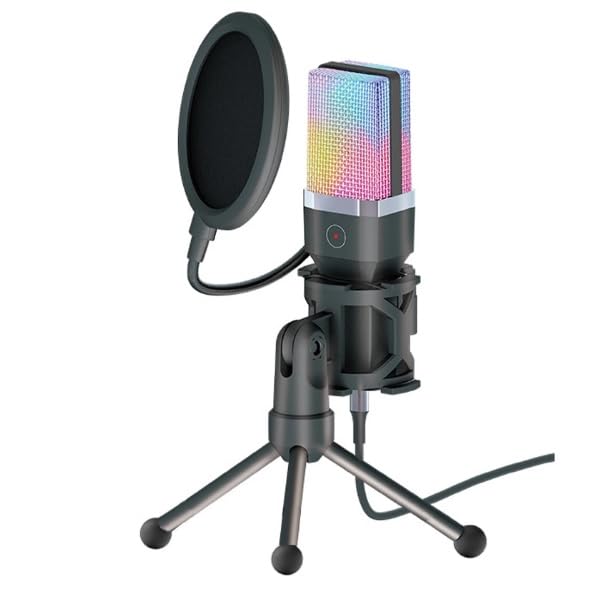
Image: The Yanmai X1R microphone, pop filter, tripod, USB cable, and USB-C adapter.
3. Инструкции по настройке
Assemble the Tripod and Microphone:
Unfold the metal anti-slip tripod and place it on a stable surface. Attach the microphone to the tripod mount. Secure the gooseneck pop filter to the tripod or microphone stand, positioning it approximately 2-3 inches in front of the microphone capsule.

Image: The Yanmai X1R microphone mounted on its tripod with the pop filter attached.
Подключитесь к вашему устройству:
Connect the provided USB-A to USB-C cable to the microphone. Then, plug the USB-A end into an available USB port on your PC, laptop, or game console. If your device only has USB-C ports, use the included USB-C adapter.

Image: The Yanmai X1R microphone connected to a laptop, showing the USB-A and USB-C connection options.
Установка драйверов (Plug & Play):
The Yanmai X1R is a plug-and-play device. Your operating system (Windows, macOS, PlayStation, etc.) should automatically detect and install the necessary drivers. No manual driver installation is typically required.
Select as Default Audio Input:
After connecting, navigate to your device's sound settings. Select the "Yanmai X1R" or similar name as your default recording (input) device. Adjust the input volume as needed.
4. Инструкция по эксплуатации
4.1 Power On/Off and RGB Lighting
The microphone powers on automatically when connected to a USB port. The RGB lighting will illuminate, cycling through 7 breathing colors. There is no separate power button.
4.2 Функция отключения звука
The microphone features a one-touch mute button located on the front of the microphone body. Tap this button to instantly mute or unmute the microphone. The indicator light will change to show the mute status (e.g., red for muted).

Image: A finger pressing the one-touch mute button on the Yanmai X1R microphone.
4.3 Optimal Microphone Placement
For best audio quality, position the microphone directly in front of you, approximately 6-12 inches (15-30 cm) from your mouth. Ensure the pop filter is between your mouth and the microphone to reduce plosive sounds (P's and B's).

Image: The Yanmai X1R microphone set up on a desk, being used by a person playing a guitar.
4.4 Шумоподавление
The Yanmai X1R features intelligent noise reduction technology. This helps to minimize background noise, focusing on your voice. No specific user action is required to activate this feature as it operates automatically.

Image: A visual representation of how the microphone's noise reduction feature processes audio, showing "before" and "after" sound wave patterns.
5. Техническое обслуживание
- Уборка: Use a soft, dry cloth to wipe the microphone body and tripod. Do not use liquid cleaners or abrasive materials.
- Поп-фильтр: Поп-фильтр можно аккуратно почистить с помощью...amp При необходимости протрите тканью. Убедитесь, что она полностью высохла, прежде чем прикреплять ее обратно.
- Хранилище: Если микрофон не используется, храните его в чистом, сухом месте, вдали от экстремальных температур и прямых солнечных лучей.
- Умение обращаться: Избегайте падения микрофона и сильных ударов, так как это может повредить внутренние компоненты.
6. Поиск Неисправностей
| Проблема | Решение |
|---|---|
| Microphone not detected by device. |
|
| Нет звука или низкая громкость. |
|
| Background noise is present. |
|
| RGB-подсветка не работает. |
|
7. Технические характеристики
| Особенность | Деталь |
|---|---|
| Бренд | Янмай |
| Модель | X1R |
| Связность | Wired USB (USB-A / USB-C) |
| Тип микрофона | Конденсатор |
| Полярная диаграмма | Однонаправленный |
| RGB-освещение | 7-цветный пульсирующий свет |
| Чувствительность | -38 ± 3 дБ |
| Частотная характеристика | 20Hz - 20KHz |
| Sampскорость | 44.1/48 кГц |
| Скорость передачи данных | 16-битный |
| Сопротивление | ≤2.2 КОм |
| Источник питания | USB-5В |
| Длина кабеля | 1.8 метров |
| Особые возможности | One-touch mute, Intelligent Noise Reduction |
| Совместимые устройства | PC, Laptop, Game Consoles |
| Цвет | Черный |
| Вес товара | 598 грамм |

Image: Technical drawing illustrating the dimensions of the Yanmai X1R microphone, pop filter, tripod, and cable.
8. Гарантия и поддержка
8.1 Информация о гарантии
The Yanmai X1R USB Gaming Microphone comes with a гарантия один год Гарантия действует с даты покупки. Данная гарантия распространяется на производственные дефекты и неисправности, возникшие при нормальной эксплуатации. Она не распространяется на повреждения, вызванные неправильным использованием, несчастными случаями, несанкционированными модификациями или неправильной установкой.
Пожалуйста, сохраните документ, подтверждающий покупку, для претензий по гарантии.
8.2 Поддержка клиентов
For technical assistance, troubleshooting, or warranty inquiries, please contact your retailer or the manufacturer's customer support. Refer to the contact information provided with your purchase documentation.